GOHIGHLEVEL ANSWERS & PROMPTS: PLAYBOOK T09 · VOICE AI & PHONE
AUTHOR: DANIEL HALLMAN
KEYWORD: VOICE
What Usually Happens
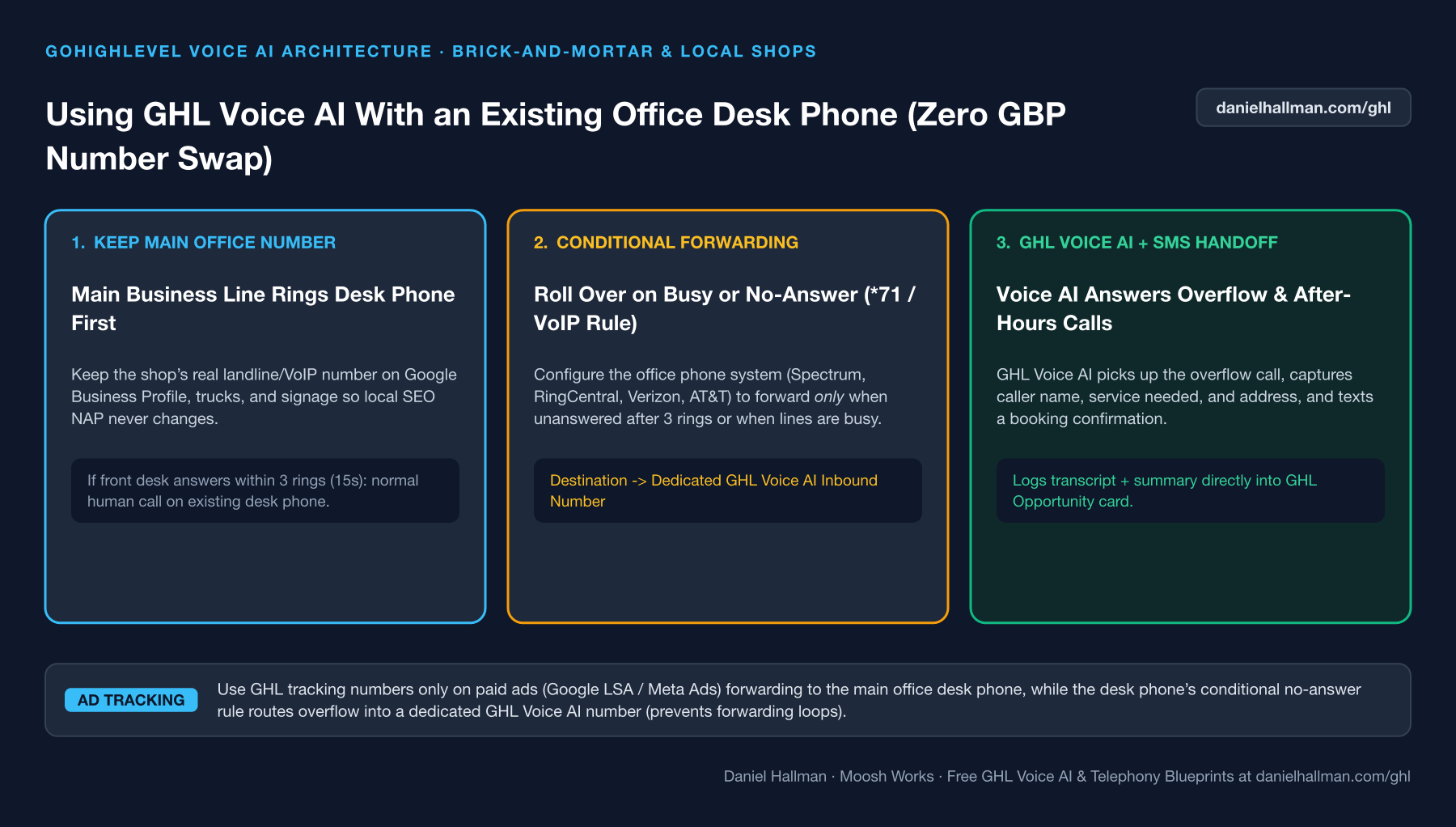
Replacing a local business's main phone number across Google Business Profile, trucks, and yard signs just to use Voice AI hurts local SEO consistency and forces every repeat customer through a bot before reaching the front desk.
How We Fix It in HighLevel
Leave the primary phone number untouched on their desk phone. Enable Conditional Call Forwarding (Busy / No-Answer after 3 rings) on their existing carrier to forward overflow and after-hours calls into a dedicated HighLevel Voice AI number.
3-Step Implementation Checklist
- Provision a dedicated local number inside GoHighLevel and attach your Voice AI receptionist agent to it.
- On the client's existing office phone carrier (Spectrum, Comcast, RingCentral, AT&T, or Verizon), enable No-Answer / Busy Call Forwarding (*71 or *92) set to 3 rings (15 seconds) pointing to the GHL Voice AI number.
- Use separate HighLevel tracking numbers strictly on Google Ads, Meta Ads, and yard signs where calls should hit the GHL funnel directly.
MODE: AGENT PROMPT
PASTE THIS PROMPT INTO CLAUDE CODE, CURSOR, CHATGPT, OR YOUR GHL ASSISTANT
SAFE READ-FIRST WORKFLOW
Set up a hybrid desk-phone + Voice AI call routing plan for our brick-and-mortar client:
1. Keep the client's existing primary number on Google Business Profile so front-desk staff answer live during business hours.
2. Configure our GoHighLevel Voice AI receptionist number to handle overflow (unanswered after 15s / 3 rings) and after-hours calls forwarded via carrier Conditional Call Forwarding (*71).
3. Generate the exact carrier dial codes (*71 / *90 / *92) and a 20-FAQ Knowledge Base tailored to their business hours, address, and emergency policies.
RUN WITH OUR GHL-TOOLS MCP SERVER OR RUST CLI (DANIELHALLMAN.COM/MCP)
SUPPORTS --DRY-RUN PREVIEW
# 1. MCP Tool Call (ghl-agency-mcp)
{
  "tool": "voice_ai_configure_overflow",
  "arguments": {
    "location_id": "<YOUR_LOCATION_ID>",
    "ring_timeout_seconds": 15,
    "require_empty_escalation_guard": true,
    "dry_run": true
  }
}

# 2. Or run via ghl-agency Rust CLI
ghl-agency voice configure-overflow --location-id <YOUR_LOCATION_ID> --ring-seconds 15 --dry-run
Similar GoHighLevel Questions & Fixes
PLAYBOOK T08 · Voice AI & Phone
How do you stop iPhone Live Voicemail from breaking GoHighLevel Missed-Call Text-Back?
Lower your GoHighLevel Incoming Call Timeout to 15 seconds and turn on Call Whisper ('Press 1 to accept') so Apple iOS 18+ cannot intercept the call at 18 seconds.
PLAYBOOK T04 · Voice AI & PhoneHow do you block Google Business robocalls from burning GoHighLevel Voice AI minutes?
Put a 4-second 'Press 1 to speak with our team' DTMF call screen in front of your Voice AI agent so automated spam dialers drop off after 5 seconds at zero AI cost.
PLAYBOOK T13 · Calendars & BookingHow do you route callers across multiple office locations and calendars in GoHighLevel?
Have your Voice AI or intake form ask for the caller's preferred neighborhood or zip code first, then route them to a partitioned location calendar and text a matching Google Maps pin.
PLAYBOOK T11 · Voice AI & PhoneHow do you fix Voice AI mispronouncing local names and set up warm call transfers in GoHighLevel?
Add local street names and trade acronyms (like HVAC, PEX, or SEER) to a pronunciation dictionary instead of spelling words strangely in the prompt, and use a 15-second warm transfer with fallback.
RUN THIS IN 30 SECONDS · GHL-TOOLS MCP + OPERATOR COMMUNITY
Want your AI agent to inspect and build this inside GoHighLevel automatically?
Connect Claude Code, Cursor, or OpenAI Codex to our ghl-tools MCP Server & Rust CLI for 30-second sub-account doctor checks, --dry-run previews, and snapshot diffs—or start/upgrade your GoHighLevel plan through our partner link to unlock up to $612+ in implementation kits (including Voice, Conversation & Knowledge Base Kit ($47)) and our weekly live engineering clinics.