GOHIGHLEVEL ANSWERS & PROMPTS: PLAYBOOK T13 · CALENDARS & BOOKING
AUTHOR: DANIEL HALLMAN
KEYWORD: CALENDAR
What Usually Happens
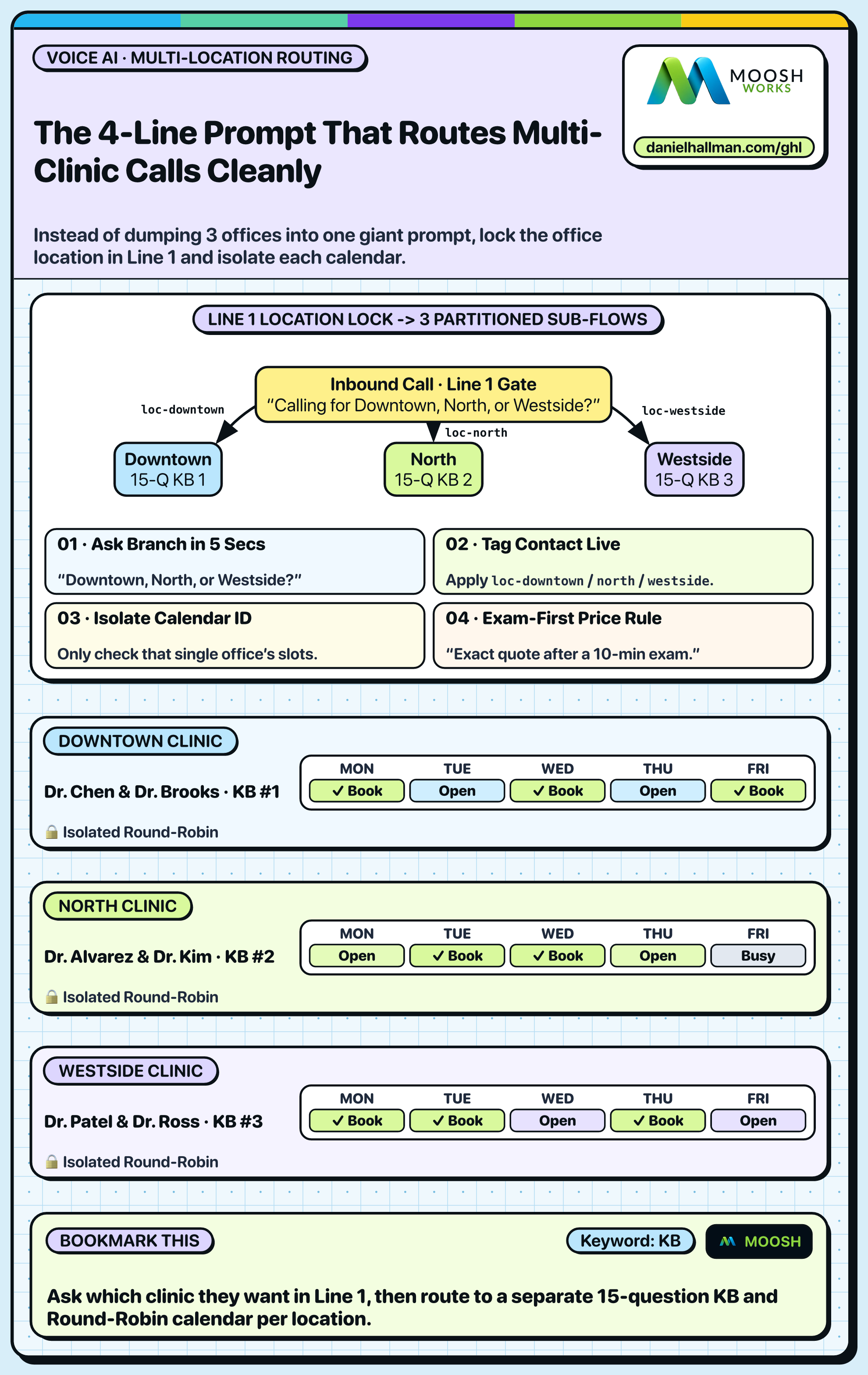
Stuffing 8 clinic locations, 20 providers, and different office hours into one giant Voice AI prompt or calendar menu confuses callers and books appointments at the wrong branch across town.
How We Fix It in HighLevel
Ask one simple location-routing question up front ('Which office is closest to you—Downtown or Northside?'), store each branch's hours in its own Knowledge Base, and book into that branch's dedicated Round Robin calendar.
3-Step Implementation Checklist
- Create separate Round Robin or Service Calendars in GoHighLevel for each physical branch (e.g. `Downtown Clinic` and `Northside Clinic`).
- Configure your Voice AI prompt or 2-step funnel to ask for the preferred branch or zip code first before checking open time slots.
- Trigger a confirmation text that includes the exact street address and Google Maps link for the selected branch.
MODE: AGENT PROMPT
PASTE THIS PROMPT INTO CLAUDE CODE, CURSOR, CHATGPT, OR YOUR GHL ASSISTANT
SAFE READ-FIRST WORKFLOW
Set up multi-location appointment routing in our GoHighLevel sub-account:
1. Inspect existing calendars and partition them cleanly by physical branch location with dedicated Round Robin staff assignments.
2. Update the Voice AI intake prompt to confirm which office location the caller prefers before querying calendar availability.
3. Configure the appointment confirmation workflow to dynamically insert the booked location's street address, parking notes, and Google Maps link.
RUN WITH OUR GHL-TOOLS MCP SERVER OR RUST CLI (DANIELHALLMAN.COM/MCP)
SUPPORTS --DRY-RUN PREVIEW
# 1. MCP Tool Call (ghl-crm-mcp)
{
  "tool": "calendars_audit_partitioning",
  "arguments": {
    "location_id": "<YOUR_LOCATION_ID>",
    "verify_conflict_calendars": true,
    "dry_run": true
  }
}

# 2. Or run via ghl-crm Rust CLI
ghl-crm calendars inspect --location-id <YOUR_LOCATION_ID>
Similar GoHighLevel Questions & Fixes
PLAYBOOK T16 · Calendars & Booking
How do you cut appointment no-shows and stop double-bookings in GoHighLevel Calendars v2?
Enable both Linked Calendar and Conflict Calendar sync on Google/Outlook, require a two-way 'Reply C to confirm' SMS 3 hours before the slot, and auto-text a 1-tap reschedule link if unconfirmed.
PLAYBOOK T09 · Voice AI & PhoneHow do you use GoHighLevel Voice AI with an existing office desk phone without swapping your main number?
Keep the business's main number on Google Business Profile so the front desk rings first for 15 seconds, then use Conditional Call Forwarding (*71) to roll unanswered and after-hours calls to your GoHighLevel Voice AI number.
PLAYBOOK T11 · Voice AI & PhoneHow do you make GoHighLevel Voice AI calls feel fast and natural without awkward pauses?
Keep every spoken response under 25 words, strip all markdown bullets from the voice prompt, and pair a 4-second DTMF greeting with a low-latency SIP bridge when sub-second response times are needed.
PLAYBOOK T17 · Funnels & FormsHow do you recover half-finished quote forms on mobile funnels in GoHighLevel?
Split long 8-field forms into a 3-field Step 1 (First Name, Mobile Phone, Service Type) and Step 2 (Address & Calendar), then trigger a 10-minute Goal Event workflow to text anyone who stops after Step 1.
RUN THIS IN 30 SECONDS · GHL-TOOLS MCP + OPERATOR COMMUNITY
Want your AI agent to inspect and build this inside GoHighLevel automatically?
Connect Claude Code, Cursor, or OpenAI Codex to our ghl-tools MCP Server & Rust CLI for 30-second sub-account doctor checks, --dry-run previews, and snapshot diffs—or start/upgrade your GoHighLevel plan through our partner link to unlock up to $612+ in implementation kits (including Voice, Conversation & Knowledge Base Kit ($47)) and our weekly live engineering clinics.