GOHIGHLEVEL ANSWERS & PROMPTS: PLAYBOOK T85 · EMERGENCY CALL ESCALATION, ON-CALL PAGING & SPEAKERPHONE ECHO TUNING
AUTHOR: DANIEL HALLMAN
KEYWORD: URGENT VOICE
STEP-BY-STEP INSTRUCTIONS + ANNOTATED GHL SCREENSHOTS
Steps in GoHighLevel
-
STEP 1In AI Agents > Voice AI, add a rule in the system prompt stating the assistant must never promise a doctor or technician is on-site right now or give medical/safety advice, and raise the barge-in interruption threshold to 2 or 3 words (
450ms–500mssilence) so a caller on speakerphone does not cause the bot to cut off its own voice.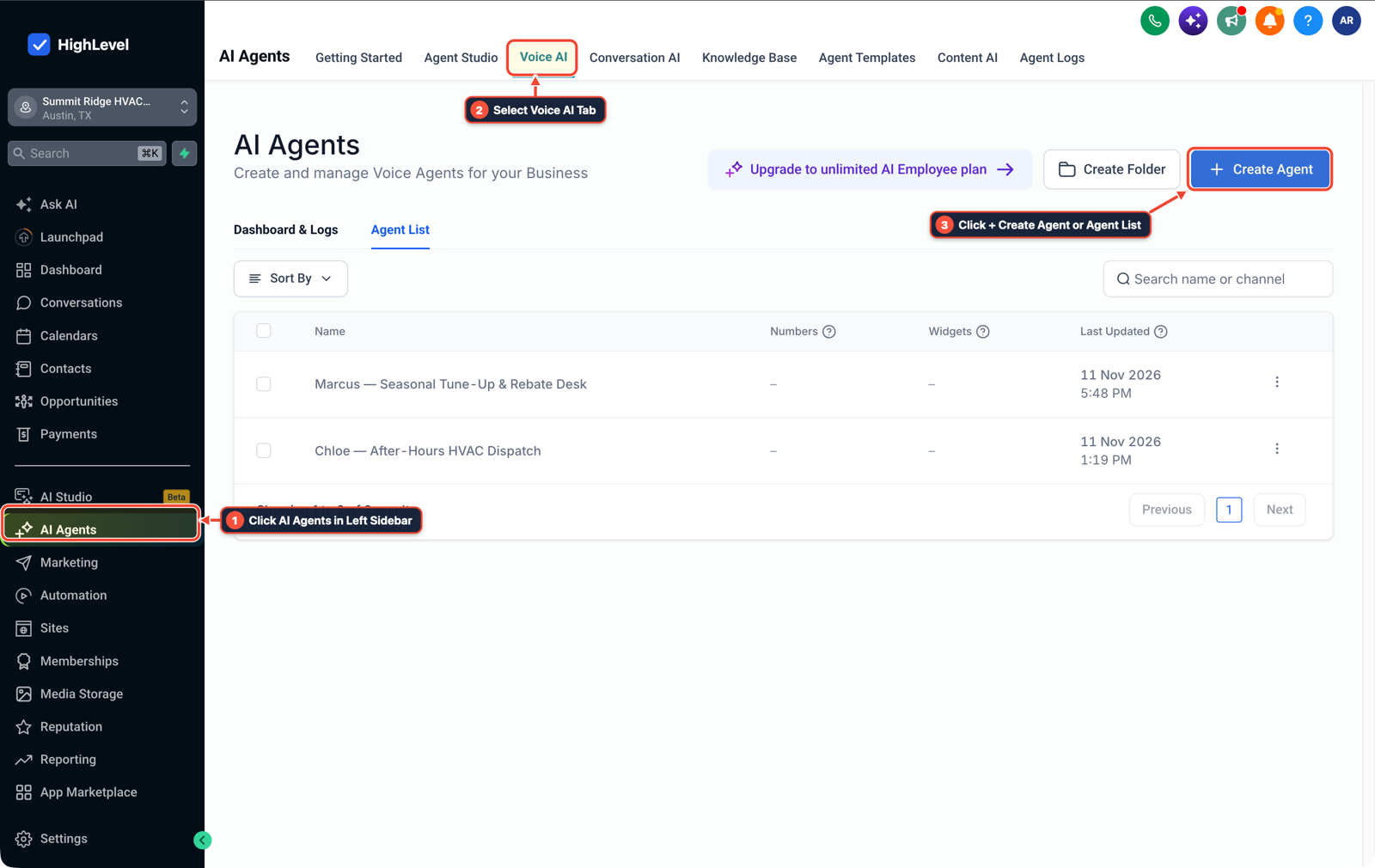
1Click AI Agents in Left Sidebar 2Select Voice AI Tab 3Click + Create Agent or Agent List -
STEP 2In AI Agents > Knowledge Base, add a dedicated emergency Q&A entry (
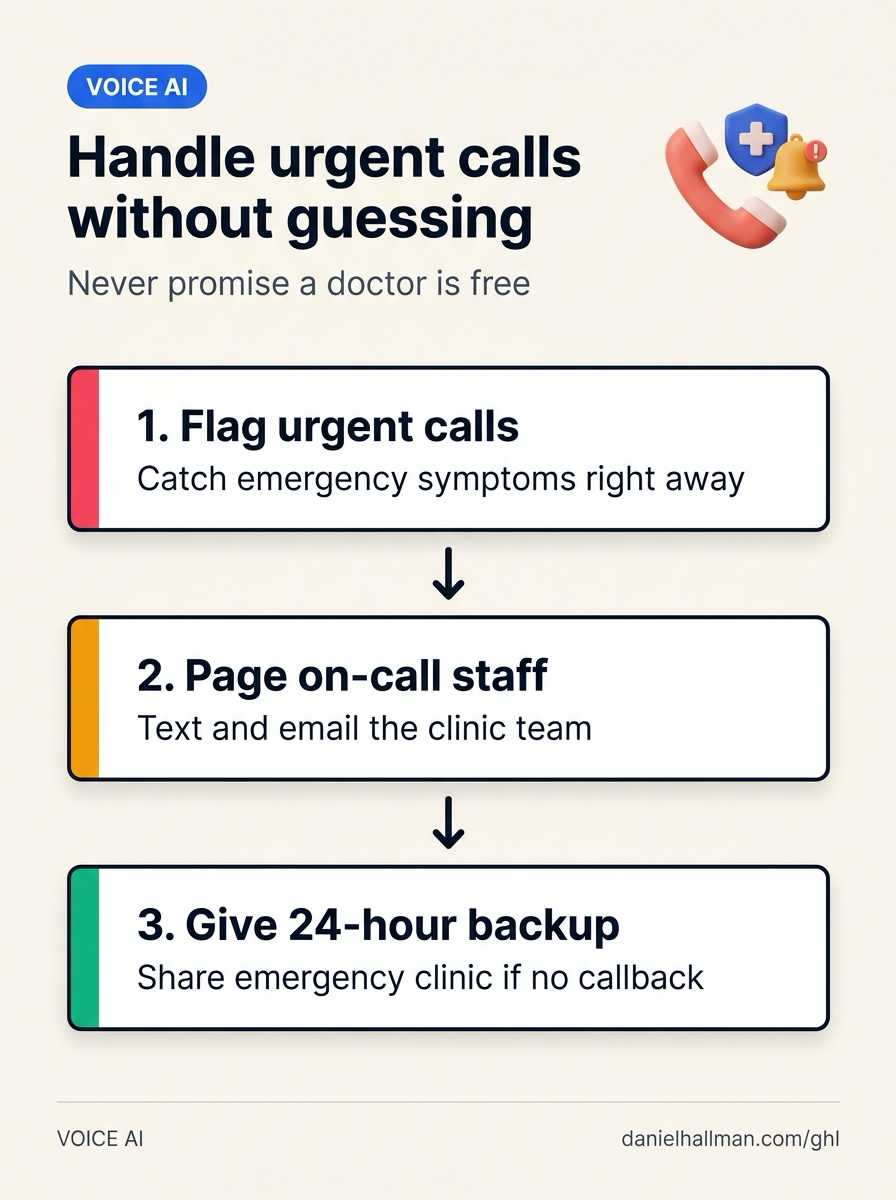
poisoning,bleeding,chest pain,burst pipe,gas smell) instructing the bot to say it is paging the on-call team right now and that if nobody calls back within 3 minutes, the caller should head straight to the listed 24-hour emergency clinic or dispatch line.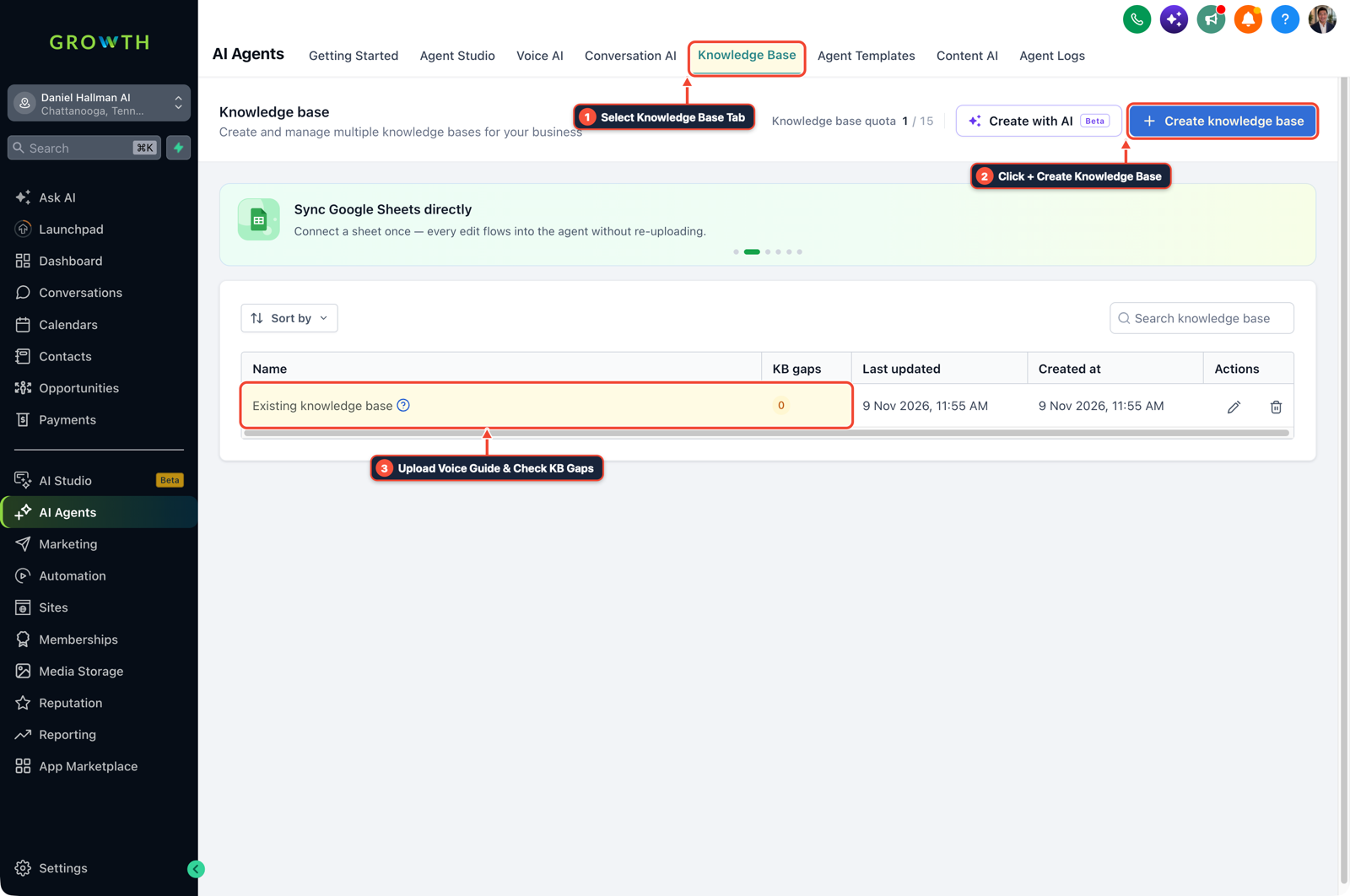
1Select Knowledge Base Tab 2Click + Create Knowledge Base 3Review Industry FAQ & Check KB Gaps -
STEP 3In Automation > Workflow Builder, trigger an emergency workflow whenever the call summary or custom field sets
Urgency = Emergencythat sends an immediate SMS and email with the caller's phone number and reason to the on-call staff member.
1Add If/Else Condition & Tag Guard 2Chain Priority & Wait Steps 3Switch to Settings or Execution Logs
MODE: AGENT PROMPT
PASTE INTO CLAUDE CODE, CURSOR, CHATGPT, OR GOHIGHLEVEL ASK AI
AGENT PROMPT
Add an emergency availability guard and on-call paging workflow to a Voice AI receptionist in sub-account <YOUR_LOCATION_ID>:
1. In AI Agents > Voice AI, update the prompt so the agent never promises immediate in-person doctor or staff availability during emergencies, and tune barge-in interruption settings so speakerphone echo does not cut the bot off.
2. In AI Agents > Knowledge Base, add an emergency response script that promises an immediate staff page and gives the nearest 24-hour emergency backup address if no callback occurs within 3 minutes.
3. In Automation > Workflow Builder, send an immediate SMS and email alert to on-call staff whenever a call is tagged or classified as an emergency.
GHL-TOOLS MCP SERVER & CLI (DANIELHALLMAN.COM/MCP)
BUILDER + SUB-ACCOUNT TOOLS
# Audit Voice AI prompt rules and emergency paging workflows in the sub-account
ghl-crm workflows list --context <YOUR_CONTEXT> --location <YOUR_LOCATION_ID>
ghl-crm custom-fields list --context <YOUR_CONTEXT> --location <YOUR_LOCATION_ID>
Official GHL MCP vs. ghl-tools: HighLevel’s official hosted MCP (services.leadconnectorhq.com/mcp) covers public v2 CRM records (contacts, opportunities, appointments, conversations). ghl-tools MCP complements it with workflow graph inspection & recipes, funnel/form builders, DNS/BIMI checks, and ghl-crm doctor audits.
Cause
- When clinics, veterinarians, or emergency trade owners test an AI phone receptionist, they do not test routine bookings first
- they test a panicked caller asking whether the doctor or tech is there right now for an emergency.
- If the bot says 'Yes, come right in, we'll see you immediately' without knowing the doctor is in surgery, or cuts itself off because the caller's phone is on speakerphone, the owner loses trust on the first test call.
GoHighLevel Configuration
- Configure AI Agents > Voice AI to never confirm live walk-in availability and to require 2 to 3 spoken words before interruption on speakerphone calls, store the 24-hour emergency redirect address in AI Agents > Knowledge Base
- and fire an instant on-call SMS and email alert in Automation > Workflow Builder.
GoHighLevel Menu Paths
| Step | Menu Path in GHL | Action |
|---|---|---|
| Step 1 | AI Agents > Voice AI | Add a rule in the system prompt stating the assistant must never promise a doctor or technician is on-site right now or give medical/safety advice, and raise the barge-in interruption threshold to 2 or 3 words (450ms–500ms silence) so a caller on speakerphone does not cause the bot to cut off its own voice. |
| Step 2 | AI Agents > Knowledge Base | Add a dedicated emergency Q&A entry (poisoning, bleeding, chest pain, burst pipe, gas smell) instructing the bot to say it is paging the on-call team right now and that if nobody calls back within 3 minutes, the caller should head straight to the listed 24-hour emergency clinic or dispatch line. |
| Step 3 | Automation > Workflow Builder | Trigger an emergency workflow whenever the call summary or custom field sets Urgency = Emergency that sends an immediate SMS and email with the caller's phone number and reason to the on-call staff member. |
DEFAULT SETUP VS. AUTOMATED WORKFLOW
Operational Comparison
After-Hours & Missed Call Capture
Qualified Jobs Booked 24/7
Related Questions
- What Can't AI Receptionists Do on Live Calls (And How Do You Set Up SMS and Human Fallbacks in GoHighLevel)?
- How Do You Set Up Multiple Transfer Numbers and Warm Transfers Inside a GoHighLevel AI Receptionist?
- How Do You Handle Dropped Calls, Caller Interruptions, and Duplicate CRM Updates When Running AI Voice Agents in Production?
- If an AI Receptionist Promises a Callback, Should a Voicemail Close the Request in GoHighLevel?
BUILD FASTER IN GOHIGHLEVEL · FREE TRIAL BONUSES + MCP SERVER
Build this directly inside your GoHighLevel sub-account
Connect Claude Code, Cursor, or OpenAI Codex to our ghl-tools MCP Server & Rust CLI to build workflows, forms, and funnels from your editor, or start your GoHighLevel plan through our partner link to unlock $612+ in ready-to-import kits (including GHL Voice AI Emergency Triage & 80-FAQ KB Kit) and weekly live clinics.