GOHIGHLEVEL ANSWERS & PROMPTS: PLAYBOOK T61 · MULTI-DEPARTMENT VOICE AI TRANSFERS & PRE-RING CONTEXT BRIEFS
AUTHOR: DANIEL HALLMAN
KEYWORD: WARM TRANSFER
STEP-BY-STEP INSTRUCTIONS + ANNOTATED GHL SCREENSHOTS
Steps in GoHighLevel
-
STEP 1In AI Agents > Voice AI (
Agent Actions> Call Transfer), add a separate Call Transfer action for each department or on-call phone line (Sales,Service & Dispatch,Billing) with a plain trigger rule (Transfer here when the caller asks for repair scheduling or emergency dispatch) so the agent routes by spoken intent without a keypad menu.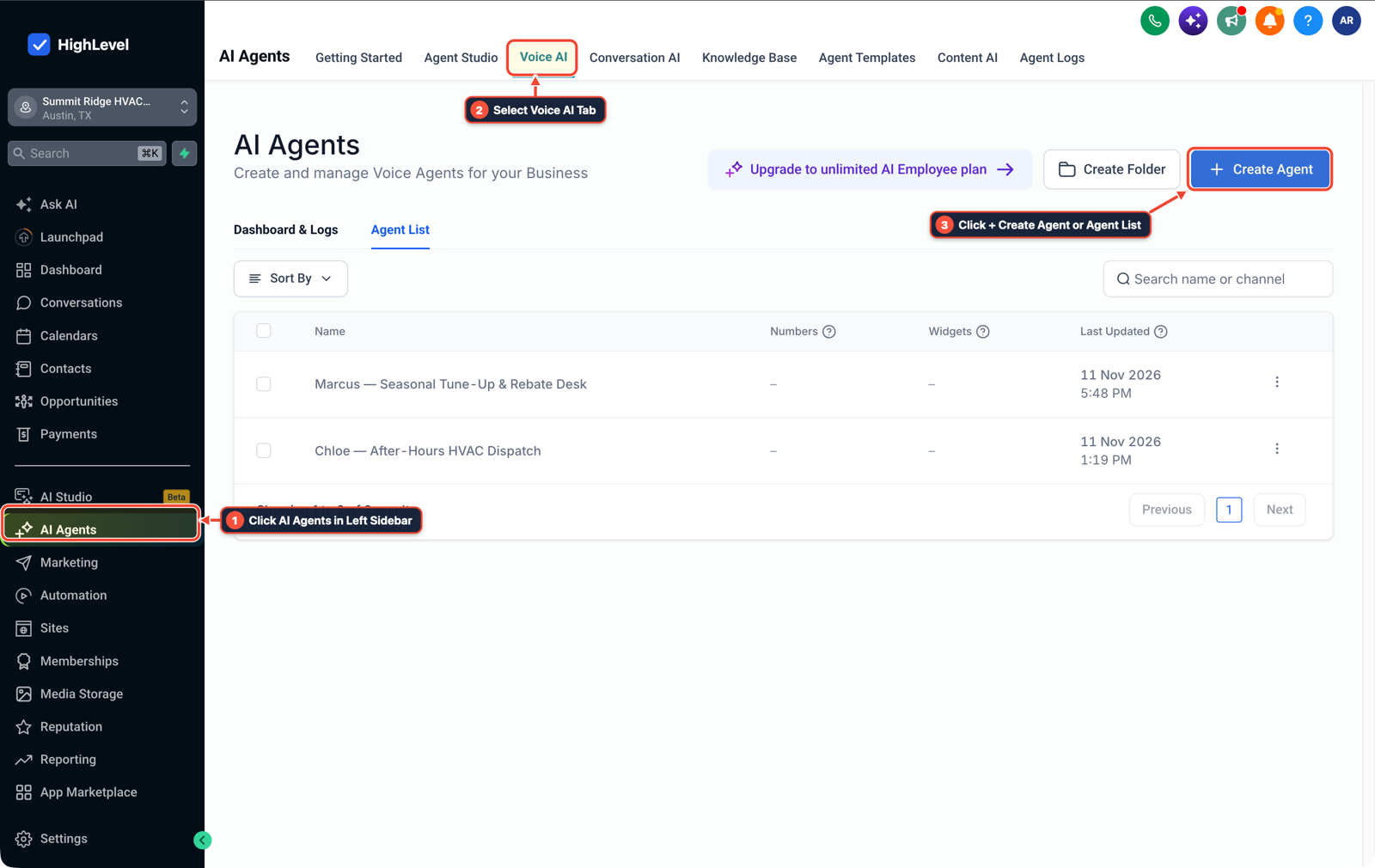
1Click AI Agents in Left Sidebar 2Select Voice AI Tab 3Click + Create Agent or Agent List -
STEP 2In Automation > Workflow Builder, trigger on Call Status or an Outbound Webhook / Custom Action right before transfer to send the receiving rep an Internal Notification SMS (
Incoming transfer: {{contact.first_name}} at {{contact.address1}}, {{contact.ai_call_summary}}) and save the summary onto the contact record.
1Add If/Else Condition & Tag Guard 2Chain Priority & Wait Steps 3Switch to Settings or Execution Logs -
STEP 3In Settings > Phone System (and your transfer workflow's Connect Call settings), set Call Timeout to
15 secondsand enable the Call Connect whisper (New caller {{contact.first_name}} for {{contact.service_needed}}. Press 1 to take the call) so unanswered transfers move to a callback stage instead of a rep's personal cell voicemail.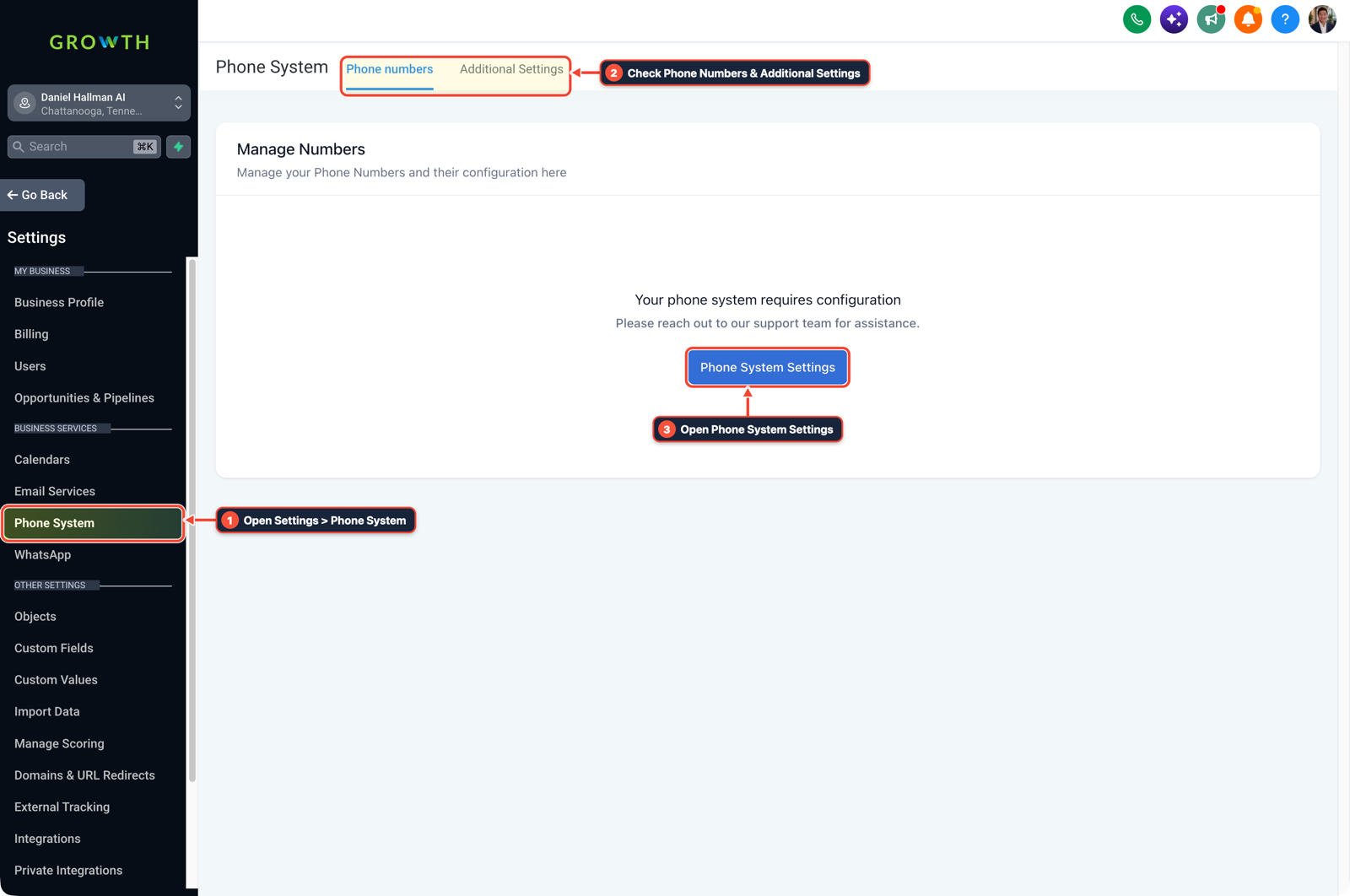
1Open Settings > Phone System 2Check Phone Numbers & Additional Settings 3Open Phone System Settings
MODE: AGENT PROMPT
PASTE INTO CLAUDE CODE, CURSOR, CHATGPT, OR GOHIGHLEVEL ASK AI
AGENT PROMPT
Configure multi-department Voice AI call transfers and warm handoff briefs in sub-account <YOUR_LOCATION_ID>:
1. In AI Agents > Voice AI > Agent Actions, create separate Call Transfer actions for Sales, Service Dispatch, and Billing with intent-specific trigger descriptions.
2. In Automation > Workflow Builder, send an Internal Notification SMS with the caller's name, phone number, and call summary to the target rep when a transfer starts.
3. In Settings > Phone System, set a 15-second Call Timeout and turn on the Call Connect whisper (Press 1 to accept) so unanswered transfers fall back to an SMS callback queue.
GHL-TOOLS MCP SERVER & CLI (DANIELHALLMAN.COM/MCP)
BUILDER + SUB-ACCOUNT TOOLS
# Audit Voice AI transfer numbers and call handoff workflows in the sub-account
ghl-agency phone-wallet-audit --context <YOUR_CONTEXT> --location <YOUR_LOCATION_ID>
ghl-crm workflows list --context <YOUR_CONTEXT> --location <YOUR_LOCATION_ID>
Official GHL MCP vs. ghl-tools: HighLevel’s official hosted MCP (services.leadconnectorhq.com/mcp) covers public v2 CRM records (contacts, opportunities, appointments, conversations). ghl-tools MCP complements it with workflow graph inspection & recipes, funnel/form builders, DNS/BIMI checks, and ghl-crm doctor audits.
Cause
- When an AI receptionist uses a single blind transfer number, callers get dumped into personal cell voicemail boxes when a rep is busy, or reach a human who has no idea who is on the line or what they asked for.
- Building a keypad IVR menu fixes routing but causes impatient mobile callers to hang up before reaching the right desk.
GoHighLevel Configuration
- Create named Call Transfer actions per department (
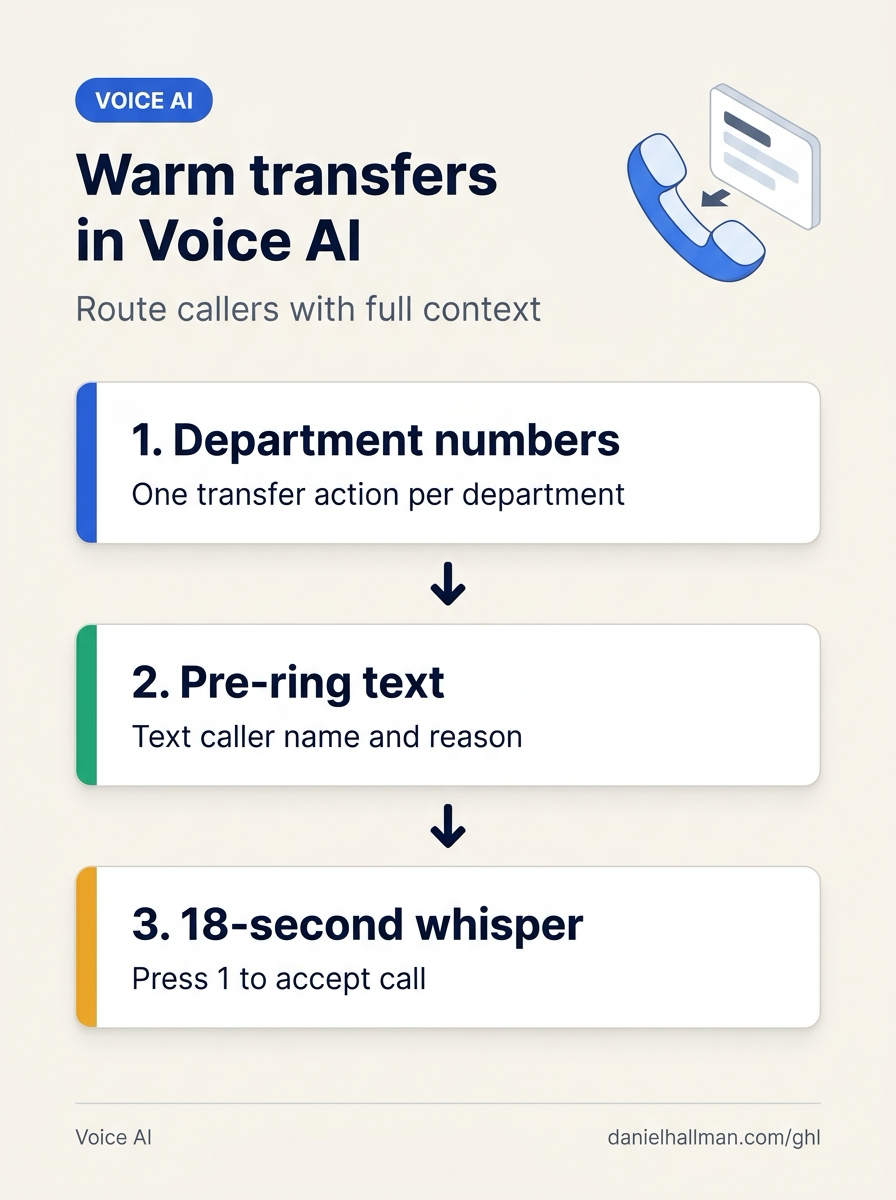
Sales,Service Dispatch,Billing - or on-call tech) in AI Agents > Voice AI, text the rep the caller's name and issue summary two seconds before dialing in Automation > Workflow Builder
- and use an
18-secondCall Connect whisper in Settings > Phone System so unanswered transfers roll back to an SMS callback hold.
GoHighLevel Menu Paths
| Step | Menu Path in GHL | Action |
|---|---|---|
| Step 1 | AI Agents > Voice AI | Add a separate Call Transfer action for each department or on-call phone line (Sales, Service & Dispatch, Billing) with a plain trigger rule (Transfer here when the caller asks for repair scheduling or emergency dispatch) so the agent routes by spoken intent without a keypad menu. |
| Step 2 | Automation > Workflow Builder | Trigger on Call Status or an Outbound Webhook / Custom Action right before transfer to send the receiving rep an Internal Notification SMS (Incoming transfer: {{contact.first_name}} at {{contact.address1}}, {{contact.ai_call_summary}}) and save the summary onto the contact record. |
| Step 3 | Settings > Phone System | In Settings > Phone System (and your transfer workflow's Connect Call settings), set Call Timeout to 15 seconds and enable the Call Connect whisper (`New caller {{contact.first_name}} for {{contact.service_needed}}. |
DEFAULT SETUP VS. AUTOMATED WORKFLOW
Operational Comparison
After-Hours & Missed Call Capture
Qualified Jobs Booked 24/7
Related Questions
- If an AI Receptionist Promises a Callback, Should a Voicemail Close the Request in GoHighLevel?
- How Do You Set Up Sequential Call Routing Between Team Members in GoHighLevel?
- How Do You Handle Dropped Calls, Caller Interruptions, and Duplicate CRM Updates When Running AI Voice Agents in Production?
- Why Does GoHighLevel Call Routing Skip the Second-Priority Answering Service (And How Do You Route Without an IVR Keypress)?
BUILD FASTER IN GOHIGHLEVEL · FREE TRIAL BONUSES + MCP SERVER
Build this directly inside your GoHighLevel sub-account
Connect Claude Code, Cursor, or OpenAI Codex to our ghl-tools MCP Server & Rust CLI to build workflows, forms, and funnels from your editor, or start your GoHighLevel plan through our partner link to unlock $612+ in ready-to-import kits (including GHL Voice AI Multi-Transfer & Warm Handoff Kit) and weekly live clinics.