GOHIGHLEVEL ANSWERS & PROMPTS: PLAYBOOK T69 · VOICE AI RECEPTIONIST BOUNDARIES & SMS ADDRESS FALLBACKS
AUTHOR: DANIEL HALLMAN
KEYWORD: VOICE AI LIMITS
STEP-BY-STEP INSTRUCTIONS + ANNOTATED GHL SCREENSHOTS
Steps in GoHighLevel
-
STEP 1In AI Agents > Voice AI, limit the agent prompt to first-pass call intake, standard FAQ pricing ranges, and connected calendar slot checks, with explicit instructions never to invent custom quotes or debate past-due bills.
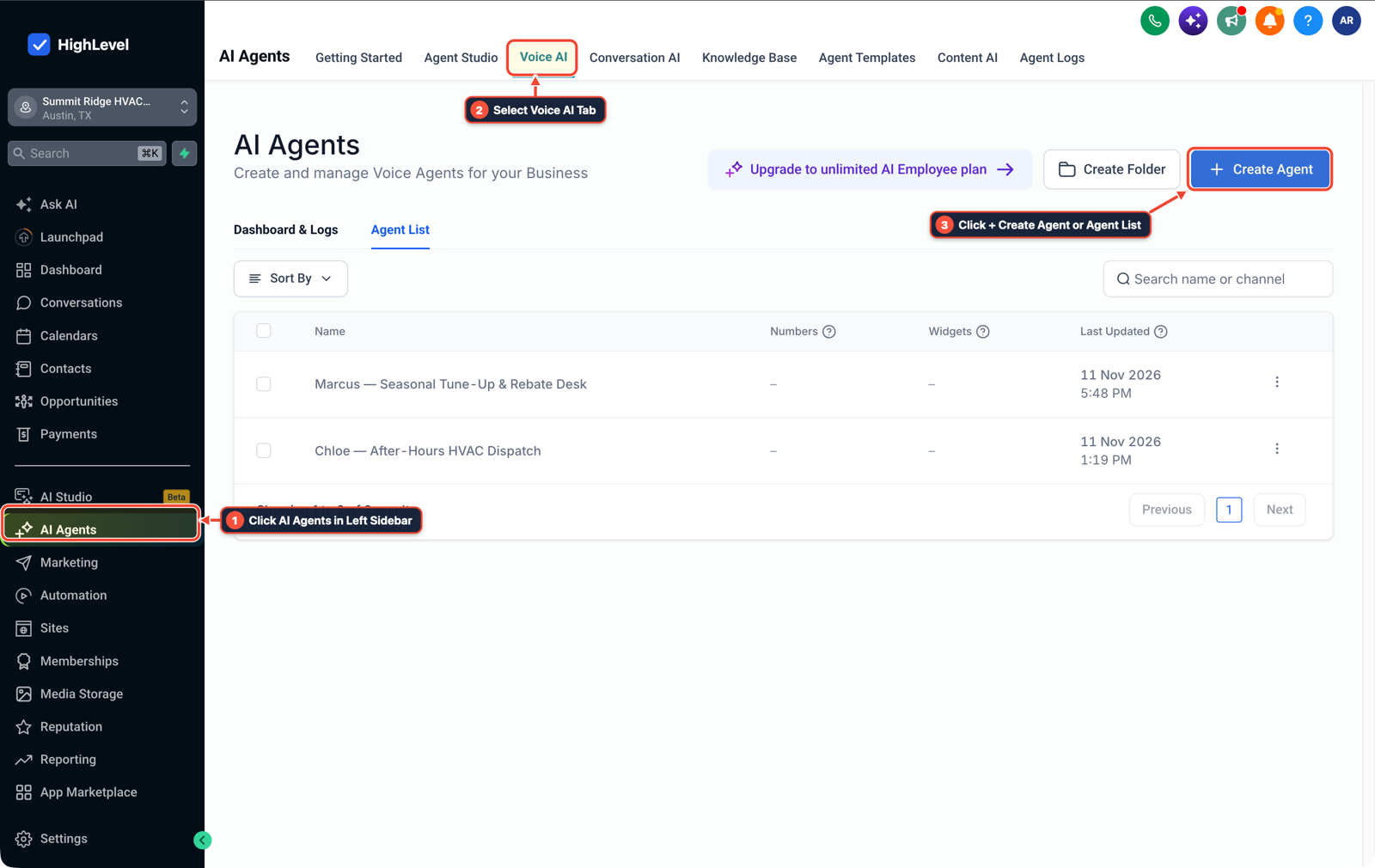
1Click AI Agents in Left Sidebar 2Select Voice AI Tab 3Click + Create Agent or Agent List -
STEP 2In Automation > Workflow Builder, trigger an automatic Send SMS step as soon as the caller asks for an on-site estimate or needs to share a street address, unit number, email address, or job photo so they can reply by text instead of spelling it over road noise.

1Add If/Else Condition & Tag Guard 2Chain Priority & Wait Steps 3Switch to Settings or Execution Logs -
STEP 3In Settings > Phone System, configure a Call Transfer action with a
15-secondring timeout and an18-secondCall Connect whisper (Press 1 to take the call) for billing disputes or emergencies, rolling unanswered transfers into a priority SMS callback stage.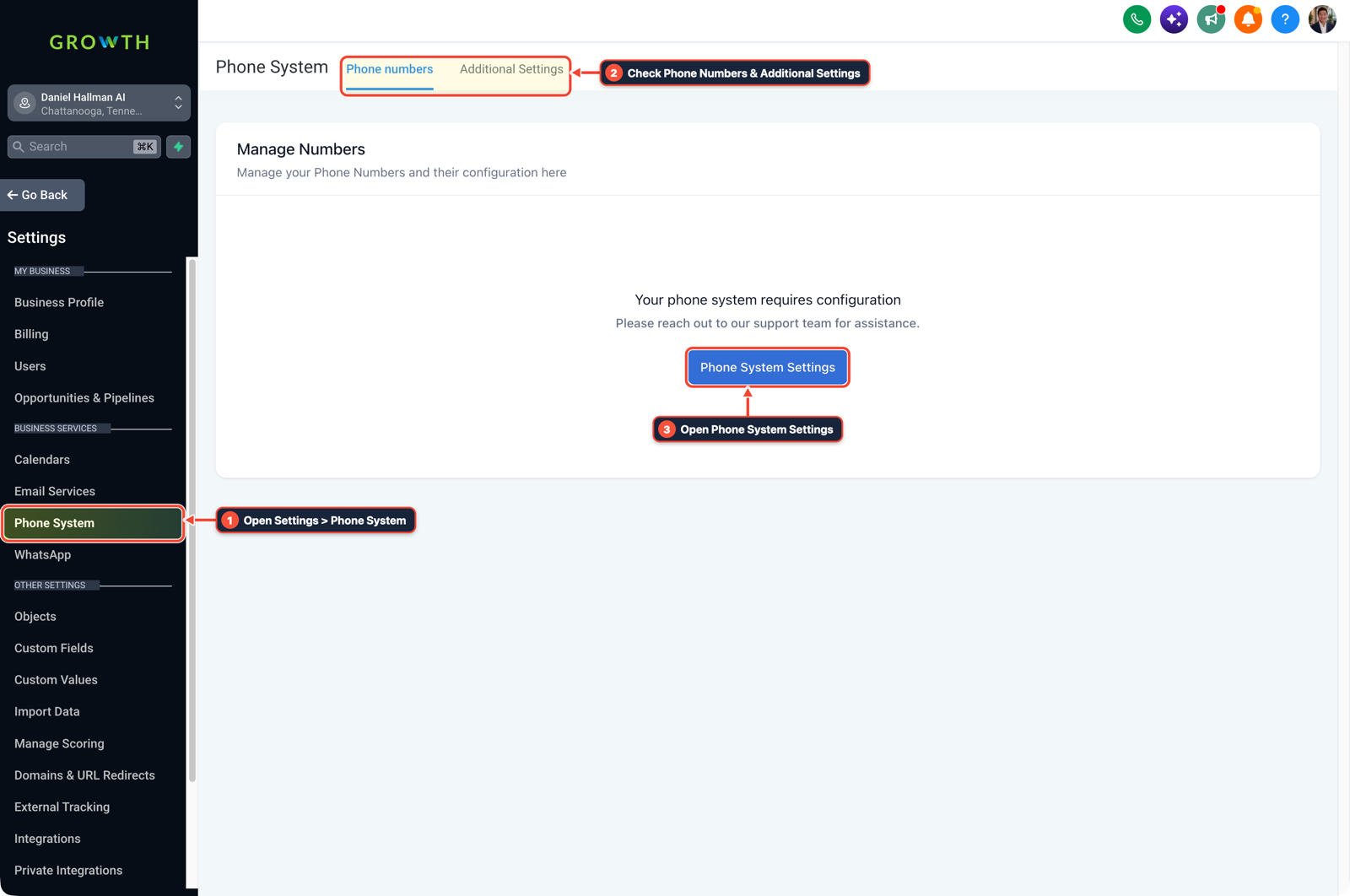
1Open Settings > Phone System 2Check Phone Numbers & Additional Settings 3Open Phone System Settings
MODE: AGENT PROMPT
PASTE INTO CLAUDE CODE, CURSOR, CHATGPT, OR GOHIGHLEVEL ASK AI
AGENT PROMPT
Configure Voice AI receptionist boundaries, SMS address collection, and human transfer fallbacks in sub-account <YOUR_LOCATION_ID>:
1. In AI Agents > Voice AI, restrict the receptionist prompt to first-pass intake, standard FAQ ranges, and live calendar availability checks.
2. In Automation > Workflow Builder, send an immediate SMS asking the caller to reply with their exact street address, email, and project photo instead of transcribing spelled-out addresses over noisy phone lines.
3. In Settings > Phone System, configure a 15-second Call Timeout and 18-second Call Connect whisper for billing disputes or urgent transfers.
GHL-TOOLS MCP SERVER & CLI (DANIELHALLMAN.COM/MCP)
BUILDER + SUB-ACCOUNT TOOLS
# Audit Voice AI phone lines and SMS fallback workflows in the sub-account
ghl-agency phone-wallet-audit --context <YOUR_CONTEXT> --location <YOUR_LOCATION_ID>
ghl-crm workflows list --context <YOUR_CONTEXT> --location <YOUR_LOCATION_ID>
Official GHL MCP vs. ghl-tools: HighLevel’s official hosted MCP (services.leadconnectorhq.com/mcp) covers public v2 CRM records (contacts, opportunities, appointments, conversations). ghl-tools MCP complements it with workflow graph inspection & recipes, funnel/form builders, DNS/BIMI checks, and ghl-crm doctor audits.
Cause
- Local business owners often expect an AI voice receptionist to improvise custom job estimates, negotiate angry invoice complaints, or catch complex street names and email addresses over highway background noise.
- When a voice bot tries to spell back an email address three times on a bad cellular connection or guesses a price without seeing the job, callers hang up frustrated.
GoHighLevel Configuration
- Scope AI Agents > Voice AI to the tasks a day-one front-desk coordinator can verify (answering on the first ring, capturing the caller's name and issue
- and checking connected calendar slots), shift address and email spelling to an instant text in Automation > Workflow Builder
- and route complaints or urgent calls to a human via Settings > Phone System.
GoHighLevel Menu Paths
| Step | Menu Path in GHL | Action |
|---|---|---|
| Step 1 | AI Agents > Voice AI | Limit the agent prompt to first-pass call intake, standard FAQ pricing ranges, and connected calendar slot checks, with explicit instructions never to invent custom quotes or debate past-due bills. |
| Step 2 | Automation > Workflow Builder | Trigger an automatic Send SMS step as soon as the caller asks for an on-site estimate or needs to share a street address, unit number, email address, or job photo so they can reply by text instead of spelling it over road noise. |
| Step 3 | Settings > Phone System | Configure a Call Transfer action with a 15-second ring timeout and an 18-second Call Connect whisper (Press 1 to take the call) for billing disputes or emergencies, rolling unanswered transfers into a priority SMS callback stage. |
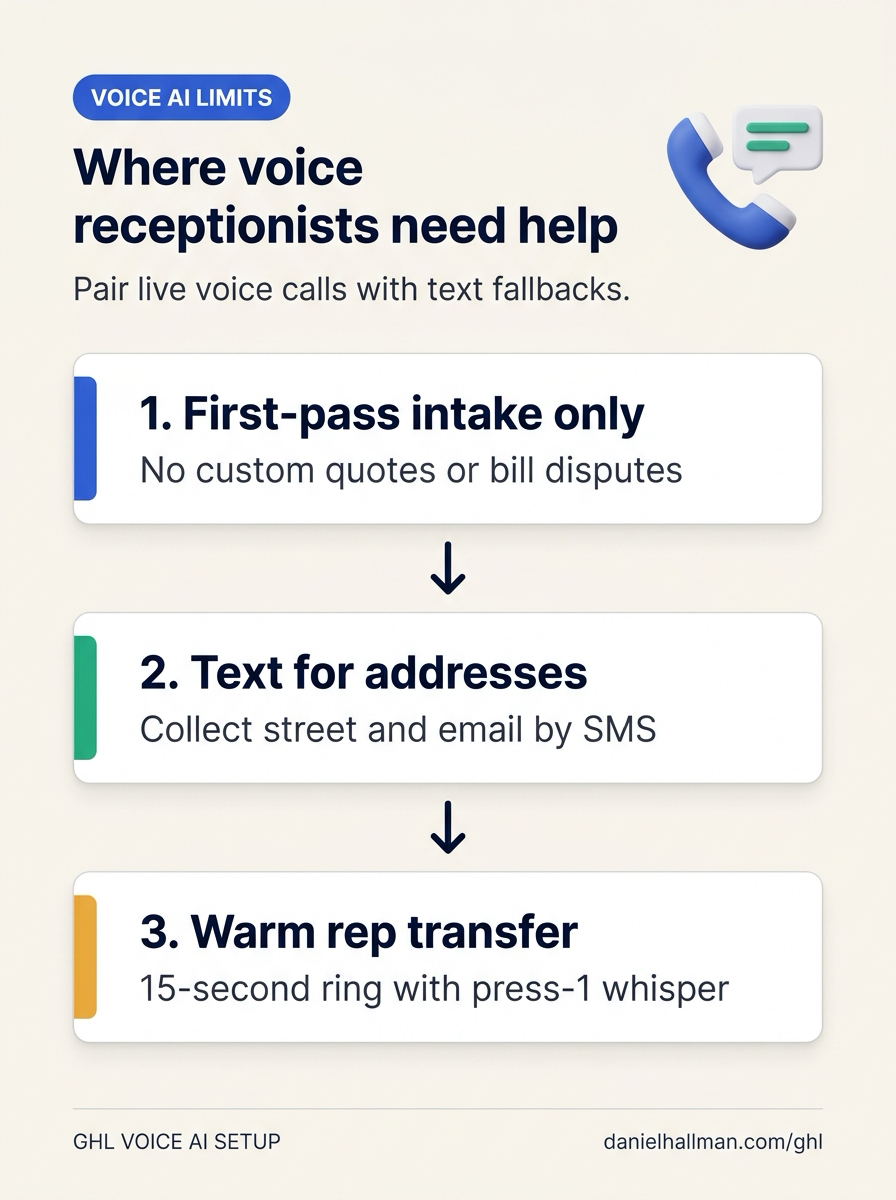
DEFAULT SETUP VS. AUTOMATED WORKFLOW
Operational Comparison
After-Hours & Missed Call Capture
Qualified Jobs Booked 24/7
Related Questions
- How Do You Set Up Multiple Transfer Numbers and Warm Transfers Inside a GoHighLevel AI Receptionist?
- If an AI Receptionist Promises a Callback, Should a Voicemail Close the Request in GoHighLevel?
- Are White-Label AI Receptionist Margins Actually Worth It in GoHighLevel?
- Does Apple iPhone Call Screening Replace an AI Receptionist or Missed-Call Text-Back for Contractors?
BUILD FASTER IN GOHIGHLEVEL · FREE TRIAL BONUSES + MCP SERVER
Build this directly inside your GoHighLevel sub-account
Connect Claude Code, Cursor, or OpenAI Codex to our ghl-tools MCP Server & Rust CLI to build workflows, forms, and funnels from your editor, or start your GoHighLevel plan through our partner link to unlock $612+ in ready-to-import kits (including GHL Voice AI Receptionist & SMS Fallback Kit) and weekly live clinics.