GOHIGHLEVEL ANSWERS & PROMPTS: PLAYBOOK T65 · SEQUENTIAL CALL ROUTING & ANSWERING SERVICE ROLLOVER WITHOUT IVR
AUTHOR: DANIEL HALLMAN
KEYWORD: PRIORITY ROUTING
STEP-BY-STEP INSTRUCTIONS + ANNOTATED GHL SCREENSHOTS
Steps in GoHighLevel
-
STEP 1In Settings > Phone System > Manage Numbers, set your internal team ring timeout to
15 seconds(below Apple's 18-second iPhone Live Voicemail pickup) and uncheck any dummy user record created for the external answering service.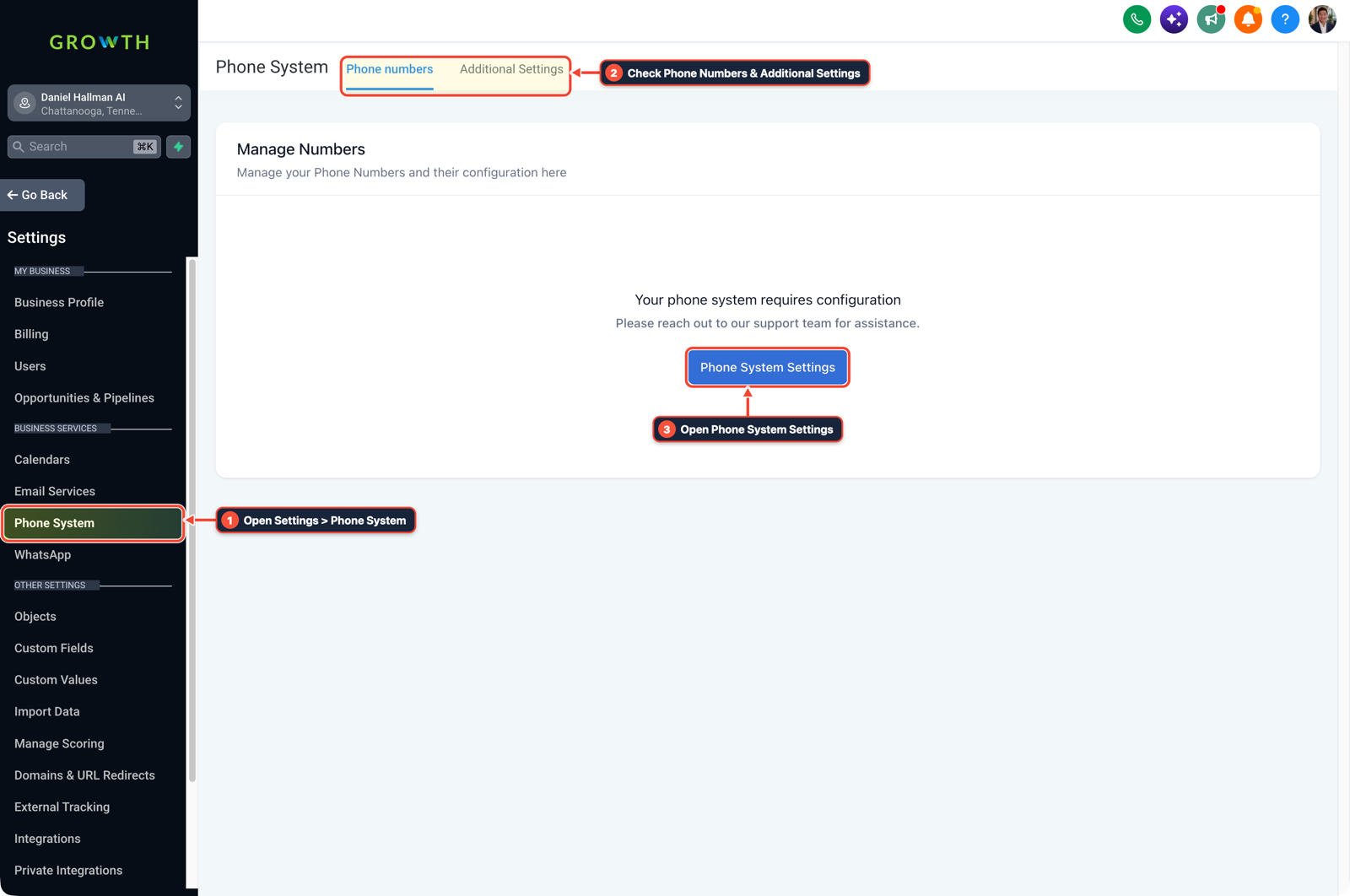
1Open Settings > Phone System 2Check Phone Numbers & Additional Settings 3Open Phone System Settings -
STEP 2In Automation > Workflow Builder, use a Start IVR Trigger with zero
Gather Inputkeypress prompts and chain three sequential actions: Connect Call #1 (Users: You + Assistant,Timeout = 15s), Connect Call #2 (Custom Number: +1NPA5550199in full E.164 format,Timeout = 25s, Call Connect Whisper = Off so the live answering service connects immediately without pressing1), and your fallback Voicemail / Voice AI step.
1Add If/Else Condition & Tag Guard 2Chain Priority & Wait Steps 3Switch to Settings or Execution Logs -
STEP 3In Reporting > Call Report, place a test call from an external phone, let Step 1 ring out for 15 seconds without answering, and expand the call leg log to verify Step 2 dials the answering service's
+1number directly before rolling to Step 3.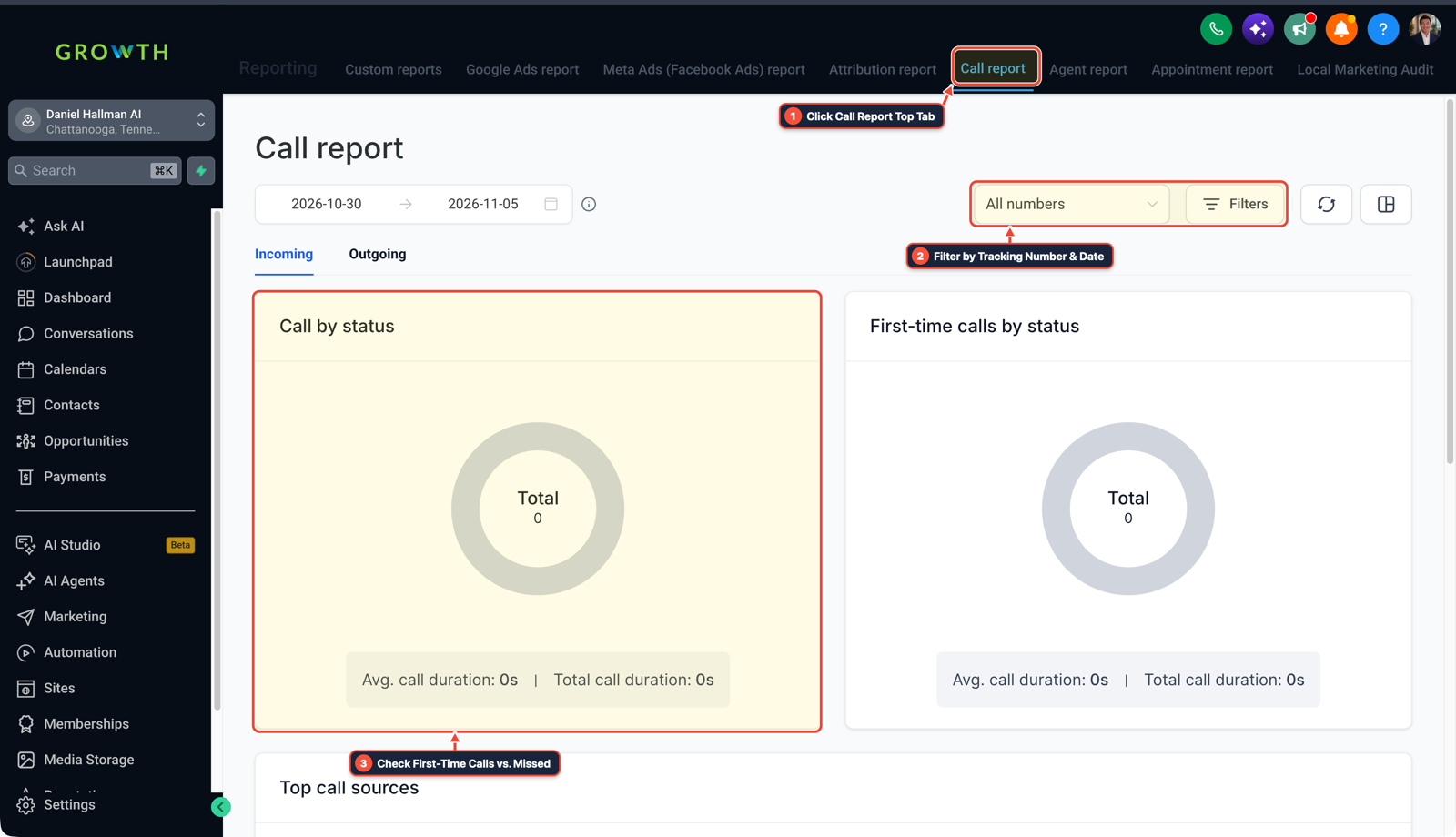
1Click Call Report Top Tab 2Filter by Tracking Number & Date 3Check First-Time Calls vs. Missed
MODE: AGENT PROMPT
PASTE INTO CLAUDE CODE, CURSOR, CHATGPT, OR GOHIGHLEVEL ASK AI
AGENT PROMPT
Fix second-priority answering service call routing without an IVR keypress in sub-account <YOUR_LOCATION_ID>:
1. In Settings > Phone System > Manage Numbers, cap the internal team ring timeout at 15 seconds so cell voicemail does not intercept the call at 18 seconds.
2. In Automation > Workflow Builder, build a Start IVR Trigger workflow with no Gather Input step: chain Connect Call #1 (Users: Owner + Assistant, 15s timeout) into Connect Call #2 (Custom Number: answering service E.164 number, 25s timeout, Call Connect whisper disabled), followed by Voicemail or Voice AI on no-answer.
3. In Reporting > Call Report, place an external test call and verify leg 1 -> leg 2 rollover timestamps.
GHL-TOOLS MCP SERVER & CLI (DANIELHALLMAN.COM/MCP)
BUILDER + SUB-ACCOUNT TOOLS
# Audit phone number routing timeouts and call workflows in the sub-account
ghl-agency phone-wallet-audit --context <YOUR_CONTEXT> --location <YOUR_LOCATION_ID>
ghl-crm workflows list --context <YOUR_CONTEXT> --location <YOUR_LOCATION_ID>
Official GHL MCP vs. ghl-tools: HighLevel’s official hosted MCP (services.leadconnectorhq.com/mcp) covers public v2 CRM records (contacts, opportunities, appointments, conversations). ghl-tools MCP complements it with workflow graph inspection & recipes, funnel/form builders, DNS/BIMI checks, and ghl-crm doctor audits.
Cause
- Setting up a third-party answering service as a second-priority staff user in GoHighLevel causes two silent routing failures: if that dummy user has no active web/mobile session or has
Call Connectwhisper enabled, HighLevel either skips the offline user immediately or drops the leg when the answering service's live receptionist answers without pressing1. - Meanwhile, leaving Step 1's timeout at
20 to 30 secondslets iPhone Live Voicemail grab the call at18 secondsbefore Step 2 ever dials.
GoHighLevel Configuration
- Set a
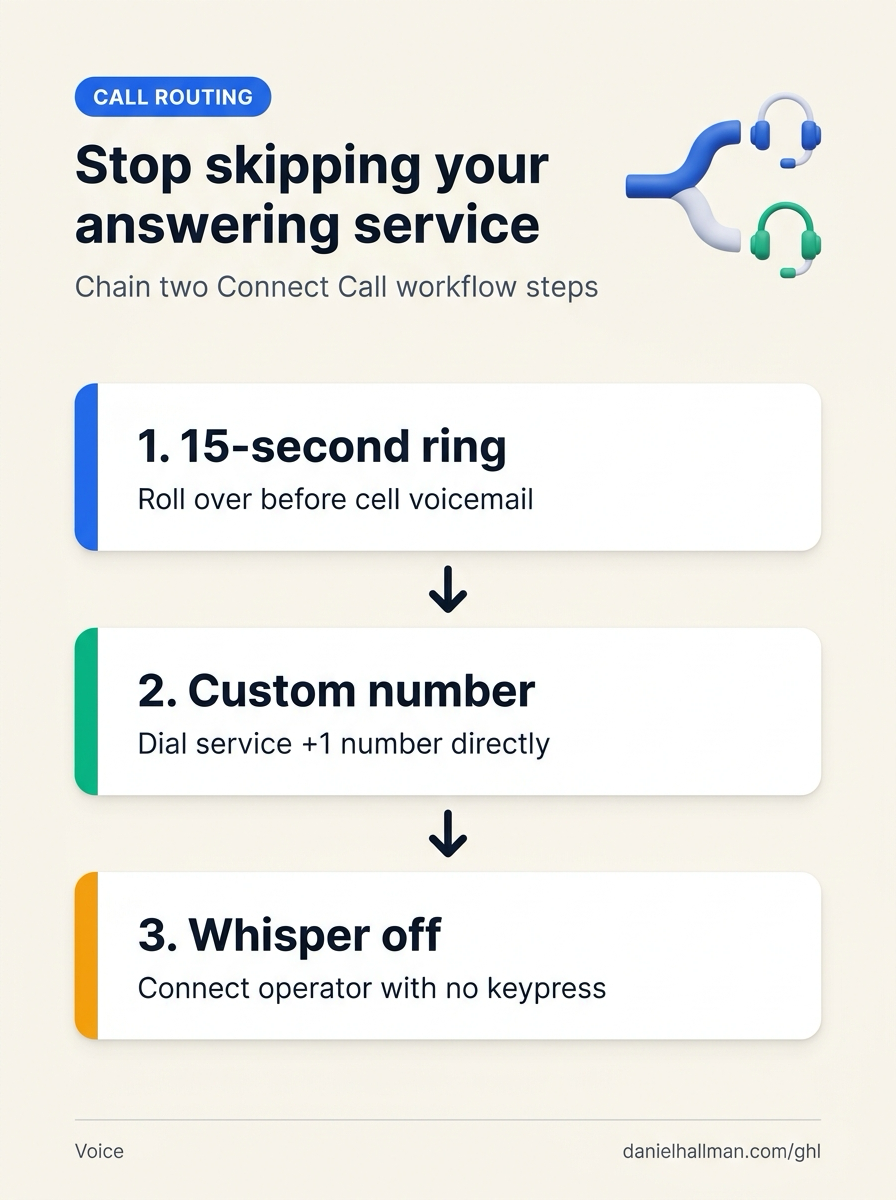
15-secondring timeout on your internal staff leg in Settings > Phone System, chain two sequential Connect Call nodes inside a keypress-free call workflow in Automation > Workflow Builder using a direct+1Custom Number (with Call Connect whisper disabled) for the answering service - and verify leg-by-leg ring times in Reporting > Call Report.
GoHighLevel Menu Paths
| Step | Menu Path in GHL | Action |
|---|---|---|
| Step 1 | Settings > Phone System > Manage Numbers | Set your internal team ring timeout to 15 seconds (below Apple's 18-second iPhone Live Voicemail pickup) and uncheck any dummy user record created for the external answering service. |
| Step 2 | Automation > Workflow Builder | Use a Start IVR Trigger with zero Gather Input keypress prompts and chain three sequential actions: Connect Call #1 (Users: You + Assistant, Timeout = 15s), Connect Call #2 (Custom Number: +1NPA5550199 in full E.164 format, Timeout = 25s, Call Connect Whisper = Off so the live answering service connects immediately without pressing 1), and your fallback Voicemail / Voice AI step. |
| Step 3 | Reporting > Call Report | Place a test call from an external phone, let Step 1 ring out for 15 seconds without answering, and expand the call leg log to verify Step 2 dials the answering service's +1 number directly before rolling to Step 3. |
DEFAULT SETUP VS. AUTOMATED WORKFLOW
Operational Comparison
After-Hours & Missed Call Capture
Qualified Jobs Booked 24/7
Related Questions
- How Do You Set Up Sequential Call Routing Between Team Members in GoHighLevel?
- How do you stop iPhone Live Voicemail from breaking GoHighLevel Missed-Call Text-Back?
- How Do You Set Up Multiple Transfer Numbers and Warm Transfers Inside a GoHighLevel AI Receptionist?
- Does Apple iPhone Call Screening Replace an AI Receptionist or Missed-Call Text-Back for Contractors?
BUILD FASTER IN GOHIGHLEVEL · FREE TRIAL BONUSES + MCP SERVER
Build this directly inside your GoHighLevel sub-account
Connect Claude Code, Cursor, or OpenAI Codex to our ghl-tools MCP Server & Rust CLI to build workflows, forms, and funnels from your editor, or start your GoHighLevel plan through our partner link to unlock $612+ in ready-to-import kits (including GHL Sequential Call Routing & Answering Service Rollover Kit) and weekly live clinics.