GOHIGHLEVEL ANSWERS & PROMPTS: PLAYBOOK T13 · SAAS MODE & SNAPSHOTS
AUTHOR: DANIEL HALLMAN
KEYWORD: AGENCY
STEP-BY-STEP INSTRUCTIONS + ANNOTATED GHL SCREENSHOTS
Steps in GoHighLevel
-
STEP 1Connect Integrations and Custom Values (Min 0–15): In Settings > Integrations, connect Google Business Profile and Google Calendar, then populate business name, phone, and review link under Settings > Custom Values.
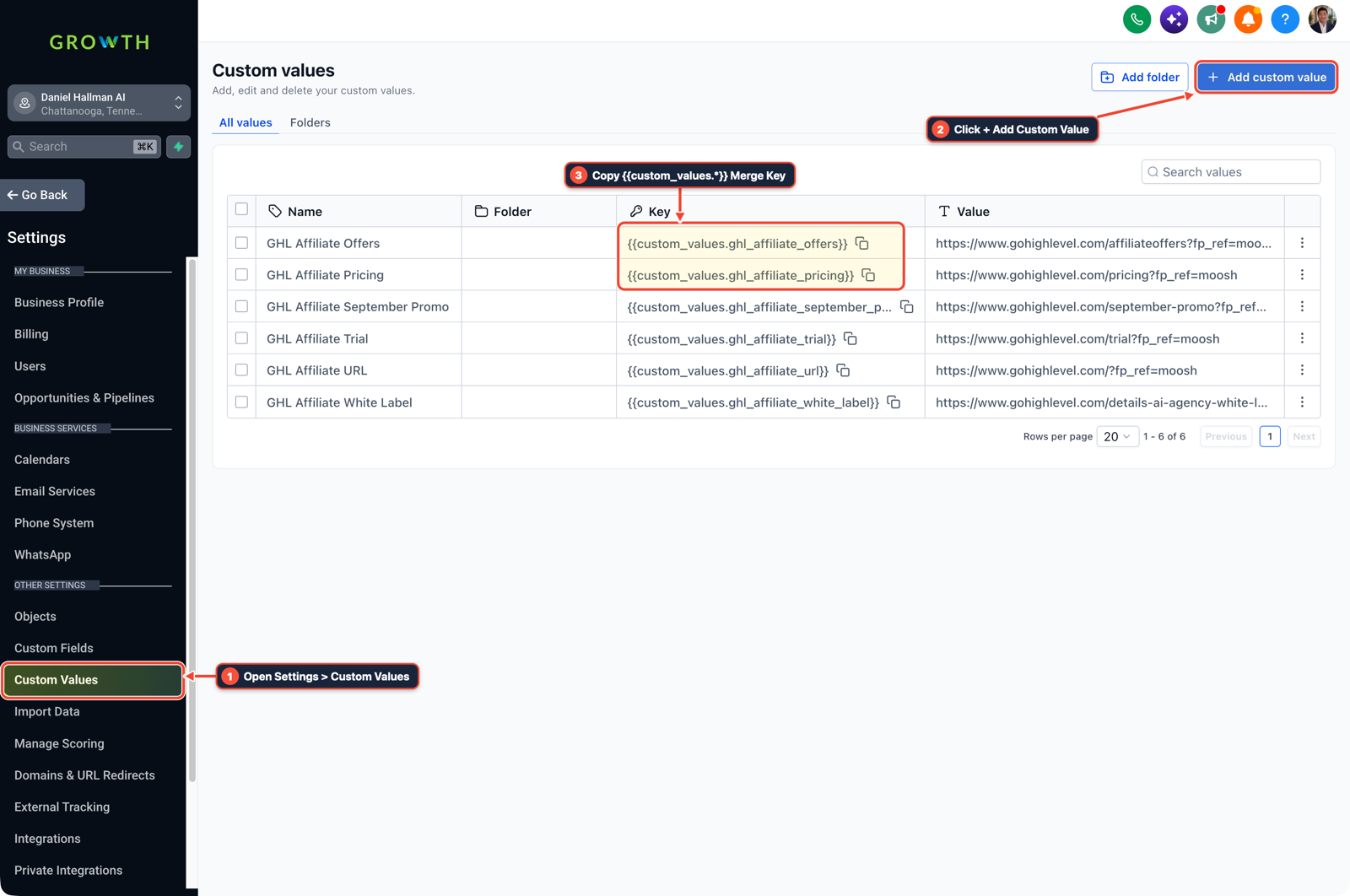
1Open Settings > Custom Values 2Click + Add Custom Value 3Copy {{custom_values.*}} Merge Key -
STEP 2Add DNS Records and Submit A2P 10DLC (Min 15–30): In Settings > Domains and Settings > Phone Numbers > Trust Center, screen-share to add the funnel and LC Email
CNAMErecords and submit the A2P 10DLC brand and campaign.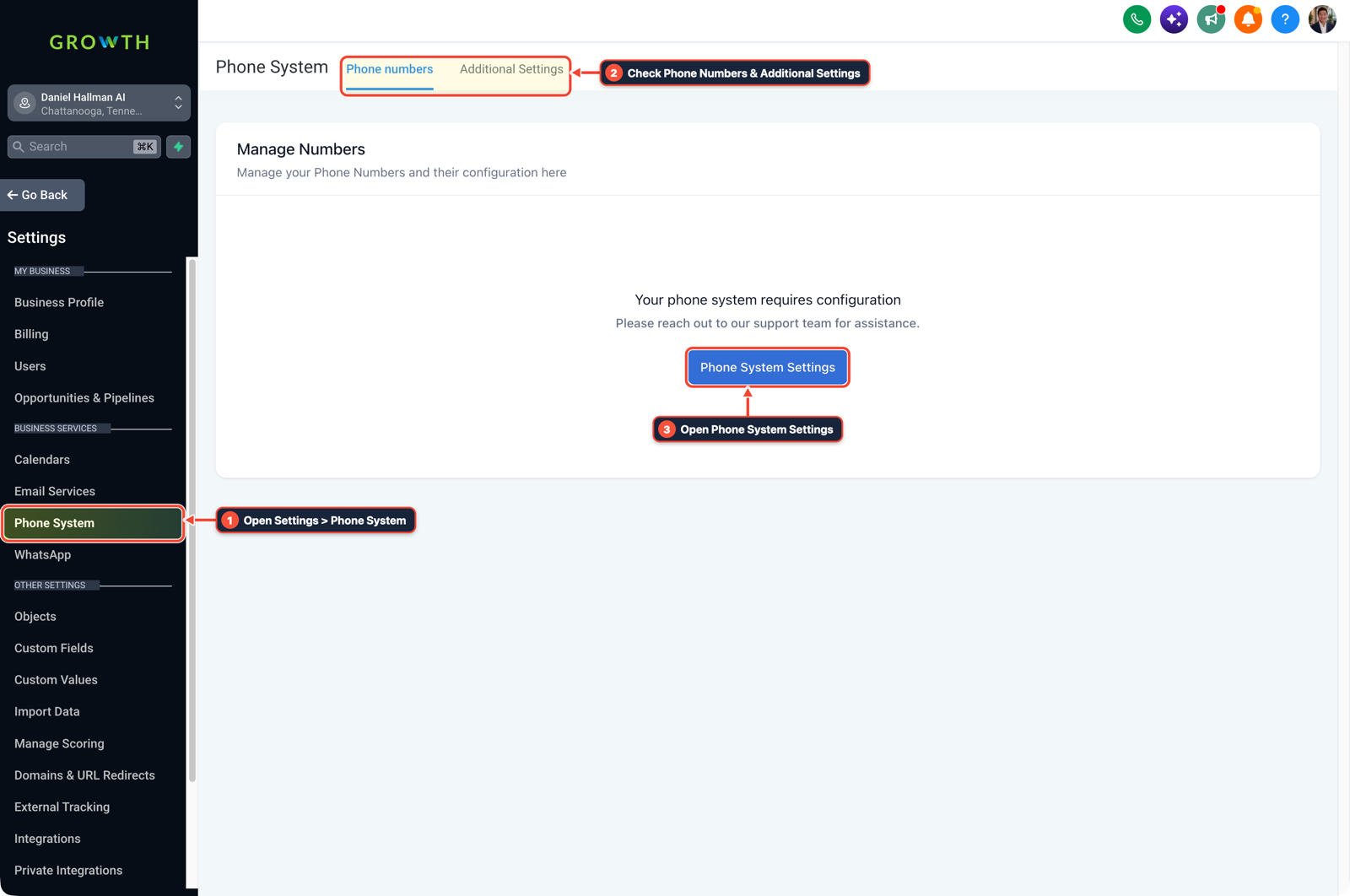
1Open Settings > Phone System 2Check Phone Numbers & Additional Settings 3Open Phone System Settings -
STEP 3Test 15s Call Timeout and Text-Back Live (Min 30–45): In Settings > Phone Numbers > Edit Configuration, set Incoming Call Timeout to
15seconds and place a test call from the owner's phone to verify the45second Missed-Call Text-Back.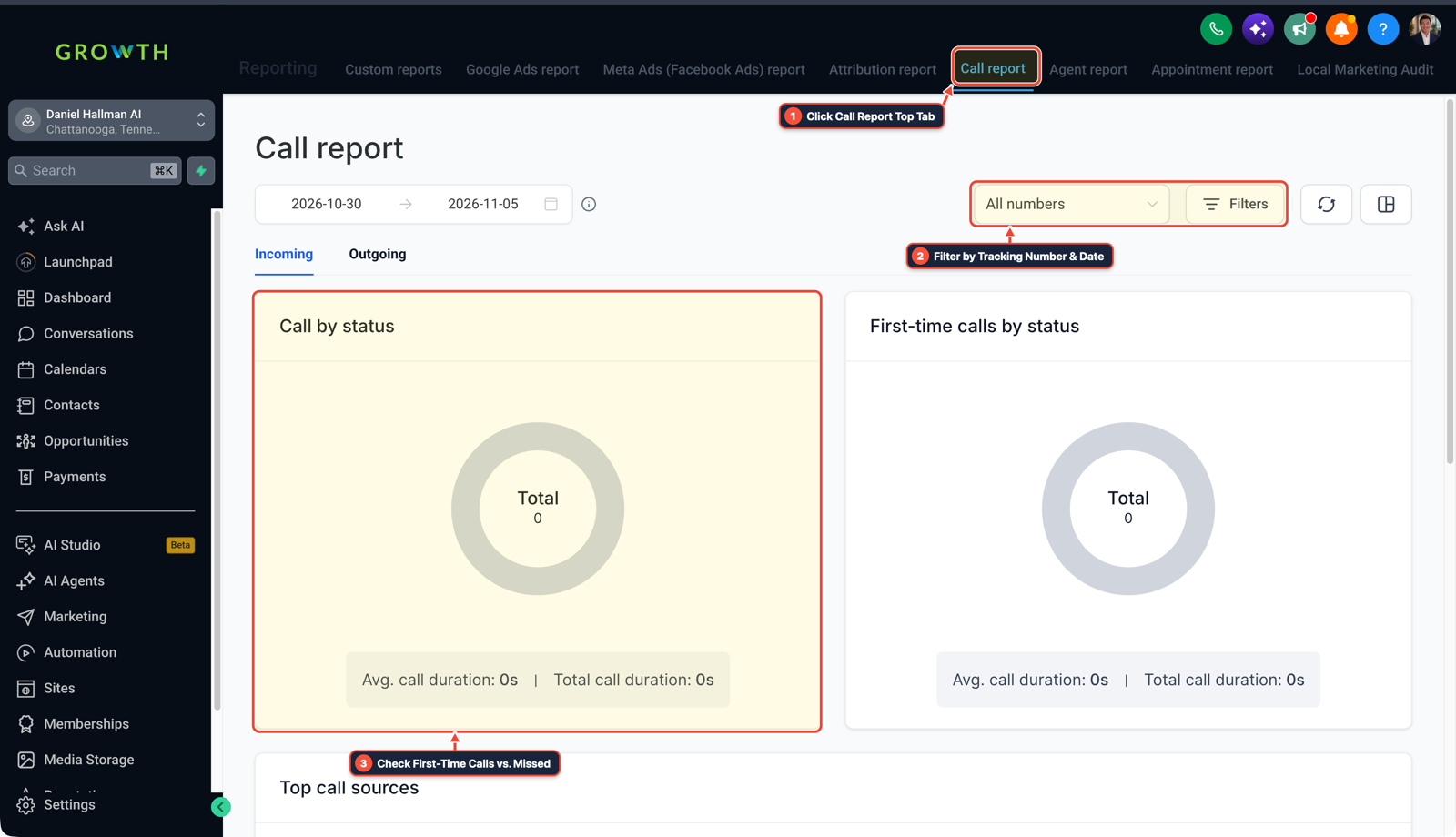
1Click Call Report Top Tab 2Filter by Tracking Number & Date 3Check First-Time Calls vs. Missed
MODE: AGENT PROMPT
PASTE INTO CLAUDE CODE, CURSOR, CHATGPT, OR GOHIGHLEVEL ASK AI
AGENT PROMPT
Run our 45-Minute GoHighLevel Client Onboarding Sprint check for a new client sub-account:
1. Verify snapshot workflows, custom values (business name, phone, booking link, review link), and calendar conflict settings.
2. Check DNS records (CNAME, SPF, DKIM, DMARC) and A2P 10DLC opt-in form readiness.
3. Output a client-facing Launch Readiness Scorecard confirming Missed-Call Text-Back and Google Review automation are ready to go live.
GHL-TOOLS MCP SERVER & CLI (DANIELHALLMAN.COM/MCP)
BUILDER + SUB-ACCOUNT TOOLS
# 1. MCP Tool Call (ghl-onboard-mcp)
{
  "tool": "onboard_verify_subaccount",
  "arguments": {
    "location_id": "<YOUR_LOCATION_ID>",
    "manifest_path": "ops/ghl-location.json"
  }
}

# 2. Or run via ghl-crm doctor CLI
ghl-crm doctor --location-id <YOUR_LOCATION_ID>
Official GHL MCP vs. ghl-tools: HighLevel’s official hosted MCP (services.leadconnectorhq.com/mcp) covers public v2 CRM records (contacts, opportunities, appointments, conversations). ghl-tools MCP complements it with workflow graph inspection & recipes, funnel/form builders, DNS/BIMI checks, and ghl-crm doctor audits.
Cause
- Sending a new client a massive onboarding questionnaire and waiting for them to figure out DNS records or EIN letters by email stalls launch for 3 weeks and causes early buyer's remorse.
GoHighLevel Configuration
- Book a 45-minute Live Setup Sprint on the checkout thank-you page.
- During the call, screen-share to add CNAMEs in 4 minutes, submit A2P registration together, connect Google Business Profile, and turn on Missed-Call Text-Back before hanging up.
GoHighLevel Menu Paths
| Step | Menu Path in GHL | Action |
|---|---|---|
| Step 1 | Settings > Integrations | Connect Google Business Profile and Google Calendar, then populate business name, phone, and review link under Settings > Custom Values. |
| Step 2 | Settings > Domains | In Settings > Domains and Settings > Phone Numbers > Trust Center, screen-share to add the funnel and LC Email CNAME records and submit the A2P 10DLC brand and campaign. |
| Step 3 | Settings > Phone Numbers > Edit Configuration | Set Incoming Call Timeout to 15 seconds and place a test call from the owner's phone to verify the 45 second Missed-Call Text-Back. |
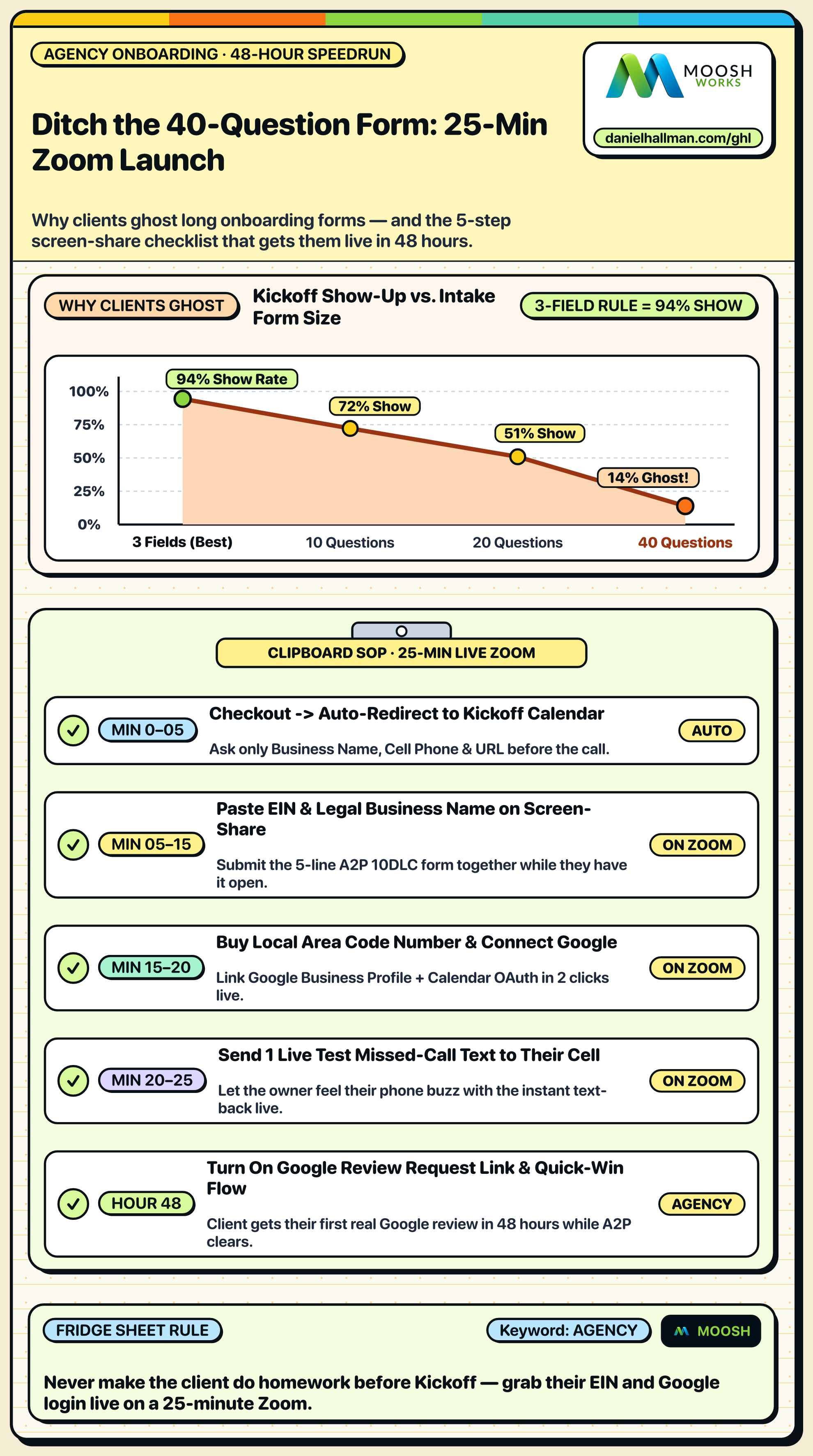
DEFAULT SETUP VS. AUTOMATED WORKFLOW
Operational Comparison
Manual Admin Work Per Client
Lead-to-Booked-Job Conversion
Related Questions
- How do you sell GoHighLevel to local contractors and home service businesses?
- How do you get GoHighLevel A2P 10DLC campaign registration approved on the first try?
- Why won't my GoDaddy DNS CNAME record or DMARC verify in GoHighLevel?
- How do you push GoHighLevel snapshot updates without wiping out client customizations?
BUILD FASTER IN GOHIGHLEVEL · FREE TRIAL BONUSES + MCP SERVER
Build this directly inside your GoHighLevel sub-account
Connect Claude Code, Cursor, or OpenAI Codex to our ghl-tools MCP Server & Rust CLI to build workflows, forms, and funnels from your editor, or start your GoHighLevel plan through our partner link to unlock $612+ in ready-to-import kits (including AI Agency Launch Kit ($197)) and weekly live clinics.