GOHIGHLEVEL ANSWERS & PROMPTS: PLAYBOOK T79 · AGENCY-TO-CLIENT SUB-ACCOUNT TRANSFER & RECONNECTION CHECKLIST
AUTHOR: DANIEL HALLMAN
KEYWORD: SUB-ACCOUNT TRANSFER
STEP-BY-STEP INSTRUCTIONS + ANNOTATED GHL SCREENSHOTS
Steps in GoHighLevel
-
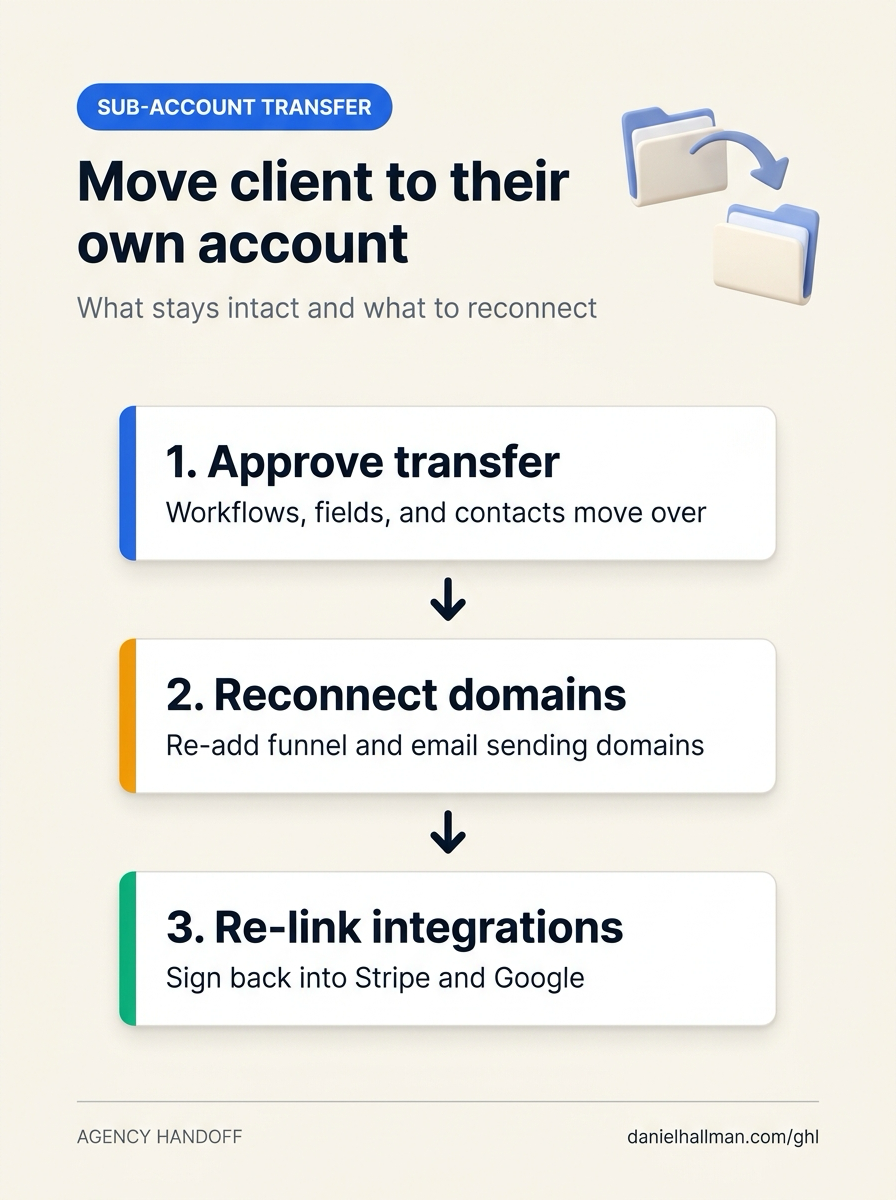
STEP 1In Agency View > Account Snapshots, save a backup snapshot of the client's sub-account, then open Agency View > Sub-Accounts > Manage Client > Actions > Transfer Sub-account and enter the receiving account's
Relationship Numberso all contacts, workflows, email templates, custom fields, forms, and calendars transfer together.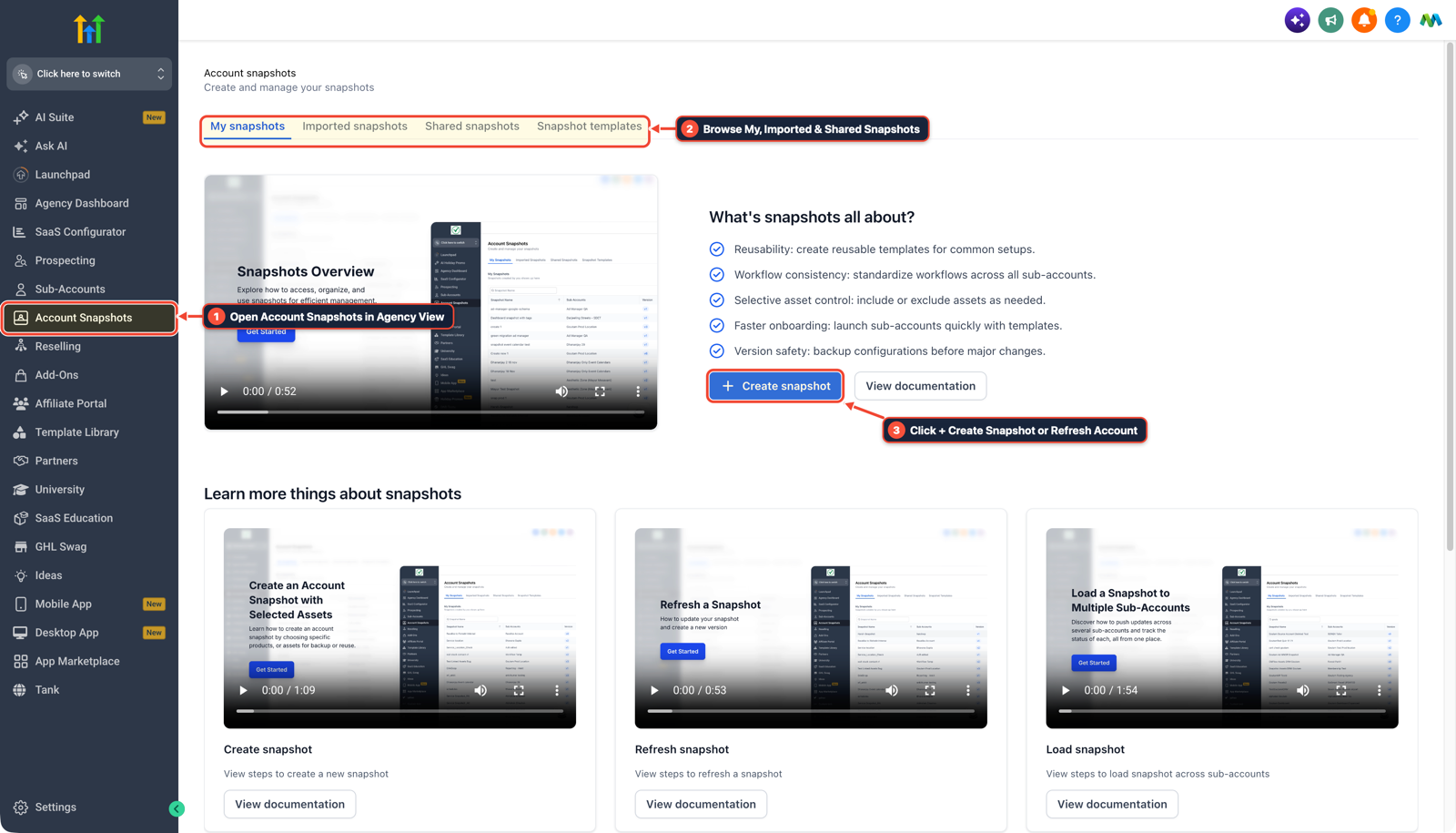
1Open Account Snapshots in Agency View 2Browse My, Imported & Shared Snapshots 3Click + Create Snapshot or Refresh Account -
STEP 2In Settings > Domains & URL Redirects and Settings > Email Services, reconnect the client's funnel
CNAMEdomains, branded calendar subdomain, and dedicatedSPF/DKIMemail sending domain inside the transferred sub-account so funnel URLs and appointment booking links resolve again.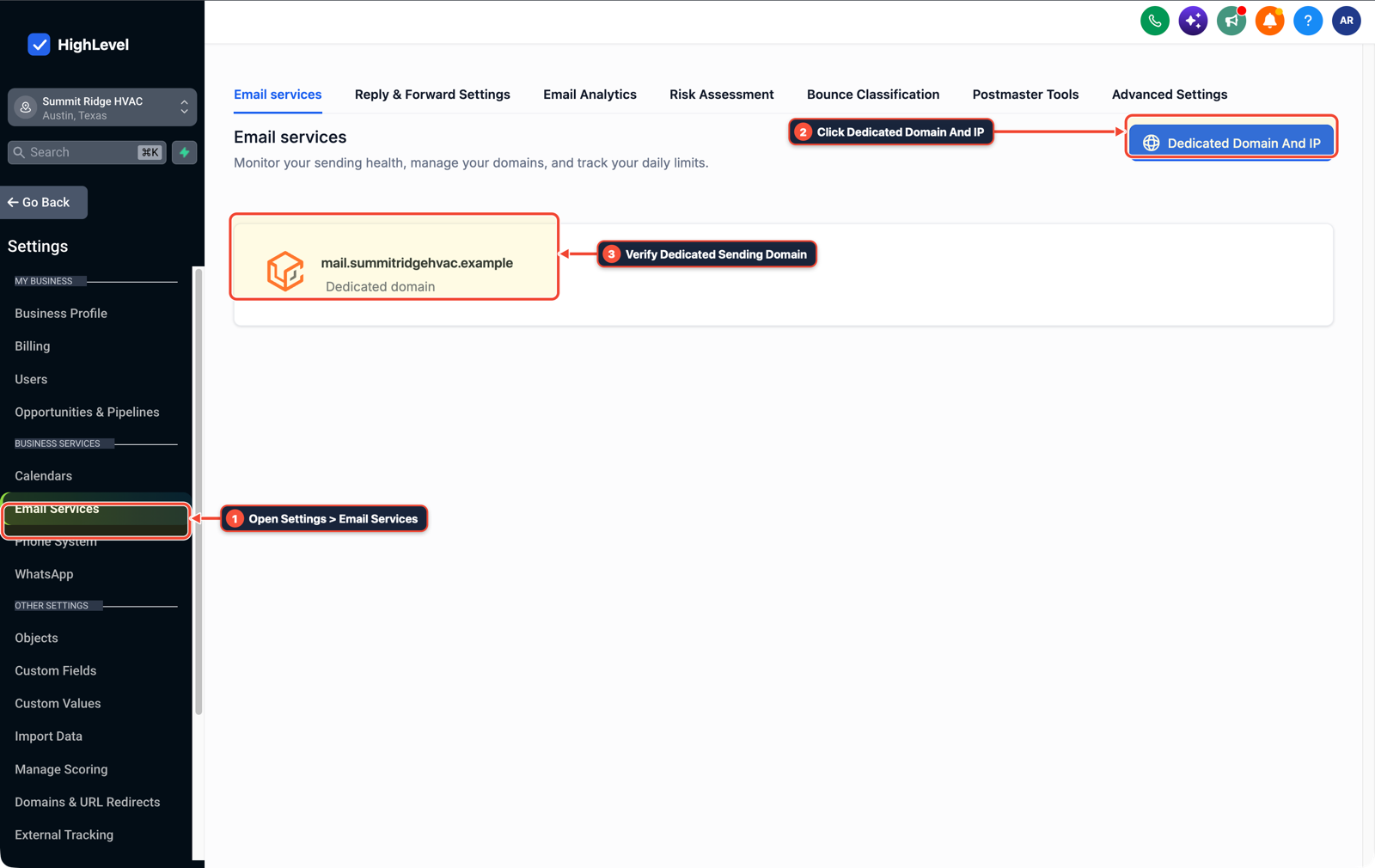
1Open Settings > Email Services 2Click Dedicated Domain And IP 3Verify Dedicated Sending Domain -
STEP 3In Settings > Phone System and Settings > Integrations, move or re-link the sub-account's phone numbers under the client's new LeadConnector or Twilio billing account and sign back into Stripe, Google, and Facebook
OAuthconnections.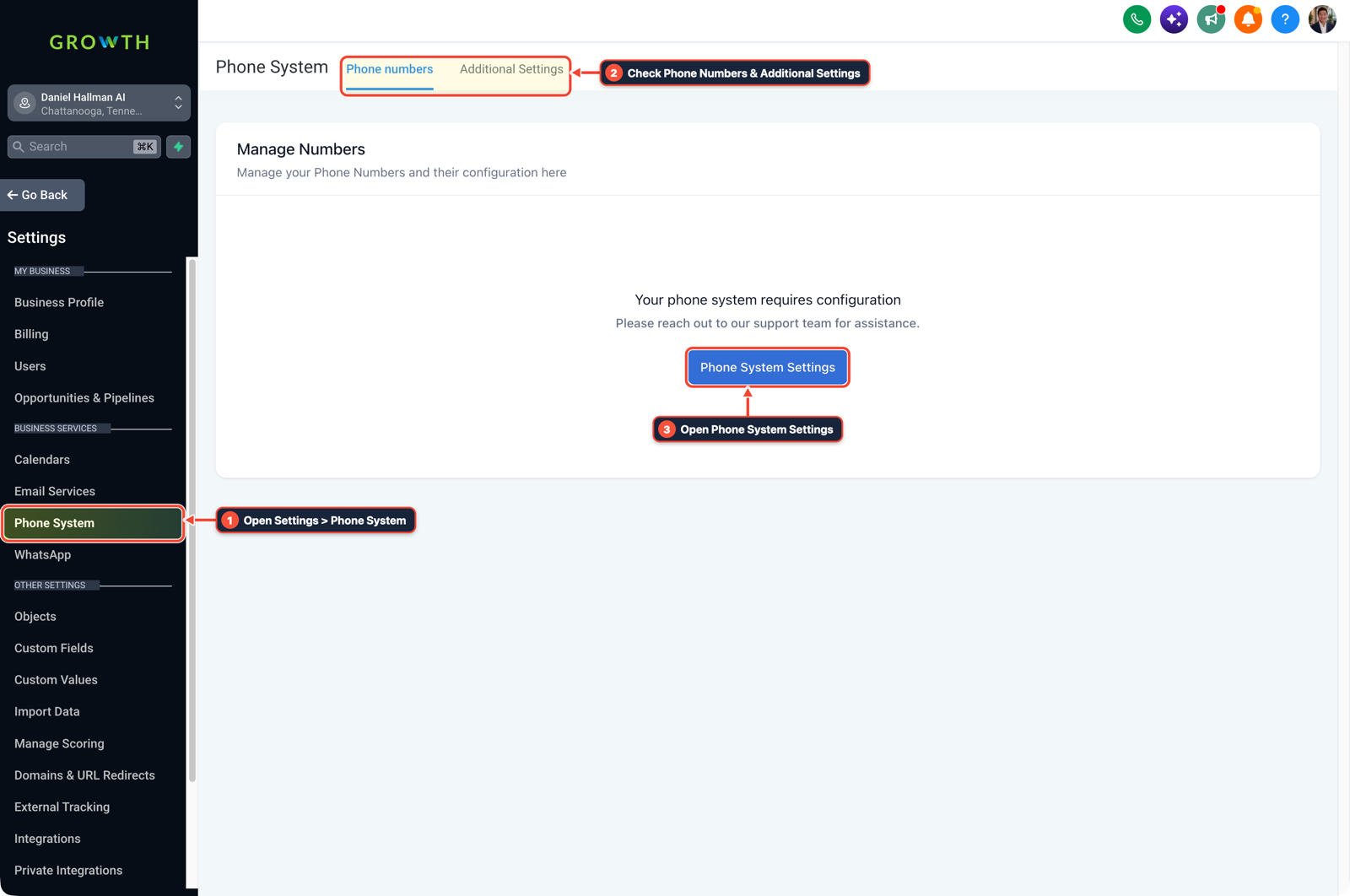
1Open Settings > Phone System 2Check Phone Numbers & Additional Settings 3Open Phone System Settings
MODE: AGENT PROMPT
PASTE INTO CLAUDE CODE, CURSOR, CHATGPT, OR GOHIGHLEVEL ASK AI
AGENT PROMPT
Prepare a pre-transfer inventory of external connections before moving sub-account <YOUR_LOCATION_ID> to a client's own GoHighLevel account:
1. List all connected domains in Settings > Domains & URL Redirects and dedicated sending domains in Settings > Email Services that will need to be re-attached after the transfer.
2. List active phone numbers in Settings > Phone System and third-party OAuth connections (Stripe, Google, Facebook) in Settings > Integrations.
3. Confirm that workflows, custom fields, email templates, forms, and calendars are saved in the sub-account before initiating Agency View > Sub-Accounts > Transfer Sub-account.
GHL-TOOLS MCP SERVER & CLI (DANIELHALLMAN.COM/MCP)
BUILDER + SUB-ACCOUNT TOOLS
# Audit custom values, domains, and workflows before an agency sub-account transfer
ghl-agency custom-values-audit --context <YOUR_CONTEXT> --location <YOUR_LOCATION_ID>
ghl-crm workflows list --context <YOUR_CONTEXT> --location <YOUR_LOCATION_ID>
Official GHL MCP vs. ghl-tools: HighLevel’s official hosted MCP (services.leadconnectorhq.com/mcp) covers public v2 CRM records (contacts, opportunities, appointments, conversations). ghl-tools MCP complements it with workflow graph inspection & recipes, funnel/form builders, DNS/BIMI checks, and ghl-crm doctor audits.
Cause
- Teams often waste hours exporting CSVs or screenshotting every workflow, email template, and custom field before a sub-account handoff because they assume assets have to be rebuilt one by one.
- Meanwhile, the items that actually break on transfer day are the agency-bound domains, dedicated email DNS connection, calendar links that relied on the old agency's branded domain, and third-party payment or calendar integrations.
GoHighLevel Configuration
- Save a backup snapshot in Agency View > Account Snapshots and initiate the transfer using the client's new Relationship Number, reconnect their funnel and dedicated email domains in Settings > Domains & URL Redirects and Settings > Email Services
- and re-authenticate Stripe, Google, Facebook
- and phone billing in Settings > Phone System.
GoHighLevel Menu Paths
| Step | Menu Path in GHL | Action |
|---|---|---|
| Step 1 | Agency View > Account Snapshots | Save a backup snapshot of the client's sub-account, then open Agency View > Sub-Accounts > Manage Client > Actions > Transfer Sub-account and enter the receiving account's Relationship Number so all contacts, workflows, email templates, custom fields, forms, and calendars transfer together. |
| Step 2 | Settings > Domains & URL Redirects | Reconnect the client's funnel CNAME domains, branded calendar subdomain, and dedicated SPF/DKIM email sending domain inside the transferred sub-account so funnel URLs and appointment booking links resolve again. |
| Step 3 | Settings > Phone System | Move or re-link the sub-account's phone numbers under the client's new LeadConnector or Twilio billing account and sign back into Stripe, Google, and Facebook OAuth connections. |
DEFAULT SETUP VS. AUTOMATED WORKFLOW
Operational Comparison
Manual Admin Work Per Client
Lead-to-Booked-Job Conversion
Related Questions
- How Do You Migrate Pipelines, Contacts, and Open Deals From Pipedrive to GoHighLevel Without Firing Accidental Texts?
- How Do You Retain Agency Clients on a GoHighLevel Systems Retainer When They Bring Content Marketing In-House?
- How Do You Point a GoHighLevel Domain to an External Website Builder Without Losing SEO or CRM Leads?
- How do you push GoHighLevel snapshot updates without wiping out client customizations?
BUILD FASTER IN GOHIGHLEVEL · FREE TRIAL BONUSES + MCP SERVER
Build this directly inside your GoHighLevel sub-account
Connect Claude Code, Cursor, or OpenAI Codex to our ghl-tools MCP Server & Rust CLI to build workflows, forms, and funnels from your editor, or start your GoHighLevel plan through our partner link to unlock $612+ in ready-to-import kits (including GHL Sub-Account Handoff & Reconnection Checklist) and weekly live clinics.