GOHIGHLEVEL ANSWERS & PROMPTS: PLAYBOOK T07 · REPUTATION & LOCAL LISTINGS
AUTHOR: DANIEL HALLMAN
KEYWORD: LISTINGS
STEP-BY-STEP INSTRUCTIONS + ANNOTATED GHL SCREENSHOTS
Steps in GoHighLevel
-
STEP 1In Reputation > Overview and Google Business Profile Manager, verify client Primary Ownership: Confirm that a client email (
@clientdomain.com) holds Primary Owner status on every Google Business Profile, Apple Business Connect, Bing Places, Facebook Page, and Yelp listing before touching Yext.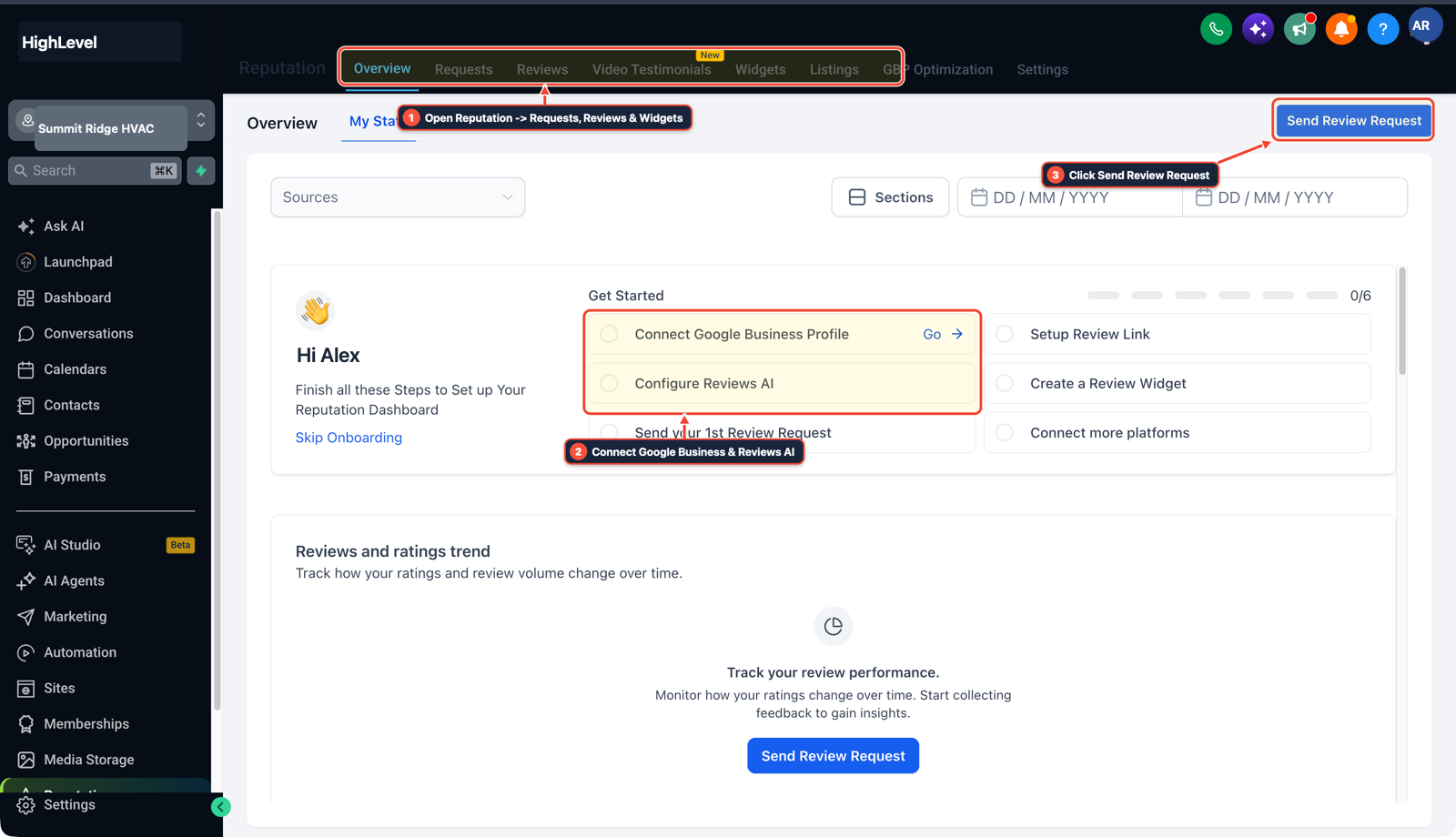
1Open Reputation > Requests, Reviews & Widgets 2Connect Google Business & Reviews AI 3Click Send Review Request -
STEP 2In Settings > Custom Values (and your Yext export), save exact NAP, categories, and UTM links: Export the full Yext location spreadsheet—including primary and secondary categories, holiday hours, attributes, and photo files—so API-leased directories (like Foursquare, MapQuest, and EZLocal) re-populate cleanly after cutover.
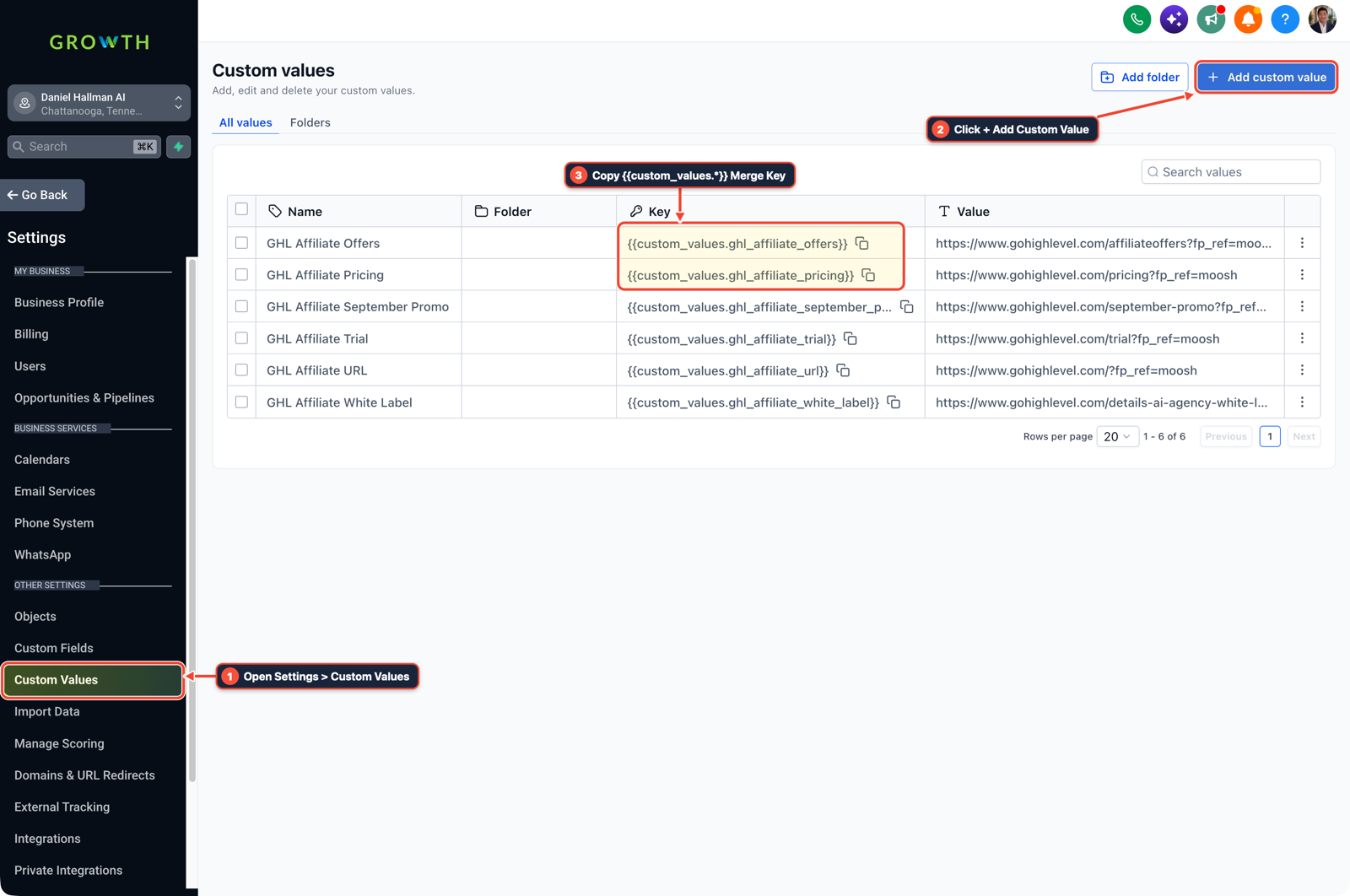
1Open Settings > Custom Values 2Click + Add Custom Value 3Copy {{custom_values.*}} Merge Key -
STEP 3In Automation > Workflows and Google Account Security, revoke Yext OAuth before activating Reputation > Listings: Remove Yext's third-party app access at
myaccount.google.com/permissionsand Facebook Business Integrations first, then connect Reputation > Listings in GoHighLevel so two systems never overwrite the same profile.
1Add If/Else Condition & Tag Guard 2Chain Priority & Wait Steps 3Switch to Settings or Execution Logs
MODE: AGENT PROMPT
PASTE INTO CLAUDE CODE, CURSOR, CHATGPT, OR GOHIGHLEVEL ASK AI
AGENT PROMPT
Prepare a multi-location client sub-account (<YOUR_LOCATION_ID>) for migrating local listings off Yext:
1. In Reputation > Overview and Settings > Integrations, verify Google Business Profile and Facebook Page owner connections.
2. In Settings > Custom Values, store standardized NAP (Name, Address, Phone), primary category, and website UTM parameters for the location.
3. Verify Yext OAuth access is revoked in Google and Facebook before enabling Reputation > Listings sync.
GHL-TOOLS MCP SERVER & CLI (DANIELHALLMAN.COM/MCP)
BUILDER + SUB-ACCOUNT TOOLS
# Inspect sub-account location NAP details and integrations via ghl-agency
ghl-agency locations get --context <YOUR_CONTEXT> --location <YOUR_LOCATION_ID>
Official GHL MCP vs. ghl-tools: HighLevel’s official hosted MCP (services.leadconnectorhq.com/mcp) covers public v2 CRM records (contacts, opportunities, appointments, conversations). ghl-tools MCP complements it with workflow graph inspection & recipes, funnel/form builders, DNS/BIMI checks, and ghl-crm doctor audits.
Cause
- When moving 10 or more client locations off Yext at contract renewal, agencies worry about two things: which directories will revert or lock when Yext shuts off, and whether they should overlap both tools for 30 days.
- Overlapping two listing aggregators causes conflicting API overwrites on hours, categories, and UTM links every night.
GoHighLevel Configuration
- Separate your directories into Owner-Claimed profiles (Google Business Profile, Apple Business Connect, Bing Places, Facebook, Yelp) and API Publisher directories (MapQuest, Foursquare, EZLocal, Superpages).
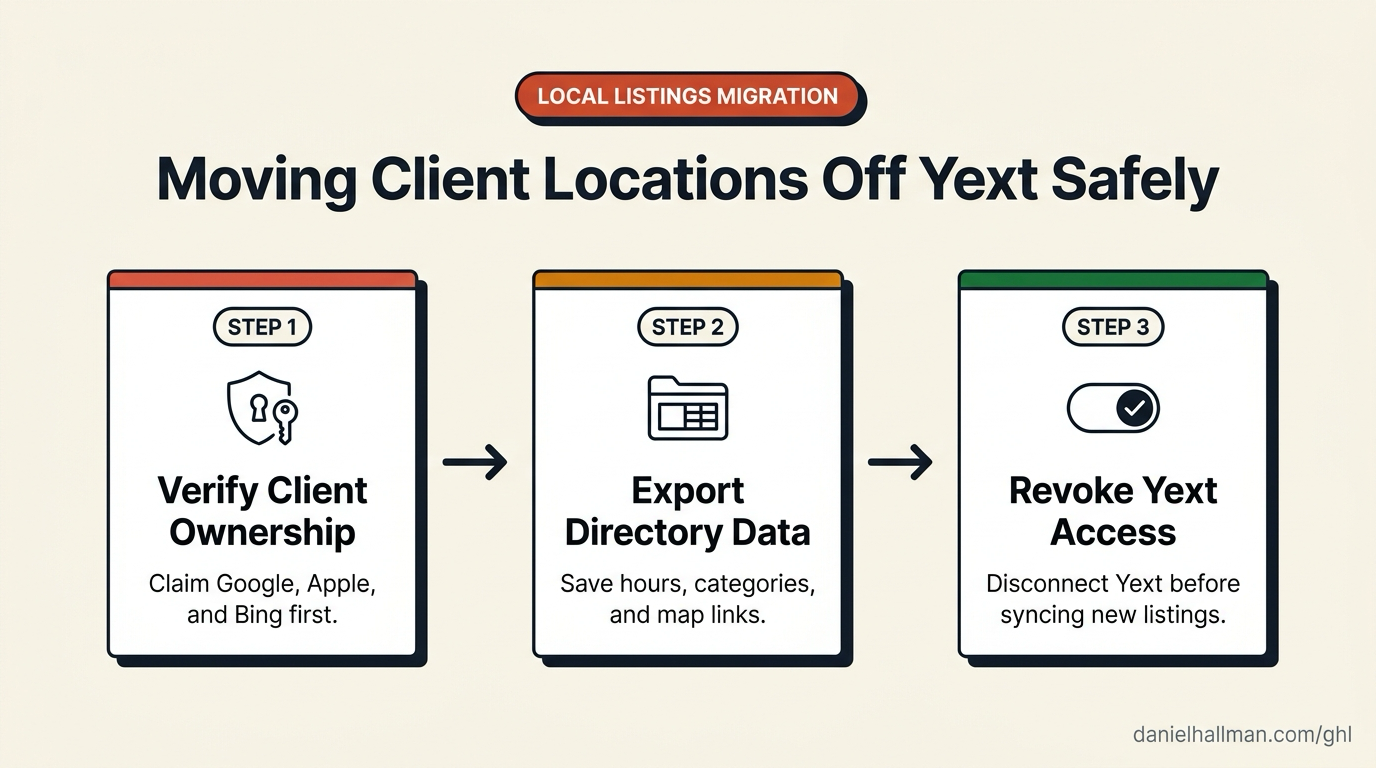
- Lock Primary Owner access on the big five under the client's domain email, export Yext's field sheet, and do a clean 1-day cutover by revoking Yext OAuth permissions right before activating GoHighLevel Listings.
GoHighLevel Menu Paths
| Step | Menu Path in GHL | Action |
|---|---|---|
| Step 1 | Reputation > Overview | Verify client Primary Ownership: Confirm that a client email (@clientdomain.com) holds Primary Owner status on every Google Business Profile, Apple Business Connect, Bing Places, Facebook Page, and Yelp listing before touching Yext. |
| Step 2 | Settings > Custom Values | Save exact NAP, categories, and UTM links: Export the full Yext location spreadsheet—including primary and secondary categories, holiday hours, attributes, and photo files—so API-leased directories (like Foursquare, MapQuest, and EZLocal) re-populate cleanly after cutover. |
| Step 3 | Automation > Workflows | Revoke Yext OAuth before activating Reputation > Listings: Remove Yext's third-party app access at myaccount.google.com/permissions and Facebook Business Integrations first, then connect Reputation > Listings in GoHighLevel so two systems never overwrite the same profile. |
DEFAULT SETUP VS. AUTOMATED WORKFLOW
Operational Comparison
Homeowner Google Review Conversion
Local Map Pack Visibility
Related Questions
- How do you get more 5-star Google reviews in GoHighLevel without annoying unhappy customers?
- How Do You Set Up Stripe Payments and Automated Google Reviews on the GoHighLevel $97 Starter Plan?
- How do you onboard a new GoHighLevel agency client fast?
- What should you know before scaling GoHighLevel past 10 sub-accounts?
BUILD FASTER IN GOHIGHLEVEL · FREE TRIAL BONUSES + MCP SERVER
Build this directly inside your GoHighLevel sub-account
Connect Claude Code, Cursor, or OpenAI Codex to our ghl-tools MCP Server & Rust CLI to build workflows, forms, and funnels from your editor, or start your GoHighLevel plan through our partner link to unlock $612+ in ready-to-import kits (including GHL Agency Onboarding & Reputation Pack) and weekly live clinics.