GOHIGHLEVEL ANSWERS & PROMPTS: PLAYBOOK T44 · FRANCHISE BRAND KITS & MULTI-LOCATION SOCIAL DROPS
AUTHOR: DANIEL HALLMAN
KEYWORD: FRANCHISE ASSETS
STEP-BY-STEP INSTRUCTIONS + ANNOTATED GHL SCREENSHOTS
Steps in GoHighLevel
-
STEP 1In Settings > Custom Values, create merge keys for
{{custom_values.brand_kit_url}},{{custom_values.locked_canva_templates_url}}, and{{custom_values.custom_graphic_request_form}}so each franchise sub-account holds its own pre-approved logo pack and editable holiday templates.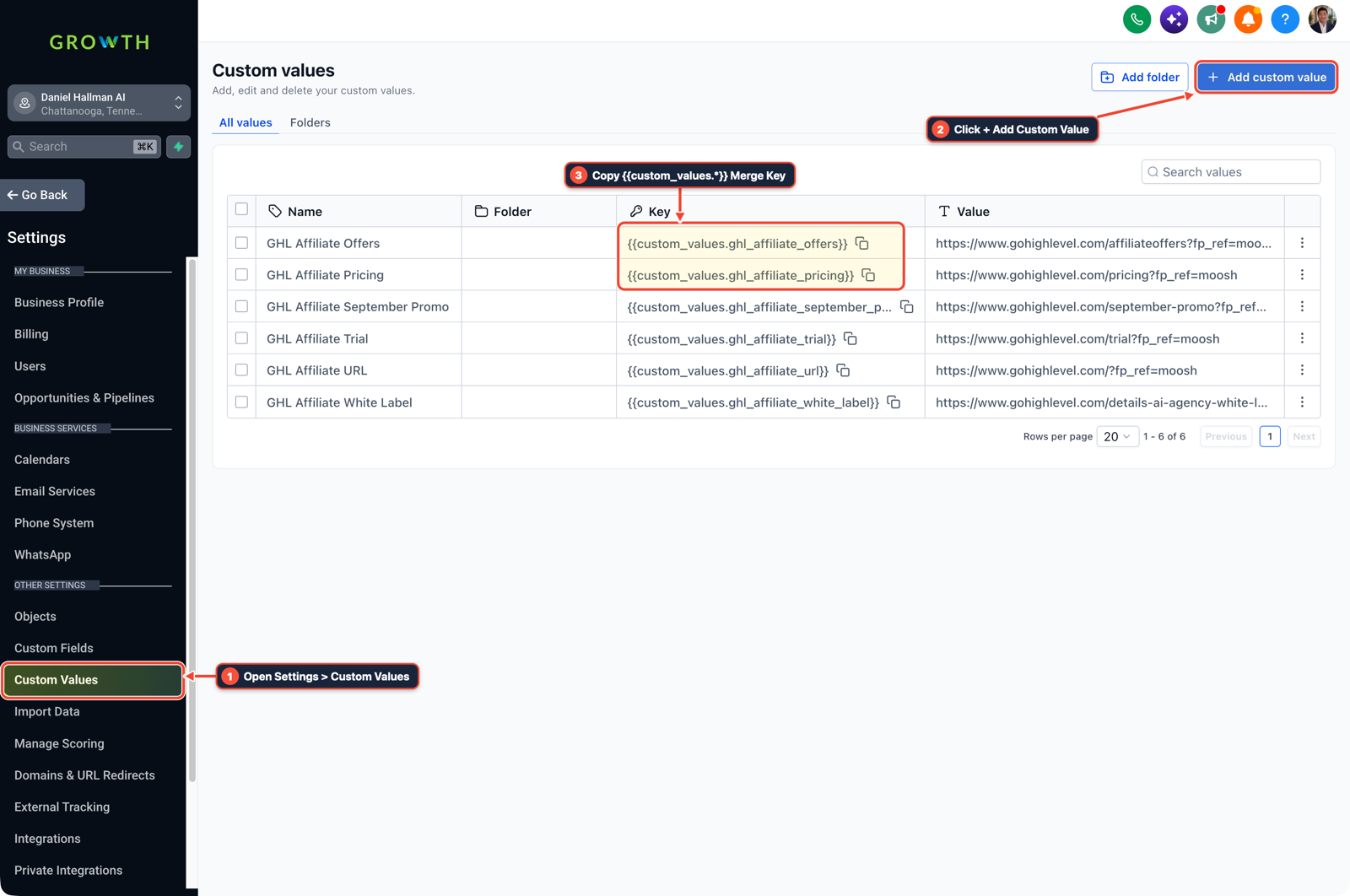
1Open Settings > Custom Values 2Click + Add Custom Value 3Copy {{custom_values.*}} Merge Key -
STEP 2In Automation > Workflow Builder, create a Customer Replied workflow filtered to inbound SMS containing
logo,menu,graphic, orholidayfrom staff/owner tags that replies in 5 seconds with the{{custom_values.brand_kit_url}}link and routes net-new custom design requests to your paid order form.
1Add If/Else Condition & Tag Guard 2Chain Priority & Wait Steps 3Switch to Settings or Execution Logs -
STEP 3In Marketing > Social Planner, upload the upcoming month's approved holiday and promo templates via CSV or multi-location post scheduling on the 1st of each month so franchise owners already see weekend posts queued on their calendar.
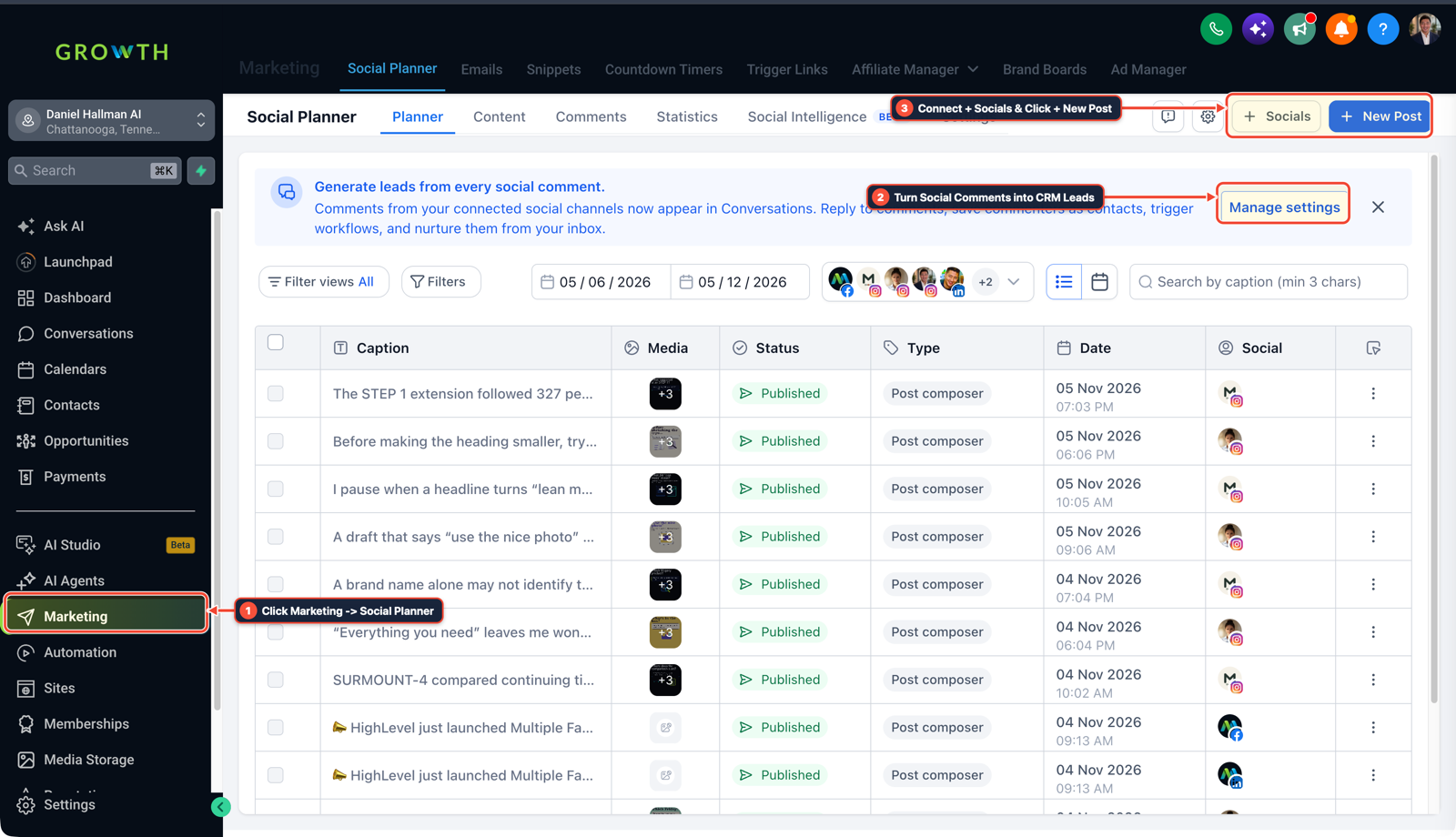
1Click Marketing > Social Planner 2Turn Social Comments into CRM Leads 3Connect + Socials & Click + New Post
MODE: AGENT PROMPT
PASTE INTO CLAUDE CODE, CURSOR, CHATGPT, OR GOHIGHLEVEL ASK AI
AGENT PROMPT
Set up automated franchise brand-asset delivery and monthly social drops in sub-account <YOUR_LOCATION_ID>:
1. In Settings > Custom Values, create keys for brand_kit_url, locked_canva_templates_url, and custom_graphic_request_form.
2. In Automation > Workflow Builder, trigger on Customer Replied when an owner texts LOGO, MENU, or HOLIDAY and auto-reply with the Custom Value links.
3. In Marketing > Social Planner, schedule the monthly franchise holiday and promo posts across connected social pages.
GHL-TOOLS MCP SERVER & CLI (DANIELHALLMAN.COM/MCP)
BUILDER + SUB-ACCOUNT TOOLS
# Audit custom values and workflows across franchise sub-accounts
ghl-agency custom-values-audit --context <YOUR_CONTEXT> --location <YOUR_LOCATION_ID>
ghl-crm workflows list --context <YOUR_CONTEXT> --location <YOUR_LOCATION_ID>
Official GHL MCP vs. ghl-tools: HighLevel’s official hosted MCP (services.leadconnectorhq.com/mcp) covers public v2 CRM records (contacts, opportunities, appointments, conversations). ghl-tools MCP complements it with workflow graph inspection & recipes, funnel/form builders, DNS/BIMI checks, and ghl-crm doctor audits.
Cause
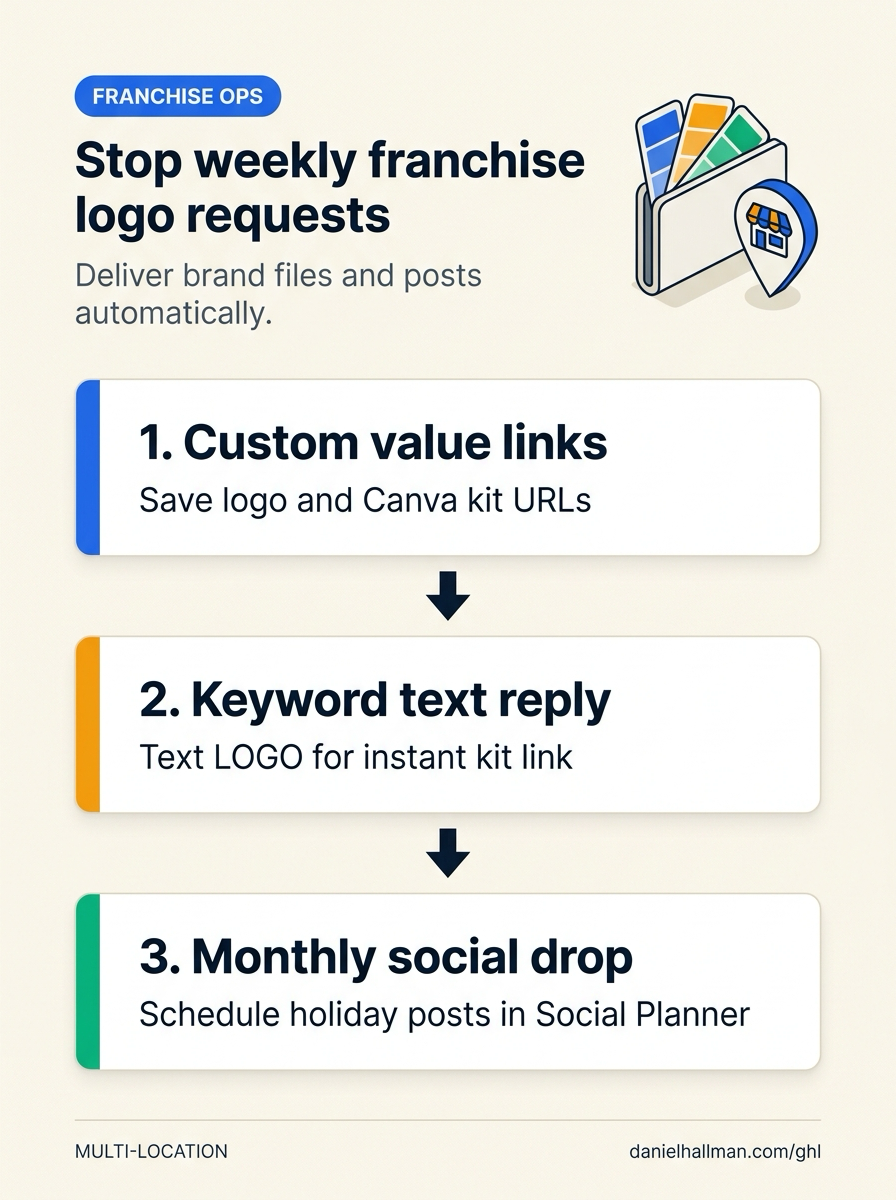
- When an agency manages 20 to 30 franchise locations, sharing a static brand folder during onboarding rarely sticks.
- Local owners lose the link, create off-brand graphics from scratch, or text the account manager every Friday afternoon asking for the logo and weekend promo graphics, burning over 150 unbilled hours a year.
GoHighLevel Configuration
- Store location-specific logo files, locked Canva template links
- and a billable custom-design request form inside Settings > Custom Values, wire an instant SMS keyword responder in Automation > Workflow Builder
- and push monthly seasonal posts through Marketing > Social Planner.
GoHighLevel Menu Paths
| Step | Menu Path in GHL | Action |
|---|---|---|
| Step 1 | Settings > Custom Values | Create merge keys for {{custom_values.brand_kit_url}}, {{custom_values.locked_canva_templates_url}}, and {{custom_values.custom_graphic_request_form}} so each franchise sub-account holds its own pre-approved logo pack and editable holiday templates. |
| Step 2 | Automation > Workflow Builder | Create a Customer Replied workflow filtered to inbound SMS containing logo, menu, graphic, or holiday from staff/owner tags that replies in 5 seconds with the {{custom_values.brand_kit_url}} link and routes net-new custom design requests to your paid order form. |
| Step 3 | Marketing > Social Planner | Upload the upcoming month's approved holiday and promo templates via CSV or multi-location post scheduling on the 1st of each month so franchise owners already see weekend posts queued on their calendar. |
DEFAULT SETUP VS. AUTOMATED WORKFLOW
Operational Comparison
Manual Admin Work Per Client
Lead-to-Booked-Job Conversion
Related Questions
BUILD FASTER IN GOHIGHLEVEL · FREE TRIAL BONUSES + MCP SERVER
Build this directly inside your GoHighLevel sub-account
Connect Claude Code, Cursor, or OpenAI Codex to our ghl-tools MCP Server & Rust CLI to build workflows, forms, and funnels from your editor, or start your GoHighLevel plan through our partner link to unlock $612+ in ready-to-import kits (including GHL Franchise Brand Asset & Social Pack) and weekly live clinics.