GOHIGHLEVEL ANSWERS & PROMPTS: PLAYBOOK T06 · SAAS & MULTI-LOCATION ARCHITECTURE
AUTHOR: DANIEL HALLMAN
KEYWORD: ENTERPRISE
MODE: AGENT PROMPT
PASTE INTO CLAUDE CODE, CURSOR, CHATGPT, OR GOHIGHLEVEL ASK AI
AGENT PROMPT
Audit the enterprise multi-location architecture in GoHighLevel agency account <YOUR_AGENCY_ID>:
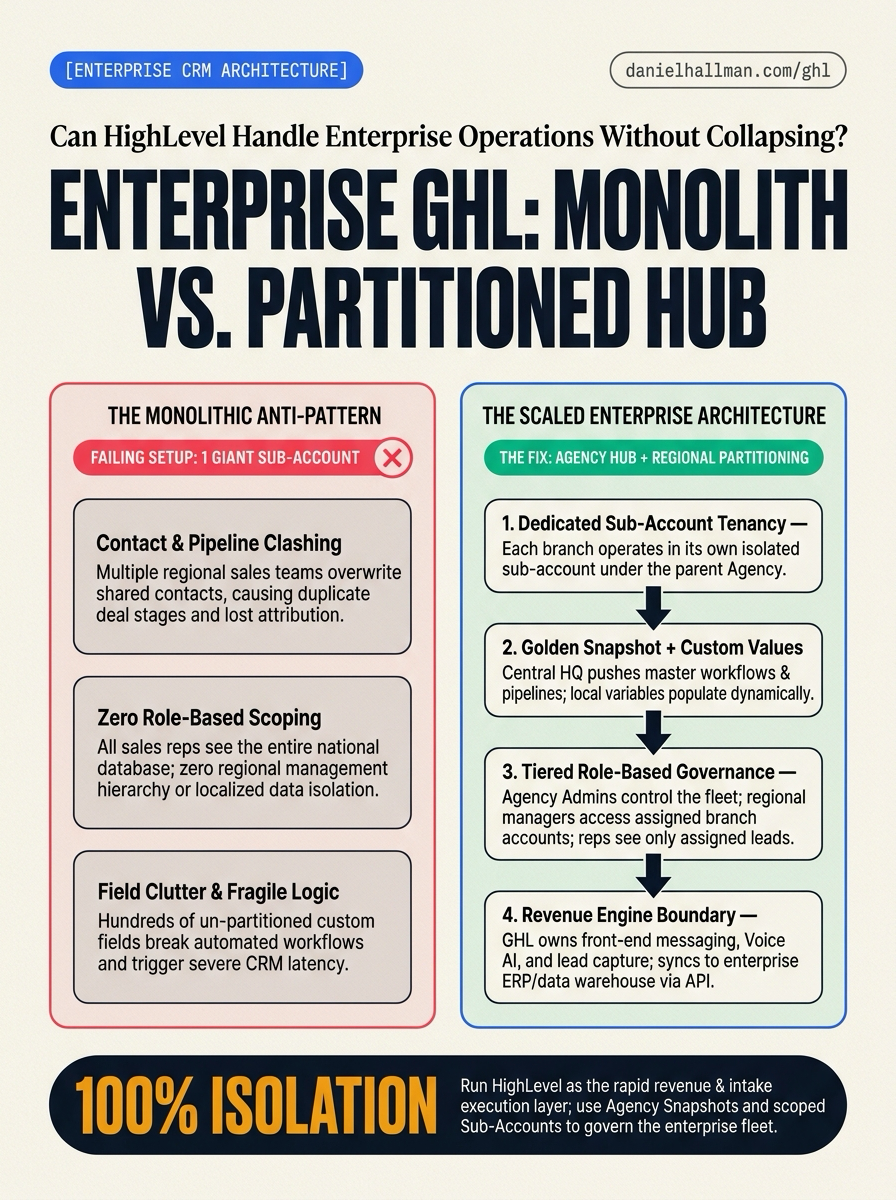
1. Verify that regional branches are partitioned into dedicated sub-accounts with proper user isolation.
2. Check that shared workflows and pipelines are synchronized from a master Golden Snapshot using Custom Values.
3. Ensure staff user permissions have Only Assigned Data enabled to prevent cross-territory data exposure.
GHL-TOOLS MCP SERVER & CLI (DANIELHALLMAN.COM/MCP)
BUILDER + SUB-ACCOUNT TOOLS
# 1. Inspect sub-account fleet and user role governance via ghl-agency MCP
{
  "tool": "ghl_agency_locations",
  "arguments": {}
}

# 2. Audit snapshot differences and custom values across locations
ghl-agency snapshot-diff --source "Golden Enterprise Master" --target-location <LOCATION_ID>
Official GHL MCP vs. ghl-tools: HighLevel’s official hosted MCP (services.leadconnectorhq.com/mcp) covers public v2 CRM records (contacts, opportunities, appointments, conversations). ghl-tools MCP complements it with workflow graph inspection & recipes, funnel/form builders, DNS/BIMI checks, and ghl-crm doctor audits.
STEP-BY-STEP INSTRUCTIONS + ANNOTATED GHL SCREENSHOTS
Steps in GoHighLevel
-
STEP 1Partition Regional Branches into Dedicated Sub-Accounts: In Agency View > Sub-Accounts, select Add Sub-Account and create an isolated sub-account for each regional branch (
location_id) rather than combining multiple regions into one account.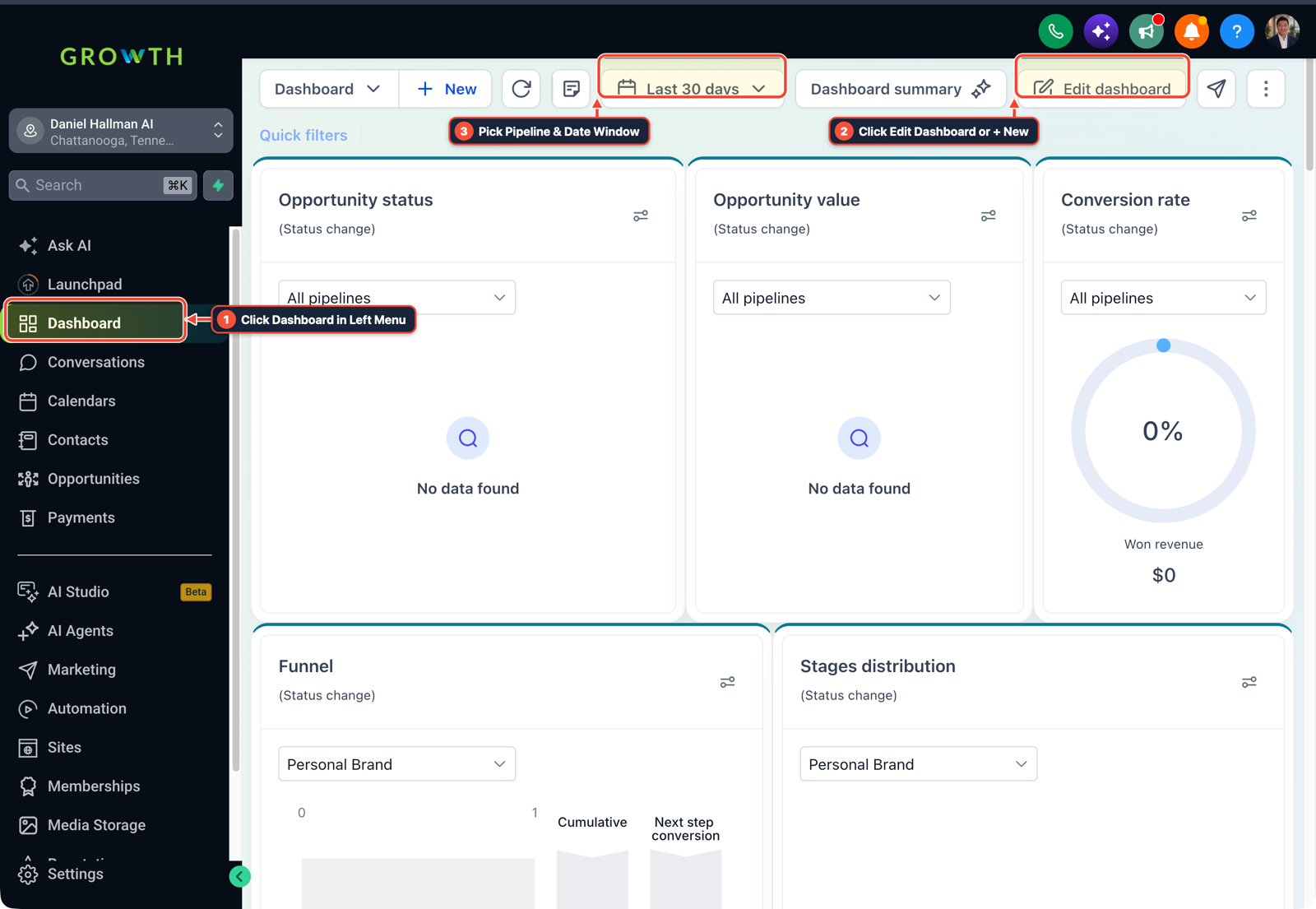
1Click Dashboard in Left Menu 2Click Edit Dashboard or + New 3Pick Pipeline & Date Window - STEP 2Distribute Master SOPs via Golden Snapshots & Custom Values: Build your standard pipelines, forms, and workflows in a template account, save it as an Agency Snapshot, and define regional variables (
{{custom_values.dispatch_phone}}and{{custom_values.regional_director}}) in Settings > Custom Values before pushing updates across your fleet. -
STEP 3Configure Role-Based Access and Scoped Visibility: In Settings > My Staff, add regional reps as Account Users, assign them exclusively to their branch sub-accounts, and toggle on User Permissions >
Only Assigned Dataso reps only access their assigned contacts and deals.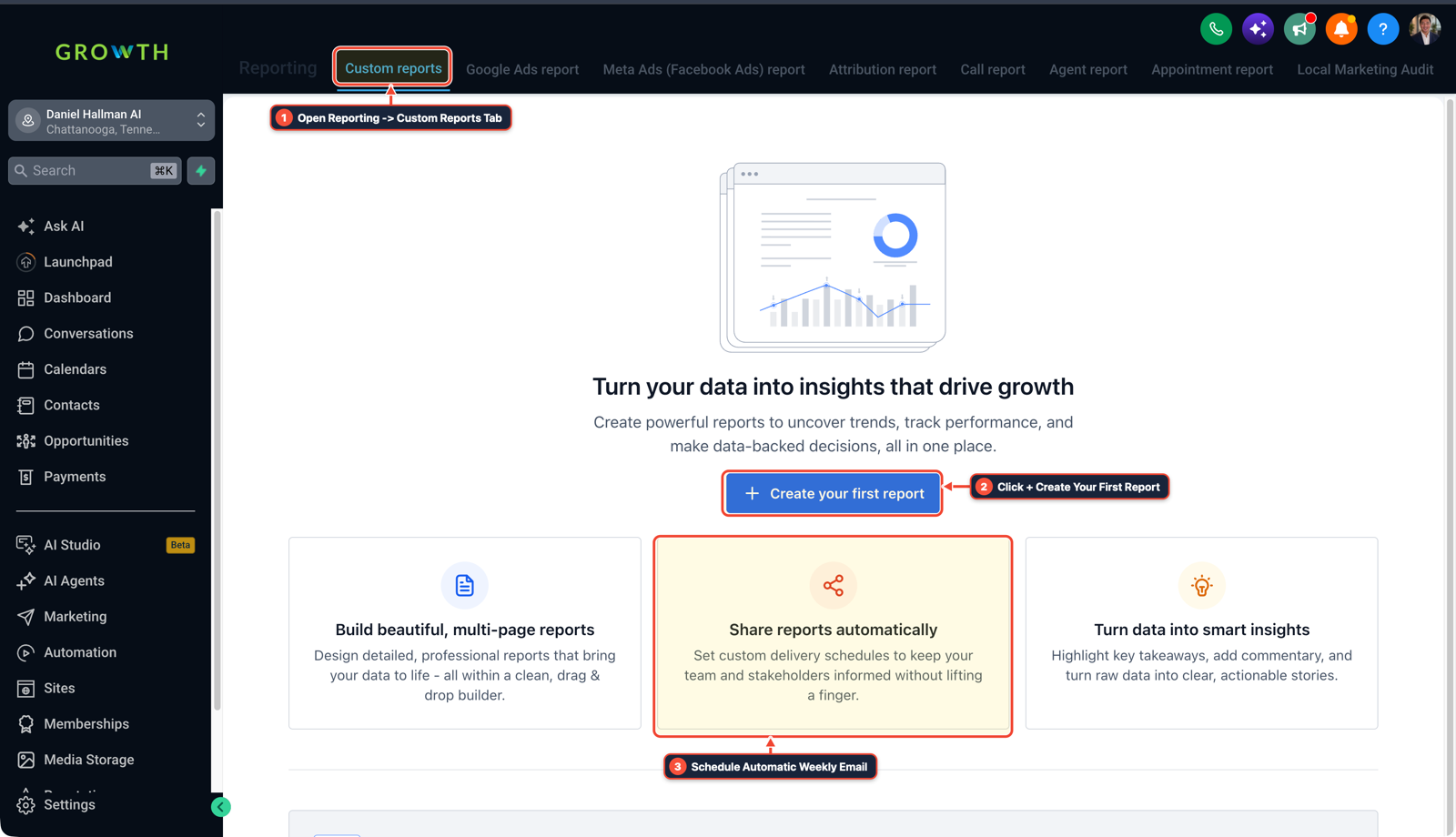
1Open Reporting > Custom Reports Tab 2Click + Create Your First Report 3Schedule Automatic Weekly Email
Cause
- When an enterprise tries to manage multiple branches, territories
- and regional sales teams inside a single HighLevel sub-account, user permissions collide, custom fields become unmanageable
- and sales reps can see or overwrite each other's deals.
GoHighLevel Configuration
- Structure the deployment as a multi-location agency hub: assign each regional branch its own isolated Sub-Account, deploy uniform pipelines and workflows using a master Golden Snapshot, populate regional variables dynamically through Custom Values
- and restrict staff visibility with the 'Only Assigned Data' permission.
GoHighLevel Menu Paths
| Step | Menu Path in GHL | Action |
|---|---|---|
| Step 1 | Agency View > Sub-Accounts | Select Add Sub-Account and create an isolated sub-account for each regional branch (location_id) rather than combining multiple regions into one account. |
| Step 2 | Settings > Custom Values | Build your standard pipelines, forms, and workflows in a template account, save it as an Agency Snapshot, and define regional variables ({{custom_values.dispatch_phone}} and {{custom_values.regional_director}}) in Settings > Custom Values before pushing updates across your fleet. |
| Step 3 | Settings > My Staff | Add regional reps as Account Users, assign them exclusively to their branch sub-accounts, and toggle on User Permissions > Only Assigned Data so reps only access their assigned contacts and deals. |
DEFAULT SETUP VS. AUTOMATED WORKFLOW
Operational Comparison
Manual Admin Work Per Client
Lead-to-Booked-Job Conversion
Related Questions
BUILD FASTER IN GOHIGHLEVEL · FREE TRIAL BONUSES + MCP SERVER
Build this directly inside your GoHighLevel sub-account
Connect Claude Code, Cursor, or OpenAI Codex to our ghl-tools MCP Server & Rust CLI to build workflows, forms, and funnels from your editor, or start your GoHighLevel plan through our partner link to unlock $612+ in ready-to-import kits (including GHL Enterprise Multi-Location Blueprint ($47 — or Free with Trial)) and weekly live clinics.