GOHIGHLEVEL ANSWERS & PROMPTS: PLAYBOOK T11 · VOICE AI & PHONE
AUTHOR: DANIEL HALLMAN
KEYWORD: VOICE
STEP-BY-STEP INSTRUCTIONS + ANNOTATED GHL SCREENSHOTS
Steps in GoHighLevel
-
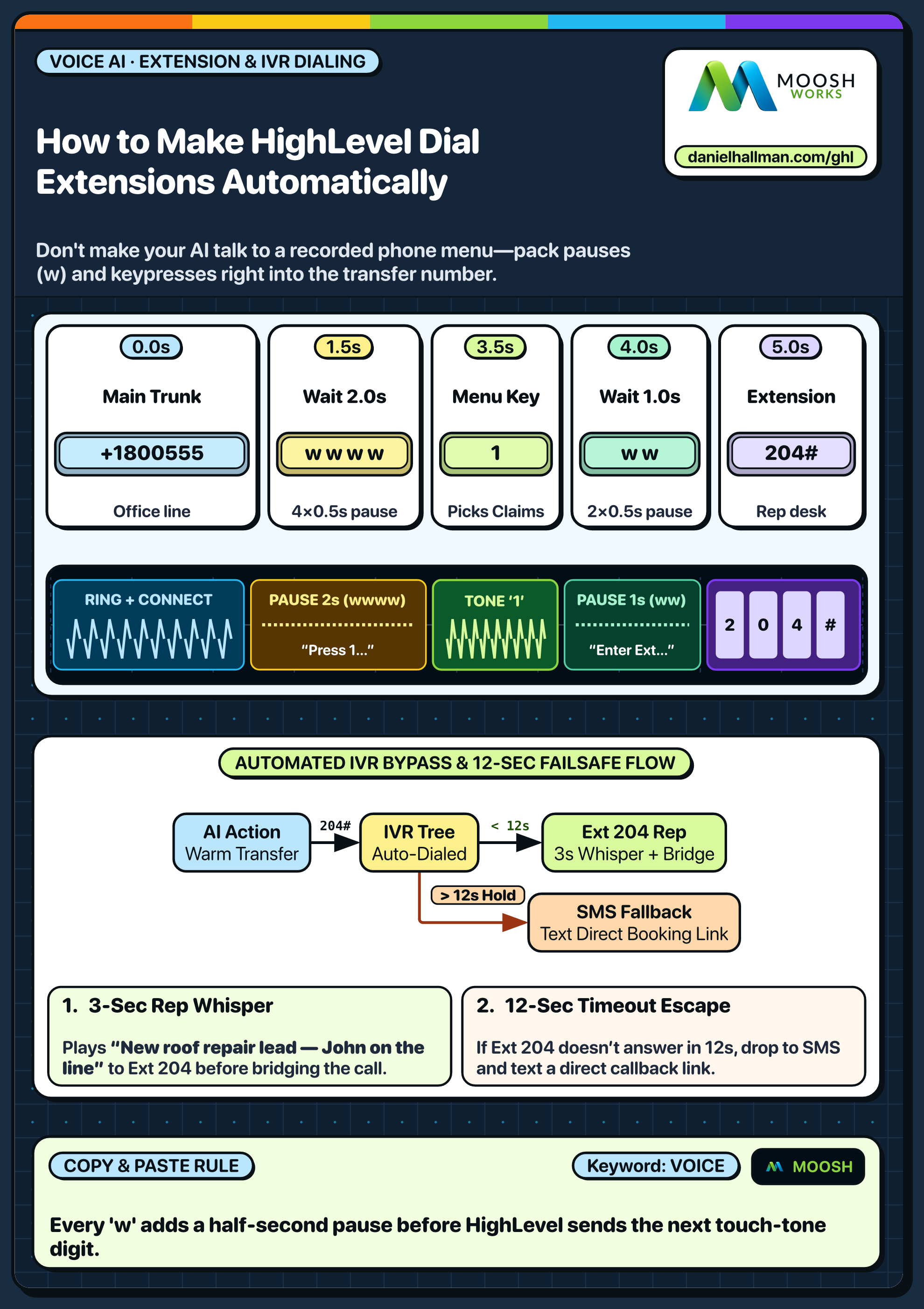
STEP 1Map Destination Extension Digits: Dial the destination office number once to time the menu greeting and note the exact extension keypresses (e.g. wait
2seconds, press1, wait1second, press2).
1Add If/Else Condition & Tag Guard 2Chain Priority & Wait Steps 3Switch to Settings or Execution Logs -
STEP 2Add Pause Commas to the Transfer Number: In AI Agents > Voice AI > Agent Actions > Call Transfer, enter the destination number with DTMF pause commas (
+18005550199,,1,2) or enable the Send DTMF Digits option.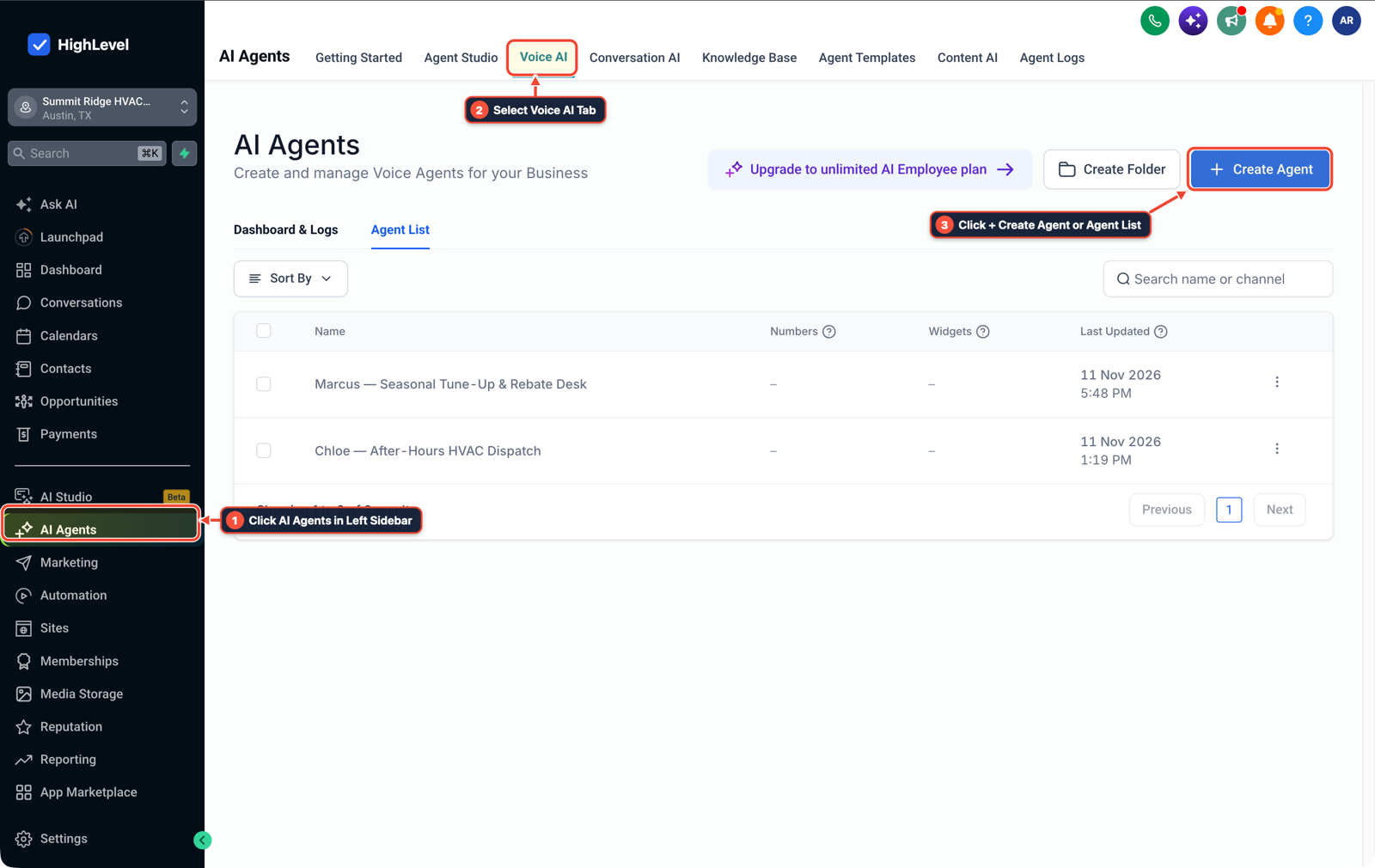
1Click AI Agents in Left Sidebar 2Select Voice AI Tab 3Click + Create Agent or Agent List -
STEP 3Set a 12-Second Reclaim Timer: In AI Agents > Voice AI > Agent Actions > Call Transfer, set the fallback timeout to
12seconds so the agent reclaims the call and books a callback if the extension stays on hold.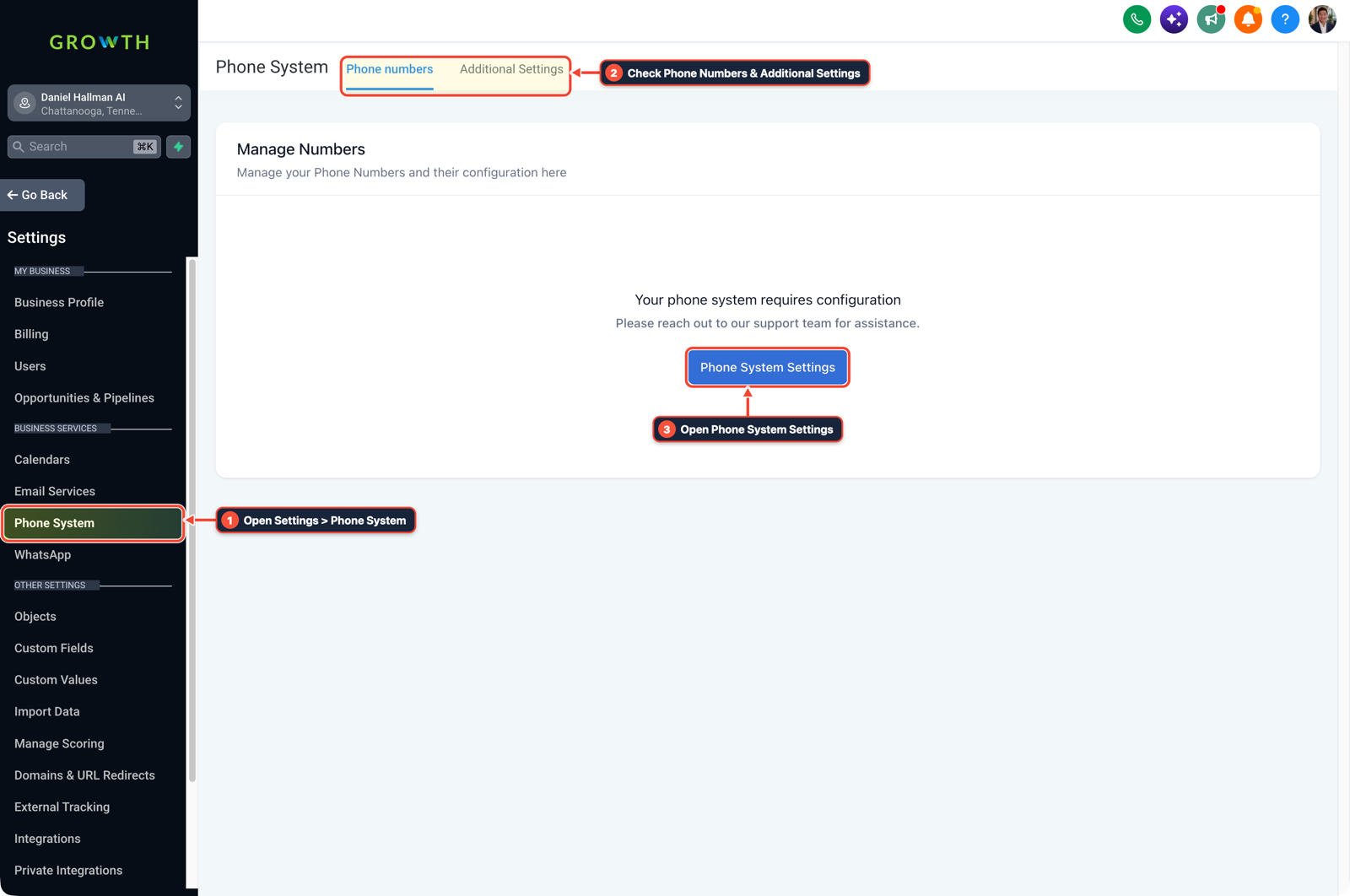
1Open Settings > Phone System 2Check Phone Numbers & Additional Settings 3Open Phone System Settings
MODE: AGENT PROMPT
PASTE INTO CLAUDE CODE, CURSOR, CHATGPT, OR GOHIGHLEVEL ASK AI
AGENT PROMPT
Configure our GoHighLevel Voice AI transfer settings to navigate an external office phone tree using DTMF touch-tones:
1. Set up the transfer number with DTMF pause sequences (800ms per comma) so it automatically dials extension 1 -> 2 when transferring to dispatch.
2. Play a reassuring message to the caller before initiating the transfer ("One moment while I connect you with our scheduling desk").
3. Configure a 12-second fallback timeout so the caller never gets stranded in an outside voicemail box.
GHL-TOOLS MCP SERVER & CLI (DANIELHALLMAN.COM/MCP)
BUILDER + SUB-ACCOUNT TOOLS
# 1. MCP Tool Call (ghl-agency-mcp)
{
  "tool": "voice_ai_configure_dtmf_transfer",
  "arguments": {
    "location_id": "<YOUR_LOCATION_ID>",
    "destination_e164": "+18005550199",
    "dtmf_sequence": ",,1,2",
    "fallback_timeout_seconds": 12
  }
}

# 2. Or run via ghl-agency Rust CLI
ghl-agency voice set-dtmf-transfer --location-id <YOUR_LOCATION_ID> --digits ",,1,2"
Official GHL MCP vs. ghl-tools: HighLevel’s official hosted MCP (services.leadconnectorhq.com/mcp) covers public v2 CRM records (contacts, opportunities, appointments, conversations). ghl-tools MCP complements it with workflow graph inspection & recipes, funnel/form builders, DNS/BIMI checks, and ghl-crm doctor audits.
Cause
- When a Voice AI agent transfers a caller to an outside answering service or hospital phone tree that says 'Press 1 for Scheduling', the AI tries speaking aloud to a touch-tone menu and drops the call.
GoHighLevel Configuration
- Store the target extension's touch-tone sequence using 800ms pause commas on the transfer action, play a brief hold message to the caller during the dial handshake
- and pull the call back if the extension doesn't pick up within 12 seconds.
GoHighLevel Menu Paths
| Step | Menu Path in GHL | Action |
|---|---|---|
| Step 1 | Automation > Workflow Builder > If/Else & Wait Steps | Dial the destination office number once to time the menu greeting and note the exact extension keypresses (e.g. wait 2 seconds, press 1, wait 1 second, press 2). |
| Step 2 | AI Agents > Voice AI > Agent Actions > Call Transfer | Enter the destination number with DTMF pause commas (+18005550199,,1,2) or enable the Send DTMF Digits option. |
| Step 3 | AI Agents > Voice AI > Agent Actions > Call Transfer | Set the fallback timeout to 12 seconds so the agent reclaims the call and books a callback if the extension stays on hold. |
DEFAULT SETUP VS. AUTOMATED WORKFLOW
Operational Comparison
After-Hours & Missed Call Capture
Qualified Jobs Booked 24/7
Related Questions
- How do you fix Voice AI mispronouncing local names and set up warm call transfers in GoHighLevel?
- How do you make GoHighLevel Voice AI calls feel fast and natural without awkward pauses?
- How do you use GoHighLevel Voice AI with an existing office desk phone without swapping your main number?
- How do you block Google Business robocalls from burning GoHighLevel Voice AI minutes?
BUILD FASTER IN GOHIGHLEVEL · FREE TRIAL BONUSES + MCP SERVER
Build this directly inside your GoHighLevel sub-account
Connect Claude Code, Cursor, or OpenAI Codex to our ghl-tools MCP Server & Rust CLI to build workflows, forms, and funnels from your editor, or start your GoHighLevel plan through our partner link to unlock $612+ in ready-to-import kits (including Voice, Conversation & Knowledge Base Kit ($47)) and weekly live clinics.