GOHIGHLEVEL ANSWERS & PROMPTS: PLAYBOOK T11 · VOICE AI & PHONE
AUTHOR: DANIEL HALLMAN
KEYWORD: VOICE
What Usually Happens
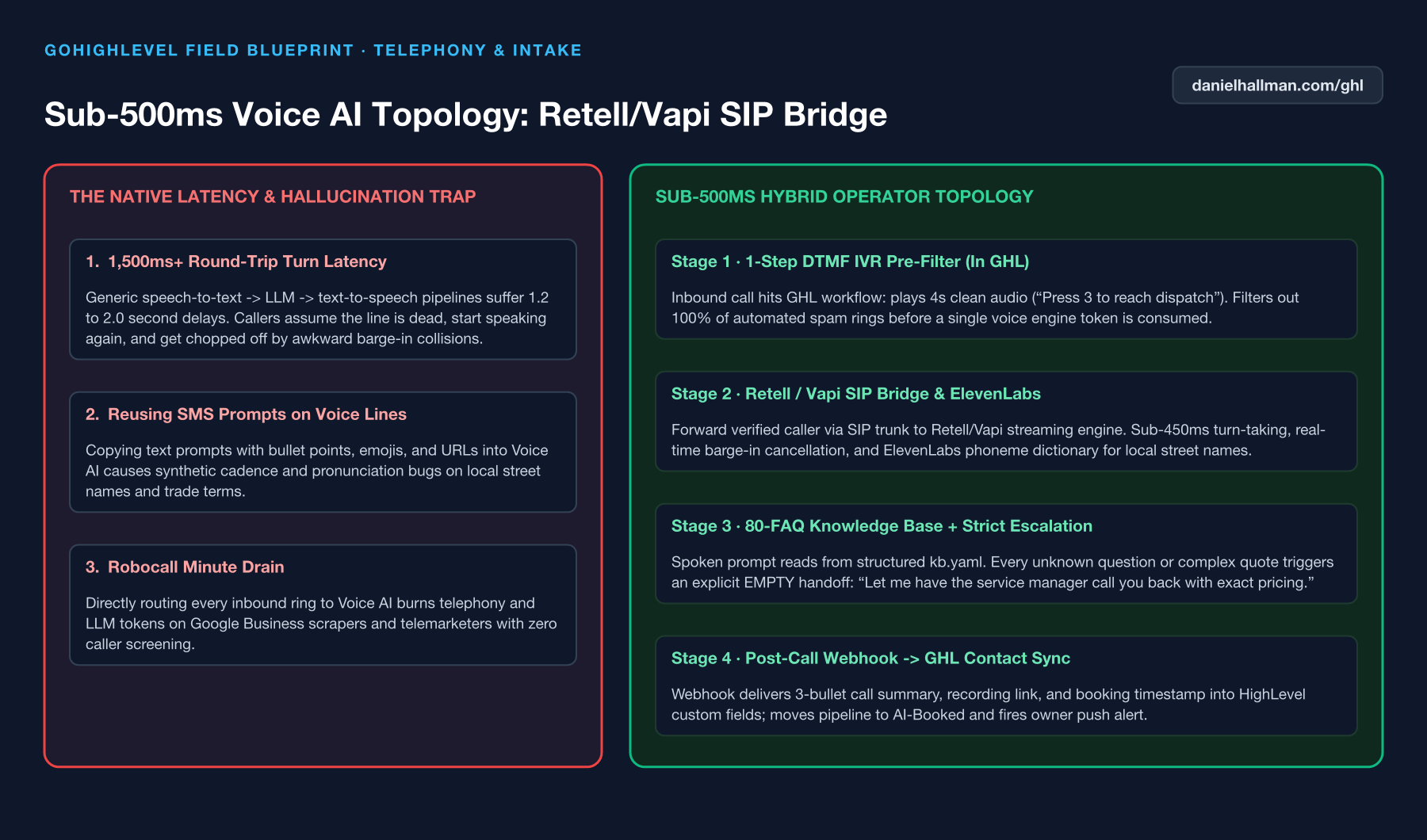
When a voice agent takes 1.5 to 2 seconds to respond because it is processing a 2,000-word prompt full of markdown lists, callers assume the line dropped, start speaking again, and collide with the bot.
How We Fix It in HighLevel
Move factual Q&A out of the system prompt into the Knowledge Base, cap the voice system prompt to short conversational sentences with commas for natural breathing pauses, and post a 3-bullet call summary back to the HighLevel contact timeline when the call finishes.
3-Step Implementation Checklist
- Trim your Voice AI system prompt to under 250 words of routing instructions only, moving all service prices, hours, and policies into the Knowledge Base.
- Write spoken prompt lines in plain conversational sentences (max 20–25 words per turn) with zero markdown asterisks or numbered lists.
- Log call outcomes (Caller Intent, Address, Appointment Status, and Recording URL) back onto the HighLevel contact record via a post-call webhook step.
MODE: AGENT PROMPT
PASTE THIS PROMPT INTO CLAUDE CODE, CURSOR, CHATGPT, OR YOUR GHL ASSISTANT
SAFE READ-FIRST WORKFLOW
Optimize our GoHighLevel Voice AI agent prompt for fast, natural phone conversation:
1. Strip all markdown formatting (bullet points, bold asterisks, numbered lists) from the voice prompt so the TTS engine never reads punctuation aloud.
2. Rewrite every spoken instruction to keep responses under 22 words per turn and ask only one question at a time.
3. Extract all business hours, pricing ranges, and service area rules into 20 structured Knowledge Base FAQ pairs, and add an EMPTY fallback rule that transfers to a human when unsure.
RUN WITH OUR GHL-TOOLS MCP SERVER OR RUST CLI (DANIELHALLMAN.COM/MCP)
SUPPORTS --DRY-RUN PREVIEW
# 1. MCP Tool Call (ghl-crm-mcp)
{
  "tool": "audit_location",
  "arguments": {
    "location_id": "<YOUR_LOCATION_ID>",
    "pillars": ["voice_sms_prompts", "call_screening_ivr"]
  }
}

# 2. Or run via ghl-crm Rust CLI
ghl-crm doctor --location-id <YOUR_LOCATION_ID> --pillar voice
Similar GoHighLevel Questions & Fixes
PLAYBOOK T01 · Voice AI & Phone
How do you stop GoHighLevel Voice AI from cutting callers off mid-sentence on cell phones?
Increase the Voice Activity Detection (VAD) pause threshold to ~400ms, keep spoken bot turns under 20–25 words, and ask only one question per turn.
PLAYBOOK T11 · Voice AI & PhoneHow do you fix Voice AI mispronouncing local names and set up warm call transfers in GoHighLevel?
Add local street names and trade acronyms (like HVAC, PEX, or SEER) to a pronunciation dictionary instead of spelling words strangely in the prompt, and use a 15-second warm transfer with fallback.
PLAYBOOK T11 · Voice AI & PhoneHow do you make GoHighLevel Voice AI navigate external phone menus with touch-tones?
Configure pre-programmed DTMF dial strings with pause commas (e.g. `,1,2`) on known transfer numbers so the transfer bridges directly to the target extension instead of talking to an automated IVR.
PLAYBOOK T04 · Voice AI & PhoneHow do you block Google Business robocalls from burning GoHighLevel Voice AI minutes?
Put a 4-second 'Press 1 to speak with our team' DTMF call screen in front of your Voice AI agent so automated spam dialers drop off after 5 seconds at zero AI cost.
RUN THIS IN 30 SECONDS · GHL-TOOLS MCP + OPERATOR COMMUNITY
Want your AI agent to inspect and build this inside GoHighLevel automatically?
Connect Claude Code, Cursor, or OpenAI Codex to our ghl-tools MCP Server & Rust CLI for 30-second sub-account doctor checks, --dry-run previews, and snapshot diffs—or start/upgrade your GoHighLevel plan through our partner link to unlock up to $612+ in implementation kits (including Voice, Conversation & Knowledge Base Kit ($47)) and our weekly live engineering clinics.