GOHIGHLEVEL ANSWERS & PROMPTS: PLAYBOOK T04 · VOICE AI & CLIENT ACQUISITION
AUTHOR: DANIEL HALLMAN
KEYWORD: VOICE DEMO
STEP-BY-STEP INSTRUCTIONS + ANNOTATED GHL SCREENSHOTS
Steps in GoHighLevel
-
STEP 1In AI Agents > Voice AI, create a niche-specific demo receptionist: Click + Create Agent, choose one local trade (such as residential HVAC or dental clinics), upload
20common customer questions into the Knowledge Base, and set the agent's goal to collect the caller's name, service issue, and preferred callback slot.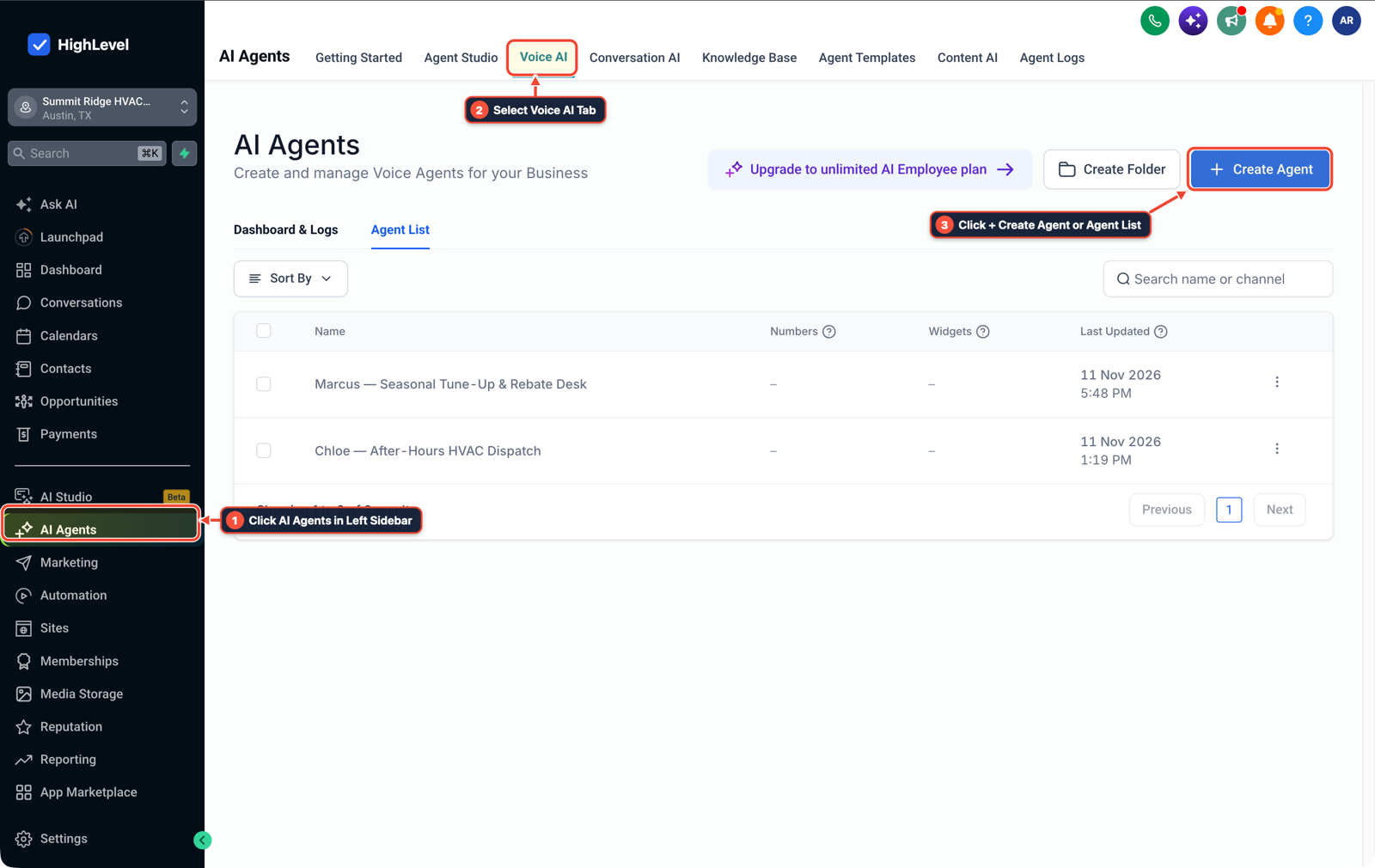
1Click AI Agents in Left Sidebar 2Select Voice AI Tab 3Click + Create Agent or Agent List -
STEP 2In Settings > Phone Numbers, set a 15-second unanswered call rollover: Select your sub-account tracking number, set Call Timeout to
15seconds (about4rings) so the office front desk rings first during daytime hours, and route unanswered or busy calls to your Voice AI agent.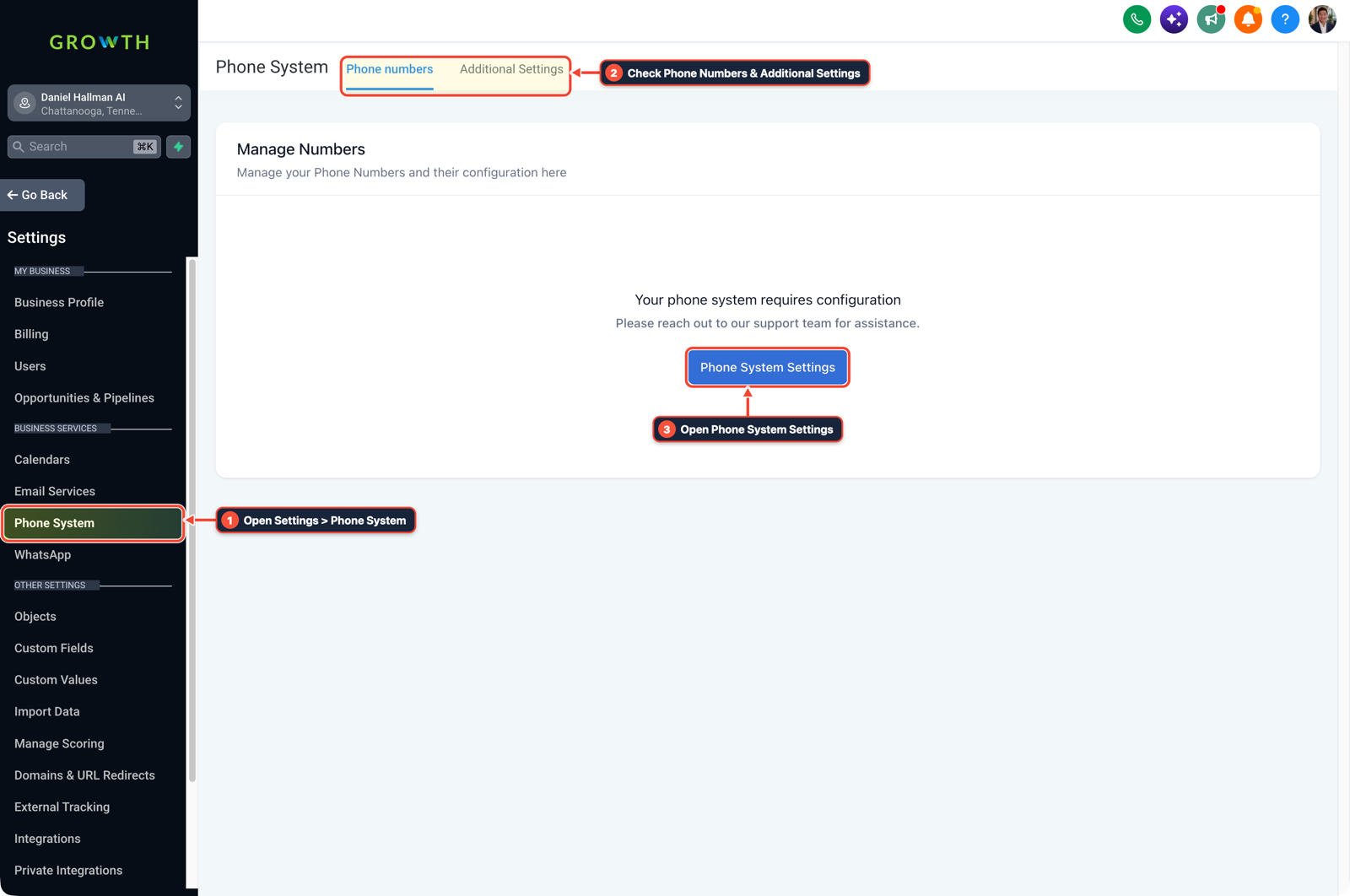
1Open Settings > Phone System 2Check Phone Numbers & Additional Settings 3Open Phone System Settings -
STEP 3In Automation > Workflows, send an instant booking summary to the owner's phone: Create a workflow triggered by Voice AI Call Ended or Customer Booked Appointment that sends an Internal Notification SMS to the business owner with the caller's name, issue summary, and calendar slot.

1Add If/Else Condition & Tag Guard 2Chain Priority & Wait Steps 3Switch to Settings or Execution Logs
MODE: AGENT PROMPT
PASTE INTO CLAUDE CODE, CURSOR, CHATGPT, OR GOHIGHLEVEL ASK AI
AGENT PROMPT
Set up a niche Voice AI receptionist demo and missed-call booking alert in sub-account <YOUR_LOCATION_ID>:
1. In AI Agents > Voice AI, create a trade-specific receptionist with 20 niche FAQs and a 3-field booking intake (name, issue, callback slot).
2. In Settings > Phone Numbers, set Call Timeout to 15 seconds so unanswered and after-hours calls roll over to the Voice AI agent.
3. In Automation > Workflows, trigger an Internal Notification SMS to the owner whenever a Voice AI call ends with a booked appointment.
GHL-TOOLS MCP SERVER & CLI (DANIELHALLMAN.COM/MCP)
BUILDER + SUB-ACCOUNT TOOLS
# Inspect sub-account phone numbers and Voice AI workflows via ghl-crm
ghl-crm workflows list --context <YOUR_CONTEXT> --location <YOUR_LOCATION_ID>
Official GHL MCP vs. ghl-tools: HighLevel’s official hosted MCP (services.leadconnectorhq.com/mcp) covers public v2 CRM records (contacts, opportunities, appointments, conversations). ghl-tools MCP complements it with workflow graph inspection & recipes, funnel/form builders, DNS/BIMI checks, and ghl-crm doctor audits.
Cause
- Technical founders and new agency operators often spend months building custom voice pipelines from scratch or debating which niche to pick because they worry using GoHighLevel is 'too simple.' Meanwhile, local business owners ignore generic cold pitches about AI technology because they cannot hear how the receptionist sounds on a real call.
GoHighLevel Configuration
- Use GoHighLevel Voice AI to launch a working niche demo in one afternoon instead of spending months on custom telephony plumbing.
- Configure a dedicated tracking number for one specific trade (such as HVAC, plumbing, or medspas), train the Voice AI agent on 20 trade-specific questions and a 3-question booking intake, forward unanswered calls after 4 rings, and text the booked appointment summary straight to the owner's cell phone.
GoHighLevel Menu Paths
| Step | Menu Path in GHL | Action |
|---|---|---|
| Step 1 | AI Agents > Voice AI | Create a niche-specific demo receptionist: Click + Create Agent, choose one local trade (such as residential HVAC or dental clinics), upload 20 common customer questions into the Knowledge Base, and set the agent's goal to collect the caller's name, service issue, and preferred callback slot. |
| Step 2 | Settings > Phone Numbers | Set a 15-second unanswered call rollover: Select your sub-account tracking number, set Call Timeout to 15 seconds (about 4 rings) so the office front desk rings first during daytime hours, and route unanswered or busy calls to your Voice AI agent. |
| Step 3 | Automation > Workflows | Send an instant booking summary to the owner's phone: Create a workflow triggered by Voice AI Call Ended or Customer Booked Appointment that sends an Internal Notification SMS to the business owner with the caller's name, issue summary, and calendar slot. |
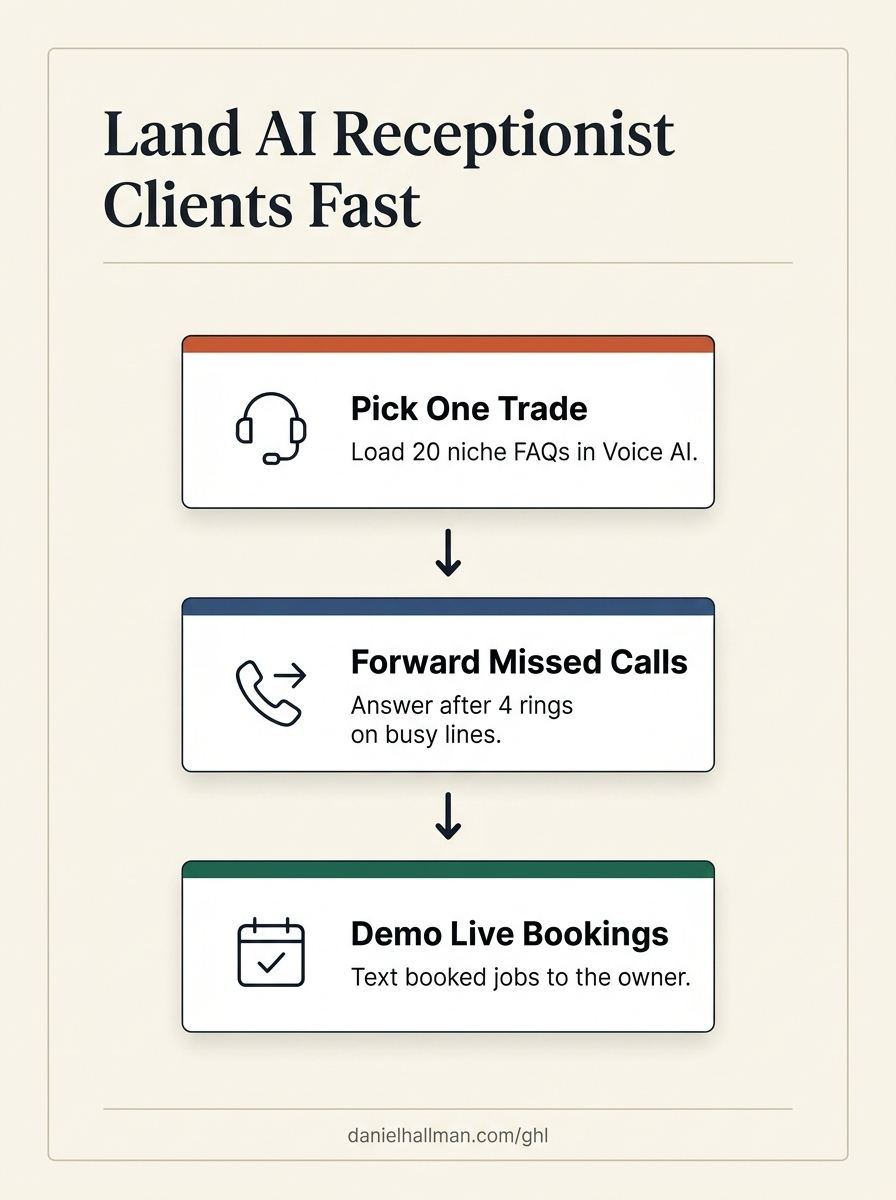
DEFAULT SETUP VS. AUTOMATED WORKFLOW
Operational Comparison
After-Hours & Missed Call Capture
Qualified Jobs Booked 24/7
Related Questions
- How Do You Pitch AI Receptionists to Local Businesses Without Getting Rejected?
- How do you use GoHighLevel Voice AI with an existing office desk phone without swapping your main number?
- How Do You Set Up Sequential Call Routing Between Team Members in GoHighLevel?
- How do you make money with GoHighLevel in 2026 without selling software logins?
BUILD FASTER IN GOHIGHLEVEL · FREE TRIAL BONUSES + MCP SERVER
Build this directly inside your GoHighLevel sub-account
Connect Claude Code, Cursor, or OpenAI Codex to our ghl-tools MCP Server & Rust CLI to build workflows, forms, and funnels from your editor, or start your GoHighLevel plan through our partner link to unlock $612+ in ready-to-import kits (including Voice AI Receptionist Pack) and weekly live clinics.