GOHIGHLEVEL ANSWERS & PROMPTS: PLAYBOOK T04 · VOICE AI & PHONE ROUTING
AUTHOR: DANIEL HALLMAN
KEYWORD: VOICE PITCH
STEP-BY-STEP INSTRUCTIONS + ANNOTATED GHL SCREENSHOTS
Steps in GoHighLevel
-
STEP 1In Settings > Phone Numbers, configure conditional call forwarding for overflow and after-hours: Keep the business's main phone number ringing the front desk first during business hours (
9:00 AMto5:00 PM), and forward calls to your HighLevel number only on No-Answer (after4rings /20seconds) or Busy.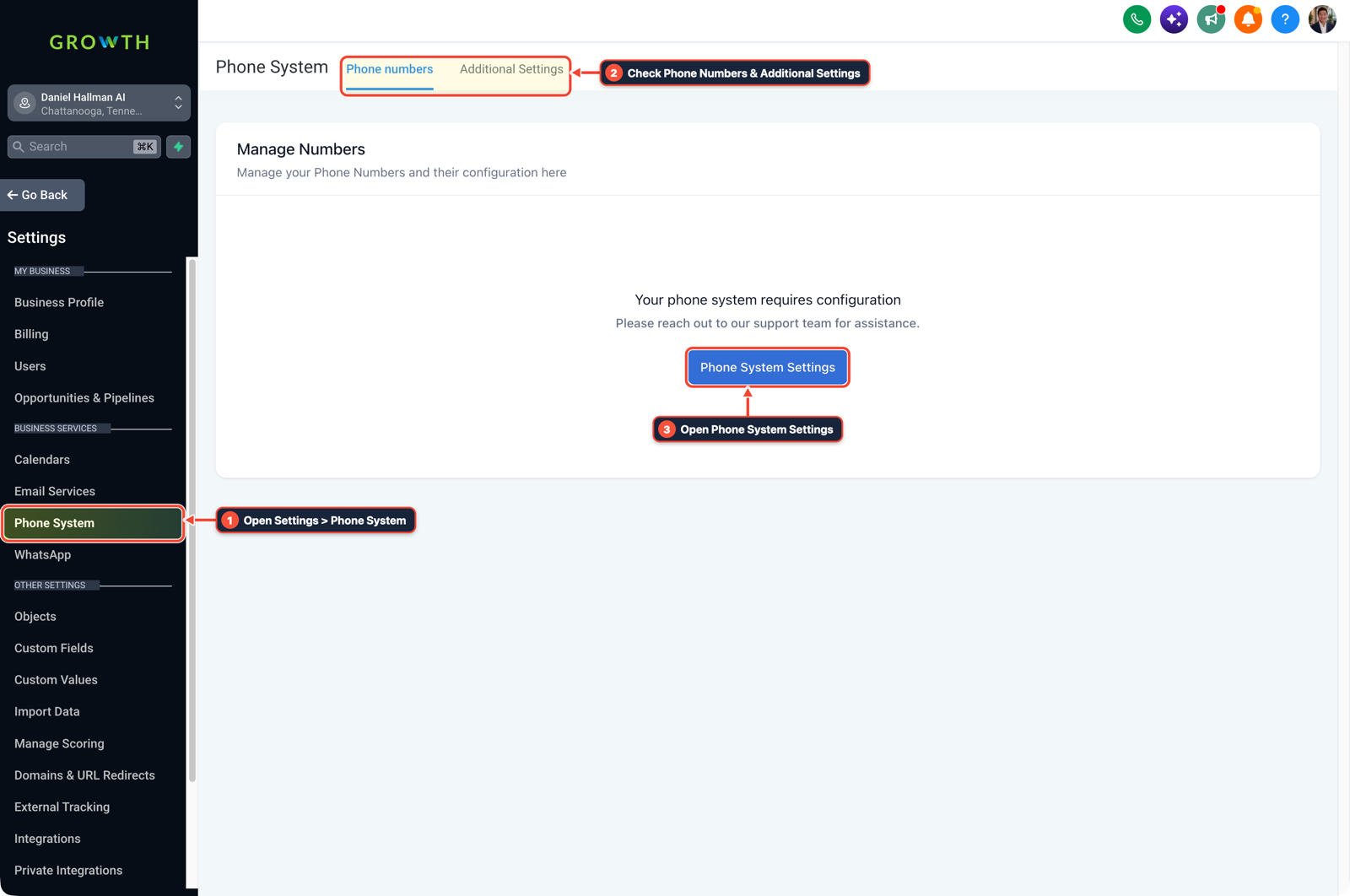
1Open Settings > Phone System 2Check Phone Numbers & Additional Settings 3Open Phone System Settings -
STEP 2In AI Agents > Voice AI, build a 3-question intake receptionist: Create a Voice AI agent that greets the caller, asks only for their name, service issue, and preferred callback window, and books the slot onto the Calendars schedule without quoting custom medical or repair prices.
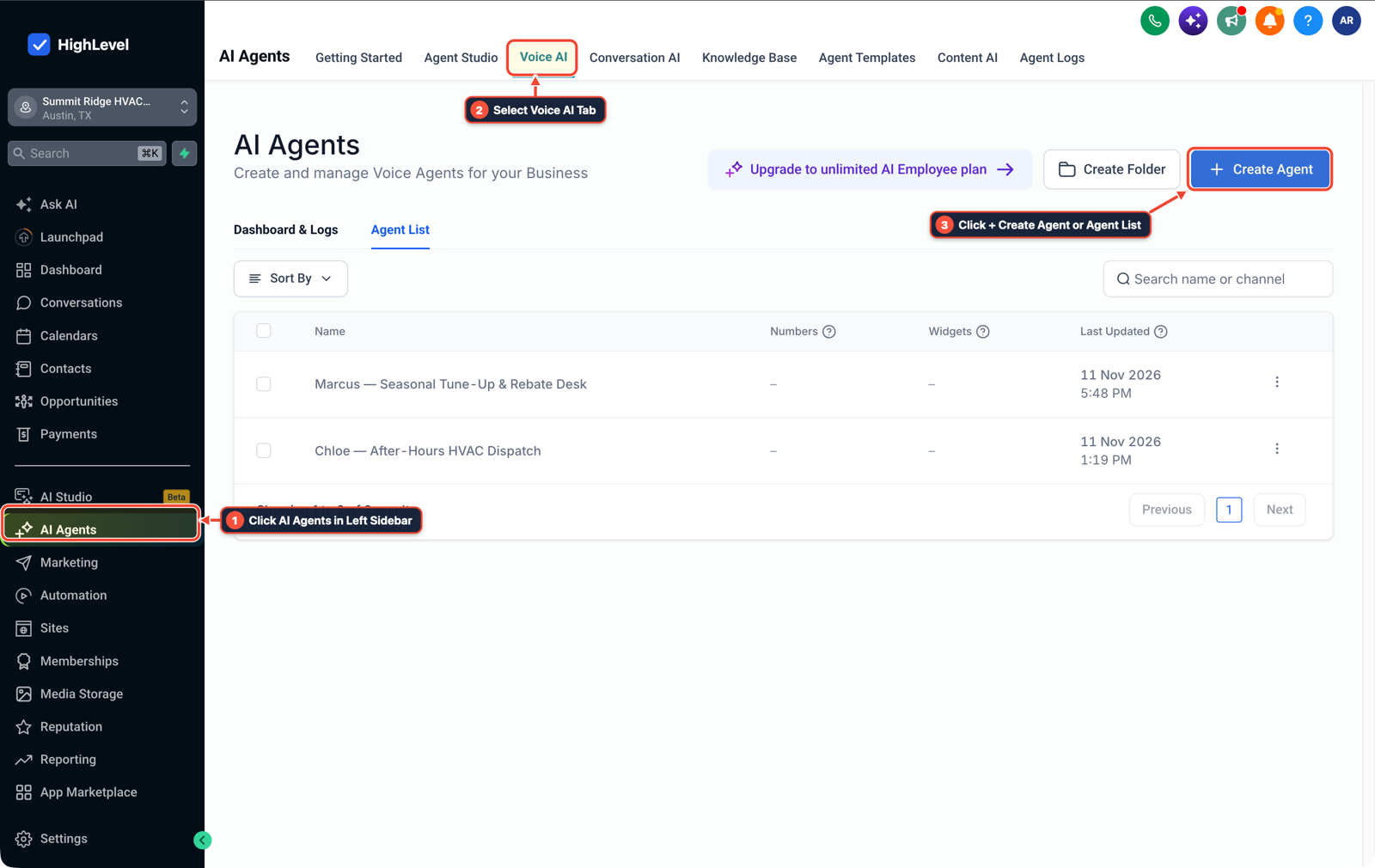
1Click AI Agents in Left Sidebar 2Select Voice AI Tab 3Click + Create Agent or Agent List -
STEP 3In Automation > Workflows, send an instant call summary to the owner's phone: Trigger a workflow on Voice AI Call Ended that sends an Internal Notification SMS to the owner with the caller's name, recorded summary, and booked appointment time so the owner sees captured evening jobs the next morning.

1Add If/Else Condition & Tag Guard 2Chain Priority & Wait Steps 3Switch to Settings or Execution Logs
MODE: AGENT PROMPT
PASTE INTO CLAUDE CODE, CURSOR, CHATGPT, OR GOHIGHLEVEL ASK AI
AGENT PROMPT
Configure an after-hours and overflow Voice AI receptionist in sub-account <YOUR_LOCATION_ID>:
1. In Settings > Phone Numbers, set call routing so daytime calls ring the human front desk first and roll over to Voice AI after 20 seconds or outside 9:00 AM - 5:00 PM.
2. In AI Agents > Voice AI, configure a 3-question intake prompt (caller name, issue, callback slot) connected to the booking calendar.
3. In Automation > Workflows, send an Internal Notification SMS to the business owner after each Voice AI call with the summary and booked slot.
GHL-TOOLS MCP SERVER & CLI (DANIELHALLMAN.COM/MCP)
BUILDER + SUB-ACCOUNT TOOLS
# Inspect sub-account phone routing and Voice AI workflows via ghl-crm
ghl-crm workflows list --context <YOUR_CONTEXT> --location <YOUR_LOCATION_ID>
Official GHL MCP vs. ghl-tools: HighLevel’s official hosted MCP (services.leadconnectorhq.com/mcp) covers public v2 CRM records (contacts, opportunities, appointments, conversations). ghl-tools MCP complements it with workflow graph inspection & recipes, funnel/form builders, DNS/BIMI checks, and ghl-crm doctor audits.
Cause
- Calling medical clinics, HVAC shops, or real estate offices during business hours and telling the front-desk receptionist that your AI bot can handle their phone calls almost always ends in a fast hang-up.
- Daytime staff view the tool as a threat to their job, and owners do not want an untested voice bot replacing human staff during peak clinic hours.
GoHighLevel Configuration
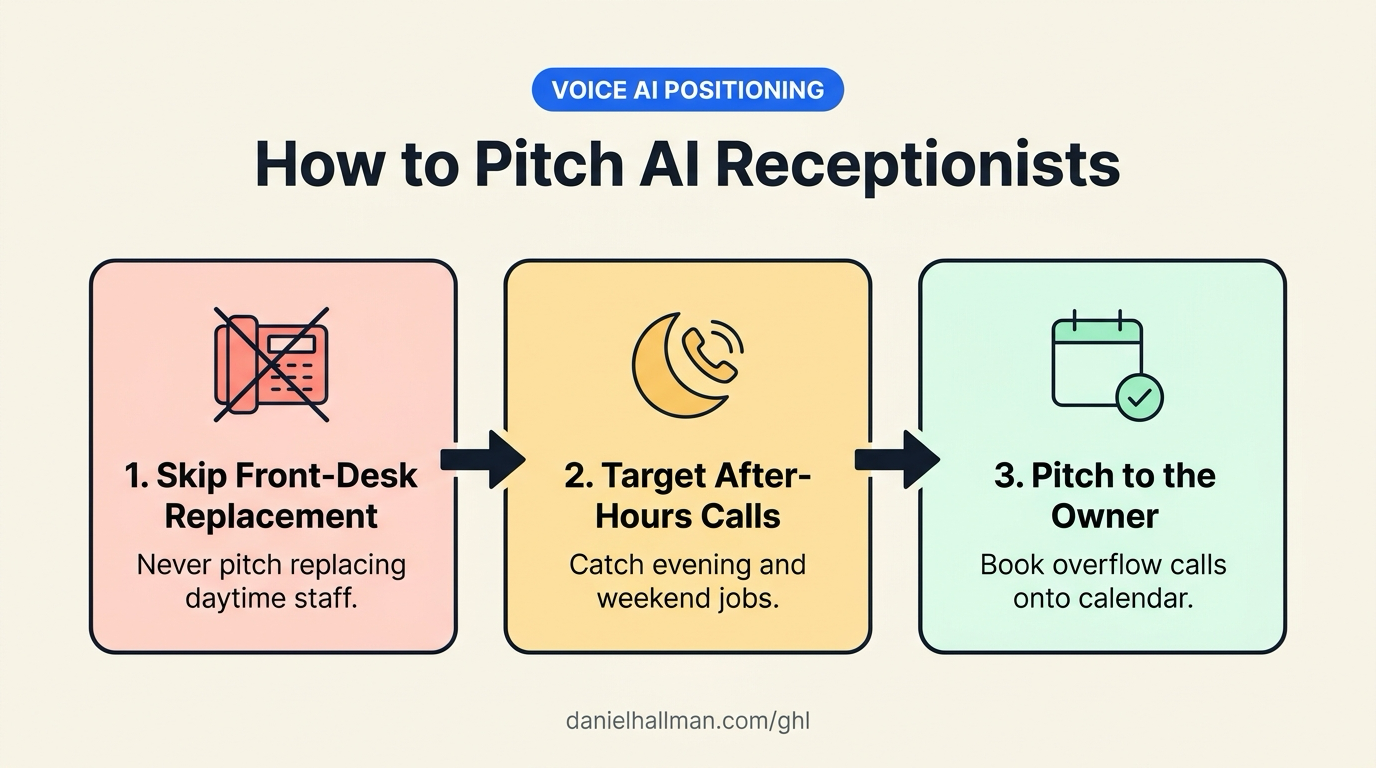
- Position Voice AI strictly as an after-hours and busy-line safety net for the business owner.
- Configure call forwarding on No-Answer and Busy so the human front desk still takes every normal daytime call, while Voice AI catches evening, weekend, and simultaneous overflow calls and books them onto the calendar.
GoHighLevel Menu Paths
| Step | Menu Path in GHL | Action |
|---|---|---|
| Step 1 | Settings > Phone Numbers | Configure conditional call forwarding for overflow and after-hours: Keep the business's main phone number ringing the front desk first during business hours (9:00 AM to 5:00 PM), and forward calls to your HighLevel number only on No-Answer (after 4 rings / 20 seconds) or Busy. |
| Step 2 | AI Agents > Voice AI | Build a 3-question intake receptionist: Create a Voice AI agent that greets the caller, asks only for their name, service issue, and preferred callback window, and books the slot onto the Calendars schedule without quoting custom medical or repair prices. |
| Step 3 | Automation > Workflows | Send an instant call summary to the owner's phone: Trigger a workflow on Voice AI Call Ended that sends an Internal Notification SMS to the owner with the caller's name, recorded summary, and booked appointment time so the owner sees captured evening jobs the next morning. |
DEFAULT SETUP VS. AUTOMATED WORKFLOW
Operational Comparison
After-Hours & Missed Call Capture
Qualified Jobs Booked 24/7
Related Questions
- How do you use GoHighLevel Voice AI with an existing office desk phone without swapping your main number?
- How do you sell GoHighLevel to local contractors and home service businesses?
- How do you reach $2k to $5k a month with GoHighLevel without pitching software features?
- How do you block Google Business robocalls from burning GoHighLevel Voice AI minutes?
BUILD FASTER IN GOHIGHLEVEL · FREE TRIAL BONUSES + MCP SERVER
Build this directly inside your GoHighLevel sub-account
Connect Claude Code, Cursor, or OpenAI Codex to our ghl-tools MCP Server & Rust CLI to build workflows, forms, and funnels from your editor, or start your GoHighLevel plan through our partner link to unlock $612+ in ready-to-import kits (including Voice AI Receptionist Pack) and weekly live clinics.