GOHIGHLEVEL ANSWERS & PROMPTS: PLAYBOOK T29 · OUTBOUND VOICE AI CONSENT & WEBHOOKS
AUTHOR: DANIEL HALLMAN
KEYWORD: AI CALL CONSENT
STEP-BY-STEP INSTRUCTIONS + ANNOTATED GHL SCREENSHOTS
Steps in GoHighLevel
-
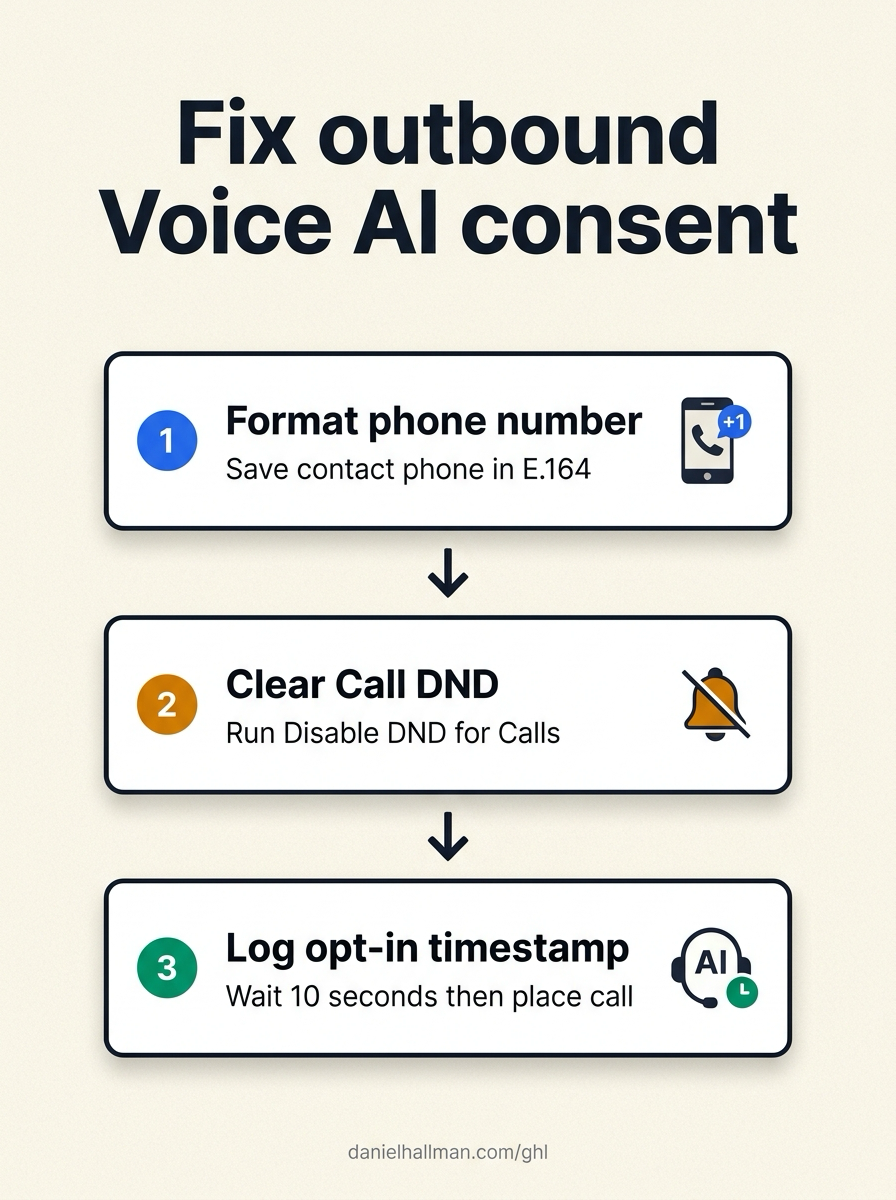
STEP 1In Automation > Workflow Builder, start from your Inbound Webhook trigger and run Create/Update Contact first, formatting the phone field in full
E.164(+15125550142) and mapping the form's opt-in timestamp and page URL to contact custom fields.
1Add If/Else Condition & Tag Guard 2Chain Priority & Wait Steps 3Switch to Settings or Execution Logs -
STEP 2In Settings > Phone System (and the Enable/Disable DND action inside your workflow), select Disable DND for Specific Channels > Calls and SMS so HighLevel's outbound voice compliance gate registers active call permission on the contact record.
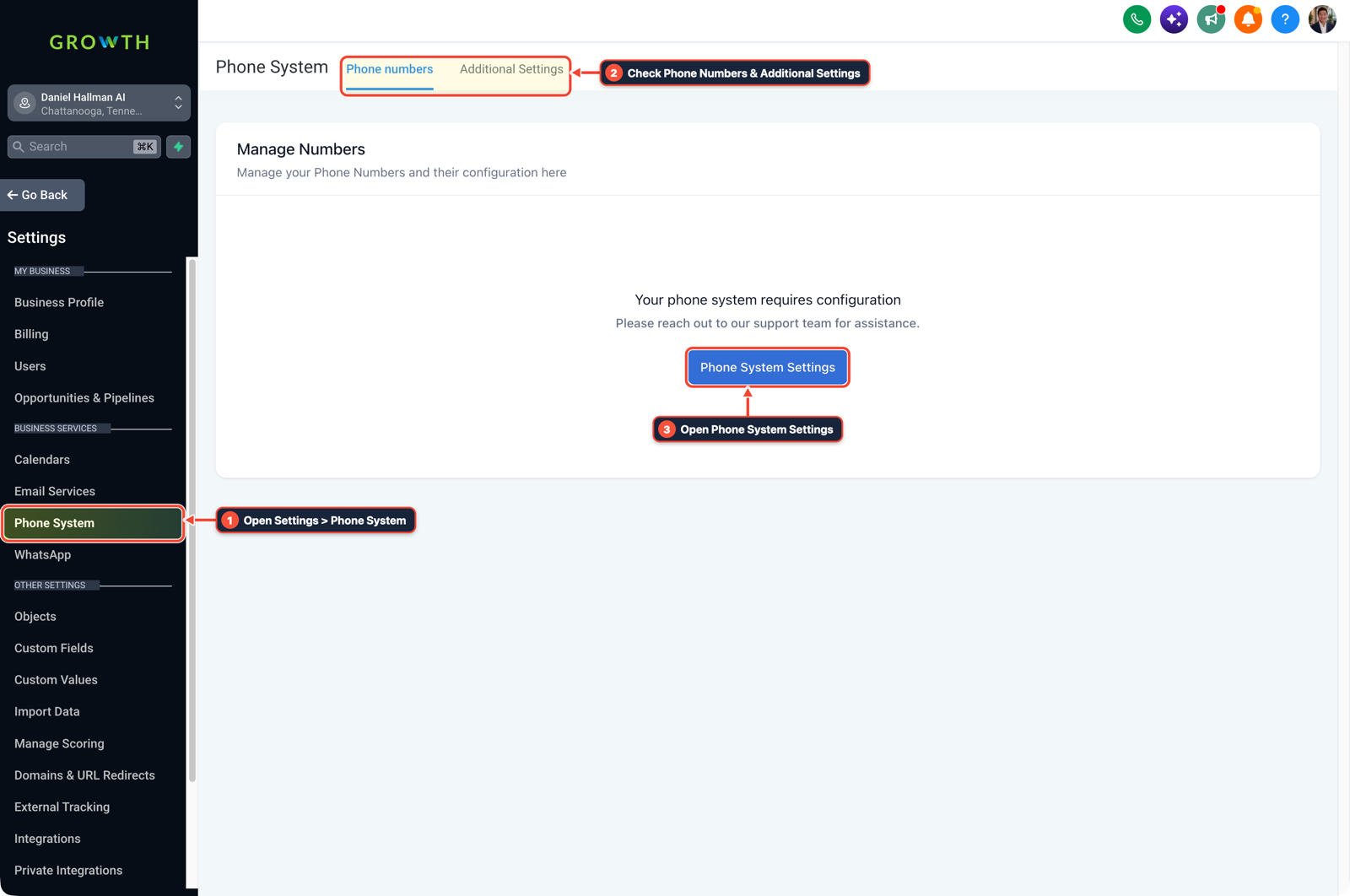
1Open Settings > Phone System 2Check Phone Numbers & Additional Settings 3Open Phone System Settings -
STEP 3In AI Agents > Voice AI, place a
10 secondWait step immediately after Disable DND before running the Voice AI Outbound Call action so the updated contact state is committed before dialing.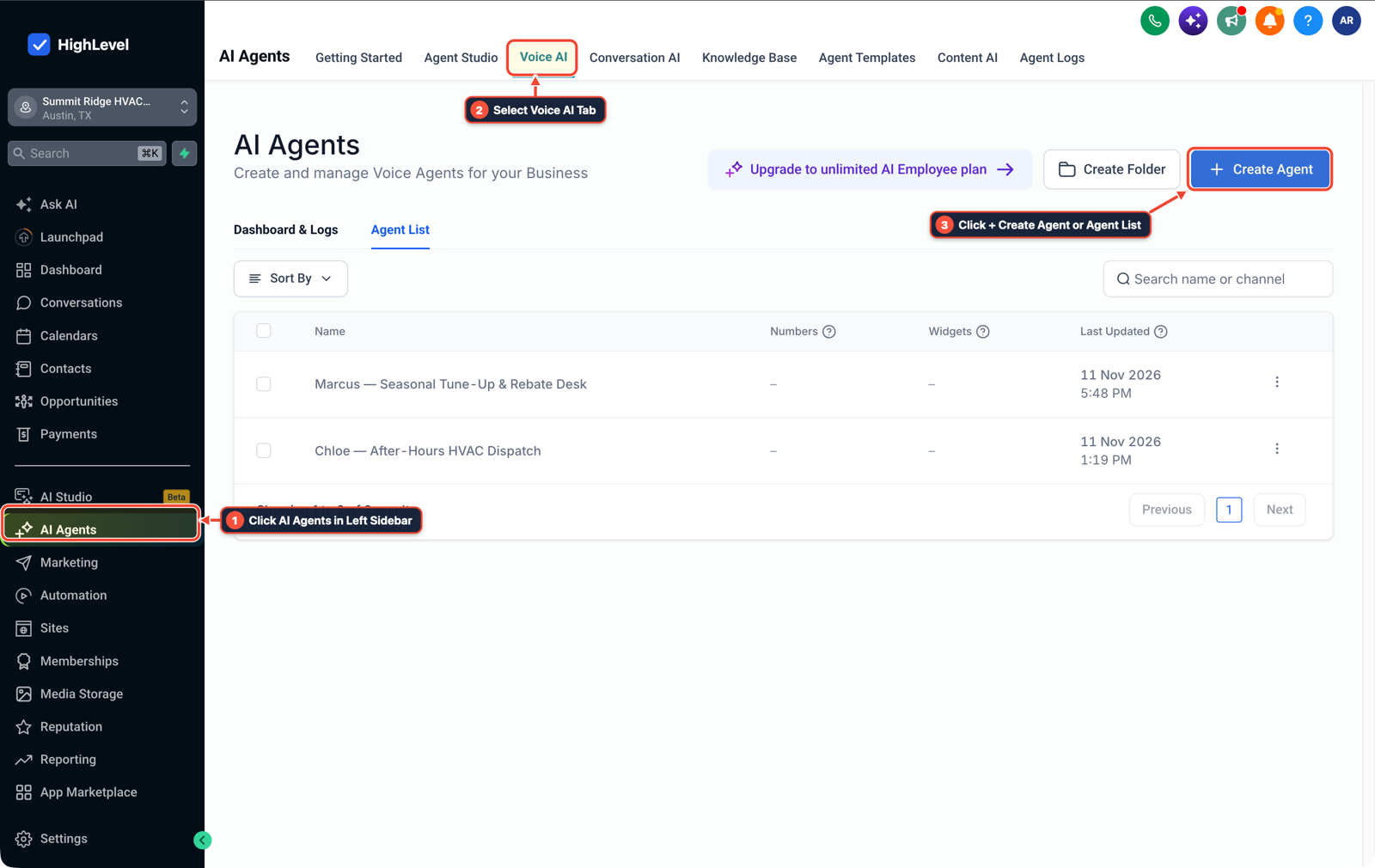
1Click AI Agents in Left Sidebar 2Select Voice AI Tab 3Click + Create Agent or Agent List
MODE: AGENT PROMPT
PASTE INTO CLAUDE CODE, CURSOR, CHATGPT, OR GOHIGHLEVEL ASK AI
AGENT PROMPT
Fix Inbound Webhook 'Consent Invalid' errors on outbound Voice AI calls in sub-account <YOUR_LOCATION_ID>:
1. In Automation > Workflow Builder, after the Inbound Webhook trigger, add Create/Update Contact with a Date/Time Formatter or Format Data step ensuring Phone is in E.164 (+1...) and save opt_in_timestamp and opt_in_source_url.
2. Add an Enable/Disable DND workflow action set to Disable DND for Specific Channels (Calls and SMS).
3. Add a 10-second Wait step after Disable DND, then trigger the Voice AI Outbound Call action.
GHL-TOOLS MCP SERVER & CLI (DANIELHALLMAN.COM/MCP)
BUILDER + SUB-ACCOUNT TOOLS
# Inspect inbound webhook and outbound Voice AI workflows in the sub-account
ghl-crm workflows list --context <YOUR_CONTEXT> --location <YOUR_LOCATION_ID>
ghl-agency phone-wallet-audit --context <YOUR_CONTEXT> --location <YOUR_LOCATION_ID>
Official GHL MCP vs. ghl-tools: HighLevel’s official hosted MCP (services.leadconnectorhq.com/mcp) covers public v2 CRM records (contacts, opportunities, appointments, conversations). ghl-tools MCP complements it with workflow graph inspection & recipes, funnel/form builders, DNS/BIMI checks, and ghl-crm doctor audits.
Cause
- Native GoHighLevel forms automatically flip the internal compliance consent flag when a lead checks the T&C box, but an external custom-coded form sent through an Inbound Webhook only writes raw JSON values.
- Mapping
consent: trueinto a custom contact field leaves the system-level Call DND / compliance state untouched, or fires the Voice AI call before the contact record finishes indexing, triggeringConsent Invalid.
GoHighLevel Configuration
- Upsert the contact first with an E.164 phone number and opt-in timestamp, execute the native Enable/Disable DND workflow action set to Disable DND for Calls
- and add a short
10 secondwait before the outbound Voice AI call step.
GoHighLevel Menu Paths
| Step | Menu Path in GHL | Action |
|---|---|---|
| Step 1 | Automation > Workflow Builder | Start from your Inbound Webhook trigger and run Create/Update Contact first, formatting the phone field in full E.164 (+15125550142) and mapping the form's opt-in timestamp and page URL to contact custom fields. |
| Step 2 | Settings > Phone System | In Settings > Phone System (and the Enable/Disable DND action inside your workflow), select Disable DND for Specific Channels > Calls and SMS so HighLevel's outbound voice compliance gate registers active call permission on the contact record. |
| Step 3 | AI Agents > Voice AI | Place a 10 second Wait step immediately after Disable DND before running the Voice AI Outbound Call action so the updated contact state is committed before dialing. |
DEFAULT SETUP VS. AUTOMATED WORKFLOW
Operational Comparison
After-Hours & Missed Call Capture
Qualified Jobs Booked 24/7
Related Questions
- Why is my GoHighLevel Inbound Webhook not creating or updating contacts?
- How do you stop GoHighLevel chat bots from replying after a customer texts STOP?
- How do you fix Voice AI mispronouncing local names and set up warm call transfers in GoHighLevel?
- How do you route weekend emergency repair calls in GoHighLevel so contractors never lose a job?
BUILD FASTER IN GOHIGHLEVEL · FREE TRIAL BONUSES + MCP SERVER
Build this directly inside your GoHighLevel sub-account
Connect Claude Code, Cursor, or OpenAI Codex to our ghl-tools MCP Server & Rust CLI to build workflows, forms, and funnels from your editor, or start your GoHighLevel plan through our partner link to unlock $612+ in ready-to-import kits (including GHL Outbound Voice AI Webhook Consent Pack) and weekly live clinics.