GOHIGHLEVEL ANSWERS & PROMPTS: PLAYBOOK T22 · WORKFLOWS & AUTOMATION
AUTHOR: DANIEL HALLMAN
KEYWORD: WORKFLOW
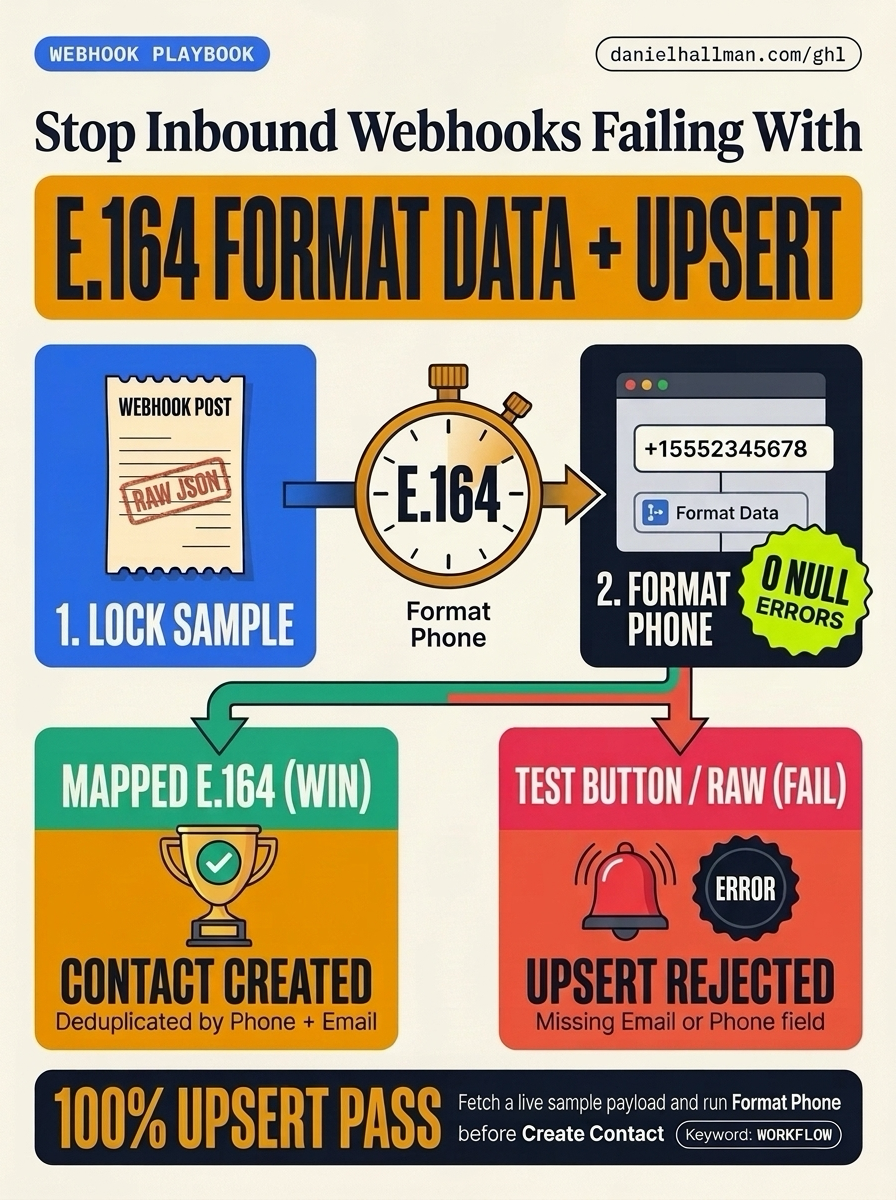
SIMPLE STEP-BY-STEP INSTRUCTIONS
How to Set This Up in GoHighLevel (Under 2 Minutes)
- STEP 1Lock a Real Webhook Sample: Open your Inbound Webhook Trigger, click 'Fetch Sample Requests', send one real POST payload to the webhook URL, select that request in the dropdown, and click Save Trigger (do not use the top-right 'Test Workflow' button).
- STEP 2Format the Phone to E.164 First: Add a native 'Format Data -> Format Phone Number' action as Step 1 of your workflow, select your inbound phone token from 'Inbound Webhook Request', and set the output format to E.164 (+1XXXXXXXXXX).
- STEP 3Map Cleaned Tokens in Create/Update Contact: Add 'Create/Update Contact' right after Format Data, map Phone to '{{format_data.phone}}' and Email to '{{inboundWebhookRequest.email}}', and publish the workflow.
What Usually Happens
When an external form or webhook sends JSON into a HighLevel Inbound Webhook Trigger, Create/Update Contact fails with 'Contact could not be Created/Updated as no differentiation field value was provided (Email or Phone)' if you clicked 'Test Workflow' (which sends blank tokens), passed an unformatted phone string, or mapped the wrong nested JSON key.
How We Fix It in HighLevel
Lock a real live POST payload inside the Inbound Webhook Trigger settings, run a native Format Data step to normalize the phone number to E.164 (+1XXXXXXXXXX), and map that cleaned output directly into Create/Update Contact right below it.
MODE: AGENT PROMPT
PASTE THIS PROMPT INTO CLAUDE CODE, CURSOR, CHATGPT, OR YOUR GHL ASSISTANT
SAFE READ-FIRST WORKFLOW
Fix our GoHighLevel Inbound Webhook workflow that fails with "Contact could not be Created/Updated as no differentiation field value was provided (Email or Phone)":
1. Inspect the Inbound Webhook Trigger payload structure to verify the exact paths for phone and email (e.g. inboundWebhookRequest.phone vs inboundWebhookRequest.body.phone).
2. Insert a native "Format Data — Format Phone Number" action before "Create/Update Contact" to normalize the incoming phone string into E.164 (+1XXXXXXXXXX).
3. Map the formatted phone token and raw email token into the "Create/Update Contact" action and verify deduplication settings match Phone first, then Email.
RUN WITH OUR GHL-TOOLS MCP SERVER OR RUST CLI (DANIELHALLMAN.COM/MCP)
SUPPORTS --DRY-RUN PREVIEW
# 1. MCP Tool Call (ghl-crm-mcp)
{
  "tool": "workflows_create_from_recipe",
  "arguments": {
    "location_id": "<YOUR_LOCATION_ID>",
    "recipe": "inbound_webhook_e164_contact_upsert",
    "dedupe_by": ["phone", "email"],
    "dry_run": true
  }
}

# 2. Or run via ghl-crm Rust CLI
ghl-crm workflows apply-recipe --location-id <YOUR_LOCATION_ID> --recipe inbound-webhook-upsert --dry-run
Similar GoHighLevel Questions & Fixes
PLAYBOOK T10 · Workflows & Automation
How do you stop bulk tag updates in GoHighLevel from flooding webhooks and duplicating contacts?
Add a 1-minute Wait step right before outbound webhook actions to coalesce rapid field edits, and key all external database writes on HighLevel's `contact.id`.
PLAYBOOK T10 · Workflows & AutomationHow do you format data and run math in GoHighLevel Workflows without paying for n8n or Make?
Use HighLevel's built-in Format Data, Math Operation, Goal Events, and Inbound/Outbound Webhook steps inside a single native workflow so contact history and error logs stay in one place.
PLAYBOOK T23 · Calendars & BookingWhy are GoHighLevel appointment start and end times blank in my webhook?
Trigger your workflow on 'Appointment Status' or 'Customer Booked Appointment' (never a Contact tag trigger), format the start/end timestamps with HighLevel's native Date/Time Formatter, and test with a real calendar booking instead of the 'Test Workflow' button.
PLAYBOOK T07 · SaaS Mode & SnapshotsHow do you connect Claude Code or Cursor to GoHighLevel using MCP?
Use a location-scoped token with our `ghl-tools` MCP Server so every change generates a read-only `--dry-run` diff first and verifies the live state after writing.
RUN THIS IN 30 SECONDS · GHL-TOOLS MCP + OPERATOR COMMUNITY
Want your AI agent to inspect and build this inside GoHighLevel automatically?
Connect Claude Code, Cursor, or OpenAI Codex to our ghl-tools MCP Server & Rust CLI for 30-second sub-account doctor checks, --dry-run previews, and snapshot diffs—or start/upgrade your GoHighLevel plan through our partner link to unlock up to $612+ in implementation kits (including GHL Workflow Recipe Pack ($47 — or Free with Trial)) and our weekly live engineering clinics.