GOHIGHLEVEL ANSWERS & PROMPTS: PLAYBOOK T58 · PRODUCTION AI AGENT PRE-SEND VERIFICATION & SOURCE AUDITS
AUTHOR: DANIEL HALLMAN
KEYWORD: PRE-SEND CHECK
STEP-BY-STEP INSTRUCTIONS + ANNOTATED GHL SCREENSHOTS
Steps in GoHighLevel
-
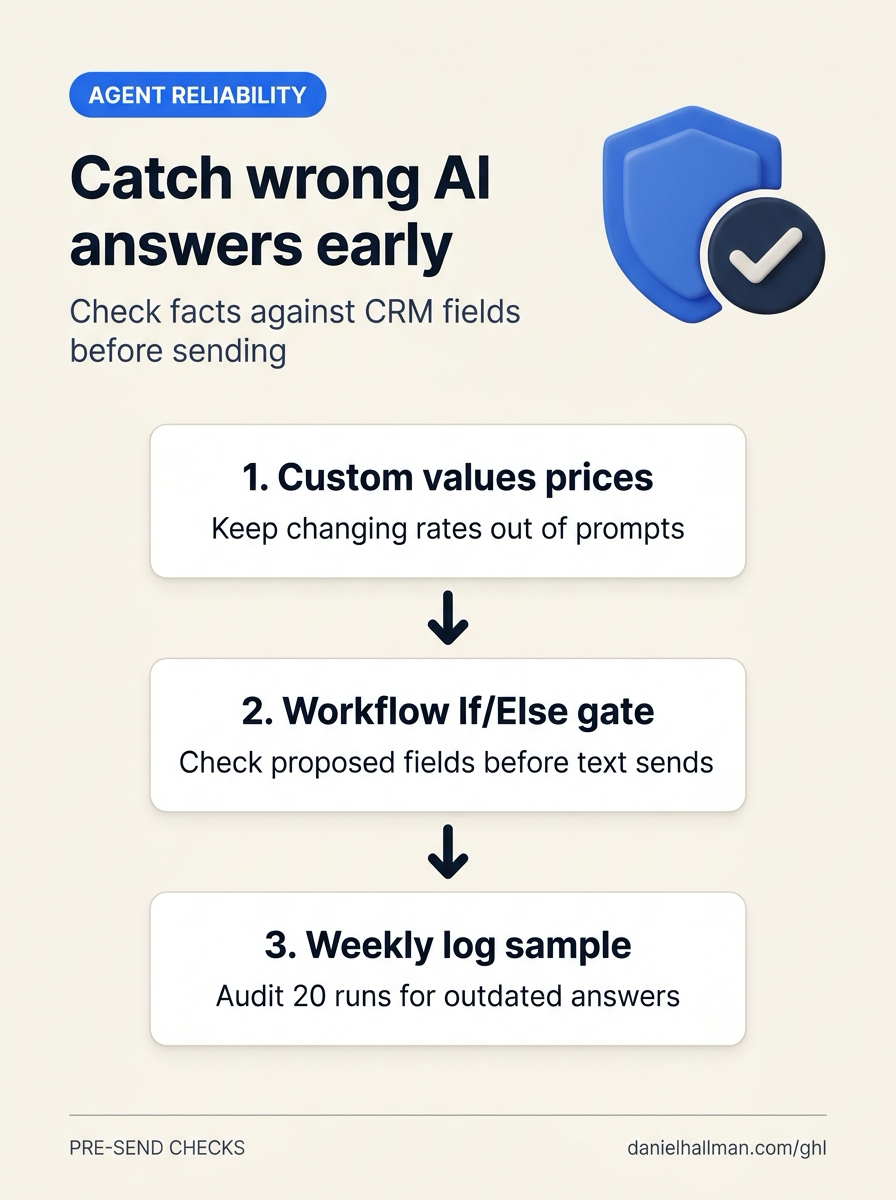
STEP 1In Settings > Custom Values (and AI Agents > Knowledge Base), store changing numbers like dispatch fees, seasonal hours, and promo deadlines as
{{custom_values.*}}keys instead of burying them inside long FAQ paragraphs that go stale.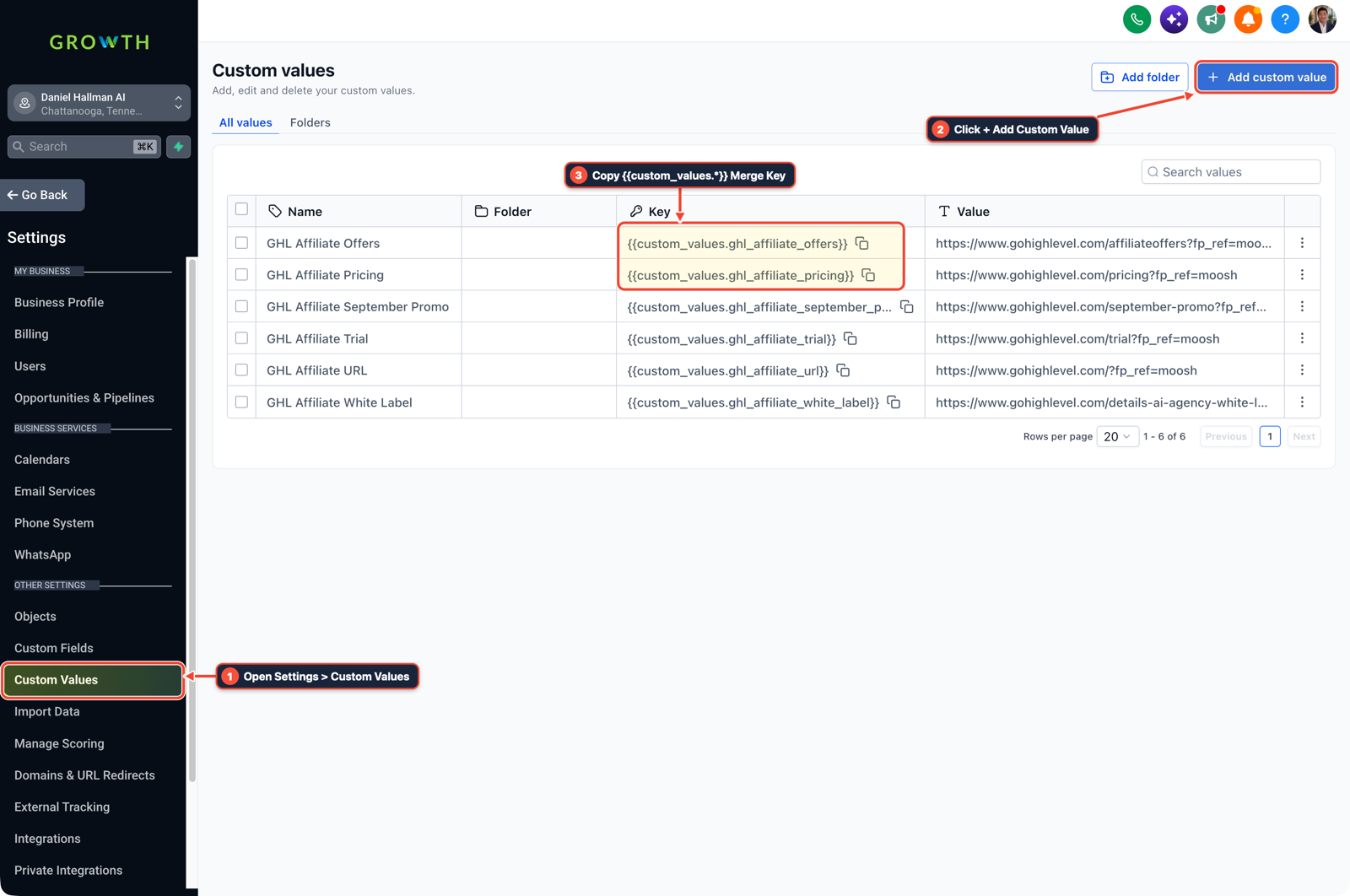
1Open Settings > Custom Values 2Click + Add Custom Value 3Copy {{custom_values.*}} Merge Key -
STEP 2In Automation > Workflow Builder, have the agent write its proposed intent and quoted tier into contact custom fields first, then run an If/Else check against your allowed values before firing the Send SMS or Send Email action (routing any mismatch or unknown question to Suggestive mode for a human rep).

1Add If/Else Condition & Tag Guard 2Chain Priority & Wait Steps 3Switch to Settings or Execution Logs -
STEP 3In Automation > Workflow > Execution Logs, log which Knowledge Base topic or intent branch answered each inquiry and review 20 random runs every Friday so you can spot outdated FAQ answers before customers report them.
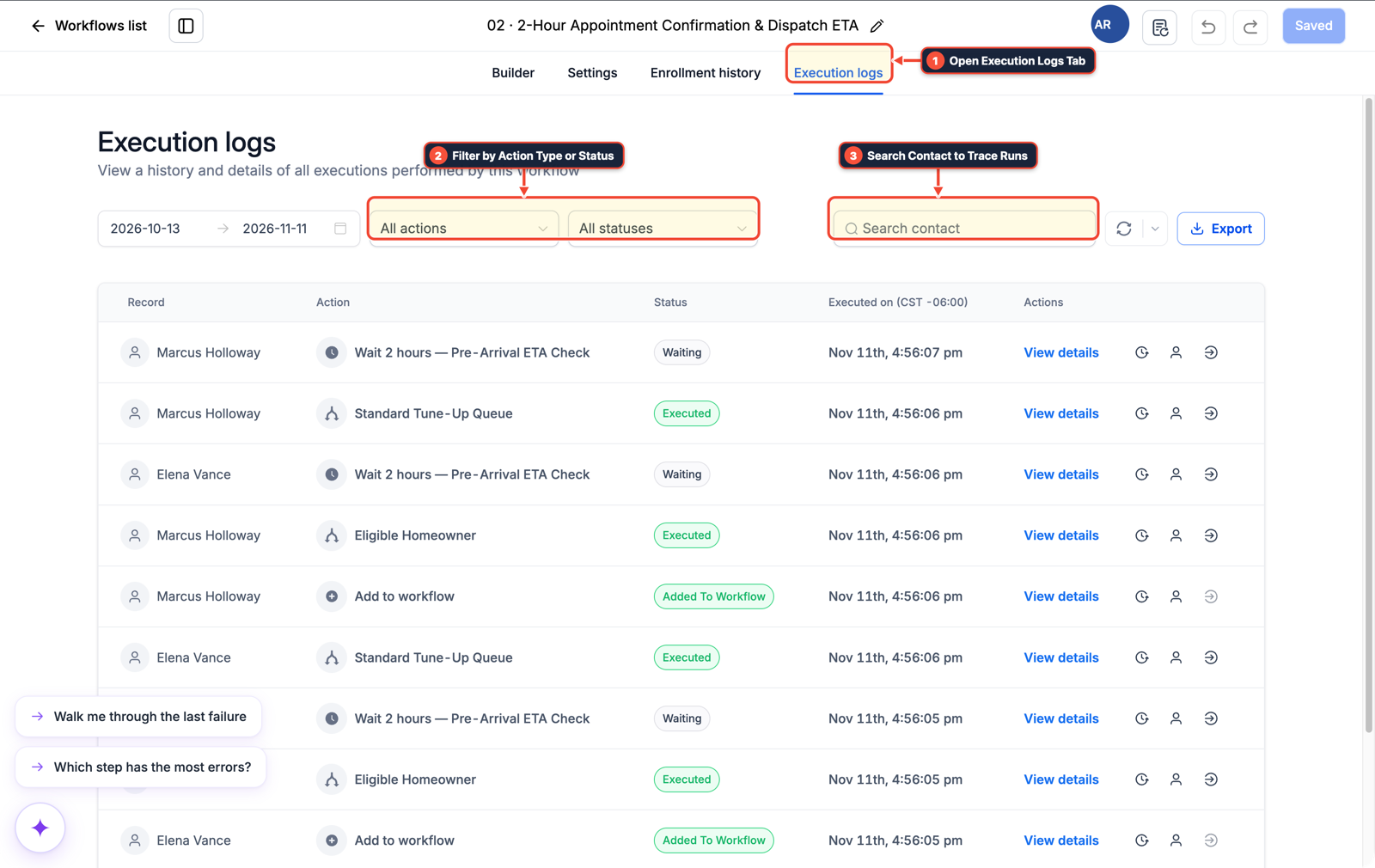
1Open Execution Logs Tab 2Filter by Action Type or Status 3Search Contact to Trace Runs
MODE: AGENT PROMPT
PASTE INTO CLAUDE CODE, CURSOR, CHATGPT, OR GOHIGHLEVEL ASK AI
AGENT PROMPT
Add pre-send field verification and weekly source logging for AI agents in sub-account <YOUR_LOCATION_ID>:
1. In Settings > Custom Values, store current service fees, business hours, and active promotions so Knowledge Base answers never hardcode expiring numbers.
2. In Automation > Workflow Builder, add an If/Else check validating the contact's extracted ai_intent and quoted_amount fields before any outbound SMS or email step fires.
3. In Automation > Workflow > Execution Logs, tag the matched Knowledge Base topic on each run and hold unverified edge cases in Suggestive mode.
GHL-TOOLS MCP SERVER & CLI (DANIELHALLMAN.COM/MCP)
BUILDER + SUB-ACCOUNT TOOLS
# Audit custom values and AI workflow validation branches in the sub-account
ghl-agency custom-values-audit --context <YOUR_CONTEXT> --location <YOUR_LOCATION_ID>
ghl-crm workflows list --context <YOUR_CONTEXT> --location <YOUR_LOCATION_ID>
Official GHL MCP vs. ghl-tools: HighLevel’s official hosted MCP (services.leadconnectorhq.com/mcp) covers public v2 CRM records (contacts, opportunities, appointments, conversations). ghl-tools MCP complements it with workflow graph inspection & recipes, funnel/form builders, DNS/BIMI checks, and ghl-crm doctor audits.
Cause
- Production customer-support and sales agents fail most often on stale retrieval and confident guesses from partial FAQ docs.
- If the model checks its own answer or sends messages directly to the customer without an outside rule check, nobody catches an outdated promo rate or wrong policy until a customer complains.
GoHighLevel Configuration
- Store changing rates and dates in Settings > Custom Values, verify the agent's extracted intent and quoted values with a rule-based If/Else gate in Automation > Workflow Builder before sending
- and review a weekly sample of 20 conversations in Automation > Workflow > Execution Logs.
GoHighLevel Menu Paths
| Step | Menu Path in GHL | Action |
|---|---|---|
| Step 1 | Settings > Custom Values | Store changing numbers like dispatch fees, seasonal hours, and promo deadlines as {{custom_values.*}} keys instead of burying them inside long FAQ paragraphs that go stale. |
| Step 2 | Automation > Workflow Builder | Have the agent write its proposed intent and quoted tier into contact custom fields first, then run an If/Else check against your allowed values before firing the Send SMS or Send Email action (routing any mismatch or unknown question to Suggestive mode for a human rep). |
| Step 3 | Automation > Workflow > Execution Logs | Log which Knowledge Base topic or intent branch answered each inquiry and review 20 random runs every Friday so you can spot outdated FAQ answers before customers report them. |
DEFAULT SETUP VS. AUTOMATED WORKFLOW
Operational Comparison
Speed to Lead & Callback Safety
Caller Reply & Booking Rate
Related Questions
- How Do You Test Whether an AI Agent Reduces Work Instead of Creating Babysitting in GoHighLevel?
- How Do You Stop AI Sales Agents From Giving Unauthorized Discounts or Pricing in GoHighLevel?
- How Do You Prevent Prompt Injection and Free-Text Memory Bugs in GoHighLevel AI Agents?
- What Should an AI Support Bot Do When Your Business Doesn't Have an Answer?
BUILD FASTER IN GOHIGHLEVEL · FREE TRIAL BONUSES + MCP SERVER
Build this directly inside your GoHighLevel sub-account
Connect Claude Code, Cursor, or OpenAI Codex to our ghl-tools MCP Server & Rust CLI to build workflows, forms, and funnels from your editor, or start your GoHighLevel plan through our partner link to unlock $612+ in ready-to-import kits (including GHL Production AI Pre-Send Verification Kit) and weekly live clinics.