GOHIGHLEVEL ANSWERS & PROMPTS: PLAYBOOK T25 · GOOGLE & META CAPI ADS
AUTHOR: DANIEL HALLMAN
KEYWORD: REPORTING
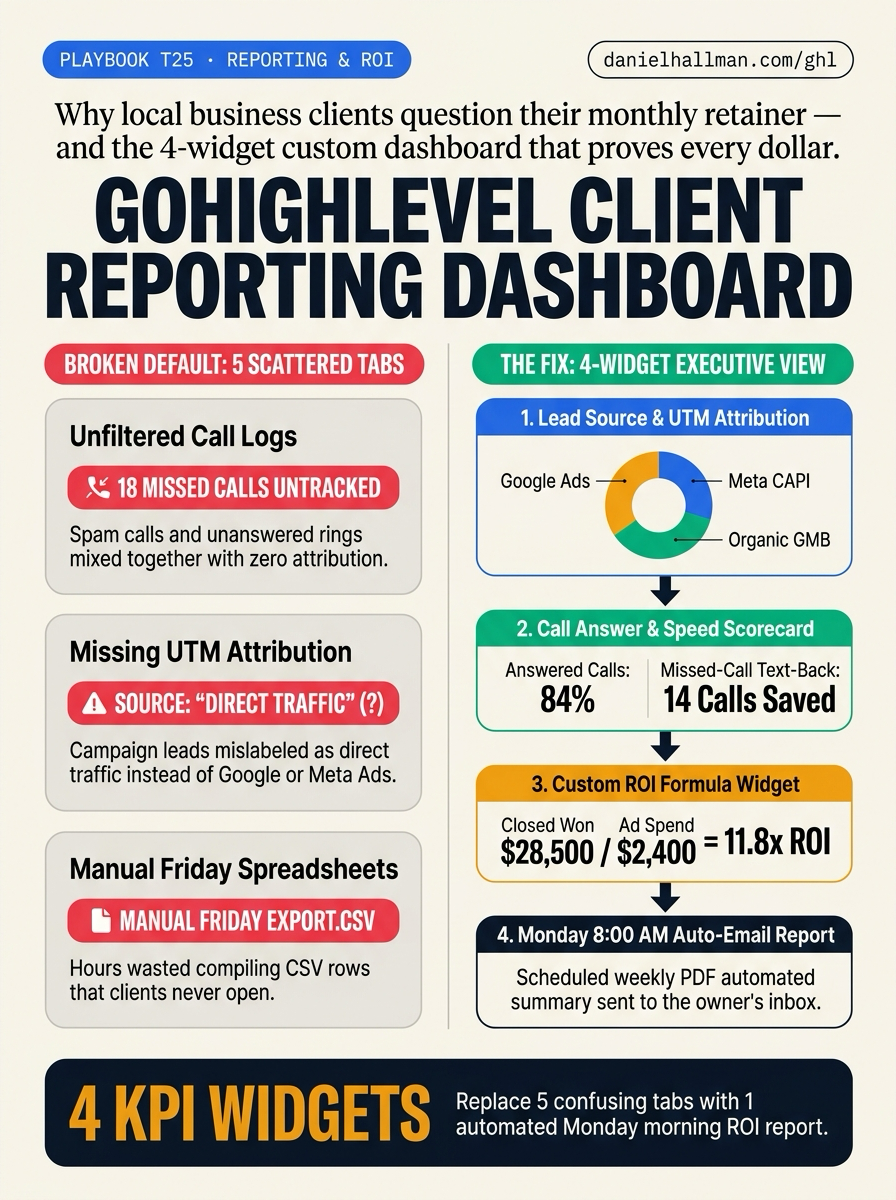
What Usually Goes Wrong
- Most local service clients cancel their monthly retainer not because the automations broke, but because they cannot tell what they received for their fee.
- When a business owner logs into a default GoHighLevel sub-account, they have to click through 5 separate Reporting tabs (Google Ads, Facebook Ads, Attribution, Call Reporting, and Appointment Reporting) filled with unfiltered robocall logs and leads mislabeled as 'Direct Traffic' when UTM templates are missing.
The Simple Fix in GoHighLevel
- Consolidate client reporting into a single 4-Widget Custom Executive Dashboard and automate weekly inbox delivery.
- First, add HighLevel's standard UTM tracking template to your Google Ads and Meta Ads accounts so First Attribution captures the exact campaign and keyword.
- Second, open the Dashboard Widget Gallery and arrange four executive cards: (1) Opportunities by First Attribution Source, (2) Call Status Breakdown paired with Missed-Call Text-Back saves, (3) Appointment Booked vs.
- Showed rate, and (4) a Custom Metric formula dividing Closed Won Opportunity Value by Total Ad Spend.
- Third, use Schedule Report to send a 1-page PDF summary to the client's inbox every Monday at 8:00 AM.
BEFORE VS. AFTER BENCHMARK
What Changes When You Turn This On
Tabs Needed to Prove Client ROI
Monthly Client Retention & Proof
Where to Click in GoHighLevel
| Step | Where to Click in GHL | What to Do |
|---|---|---|
| Step 1 | Connect Google Ads and Meta Ads in Settings -> Integrations with UTM tracking templates active | Connect Google Ads and Meta Ads in Settings -> Integrations with UTM tracking templates active, then click Edit Dashboard -> Add Widget to place four cards on one screen: Opportunities by First Attribution Source (Donut), Call Answer & Missed-Call Text-Back Saves, Appointment Show Rate, and Closed Won Revenue. |
| Step 2 | Add a Live ROAS & Cost-Per-Booked-Job Custom Metric | In the Dashboard Widget drawer, select Custom Metrics and create two formula widgets—Return on Ad Spend (Closed Won Opportunity Value / Total Ad Spend) and Cost Per Booked Appointment (Total Ad Spend / Confirmed + Showed Appointments)—eliminating manual Friday CSV exports. |
| Step 3 | Click the three-dot menu on your Custom Dashboard -> Schedule Report | 00 AM PDF Email Delivery: Click the three-dot menu on your Custom Dashboard -> Schedule Report, select Weekly on Monday at 8:00 AM (plus a Monthly roll-up on the 1st), attach the visual PDF summary, and send it directly to the business owner's email. |
SIMPLE STEP-BY-STEP INSTRUCTIONS + ANNOTATED GHL SCREENSHOTS
How to Set This Up in GoHighLevel (Under 2 Minutes)
-
STEP 1Enable UTM Attribution & Build the 4-Widget Executive Dashboard: Connect Google Ads and Meta Ads in Settings -> Integrations with UTM tracking templates active, then click Edit Dashboard -> Add Widget to place four cards on one screen: Opportunities by First Attribution Source (Donut), Call Answer & Missed-Call Text-Back Saves, Appointment Show Rate, and Closed Won Revenue.
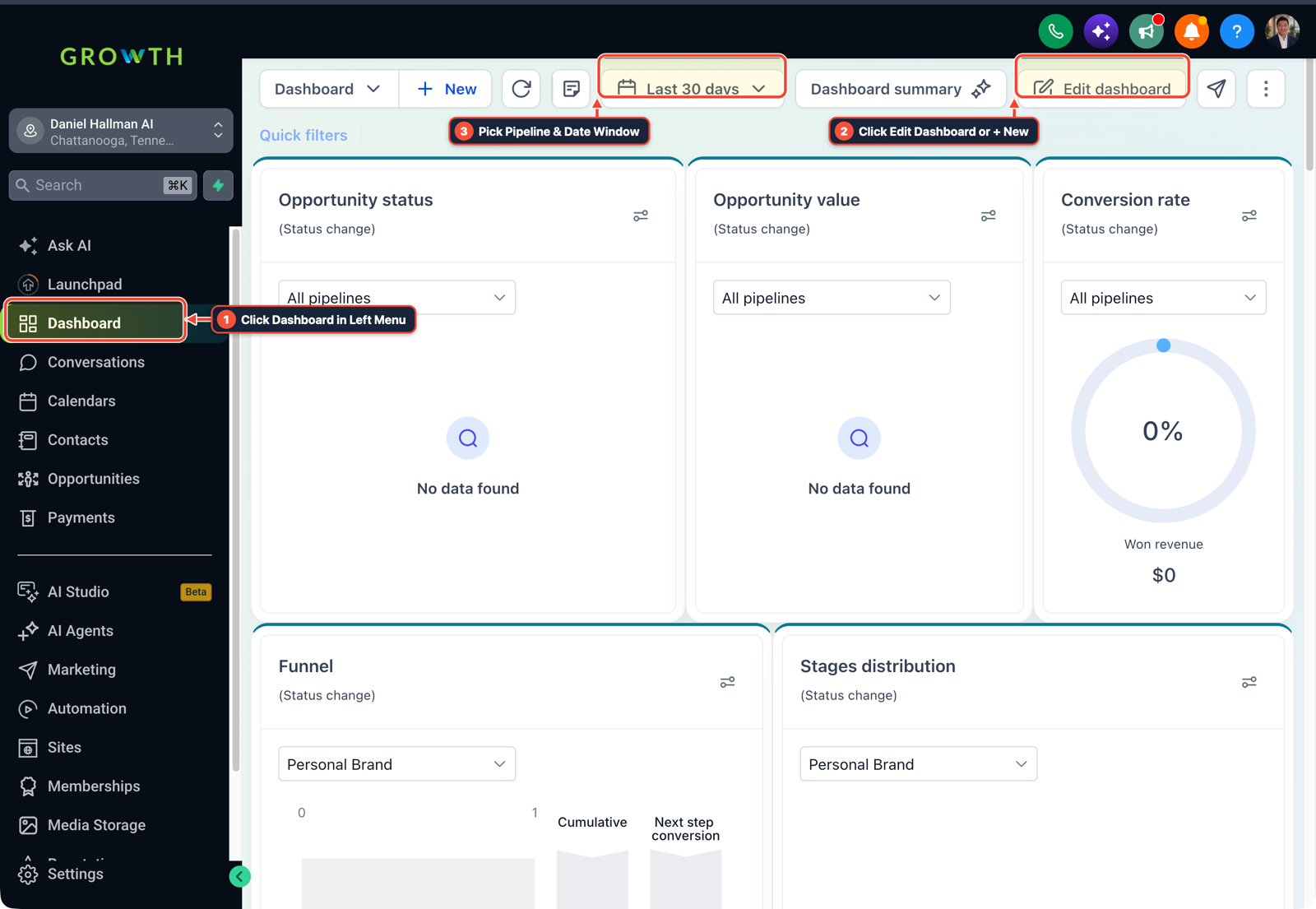
1Click Dashboard in Left Menu 2Click Edit Dashboard or + New 3Pick Pipeline & Date Window -
STEP 2Add a Live ROAS & Cost-Per-Booked-Job Custom Metric: In the Dashboard Widget drawer, select Custom Metrics and create two formula widgets—Return on Ad Spend (Closed Won Opportunity Value / Total Ad Spend) and Cost Per Booked Appointment (Total Ad Spend / Confirmed + Showed Appointments)—eliminating manual Friday CSV exports.
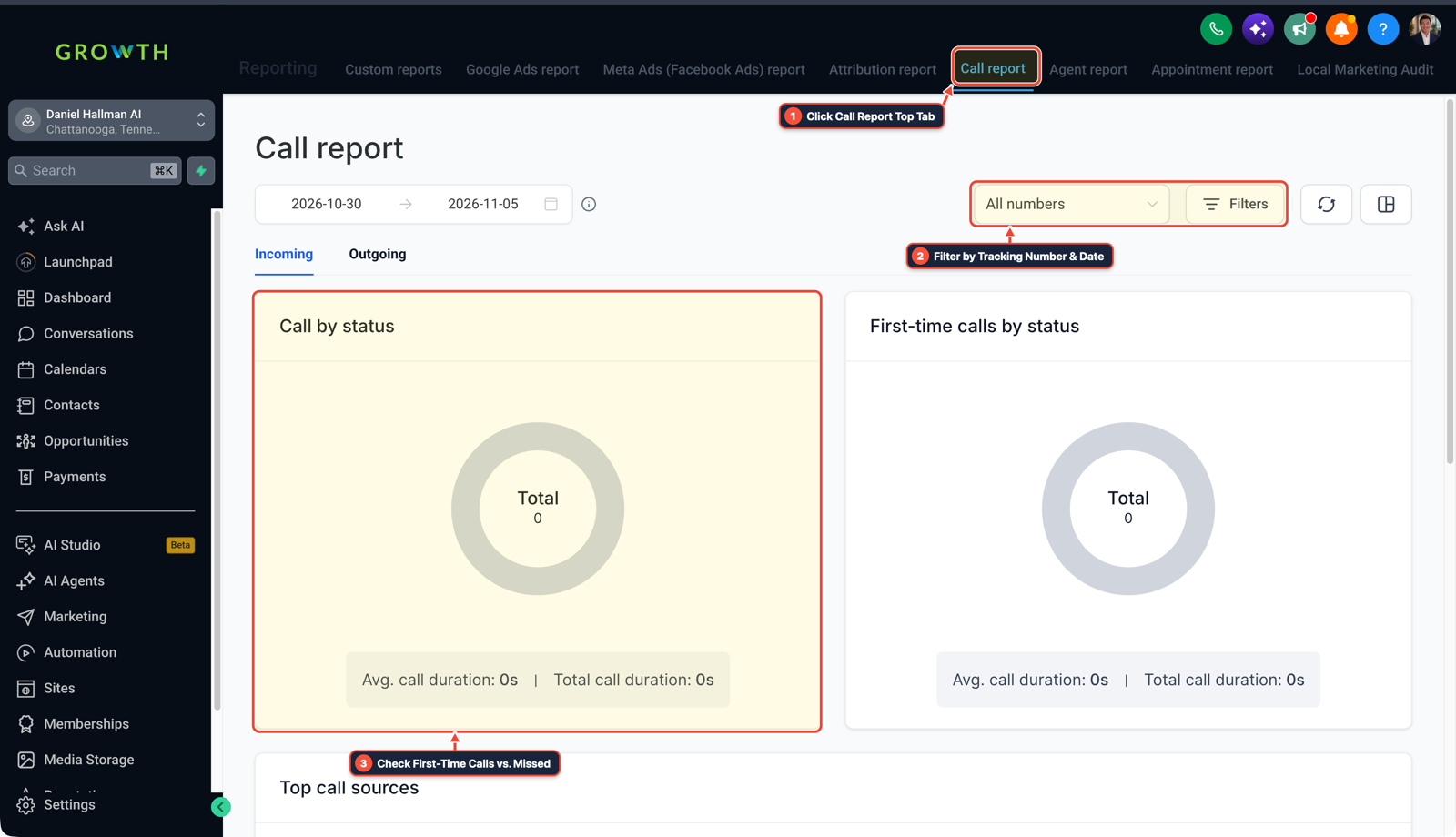
1Click Call Report Top Tab 2Filter by Tracking Number & Date 3Check First-Time Calls vs. Missed -
STEP 3Schedule Automated Monday 8:00 AM PDF Email Delivery: Click the three-dot menu on your Custom Dashboard -> Schedule Report, select Weekly on Monday at 8:00 AM (plus a Monthly roll-up on the 1st), attach the visual PDF summary, and send it directly to the business owner's email.
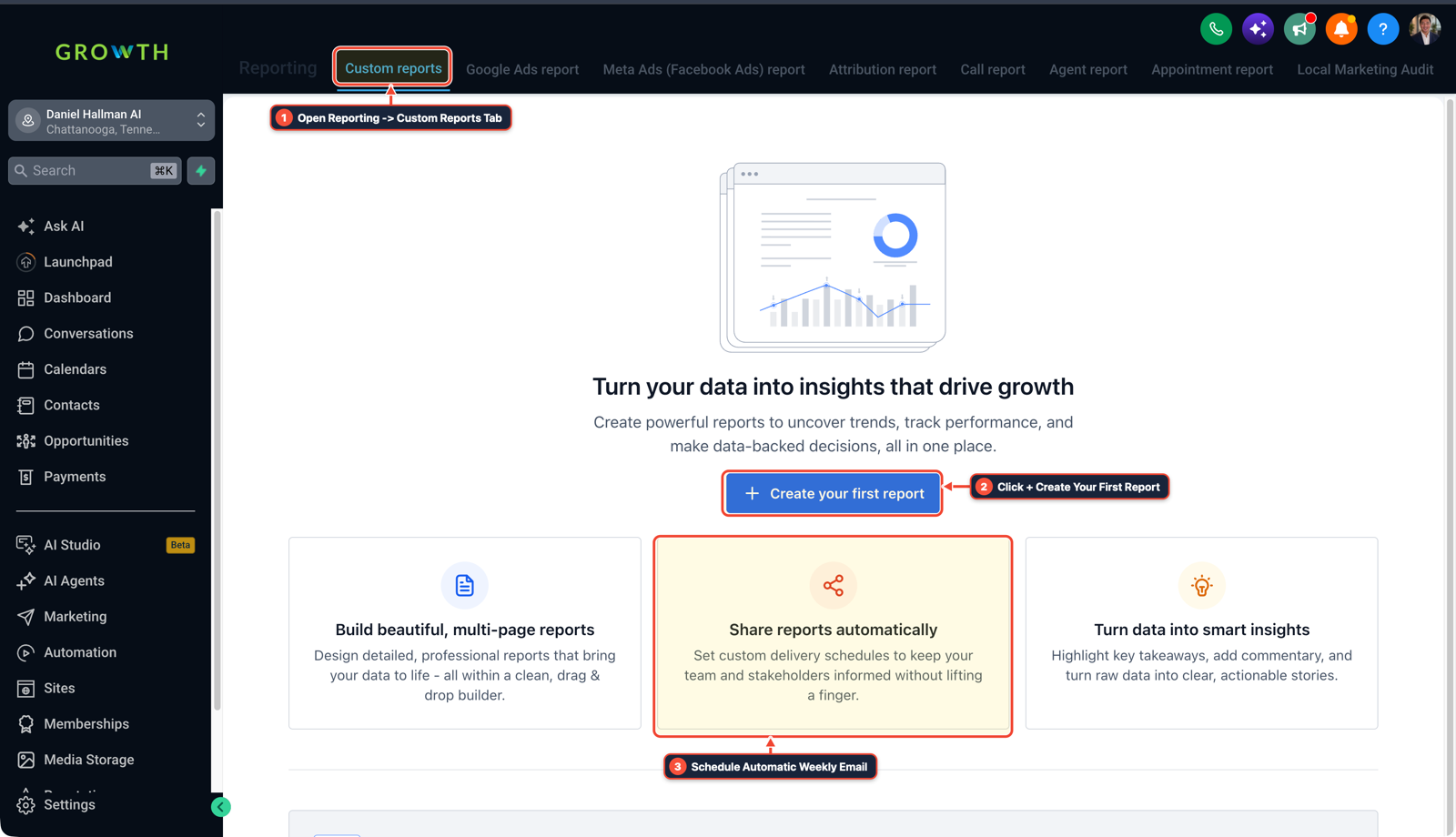
1Open Reporting -> Custom Reports Tab 2Click + Create Your First Report 3Schedule Automatic Weekly Email
MODE: AGENT PROMPT
PASTE THIS PROMPT INTO CLAUDE CODE, CURSOR, CHATGPT, OR YOUR GHL ASSISTANT
SAFE READ-FIRST WORKFLOW
Configure a 4-Widget Executive Client Reporting Dashboard and automated Monday PDF email in our GoHighLevel sub-account:
1. Verify Google Ads and Meta Ads UTM tracking templates are active so First Attribution records campaign, ad group, and keyword sources instead of 'Direct Traffic'.
2. Create a Custom Dashboard named 'Executive ROI Summary' with 4 core widgets:
   - Widget 1: Opportunities by First Attribution Source (Donut chart: Google Ads, Meta CAPI, Organic GMB).
   - Widget 2: Call Status Scorecard (Answered vs. Missed Calls + Missed-Call Text-Back conversations saved).
   - Widget 3: Appointment Funnel (Booked -> Confirmed -> Showed -> Won conversion rate).
   - Widget 4: Custom Metric Formula displaying Live ROAS (Total Won Opportunity Value / Total Ad Spend) and Cost Per Booked Job.
3. Configure Scheduled Reports to email a PDF snapshot of 'Executive ROI Summary' to the client owner every Monday at 8:00 AM local time.
RUN WITH OUR GHL-TOOLS MCP SERVER OR RUST CLI (DANIELHALLMAN.COM/MCP)
SUPPORTS --DRY-RUN PREVIEW
# 1. MCP Tool Call (ghl-crm-mcp)
{
  "tool": "dashboards_apply_template",
  "arguments": {
    "location_id": "<YOUR_LOCATION_ID>",
    "template": "executive_4_widget_roi",
    "schedule_weekly_pdf": "MON_0800",
    "dry_run": true
  }
}

# 2. Or run a 30-second sub-account & attribution audit via ghl-crm Rust CLI
ghl-crm doctor --location-id <YOUR_LOCATION_ID>
Related GoHighLevel Questions & Fixes
PLAYBOOK T21 · Ad Attribution & CAPI
How do you set up Facebook Conversion API (CAPI) and Google Offline Conversions in GoHighLevel?
Stop firing your primary ad conversion pixel on raw form submissions; instead, fire HighLevel's native Facebook Conversion API (CAPI) and Google Offline Conversion workflow actions when the pipeline stage moves to 'Appointment Booked' or 'Job Won'.
PLAYBOOK T02 · SaaS Mode & SnapshotsHow do you sell GoHighLevel to local contractors and home service businesses?
Skip the $2,500 AI buzzword pitch: call local plumbers, roofers, or HVAC shops on Saturday at 6 PM, note which ones go to voicemail, and show them how a $297–$497/month Missed-Call Text-Back setup saves their next weekend repair job.
PLAYBOOK T16 · Calendars & BookingHow do you reduce appointment no-shows and stop double bookings in GoHighLevel?
Enable both Linked Calendar and Conflict Calendar sync on Google/Outlook, require a two-way 'Reply C to confirm' SMS 3 hours before the slot, and auto-text a 1-tap reschedule link if unconfirmed.
PLAYBOOK T13 · SaaS Mode & SnapshotsHow do you onboard a new GoHighLevel agency client fast?
Skip the 40-question onboarding form: run one 45-minute live Zoom sprint right after payment to connect DNS, Google Business Profile, and call forwarding on the spot.
BUILD FASTER IN GOHIGHLEVEL · FREE TRIAL BONUSES + MCP SERVER
Want this built inside your GoHighLevel account automatically?
Connect Claude Code, Cursor, or OpenAI Codex to our ghl-tools MCP Server & Rust CLI for 30-second sub-account checks and --dry-run previews—or start/upgrade your GoHighLevel plan through our partner link to unlock up to $612+ in ready-to-import kits (including GHL 3-Tier Operator Bonus Stack ($291 to $612+ Free with Trial/Upgrade)) and our weekly live clinics.