GOHIGHLEVEL ANSWERS & PROMPTS: PLAYBOOK T21 · AD ATTRIBUTION & CAPI
AUTHOR: DANIEL HALLMAN
KEYWORD: CAPI
STEP-BY-STEP INSTRUCTIONS + ANNOTATED GHL SCREENSHOTS
Steps in GoHighLevel
-
STEP 1Connect Meta Pixel and Google Ads: In Settings > Integrations, connect your Meta Dataset/Pixel (with Conversions API token) and your Google Ads account.
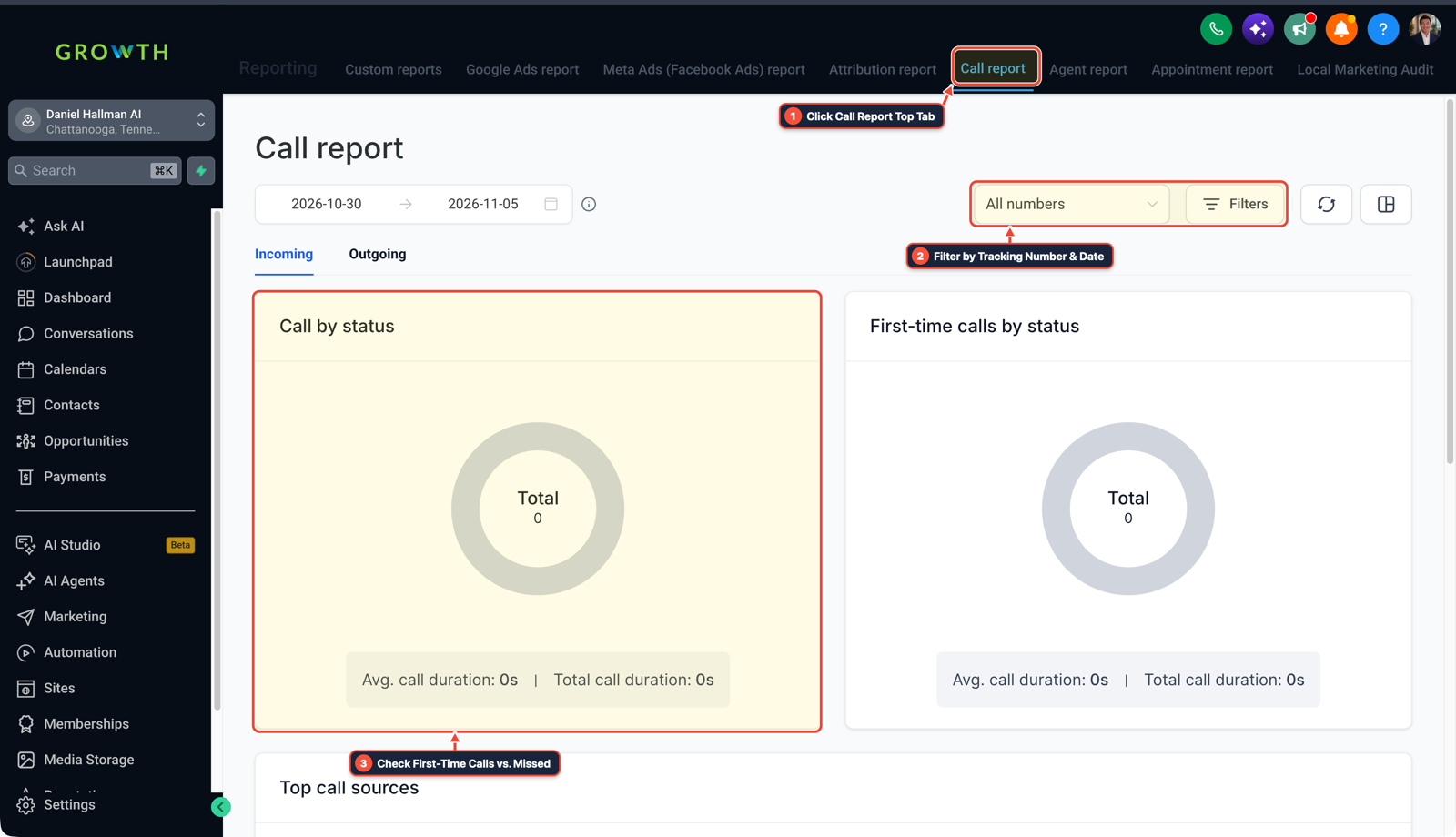
1Click Call Report Top Tab 2Filter by Tracking Number & Date 3Check First-Time Calls vs. Missed -
STEP 2Trigger on Qualified Pipeline Stage: In Automation > Workflows, create a workflow triggered on Opportunity Stage Changed (
Stage = Appointment BookedorJob Won).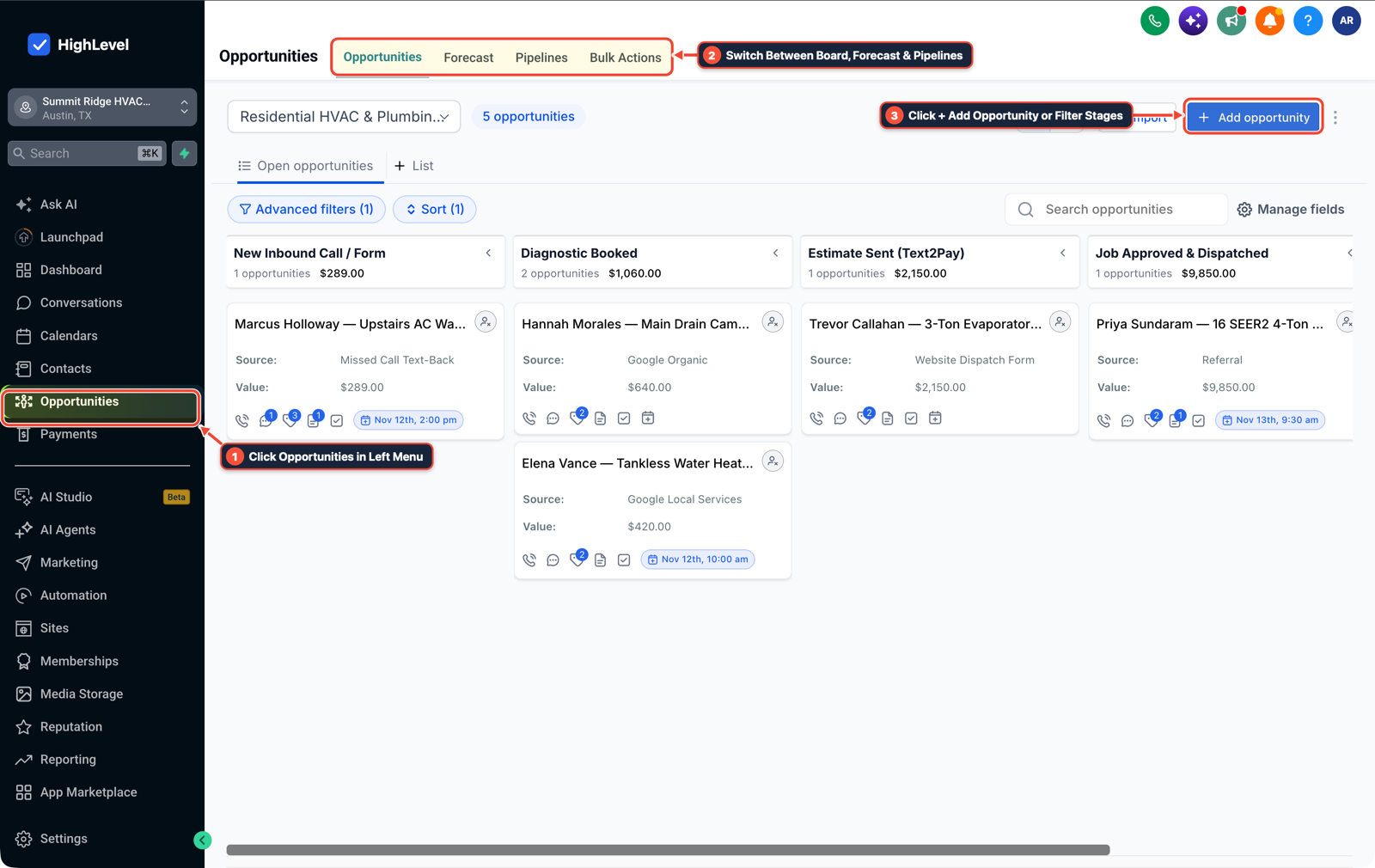
1Click Opportunities in Left Menu 2Switch Between Board, Forecast & Pipelines 3Click + Add Opportunity or Filter Stages -
STEP 3Fire Server-Side CAPI and Offline Conversions: In Automation > Workflows, add Facebook — Conversion API (
Event = ScheduleorPurchase,Value = {{opportunity.lead_value}}) and Google AdWords — Add to Offline Conversion.
1Add If/Else Condition & Tag Guard 2Chain Priority & Wait Steps 3Switch to Settings or Execution Logs
MODE: AGENT PROMPT
PASTE INTO CLAUDE CODE, CURSOR, CHATGPT, OR GOHIGHLEVEL ASK AI
AGENT PROMPT
Set up server-side Meta CAPI and Google Offline Conversion pipeline attribution in our GoHighLevel sub-account:
1. Verify that our funnel forms and Lead Ad integrations are capturing gclid and fbclid attribution parameters onto contact records.
2. Create a Pipeline Attribution workflow triggered when an Opportunity moves to "Appointment Booked" or "Job Won".
3. Configure the native Facebook Conversion API step (passing email, phone, fbclid, and deal value) and Google Offline Conversion step so ad spend optimizes for qualified buyers instead of raw form fills.
GHL-TOOLS MCP SERVER & CLI (DANIELHALLMAN.COM/MCP)
BUILDER + SUB-ACCOUNT TOOLS
# 1. MCP Tool Call (ghl-crm-mcp)
{
  "tool": "workflows_create_from_recipe",
  "arguments": {
    "location_id": "<YOUR_LOCATION_ID>",
    "recipe": "pipeline_capi_offline_conversions",
    "trigger_stages": ["Appointment Booked", "Job Won"]
  }
}

# 2. Or run via ghl-crm Rust CLI
ghl-crm workflows apply-recipe --location-id <YOUR_LOCATION_ID> --recipe capi-offline-sync
Official GHL MCP vs. ghl-tools: HighLevel’s official hosted MCP (services.leadconnectorhq.com/mcp) covers public v2 CRM records (contacts, opportunities, appointments, conversations). ghl-tools MCP complements it with workflow graph inspection & recipes, funnel/form builders, DNS/BIMI checks, and ghl-crm doctor audits.
Cause
- When Meta or Google Ads optimize solely for landing-page form submissions, the ad algorithm floods your funnel with cheap clickers and bots who never answer the phone.
GoHighLevel Configuration
- Let HighLevel automatically capture
fbclid,fbc,fbp - and
gclidon form fill or Lead Ad sync, then trigger server-side Meta CAPI (Schedule/Purchase) and Google Offline Conversion steps from your pipeline stage workflow when a lead actually books or pays.
GoHighLevel Menu Paths
| Step | Menu Path in GHL | Action |
|---|---|---|
| Step 1 | Settings > Integrations | Connect your Meta Dataset/Pixel (with Conversions API token) and your Google Ads account. |
| Step 2 | Automation > Workflows | Create a workflow triggered on Opportunity Stage Changed (Stage = Appointment Booked or Job Won). |
| Step 3 | Automation > Workflows | Add Facebook — Conversion API (Event = Schedule or Purchase, Value = {{opportunity.lead_value}}) and Google AdWords — Add to Offline Conversion. |
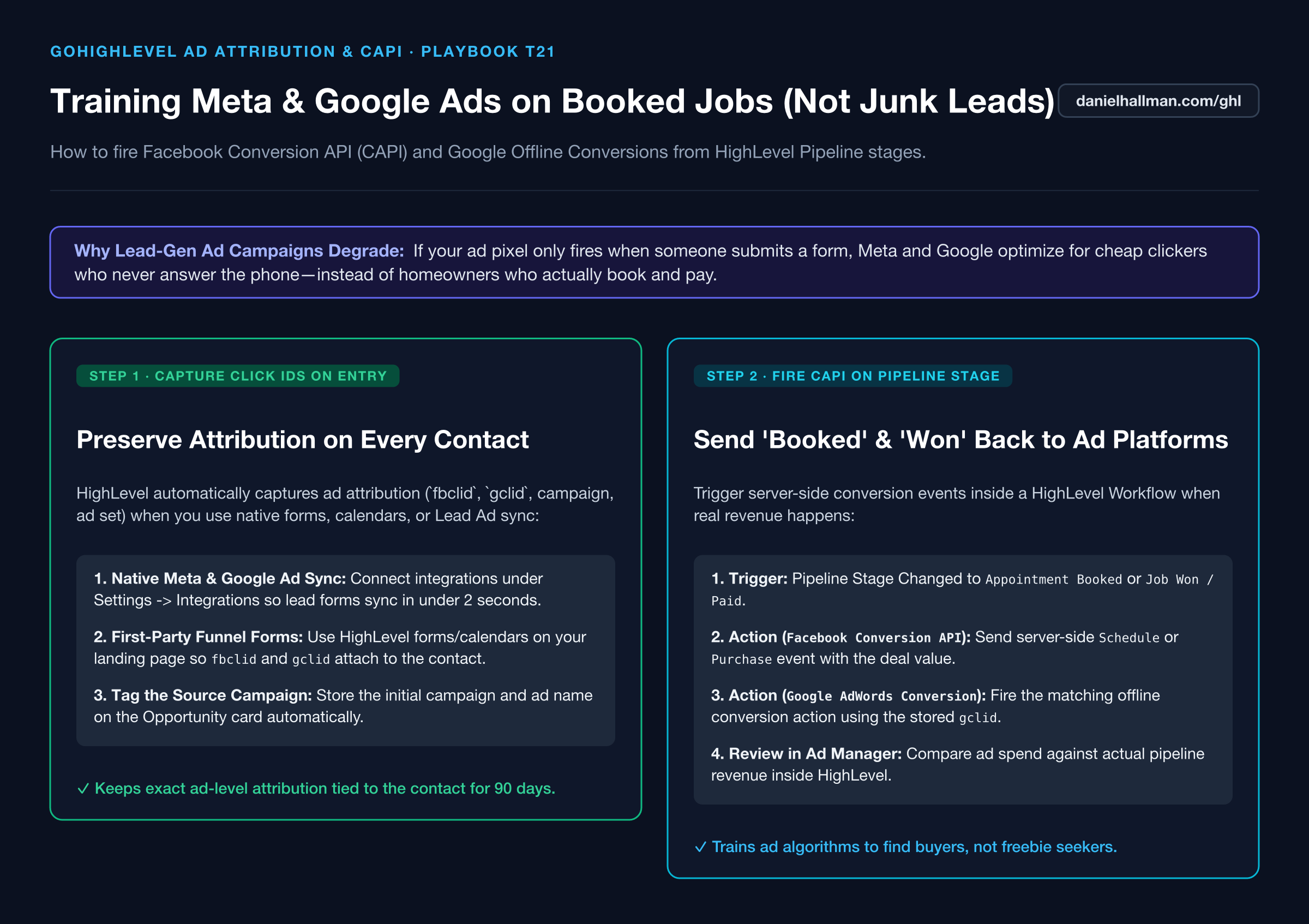
DEFAULT SETUP VS. AUTOMATED WORKFLOW
Operational Comparison
Manual Admin Work Per Client
Lead-to-Booked-Job Conversion
Related Questions
- How do you capture partial form submissions in a 2-step GoHighLevel funnel?
- How do you send estimates and collect Text2Pay deposits in GoHighLevel?
- How do you reduce appointment no-shows and stop double bookings in GoHighLevel?
- How do you format data and run math in GoHighLevel Workflows without paying for n8n or Make?
BUILD FASTER IN GOHIGHLEVEL · FREE TRIAL BONUSES + MCP SERVER
Build this directly inside your GoHighLevel sub-account
Connect Claude Code, Cursor, or OpenAI Codex to our ghl-tools MCP Server & Rust CLI to build workflows, forms, and funnels from your editor, or start your GoHighLevel plan through our partner link to unlock $612+ in ready-to-import kits (including GHL Workflow Recipe Pack ($47 — or Free with Trial)) and weekly live clinics.