GOHIGHLEVEL ANSWERS & PROMPTS: PLAYBOOK T16 · CALENDARS & BOOKING
AUTHOR: DANIEL HALLMAN
KEYWORD: CALENDAR
STEP-BY-STEP INSTRUCTIONS + ANNOTATED GHL SCREENSHOTS
Steps in GoHighLevel
-
STEP 1Enable Linked and Conflict Calendars: In Calendars > Calendar Settings > Connections, select the team member's Google or Outlook calendar as both the Linked Calendar and the Conflict Calendar.
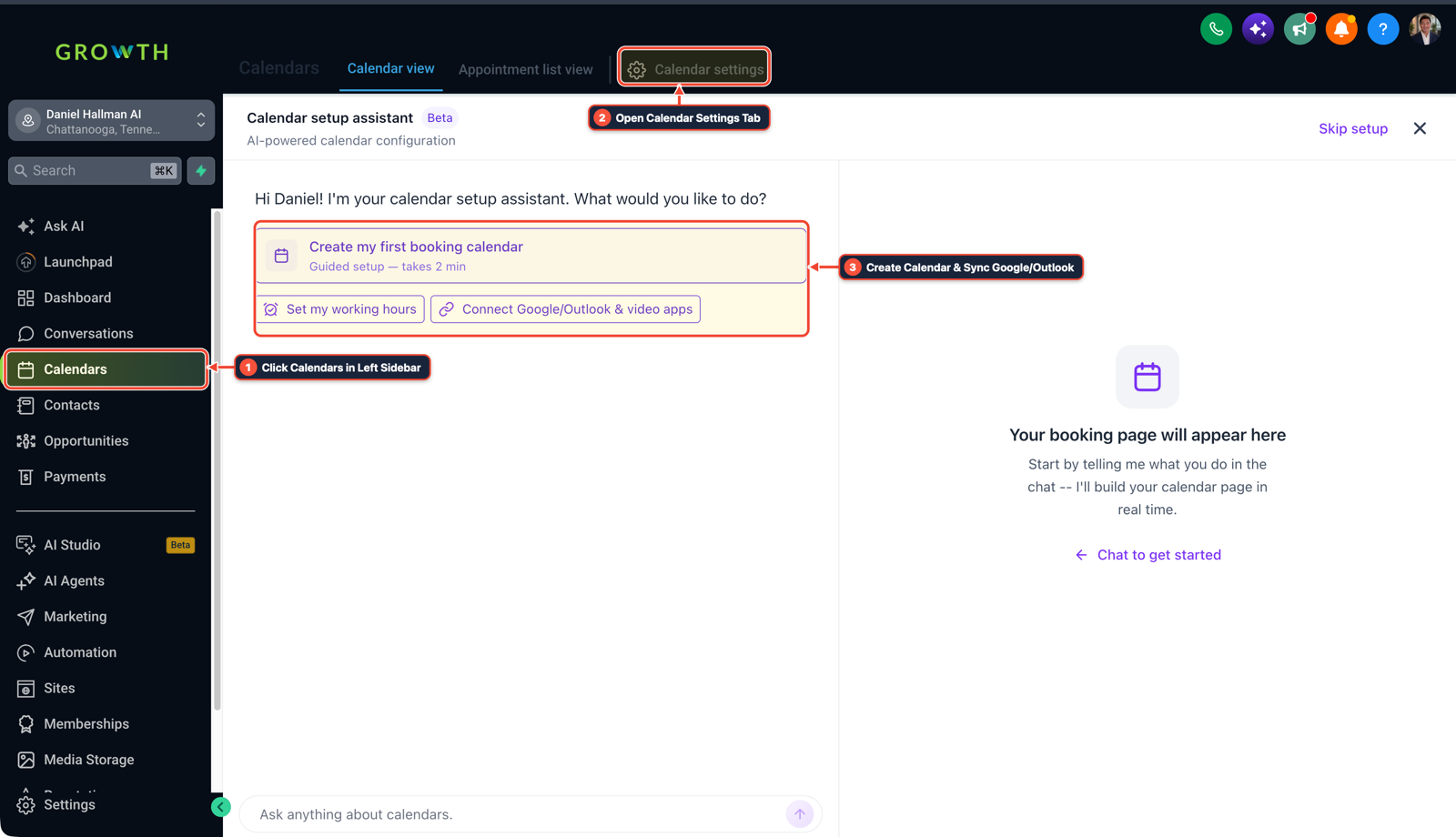
1Click Calendars in Left Sidebar 2Switch Calendar View, List & Settings 3Review Confirmed Bookings or Click + New -
STEP 2Send a 3-Hour Interactive Confirm SMS: In Automation > Workflows, build an appointment reminder workflow that sends a
24hour reminder and a3hour check (Reply C to confirm your slot today at {{appointment.only_start_time}}).
1Add If/Else Condition & Tag Guard 2Chain Priority & Wait Steps 3Switch to Settings or Execution Logs -
STEP 3Update Status or Reschedule via Goal Event: In Automation > Workflows, add a Goal Event listening for
CorConfirm: if met, run Update Appointment Status (Confirmed); if unconfirmed90minutes prior, text a 1-tap reschedule link.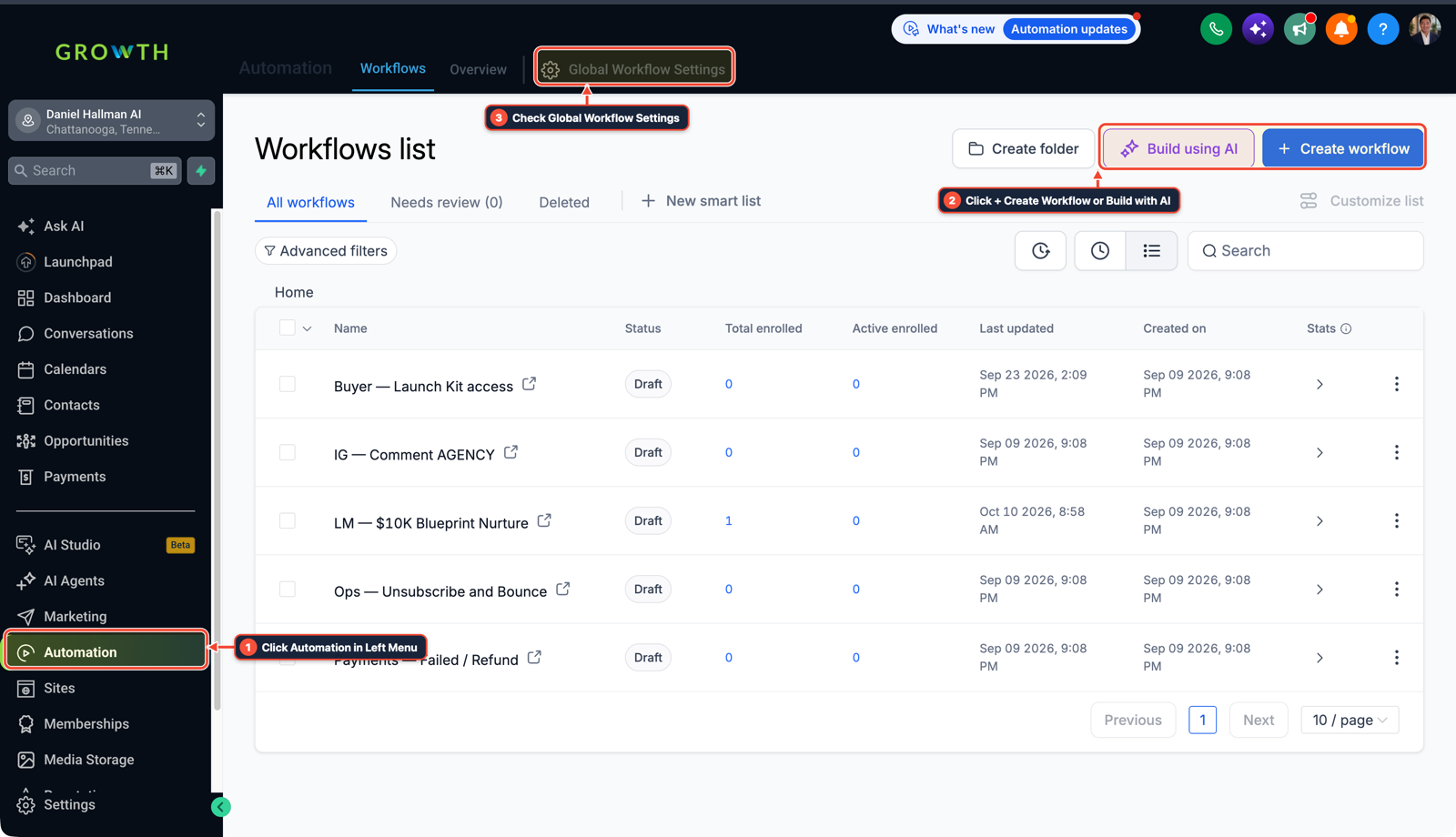
1Click Automation in Left Menu 2Click + Create Workflow or Build with AI 3Check Global Workflow Settings
MODE: AGENT PROMPT
PASTE INTO CLAUDE CODE, CURSOR, CHATGPT, OR GOHIGHLEVEL ASK AI
AGENT PROMPT
Audit our GoHighLevel Calendars v2 setup and build a No-Show Recovery workflow:
1. Check every active calendar to verify that both a Linked Calendar and a Conflict Calendar are enabled so personal events block booking slots.
2. Create an Appointment Confirmation workflow with 24-hour and 3-hour SMS reminders asking the lead to "Reply C to confirm or R to reschedule".
3. Add a No-Show Recovery branch that texts a friendly 1-click reschedule link 10 minutes after any missed appointment.
GHL-TOOLS MCP SERVER & CLI (DANIELHALLMAN.COM/MCP)
BUILDER + SUB-ACCOUNT TOOLS
# 1. MCP Tool Call (ghl-crm-mcp)
{
  "tool": "calendars_configure_noshow_guard",
  "arguments": {
    "location_id": "<YOUR_LOCATION_ID>",
    "require_conflict_sync": true,
    "confirmation_keyword": "C"
  }
}

# 2. Or run via ghl-crm Rust CLI
ghl-crm workflows apply-recipe --location-id <YOUR_LOCATION_ID> --recipe calendar-noshow-recovery
Official GHL MCP vs. ghl-tools: HighLevel’s official hosted MCP (services.leadconnectorhq.com/mcp) covers public v2 CRM records (contacts, opportunities, appointments, conversations). ghl-tools MCP complements it with workflow graph inspection & recipes, funnel/form builders, DNS/BIMI checks, and ghl-crm doctor audits.
Cause
- Connecting a rep's Google Calendar as one-way without selecting Conflict Calendars lets HighLevel book calls right on top of personal events
- while passive reminder texts still suffer 30%+ no-show rates.
GoHighLevel Configuration
- Turn on two-way Conflict Calendar sync in Calendars v2, send an interactive confirmation text 3 hours before the appointment ('Reply C to confirm or R to reschedule')
- and move unconfirmed slots to a fast reschedule flow.
GoHighLevel Menu Paths
| Step | Menu Path in GHL | Action |
|---|---|---|
| Step 1 | Calendars > Calendar Settings > Connections | Select the team member's Google or Outlook calendar as both the Linked Calendar and the Conflict Calendar. |
| Step 2 | Automation > Workflows | Build an appointment reminder workflow that sends a 24 hour reminder and a 3 hour check (Reply C to confirm your slot today at {{appointment.only_start_time}}). |
| Step 3 | Automation > Workflows | Add a Goal Event listening for C or Confirm: if met, run Update Appointment Status (Confirmed); if unconfirmed 90 minutes prior, text a 1-tap reschedule link. |
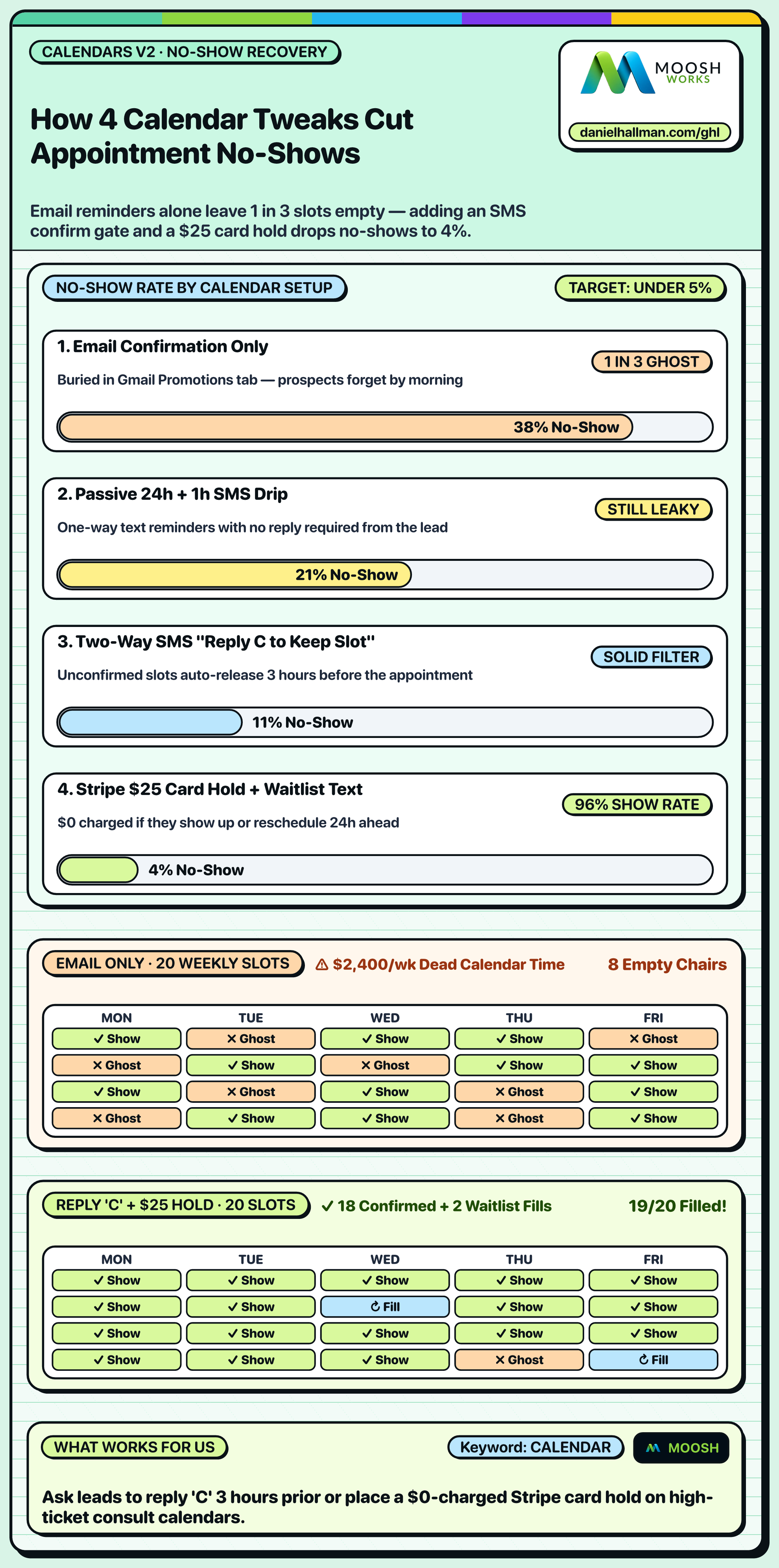
DEFAULT SETUP VS. AUTOMATED WORKFLOW
Operational Comparison
Appointment No-Show Rate
Calendar Slot Utilization
Related Questions
- How do you route callers across multiple office locations and calendars in GoHighLevel?
- How do you capture partial form submissions in a 2-step GoHighLevel funnel?
- How do you send estimates and collect Text2Pay deposits in GoHighLevel?
- How do you replace Zapier, Calendly, and ManyChat with native GoHighLevel Workflows?
BUILD FASTER IN GOHIGHLEVEL · FREE TRIAL BONUSES + MCP SERVER
Build this directly inside your GoHighLevel sub-account
Connect Claude Code, Cursor, or OpenAI Codex to our ghl-tools MCP Server & Rust CLI to build workflows, forms, and funnels from your editor, or start your GoHighLevel plan through our partner link to unlock $612+ in ready-to-import kits (including GHL Workflow Recipe Pack ($47 — or Free with Trial)) and weekly live clinics.