RÉPONSES ET PROMPTS GOHIGHLEVEL : PLAYBOOK T07 · WORKFLOWS ET AUTOMATISATION
AUTEUR : DANIEL HALLMAN
MOT-CLÉ : WORKFLOWS
INSTRUCTIONS ÉTAPE PAR ÉTAPE + CAPTURES D'ÉCRAN ANNOTÉES DE GHL
Étapes dans GoHighLevel
-
ÉTAPE 1Configurer le déclencheur d'appel manqué : Dans Automatisation > Flux de travail, créez un workflow déclenché par Statut de l'appel (
Direction = Incoming,StatusdansBusy,No-Answer, ouVoicemail) et activez Arrêter en cas de réponse sous Paramètres.
1Ajouter une condition If/Else et une protection de balise 2Enchaîner priorité et étapes d'attente 3Basculer vers les paramètres ou les journaux d'exécution -
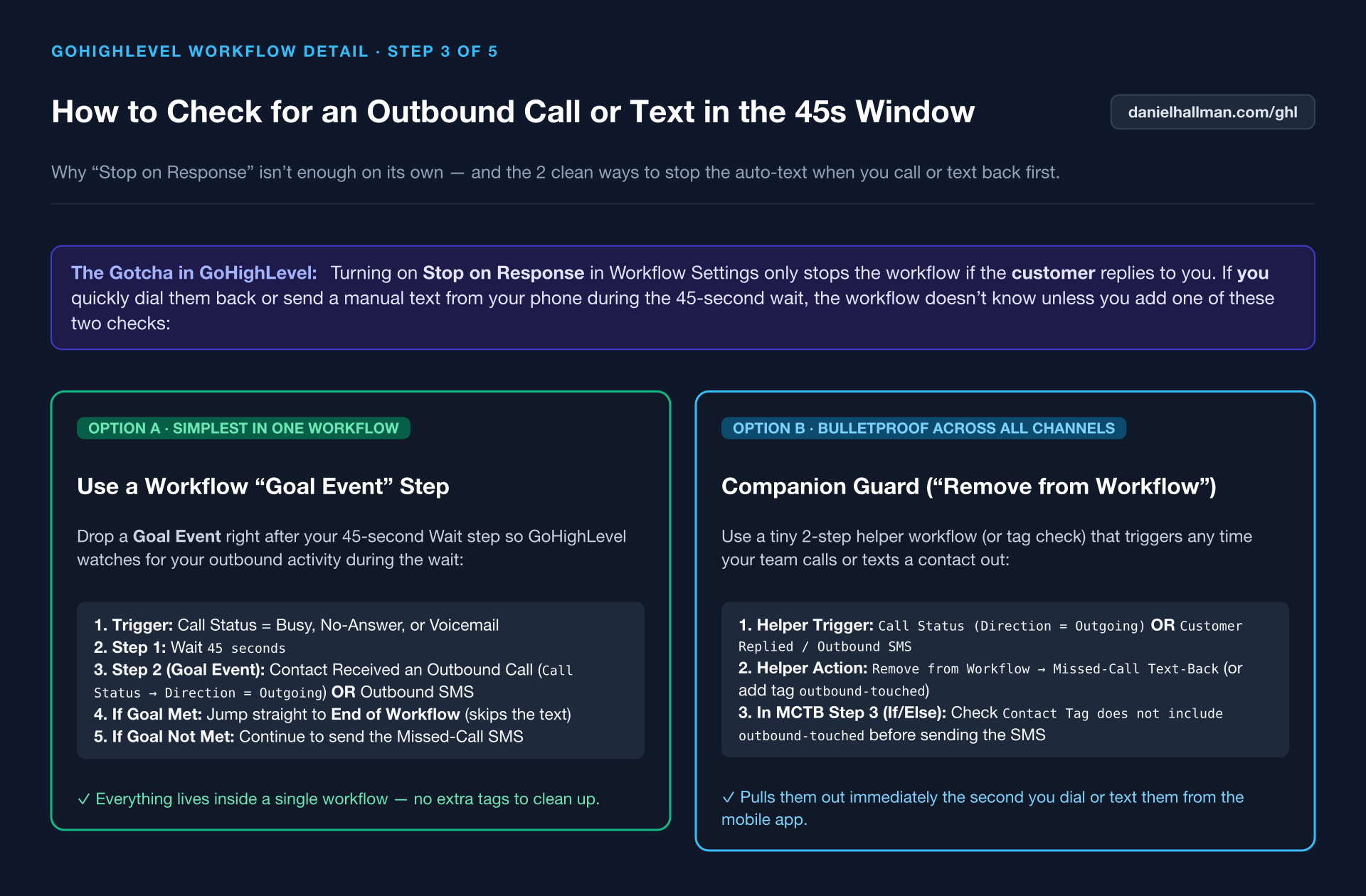
ÉTAPE 2Ajoutez une protection de rappel par le conseiller de 45 secondes : Ajoutez un
45deuxième Attendre étape suivie d'une Événement d'objectif (ou workflow d'accompagnement sur Appel sortant / SMS sortant) qui applique le taghandled-by-repet quitte le workflow.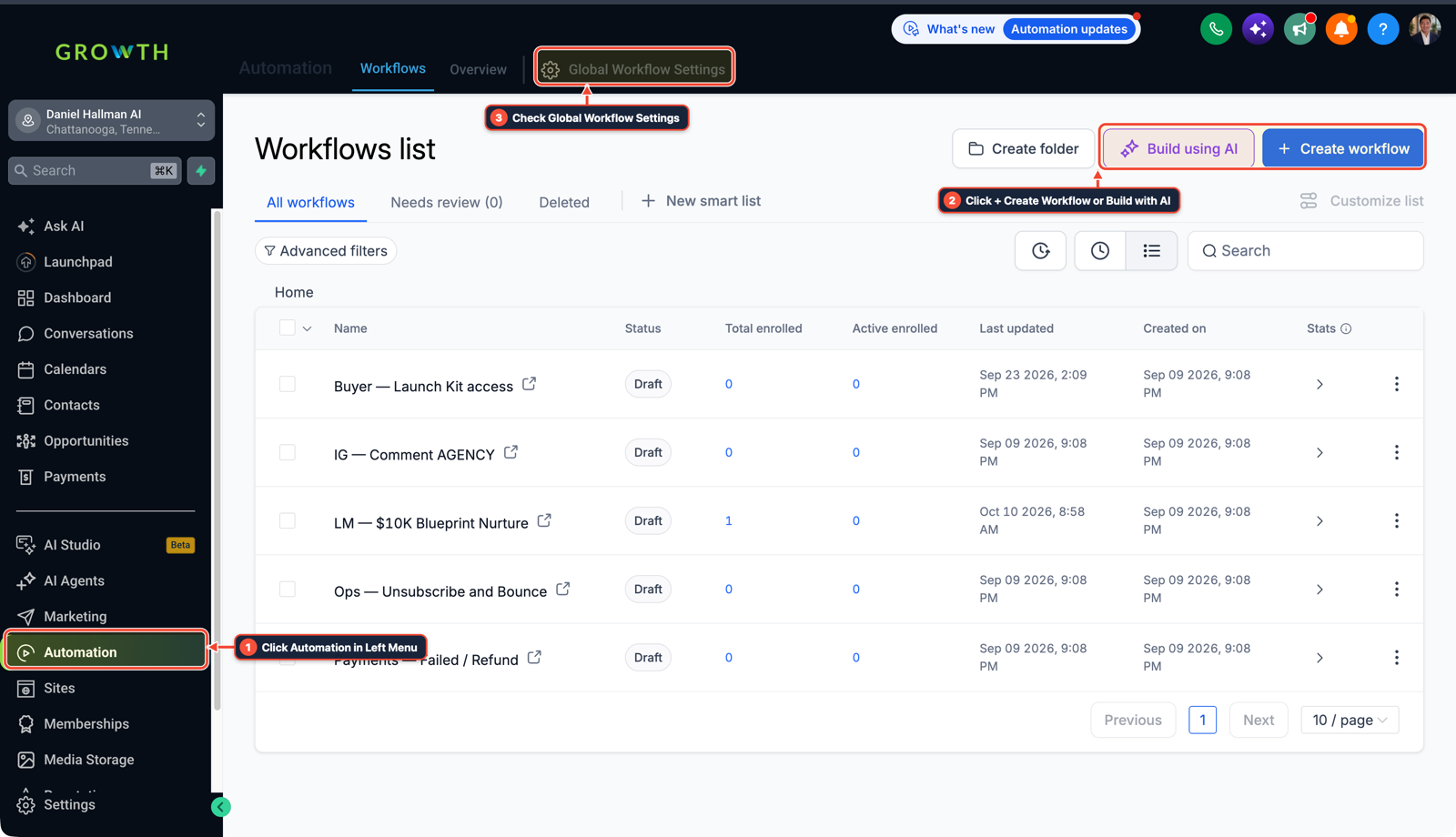
1Cliquer sur Automatisation dans le menu de gauche 2Cliquer sur + Créer un flux de travail ou Créer avec l'IA 3Vérifier les paramètres globaux du flux de travail -
ÉTAPE 3Envoyer le SMS d'accueil : Après l'étape d'attente, ajoutez une action Envoyer un SMS demandant si l'appelant a besoin d'une réparation urgente ou d'un devis et lui réclamant son adresse postale.
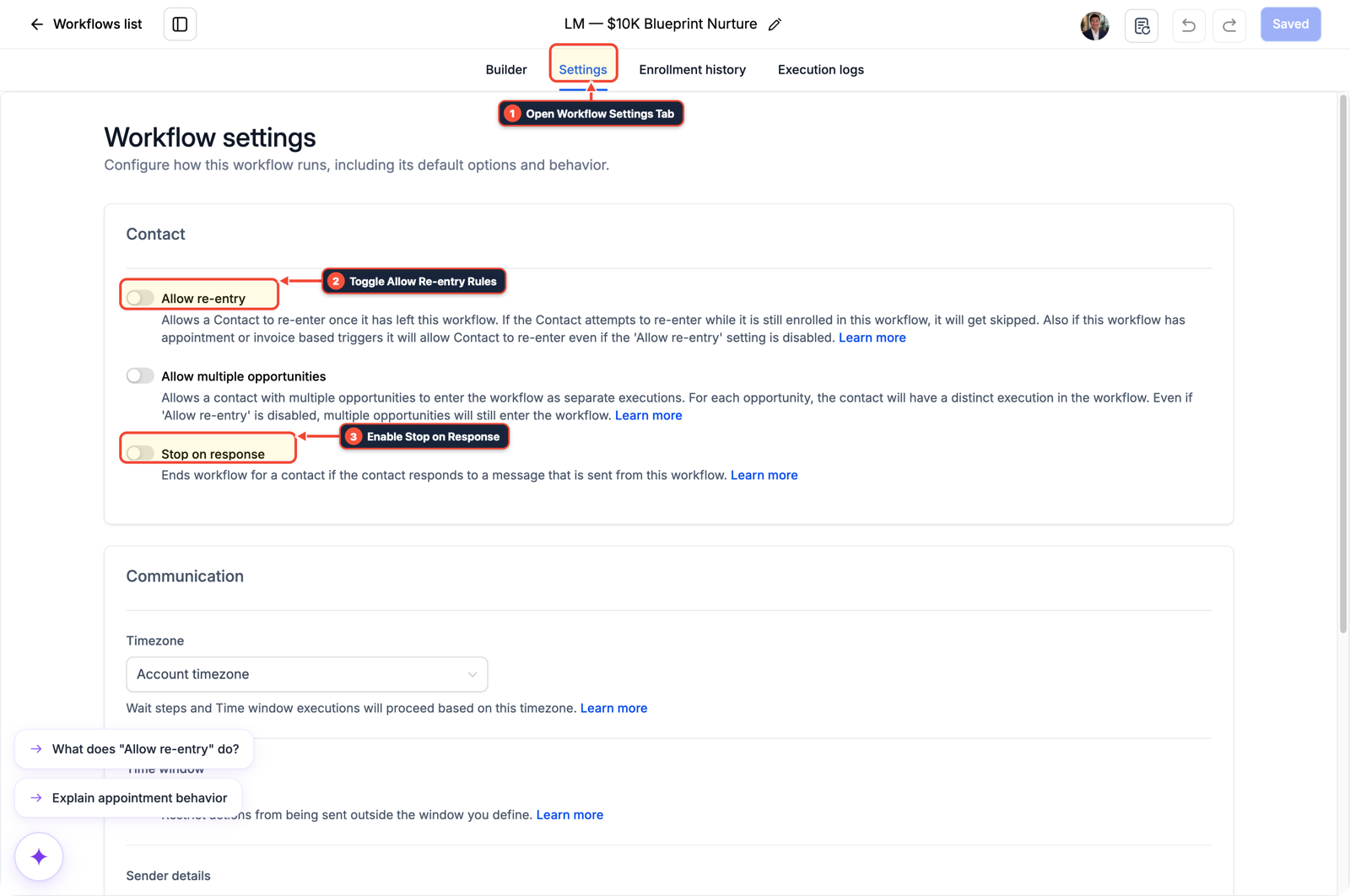
1Ouvrir l'onglet Paramètres du flux de travail 2Basculer les règles d'autorisation de réentrée 3Activer l'arrêt lors de la réponse
MODE : PROMPT D'AGENT
COLLER DANS CLAUDE CODE, CURSOR, CHATGPT OU GOHIGHLEVEL ASK AI PROMPT D'AGENT
You are configuring our GoHighLevel sub-account for a home service business.
1. Check if the native 0-second Missed-Call Text-Back checkbox is enabled in location settings and recommend disabling it.
2. Draft a 5-step HighLevel workflow named "MCTB — 45s Rep Callback Guard":
   - Trigger: Call Status (Direction = Incoming, Status in [Busy, No-Answer, Voicemail]).
   - Settings: Enable "Stop on Response" and "Allow Re-Entry".
   - Step 1: Wait 45 seconds.
   - Step 2: Goal Event / If-Else check for tag "handled-by-rep" or Outgoing Call/SMS activity during the wait window.
   - Step 3: Send SMS: "Hey {{contact.first_name}}, sorry we missed your call at {{location.name}}! Are you reaching out for an urgent repair or a quote, and what is the best street address?"
   - Step 4: Send Internal Notification to the assigned user when the customer replies.
GHL-TOOLS MCP SERVER & CLI (DANIELHALLMAN.COM/MCP)
BUILDER + SUB-ACCOUNT TOOLS
# 1. MCP Tool Call (ghl-crm-mcp)
{
  "tool": "workflows_create_from_recipe",
  "arguments": {
    "location_id": "<YOUR_LOCATION_ID>",
    "recipe": "mctb_45s_outbound_guard",
    "wait_seconds": 45,
    "stop_on_response": true
  }
}

# 2. Or run via ghl-crm Rust CLI
ghl-crm workflows apply-recipe --location-id <YOUR_LOCATION_ID> --recipe mctb-45s-guard
Official GHL MCP vs. ghl-tools: HighLevel’s official hosted MCP (services.leadconnectorhq.com/mcp) covers public v2 CRM records (contacts, opportunities, appointments, conversations). ghl-tools MCP complements it with workflow graph inspection & recipes, funnel/form builders, DNS/BIMI checks, and ghl-crm doctor audits.
Cause
- La case intégrée de réponse automatique par SMS aux appels manqués se déclenche à 0 seconde
- même lorsqu'un plombier ou un technicien s'essuie les mains et rappelle 15 secondes plus tard
- l'envoi d'un message générique « Désolé, nous avons manqué votre appel » qui perturbe l'appelant.
Configuration de GoHighLevel
- Désactivez la case native et exécutez un flux de travail personnalisé avec une étape d'attente de 45 secondes, avec 'Stop on Response' activé
- et un Goal Event ou un workflow associé qui extrait le contact dès qu'un appel sortant ou un SMS manuel est consigné.
Chemins de menu GoHighLevel
| Étape | Chemin du menu dans GHL | Action |
|---|---|---|
| Étape 1 | Automation > Workflows | Créez un flux de travail déclenché par Statut de l'appel (Direction = Incoming, Status dans Busy, No-Answer, ou Voicemail) et activez Arrêter en cas de réponse sous Paramètres. |
| Étape 2 | Automatisation > Workflows > + Créer un workflow | Ajoutez un 45 deuxième Attendre étape suivie d'une Événement d'objectif (ou workflow d'accompagnement sur Appel sortant / SMS sortant) qui applique le tag handled-by-rep et quitte le workflow. |
| Étape 3 | Automatisation > Workflow > Paramètres > Stop on Response | Après l'étape d'attente, ajoutez une Envoyer un SMS action demandant si l'appelant a besoin d'une réparation urgente ou d'un devis et lui demandant son adresse. |
CONFIGURATION PAR DÉFAUT VS FLUX DE TRAVAIL AUTOMATISÉ
Comparaison opérationnelle
Rapidité de réponse et sécurité de rappel
Taux de réponse et de réservation
Questions associées
- Comment empêcher le répondeur en direct de l'iPhone de bloquer l'envoi de SMS de rappel de GoHighLevel ?
- Comment bloquer les appels automatisés Google Business pour éviter de consommer des minutes Voice AI sur GoHighLevel ?
- Comment acheminer les appels d'urgence de réparation le week-end dans GoHighLevel pour que les artisans ne ratent jamais un chantier ?
- Comment formater des données et exécuter des opérations mathématiques dans les flux de travail GoHighLevel sans payer pour n8n ou Make ?
CONSTRUISEZ PLUS VITE DANS GOHIGHLEVEL · BONUS D'ESSAI GRATUIT + SERVEUR MCP
Créez ceci directement dans votre sous-compte GoHighLevel
Connectez Claude Code, Cursor ou OpenAI Codex à notre ghl-tools Serveur MCP et CLI Rust pour créer des flux de travail, formulaires et tunnels depuis votre éditeur, ou commencez votre forfait GoHighLevel via notre lien partenaire pour débloquer $612+ en kits prêts à importer (y compris Pack de recettes de flux de travail GHL (47 $ — ou gratuit avec l'essai)) et cliniques en direct hebdomadaires.