GOHIGHLEVEL ANTWORTEN & PROMPTS: PLAYBOOK T07 · WORKFLOWS & AUTOMATISIERUNG
AUTOR: DANIEL HALLMAN
SCHLÜSSELWORT: WORKFLOWS
SCHRITT-FÜR-SCHRITT-ANLEITUNGEN + MIT ANMERKUNGEN VERSEHENE GHL-SCREENSHOTS
Schritte in GoHighLevel
-
SCHRITT 1Missed-Call-Auslöser konfigurieren: In Automatisierung > Workflows, erstellen Sie einen Workflow, der ausgelöst wird durch Anrufstatus (
Direction = Incoming,StatusinBusy,No-Answer, oderVoicemail) und aktivieren Sie Bei Antwort anhalten unter Einstellungen.
1If/Else-Bedingung und Tag-Schutz hinzufügen 2Prioritäts- & Warteschritte verketten 3Zu Einstellungen oder Ausführungsprotokollen wechseln -
SCHRITT 2Fügen Sie einen 45-Sekunden-Rückrufschutz für Vertriebsmitarbeiter hinzu: Fügen Sie ein
45zweites Warten Schritt gefolgt von einem Ziel-Ereignis (oder Begleit-Workflow auf Ausgehender Anruf / Ausgehende SMS), das den Tag anwendethandled-by-repund beendet den Workflow.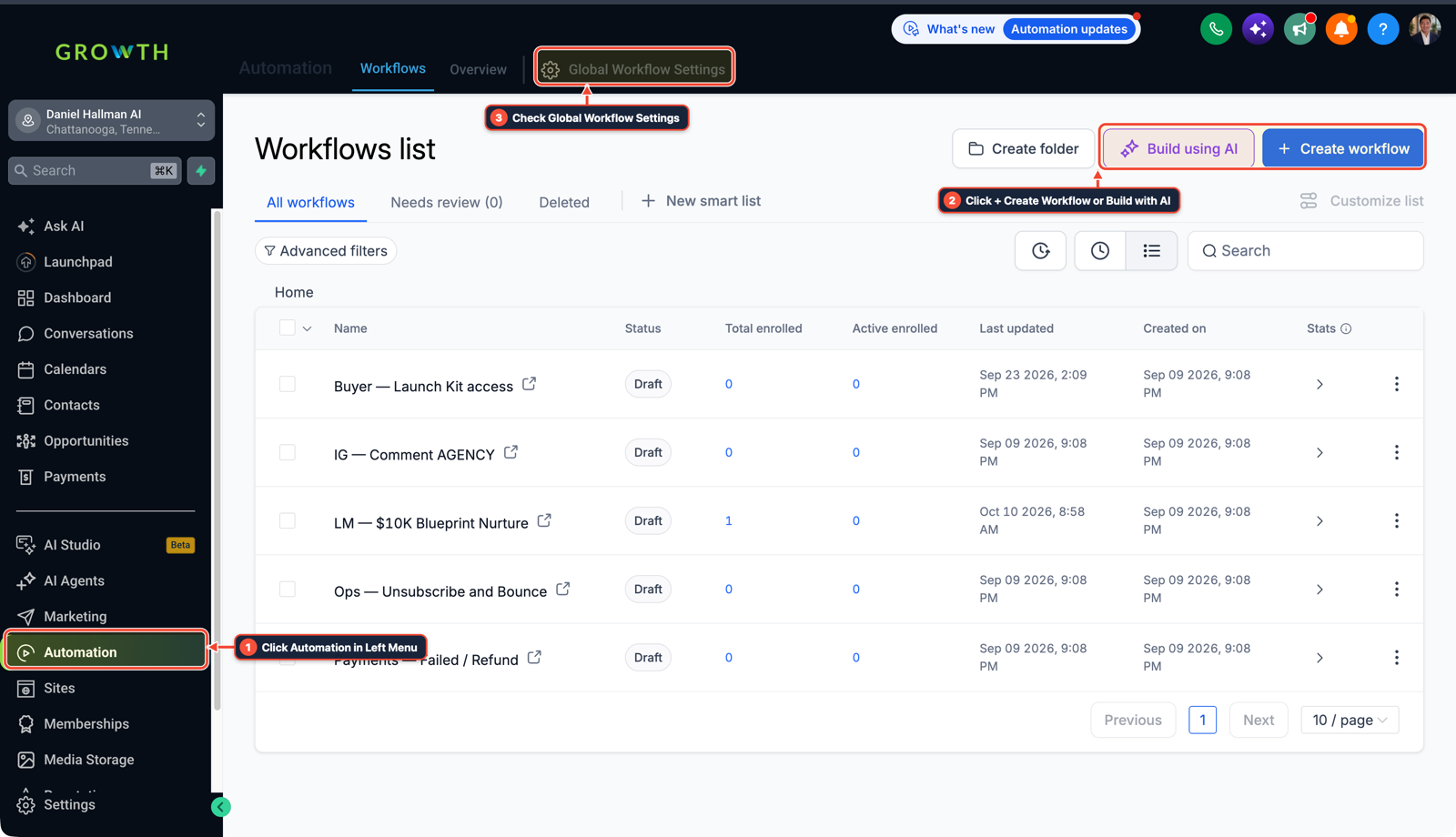
1Auf Automation im linken Menü klicken 2Auf + Workflow erstellen oder Mit KI erstellen klicken 3Globale Workflow-Einstellungen prüfen -
SCHRITT 3Aufnahme-SMS senden: Nach dem Warteschritt eine Aktion SMS senden hinzufügen, in der gefragt wird, ob der Anrufer eine dringende Reparatur oder einen Kostenvoranschlag benötigt, und die Straßenadresse erfragt wird.
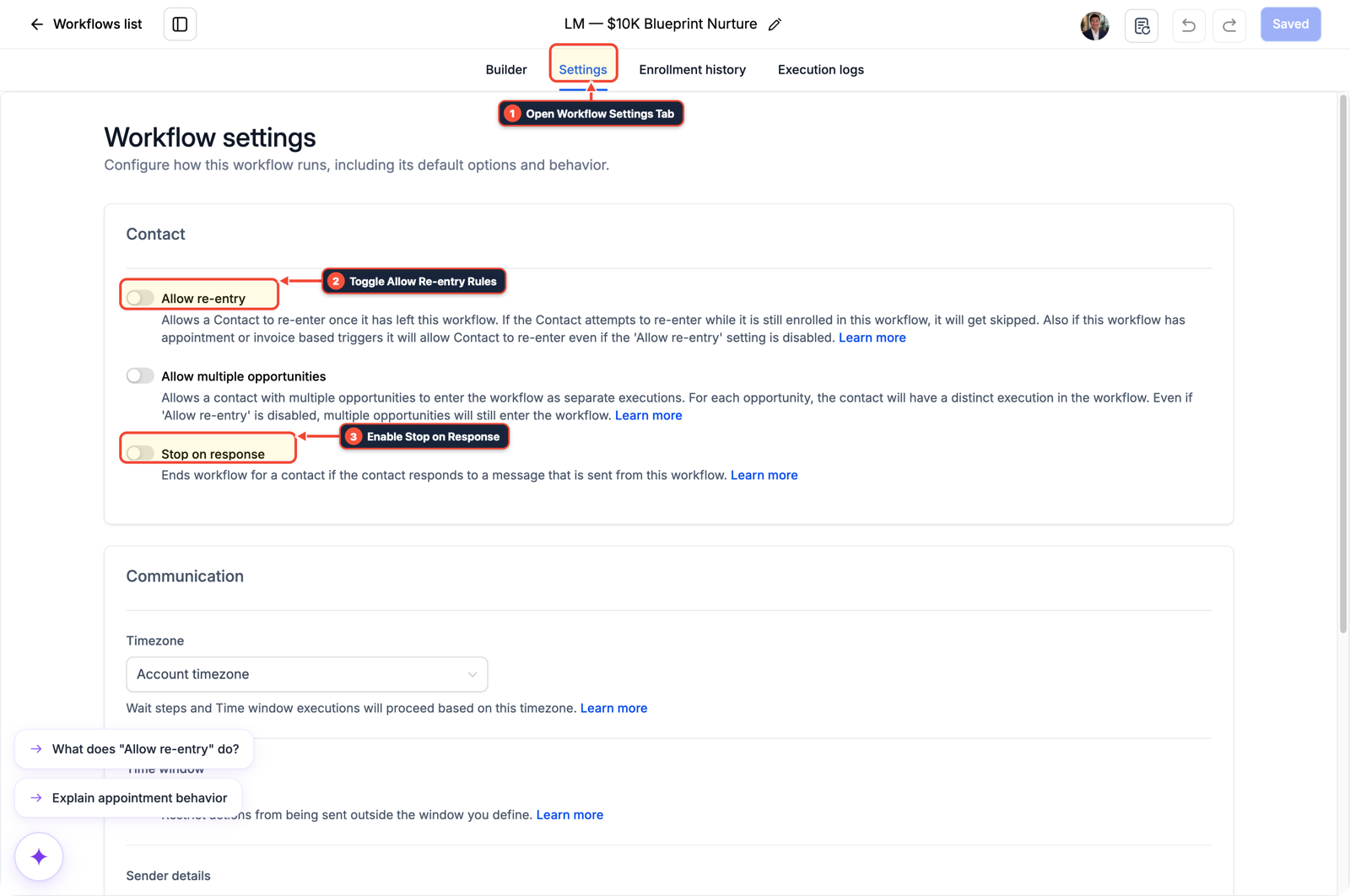
1Den Tab Workflow-Einstellungen öffnen 2Wiedereintrittsregeln umschalten 3Bei Antwort anhalten aktivieren
MODUS: AGENT-PROMPT
IN CLAUDE CODE, CURSOR, CHATGPT ODER GOHIGHLEVEL ASK AI EINFÜGEN AGENTEN-PROMPT
You are configuring our GoHighLevel sub-account for a home service business.
1. Check if the native 0-second Missed-Call Text-Back checkbox is enabled in location settings and recommend disabling it.
2. Draft a 5-step HighLevel workflow named "MCTB — 45s Rep Callback Guard":
   - Trigger: Call Status (Direction = Incoming, Status in [Busy, No-Answer, Voicemail]).
   - Settings: Enable "Stop on Response" and "Allow Re-Entry".
   - Step 1: Wait 45 seconds.
   - Step 2: Goal Event / If-Else check for tag "handled-by-rep" or Outgoing Call/SMS activity during the wait window.
   - Step 3: Send SMS: "Hey {{contact.first_name}}, sorry we missed your call at {{location.name}}! Are you reaching out for an urgent repair or a quote, and what is the best street address?"
   - Step 4: Send Internal Notification to the assigned user when the customer replies.
GHL-TOOLS MCP SERVER & CLI (DANIELHALLMAN.COM/MCP)
BUILDER + SUB-ACCOUNT TOOLS
# 1. MCP Tool Call (ghl-crm-mcp)
{
  "tool": "workflows_create_from_recipe",
  "arguments": {
    "location_id": "<YOUR_LOCATION_ID>",
    "recipe": "mctb_45s_outbound_guard",
    "wait_seconds": 45,
    "stop_on_response": true
  }
}

# 2. Or run via ghl-crm Rust CLI
ghl-crm workflows apply-recipe --location-id <YOUR_LOCATION_ID> --recipe mctb-45s-guard
Official GHL MCP vs. ghl-tools: HighLevel’s official hosted MCP (services.leadconnectorhq.com/mcp) covers public v2 CRM records (contacts, opportunities, appointments, conversations). ghl-tools MCP complements it with workflow graph inspection & recipes, funnel/form builders, DNS/BIMI checks, and ghl-crm doctor audits.
Ursache
- Das integrierte Kontrollkästchen für den SMS-Rückruf bei verpassten Anrufen wird bei 0 Sekunden ausgelöst
- selbst wenn sich ein Klempner oder Techniker die Hände abwischt und 15 Sekunden später zurückruft
- das Senden einer generischen 'Entschuldigung, wir haben Ihren Anruf verpasst'-SMS, die den Anrufer verwirrt.
GoHighLevel-Konfiguration
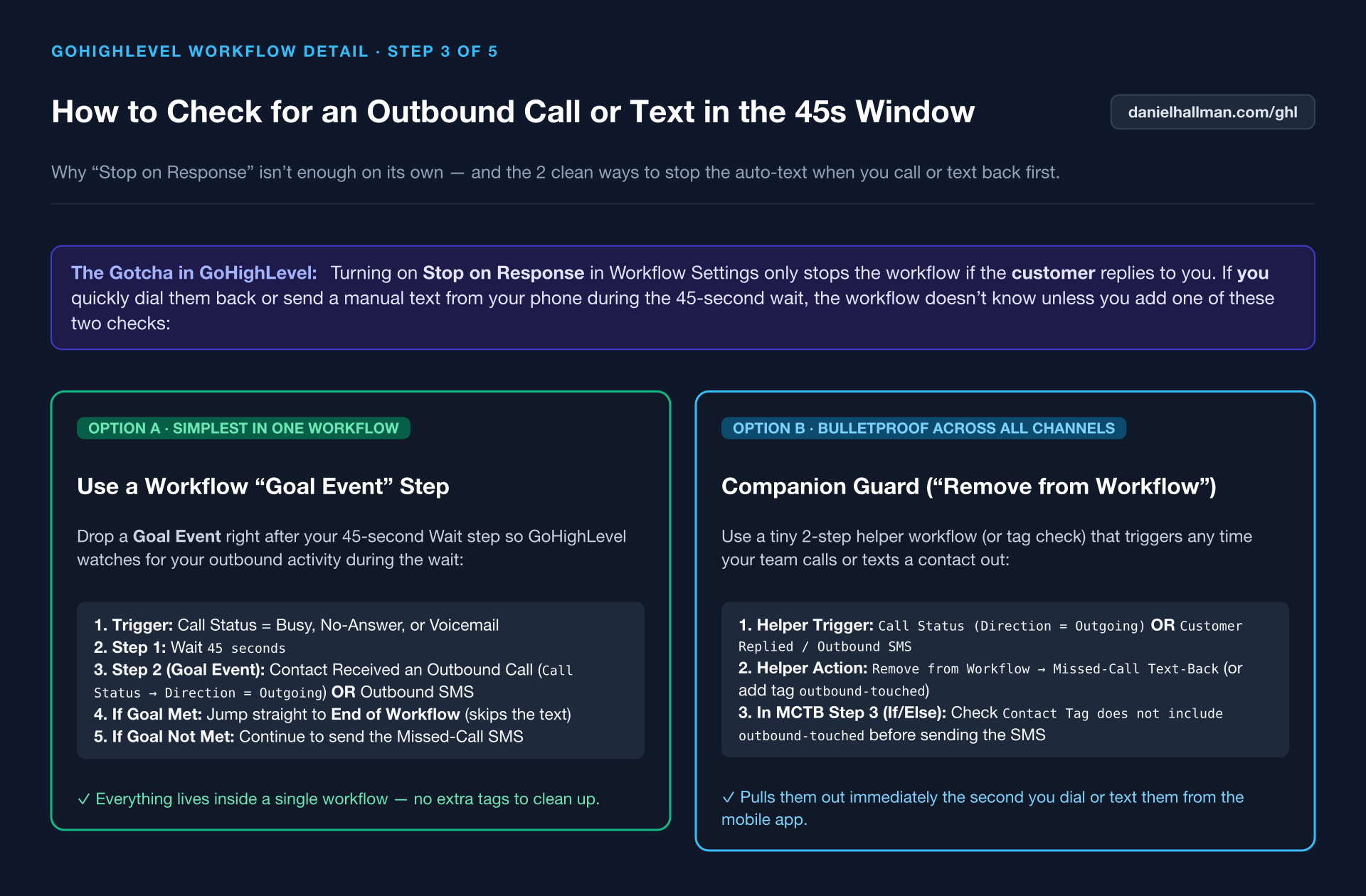
- Deaktivieren Sie das native Kontrollkästchen und führen Sie einen benutzerdefinierten Workflow mit einem 45-Sekunden-Warteschritt und aktiviertem 'Stop on Response' aus
- und ein Goal-Event oder ein begleitender Workflow, der den Kontakt in dem Moment herauszieht, in dem ein ausgehender Anruf oder eine manuelle SMS protokolliert wird.
GoHighLevel-Menüpfade
| Schritt | Menüpfad in GHL | Aktion |
|---|---|---|
| Schritt 1 | Automation > Workflows | Erstellen Sie einen Workflow, der ausgelöst wird durch Anrufstatus (Direction = Incoming, Status in Busy, No-Answer, oder Voicemail) und aktivieren Sie Bei Antwort anhalten unter Einstellungen. |
| Schritt 2 | Automatisierung > Workflows > + Workflow erstellen | Fügen Sie ein 45 zweites Warten Schritt gefolgt von einem Ziel-Ereignis (oder Begleit-Workflow auf Ausgehender Anruf / Ausgehende SMS), das den Tag anwendet handled-by-rep und beendet den Workflow. |
| Schritt 3 | Automatisierung > Workflow > Einstellungen > Stop on Response | Fügen Sie nach dem Warte-Schritt eine SMS senden Aktion hinzu, in der gefragt wird, ob der Anrufer eine dringende Reparatur oder einen Kostenvoranschlag benötigt, und seine Anschrift angefordert wird. |
STANDARD-SETUP VS. AUTOMATISIERTER WORKFLOW
Operativer Vergleich
Speed-to-Lead & Rückrufsicherheit
Antwort- & Buchungsrate bei Anrufen
Ähnliche Fragen
- Wie verhindern Sie, dass iPhone Live Voicemail das GoHighLevel Missed-Call Text-Back beeinträchtigt?
- Wie blockieren Sie Google Business-Robocalls, damit sie keine GoHighLevel Voice AI-Minuten verbrauchen?
- Wie leiten Sie Wochenend-Notfallreparaturanrufe in GoHighLevel weiter, damit Handwerker keinen Auftrag verpassen?
- Wie formatieren Sie Daten und führen Berechnungen in GoHighLevel-Workflows durch, ohne für n8n oder Make zu bezahlen?
SCHNELLER BAUEN IN GOHIGHLEVEL · KOSTENLOSE TEST-BONI + MCP-SERVER
Bauen Sie dies direkt in Ihrem GoHighLevel-Unterkonto auf
Verbinden Sie Claude Code, Cursor oder OpenAI Codex mit unserem ghl-tools MCP-Server & Rust-CLI um Workflows, Formulare und Funnels direkt aus Ihrem Editor zu erstellen, oder starten Sie Ihren GoHighLevel-Tarif über unseren Partner-Link, um freizuschalten $612+ in sofort importierbaren Kits (einschließlich GHL-Workflow-Rezeptpaket ($47 – oder kostenlos mit Testphase)) und wöchentliche Live-Sprechstunden.