GOHIGHLEVEL ANSWERS & PROMPTS: PLAYBOOK T08 · AI AGENTS & WORKFLOWS
AUTHOR: DANIEL HALLMAN
KEYWORD: HYBRID
STEP-BY-STEP INSTRUCTIONS + ANNOTATED GHL SCREENSHOTS
Steps in GoHighLevel
-
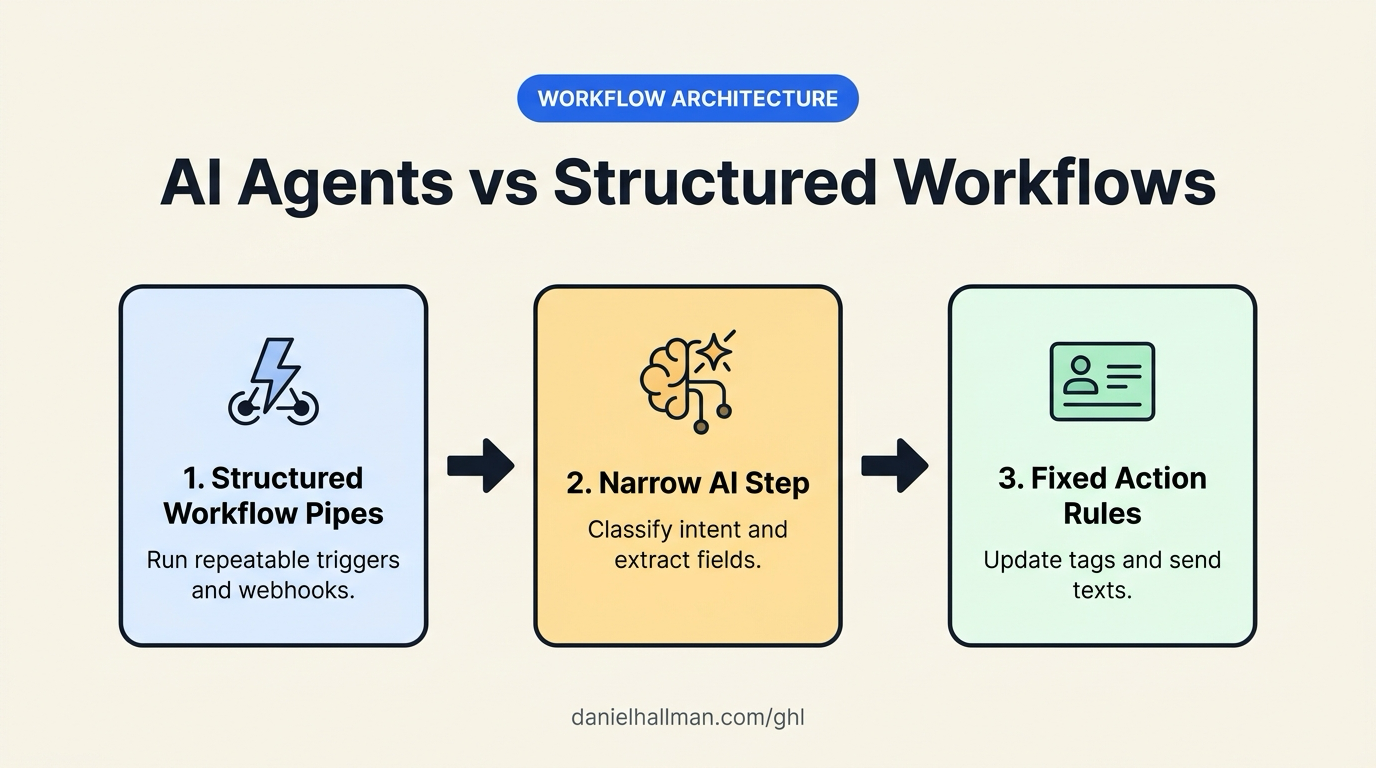
STEP 1In Automation > Workflows, handle repeatable triggers and data formatting with native actions: Use Inbound Webhook, Form Submitted, Format Data, and Math Operation actions to normalize phone numbers, calculate follow-up dates, and assign pipeline stages at zero token cost.

1Add If/Else Condition & Tag Guard 2Chain Priority & Wait Steps 3Switch to Settings or Execution Logs -
STEP 2In Automation > Workflows, insert a narrow AI step only for unstructured text: When a lead replies with a free-form message or voicemail transcript, pass only the last
3messages to a Conversation AI or AI Action node to classify intent (book_estimate,pricing_question,wrong_number) into a custom field.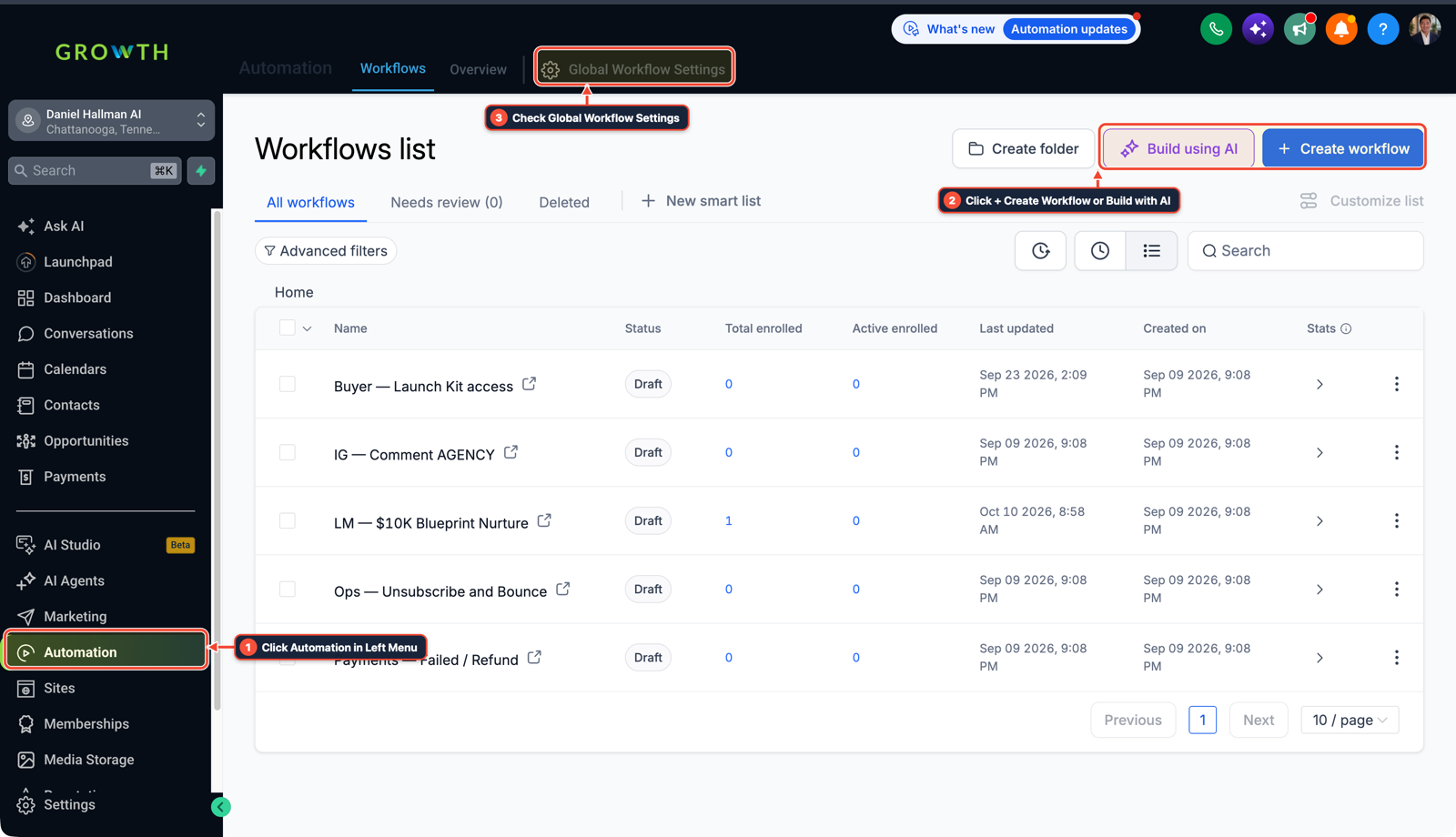
1Click Automation in Left Menu 2Click + Create Workflow or Build with AI 3Check Global Workflow Settings -
STEP 3In Automation > Workflows, route the final action with fixed If/Else branches: Branch on the extracted intent field so standard workflow actions update contact tags, move the opportunity stage, and send the confirmation SMS, and use external tools like
n8nonly when syncing an external SQL database or legacy ERP.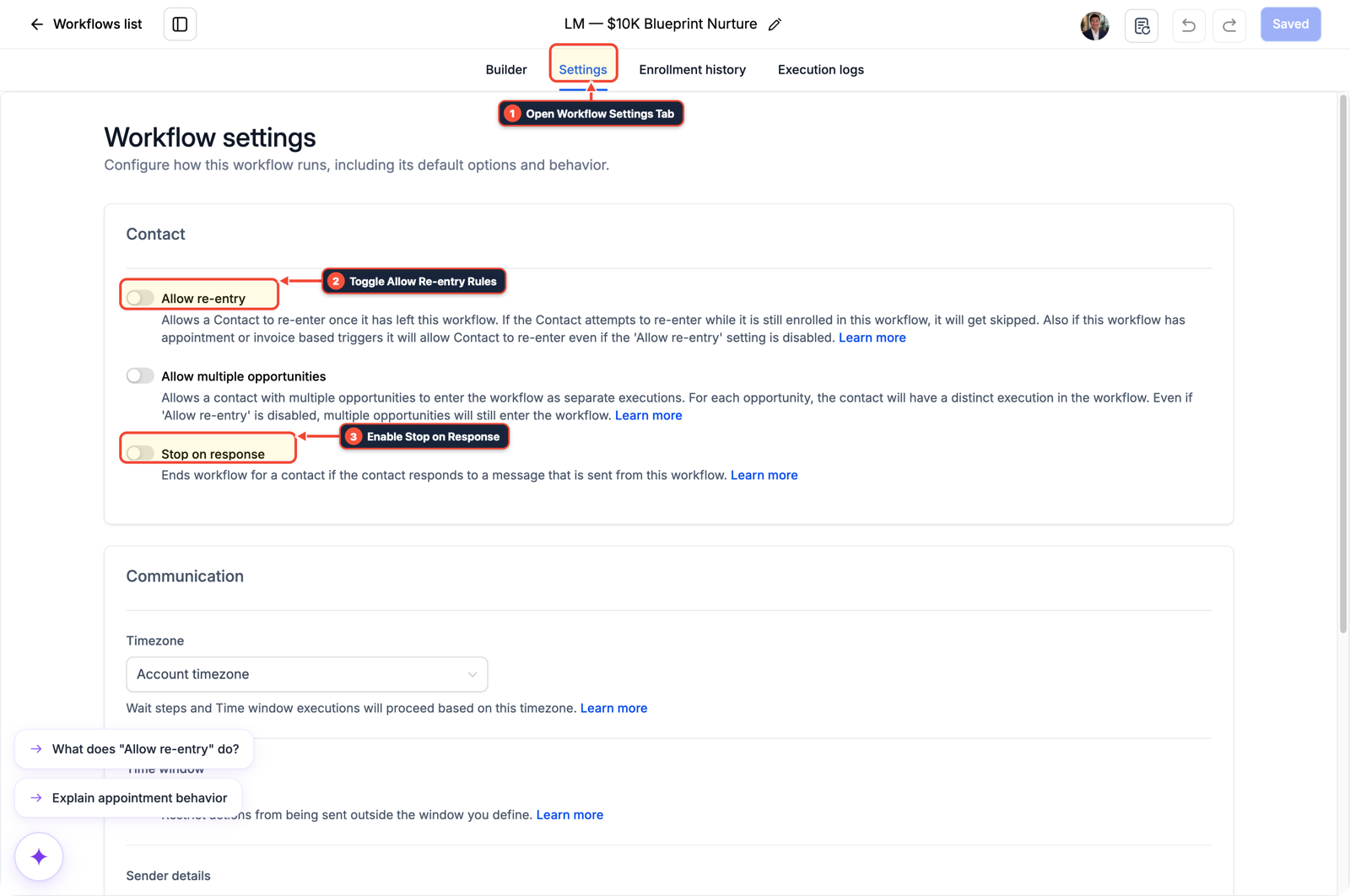
1Open Workflow Settings Tab 2Toggle Allow Re-entry Rules 3Enable Stop on Response
MODE: AGENT PROMPT
PASTE INTO CLAUDE CODE, CURSOR, CHATGPT, OR GOHIGHLEVEL ASK AI
AGENT PROMPT
Refactor sub-account <YOUR_LOCATION_ID> workflows to separate repeatable CRM routing from narrow AI classification:
1. In Automation > Workflows, use native Format Data, Math Operation, and If/Else actions for phone formatting, date offsets, and tag routing.
2. Isolate Conversation AI / AI Action nodes to classify unstructured inbound message intent into a custom field with a 3-turn context limit.
3. Trigger outbound SMS, calendar booking, and pipeline stage updates from fixed If/Else workflow branches based on the classified field.
GHL-TOOLS MCP SERVER & CLI (DANIELHALLMAN.COM/MCP)
BUILDER + SUB-ACCOUNT TOOLS
# Audit workflow steps and AI node boundaries via ghl-crm
ghl-crm workflows list --context <YOUR_CONTEXT> --location <YOUR_LOCATION_ID>
Official GHL MCP vs. ghl-tools: HighLevel’s official hosted MCP (services.leadconnectorhq.com/mcp) covers public v2 CRM records (contacts, opportunities, appointments, conversations). ghl-tools MCP complements it with workflow graph inspection & recipes, funnel/form builders, DNS/BIMI checks, and ghl-crm doctor audits.
Cause
- With coding agents and MCP tools everywhere, operators often try to replace structured workflows by letting an autonomous AI agent call APIs directly for every incoming lead.
- Running an open-ended agent loop on every form submission or missed call burns token budget, adds multi-second latency, and introduces random formatting errors.
GoHighLevel Configuration
- Pair structured GoHighLevel Workflows with narrow AI nodes.
- Use native workflow triggers, Format Data, Math Operation, and If/Else branches for repeatable CRM routing, and invoke a focused AI step (or ghl-tools MCP during build and audit sessions) only for unstructured lead replies.
GoHighLevel Menu Paths
| Step | Menu Path in GHL | Action |
|---|---|---|
| Step 1 | Automation > Workflows | Handle repeatable triggers and data formatting with native actions: Use Inbound Webhook, Form Submitted, Format Data, and Math Operation actions to normalize phone numbers, calculate follow-up dates, and assign pipeline stages at zero token cost. |
| Step 2 | Automation > Workflows | Insert a narrow AI step only for unstructured text: When a lead replies with a free-form message or voicemail transcript, pass only the last 3 messages to a Conversation AI or AI Action node to classify intent (book_estimate, pricing_question, wrong_number) into a custom field. |
| Step 3 | Automation > Workflows | Route the final action with fixed If/Else branches: Branch on the extracted intent field so standard workflow actions update contact tags, move the opportunity stage, and send the confirmation SMS, and use external tools like n8n only when syncing an external SQL database or legacy ERP. |
DEFAULT SETUP VS. AUTOMATED WORKFLOW
Operational Comparison
Speed to Lead & Callback Safety
Caller Reply & Booking Rate
Related Questions
- How do you format data and run math in GoHighLevel Workflows without paying for n8n or Make?
- Why are AI agents unreliable in production workflows and how do you fix them in GoHighLevel?
- How to Stop Runaway AI Costs in Business Workflows Without Killing Team Adoption
- How do I get started automating everyday tasks with AI?
BUILD FASTER IN GOHIGHLEVEL · FREE TRIAL BONUSES + MCP SERVER
Build this directly inside your GoHighLevel sub-account
Connect Claude Code, Cursor, or OpenAI Codex to our ghl-tools MCP Server & Rust CLI to build workflows, forms, and funnels from your editor, or start your GoHighLevel plan through our partner link to unlock $612+ in ready-to-import kits (including AI Agent Workflow Pack) and weekly live clinics.