GOHIGHLEVEL ANSWERS & PROMPTS: PLAYBOOK T06 · OMNICHANNEL & MESSAGING
AUTHOR: DANIEL HALLMAN
KEYWORD: WHATSAPP
STEP-BY-STEP INSTRUCTIONS + ANNOTATED GHL SCREENSHOTS
Steps in GoHighLevel
-
STEP 1In Settings > Phone Numbers, register your local number for standard SMS: Open the Trust Center tab, submit your business EIN and sample texts for A2P 10DLC registration, and assign a local area-code phone number so US and Canadian homeowners receive regular texts.
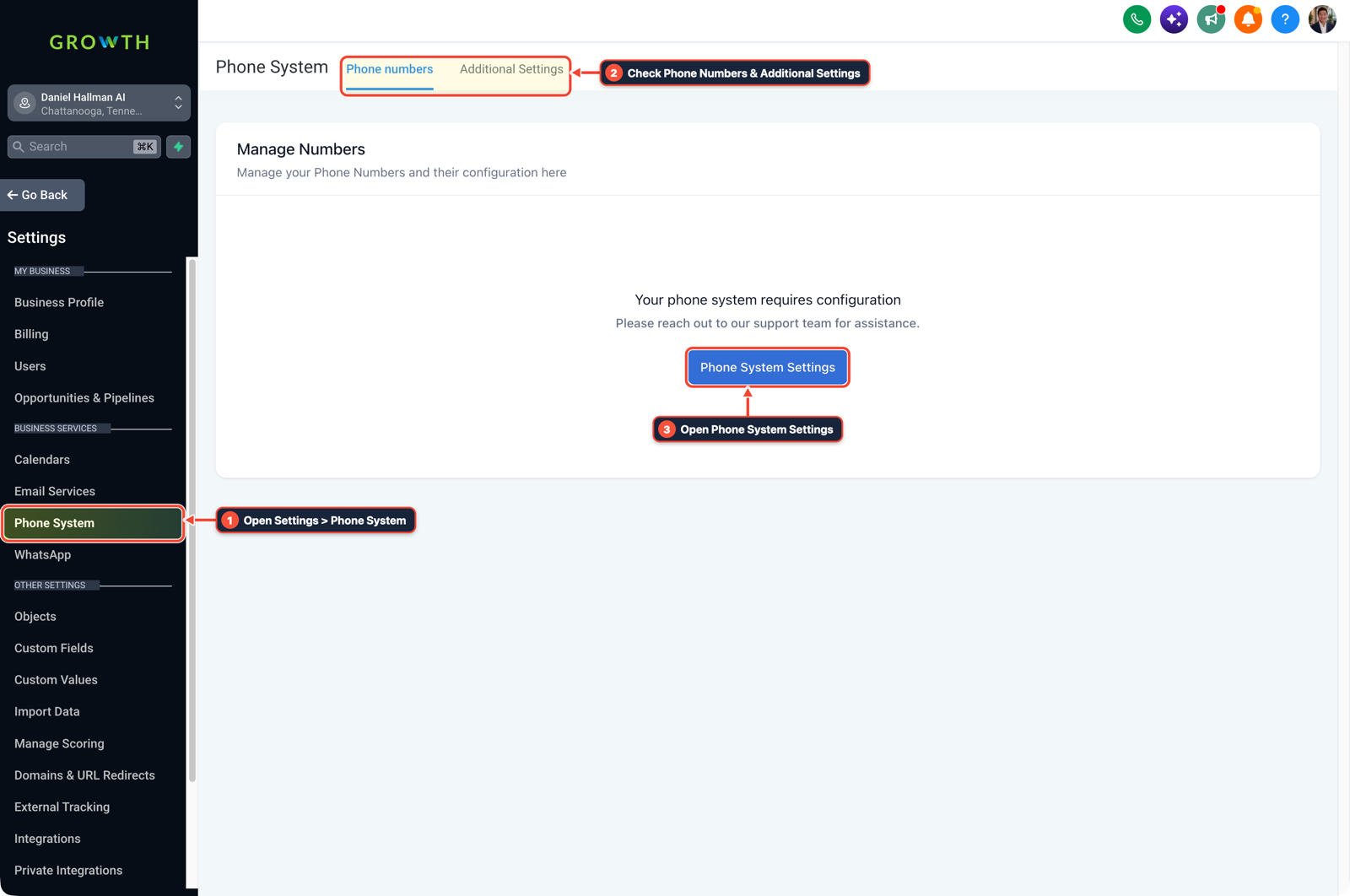
1Open Settings > Phone System 2Check Phone Numbers & Additional Settings 3Open Phone System Settings -
STEP 2In Automation > Workflows, keep Missed-Call Text-Back on SMS: Open your missed-call workflow, trigger on Call Status (
Busy,No-Answer, orVoicemail), enable Stop on Response, wait45seconds, and send a standard SMS asking what roof repair they need and their street address.
1Add If/Else Condition & Tag Guard 2Chain Priority & Wait Steps 3Switch to Settings or Execution Logs -
STEP 3In Settings > WhatsApp, enable WhatsApp only for international or inbound WhatsApp leads: If you serve markets outside North America or accept roof damage photos over WhatsApp, connect your Meta Business number and add an If/Else branch in Workflows that replies via WhatsApp only when
{{contact.source}}or the inbound message channel isWhatsApp.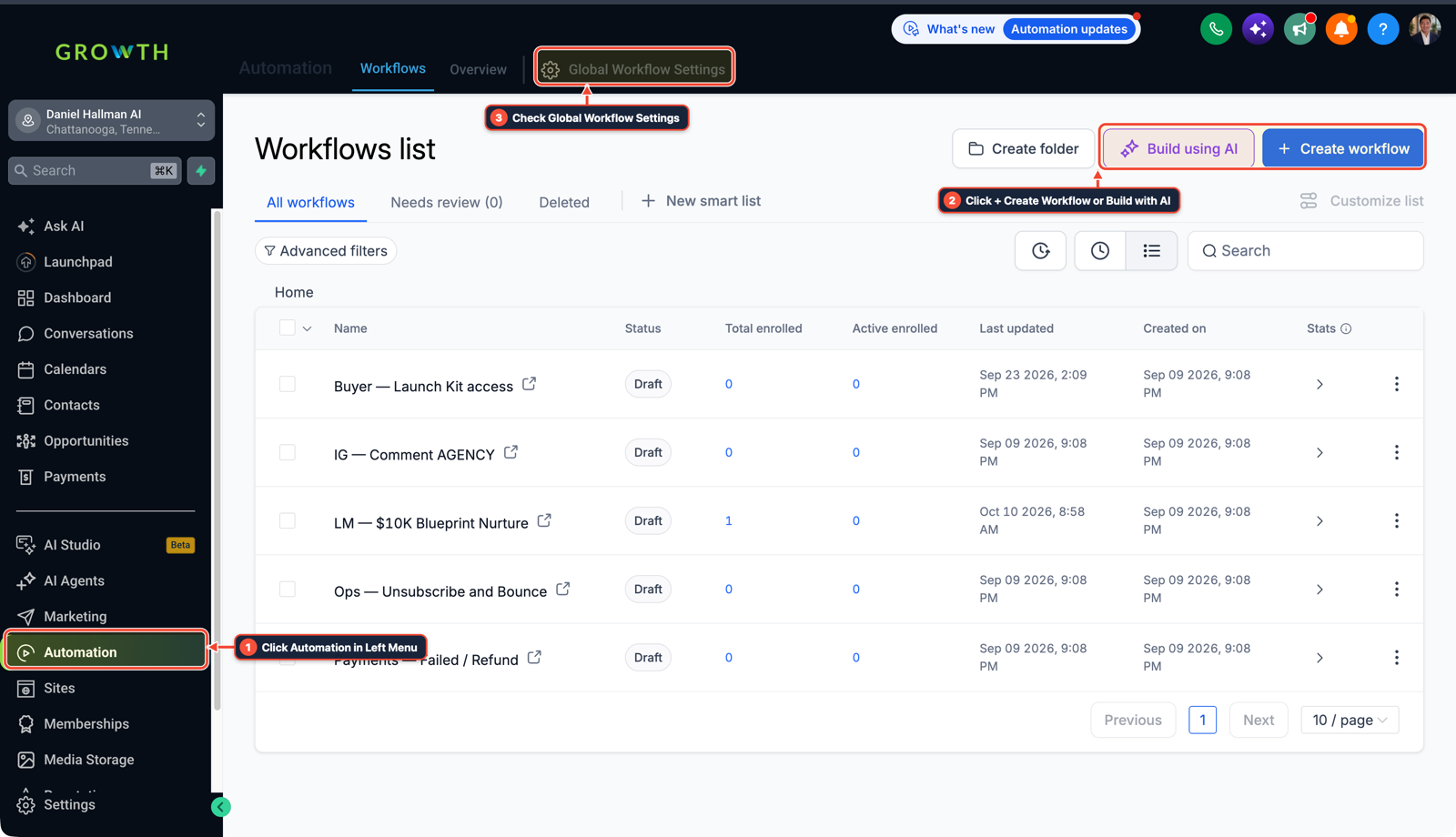
1Click Automation in Left Menu 2Click + Create Workflow or Build with AI 3Check Global Workflow Settings
MODE: AGENT PROMPT
PASTE INTO CLAUDE CODE, CURSOR, CHATGPT, OR GOHIGHLEVEL ASK AI
AGENT PROMPT
Configure SMS and WhatsApp channel routing for sub-account <YOUR_LOCATION_ID>:
1. In Settings > Phone Numbers > Trust Center, verify A2P 10DLC registration is active on the primary local phone number.
2. In Automation > Workflows, ensure '01 — 45s Missed-Call Text-Back' sends a standard SMS with Stop on Response enabled.
3. In Automation > Workflows, add an If/Else channel check so inbound WhatsApp messages receive WhatsApp replies while phone callers receive standard SMS.
GHL-TOOLS MCP SERVER & CLI (DANIELHALLMAN.COM/MCP)
BUILDER + SUB-ACCOUNT TOOLS
# Inspect sub-account phone numbers and messaging workflows via ghl-crm
ghl-crm workflows list --context <YOUR_CONTEXT> --location <YOUR_LOCATION_ID>
Official GHL MCP vs. ghl-tools: HighLevel’s official hosted MCP (services.leadconnectorhq.com/mcp) covers public v2 CRM records (contacts, opportunities, appointments, conversations). ghl-tools MCP complements it with workflow graph inspection & recipes, funnel/form builders, DNS/BIMI checks, and ghl-crm doctor audits.
Cause
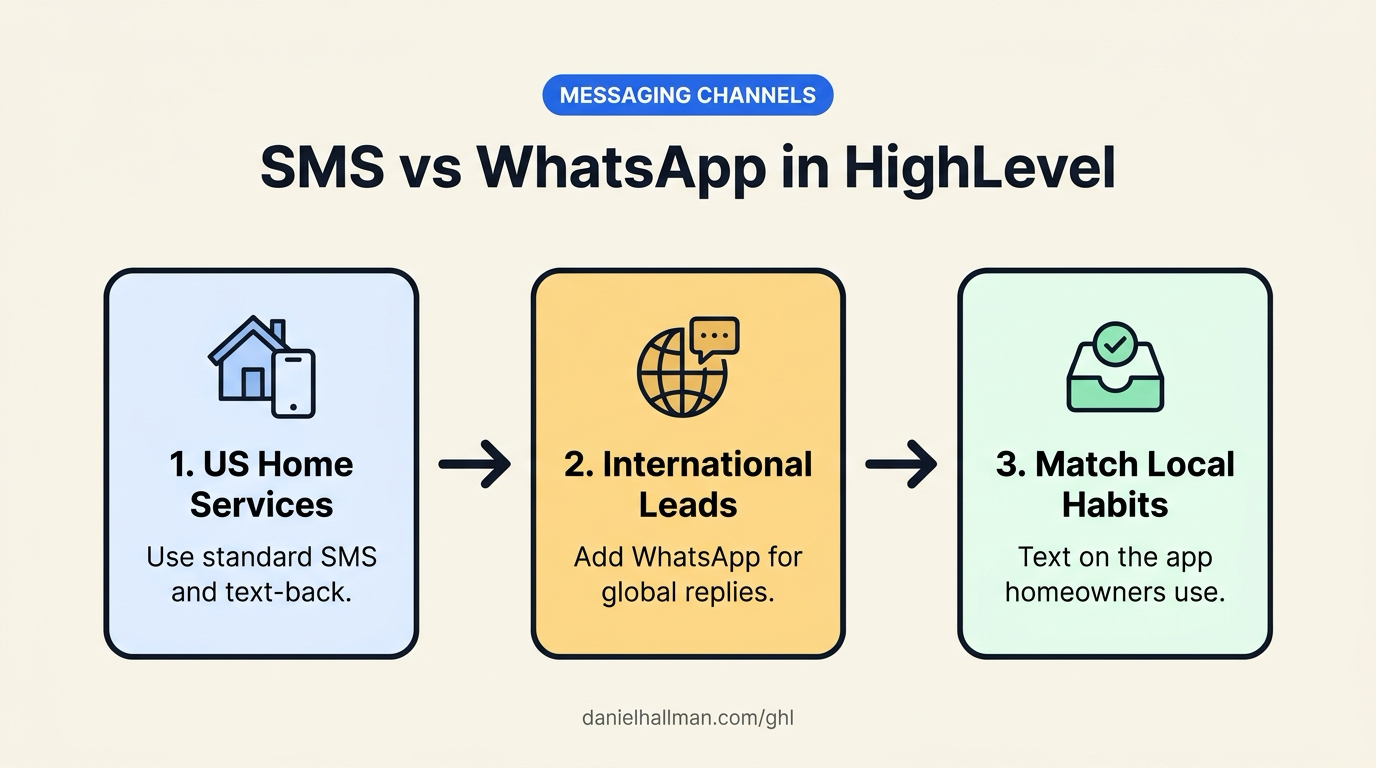
- Overseas freelance developers often pitch WhatsApp automation to US contractors because WhatsApp dominates outside North America and avoids US A2P 10DLC carrier registration.
- Forcing a US homeowner to open WhatsApp after calling a local roofer adds friction and lowers reply rates compared to a regular text message.
GoHighLevel Configuration
- Match the messaging channel your local homeowners already use.
- Keep US and Canadian missed-call recovery, appointment reminders, and estimate follow-ups on standard A2P-registered SMS, and enable WhatsApp in the Conversations inbox only when leads initiate messages on WhatsApp or live in WhatsApp-first regions.
GoHighLevel Menu Paths
| Step | Menu Path in GHL | Action |
|---|---|---|
| Step 1 | Settings > Phone Numbers | Register your local number for standard SMS: Open the Trust Center tab, submit your business EIN and sample texts for A2P 10DLC registration, and assign a local area-code phone number so US and Canadian homeowners receive regular texts. |
| Step 2 | Automation > Workflows | Keep Missed-Call Text-Back on SMS: Open your missed-call workflow, trigger on Call Status (Busy, No-Answer, or Voicemail), enable Stop on Response, wait 45 seconds, and send a standard SMS asking what roof repair they need and their street address. |
| Step 3 | Settings > WhatsApp | Enable WhatsApp only for international or inbound WhatsApp leads: If you serve markets outside North America or accept roof damage photos over WhatsApp, connect your Meta Business number and add an If/Else branch in Workflows that replies via WhatsApp only when {{contact.source}} or the inbound message channel is WhatsApp. |
DEFAULT SETUP VS. AUTOMATED WORKFLOW
Operational Comparison
Manual Admin Work Per Client
Lead-to-Booked-Job Conversion
Related Questions
- How do you set up GoHighLevel for a solo home service business without bloated agency snapshots?
- How do you get GoHighLevel A2P 10DLC campaign registration approved on the first try?
- How do you stop GoHighLevel Missed-Call Text-Back from texting while a rep is calling back?
- How do you set up Instagram and Facebook Comment-to-DM in GoHighLevel?
BUILD FASTER IN GOHIGHLEVEL · FREE TRIAL BONUSES + MCP SERVER
Build this directly inside your GoHighLevel sub-account
Connect Claude Code, Cursor, or OpenAI Codex to our ghl-tools MCP Server & Rust CLI to build workflows, forms, and funnels from your editor, or start your GoHighLevel plan through our partner link to unlock $612+ in ready-to-import kits (including GHL Workflow Architect Pack) and weekly live clinics.