GOHIGHLEVEL ANSWERS & PROMPTS: PLAYBOOK T07 · WORKFLOWS & AUTOMATION
AUTHOR: DANIEL HALLMAN
KEYWORD: WORKFLOW
What Usually Happens
The built-in missed-call text-back checkbox fires at 0 seconds—even when a plumber or technician wipes their hands and calls right back 15 seconds later—sending a generic 'Sorry we missed your call' text that confuses the caller.
How We Fix It in HighLevel
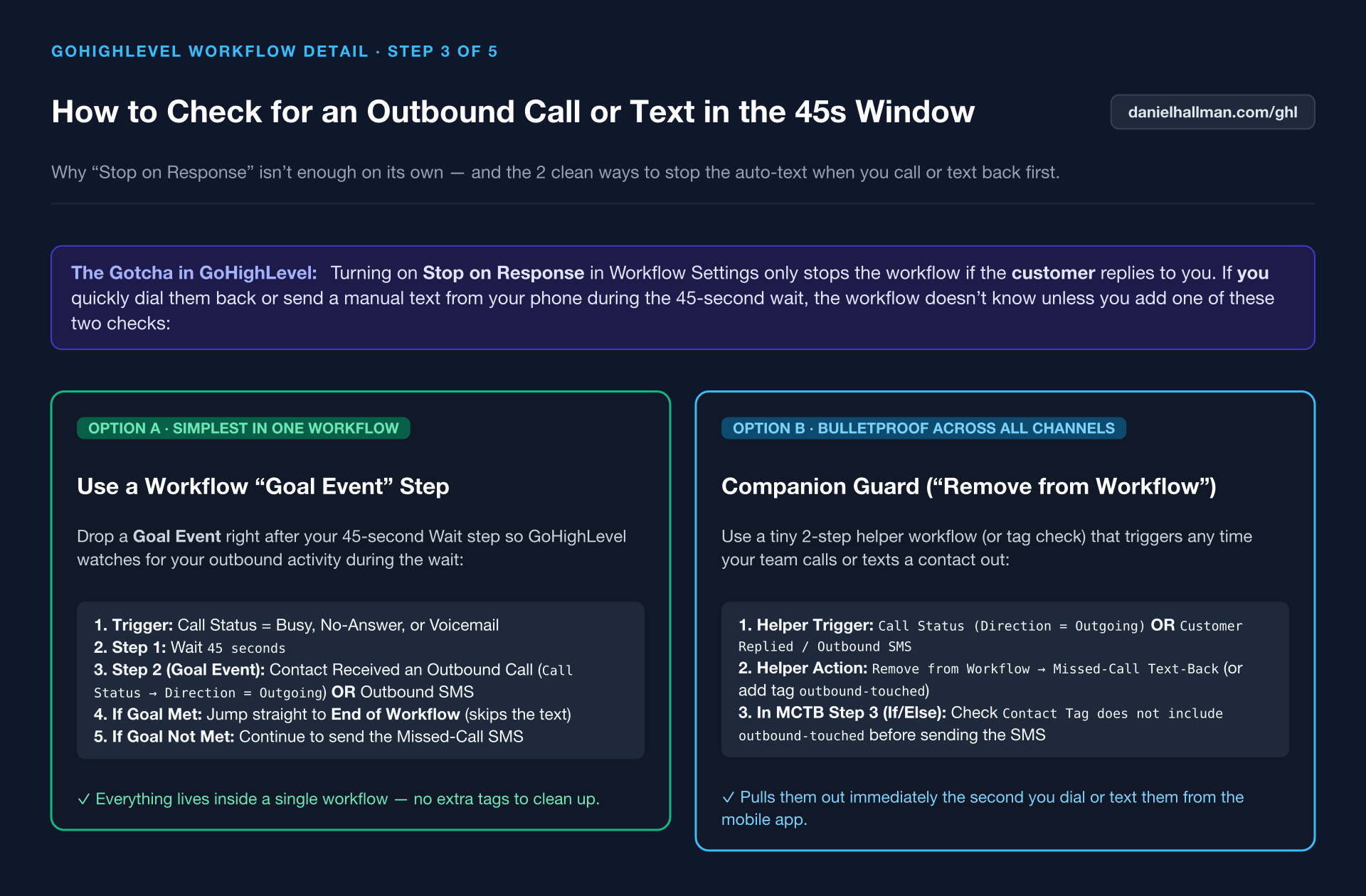
Turn off the native checkbox and run a custom workflow with a 45-second wait step, 'Stop on Response' enabled, and a Goal Event or companion workflow that pulls the contact out the moment an outbound call or manual SMS is logged.
3-Step Implementation Checklist
- Trigger a new workflow on Call Status (Incoming) where status is Busy, No-Answer, or Voicemail, and turn on 'Stop on Response' in Workflow Settings.
- Add a 45-second Wait step followed by a Goal Event (or companion workflow on Outgoing Call / Outbound SMS) that adds a 'handled-by-rep' tag and exits.
- If no outbound touch occurred after 45 seconds, send a trade-specific SMS asking if they need an urgent repair or an estimate plus their street address.
MODE: AGENT PROMPT
PASTE THIS PROMPT INTO CLAUDE CODE, CURSOR, CHATGPT, OR YOUR GHL ASSISTANT
SAFE READ-FIRST WORKFLOW
You are configuring our GoHighLevel sub-account for a home service business.
1. Check if the native 0-second Missed-Call Text-Back checkbox is enabled in location settings and recommend disabling it.
2. Draft a 5-step HighLevel workflow named "MCTB — 45s Rep Callback Guard":
   - Trigger: Call Status (Direction = Incoming, Status in [Busy, No-Answer, Voicemail]).
   - Settings: Enable "Stop on Response" and "Allow Re-Entry".
   - Step 1: Wait 45 seconds.
   - Step 2: Goal Event / If-Else check for tag "handled-by-rep" or Outgoing Call/SMS activity during the wait window.
   - Step 3: Send SMS: "Hey {{contact.first_name}}, sorry we missed your call at {{location.name}}! Are you reaching out for an urgent repair or a quote, and what is the best street address?"
   - Step 4: Send Internal Notification to the assigned user when the customer replies.
RUN WITH OUR GHL-TOOLS MCP SERVER OR RUST CLI (DANIELHALLMAN.COM/MCP)
SUPPORTS --DRY-RUN PREVIEW
# 1. MCP Tool Call (ghl-crm-mcp)
{
  "tool": "workflows_create_from_recipe",
  "arguments": {
    "location_id": "<YOUR_LOCATION_ID>",
    "recipe": "mctb_45s_outbound_guard",
    "wait_seconds": 45,
    "stop_on_response": true,
    "dry_run": true
  }
}

# 2. Or run via ghl-crm Rust CLI
ghl-crm workflows apply-recipe --location-id <YOUR_LOCATION_ID> --recipe mctb-45s-guard --dry-run
Similar GoHighLevel Questions & Fixes
PLAYBOOK T08 · Voice AI & Phone
How do you stop iPhone Live Voicemail from breaking GoHighLevel Missed-Call Text-Back?
Lower your GoHighLevel Incoming Call Timeout to 15 seconds and turn on Call Whisper ('Press 1 to accept') so Apple iOS 18+ cannot intercept the call at 18 seconds.
PLAYBOOK T04 · Voice AI & PhoneHow do you block Google Business robocalls from burning GoHighLevel Voice AI minutes?
Put a 4-second 'Press 1 to speak with our team' DTMF call screen in front of your Voice AI agent so automated spam dialers drop off after 5 seconds at zero AI cost.
PLAYBOOK T02 · Workflows & AutomationHow do you route weekend emergency repair calls in GoHighLevel so contractors never lose a job?
Ask missed callers to reply 1 for an urgent emergency or 2 for a standard quote, then trigger an instant on-call tech Call Connect when they reply 1.
PLAYBOOK T10 · Workflows & AutomationHow do you format data and run math in GoHighLevel Workflows without paying for n8n or Make?
Use HighLevel's built-in Format Data, Math Operation, Goal Events, and Inbound/Outbound Webhook steps inside a single native workflow so contact history and error logs stay in one place.
RUN THIS IN 30 SECONDS · GHL-TOOLS MCP + OPERATOR COMMUNITY
Want your AI agent to inspect and build this inside GoHighLevel automatically?
Connect Claude Code, Cursor, or OpenAI Codex to our ghl-tools MCP Server & Rust CLI for 30-second sub-account doctor checks, --dry-run previews, and snapshot diffs—or start/upgrade your GoHighLevel plan through our partner link to unlock up to $612+ in implementation kits (including GHL Workflow Recipe Pack ($47 — or Free with Trial)) and our weekly live engineering clinics.