GOHIGHLEVEL ANSWERS & PROMPTS: PLAYBOOK T81 · SMALL CREW MISSED-CALL TEXT-BACK VS USAGE-PRICED VOICE AI BACKUP
AUTHOR: DANIEL HALLMAN
KEYWORD: VOICE COST
STEP-BY-STEP INSTRUCTIONS + ANNOTATED GHL SCREENSHOTS
Steps in GoHighLevel
-
STEP 1In Settings > Phone System (Phone Numbers), forward your business tracking number to your mobile phone with Incoming Call Timeout set to
15seconds and Call Whisper enabled so you can answer between jobs without Apple iOS Live Voicemail swallowing the call at 18 seconds.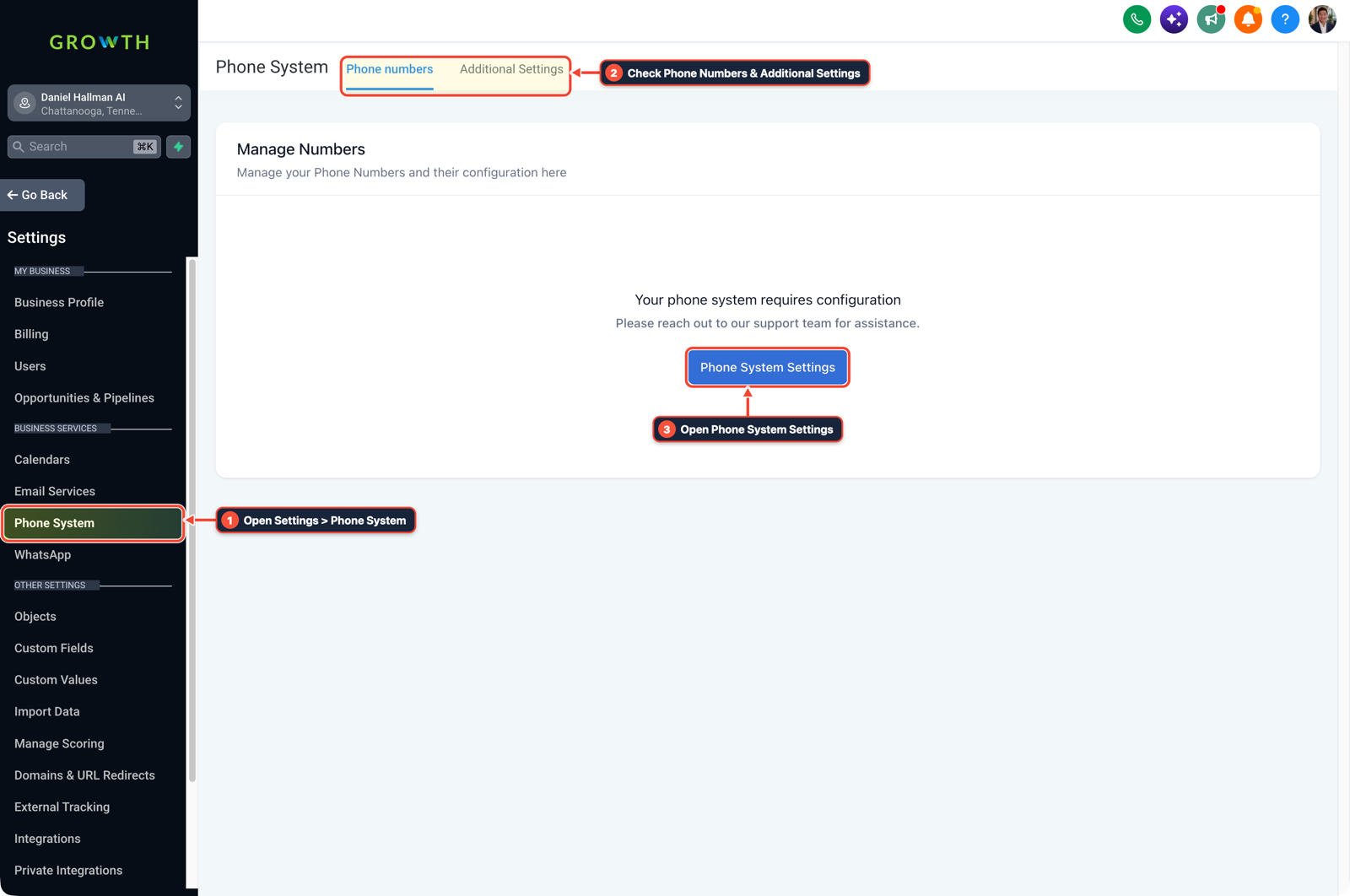
1Open Settings > Phone System 2Check Phone Numbers & Additional Settings 3Open Phone System Settings -
STEP 2In Automation > Workflow Builder, trigger a workflow on Call Status (
Busy,No-Answer,Voicemail) with Stop on Response turned on that waits45seconds and sends a plain text ("Hey, I'm out on a property right now. What's your street address and what yard work are you looking to get done?").
1Add If/Else Condition & Tag Guard 2Chain Priority & Wait Steps 3Switch to Settings or Execution Logs -
STEP 3In AI Agents > Voice AI, if you want a voice assistant to pick up when you are on a loud machine, use pay-as-you-go per-minute Voice AI scoped to three intake fields (
Caller Name,Property Street Address, andService Requested) instead of a flat $300/month subscription.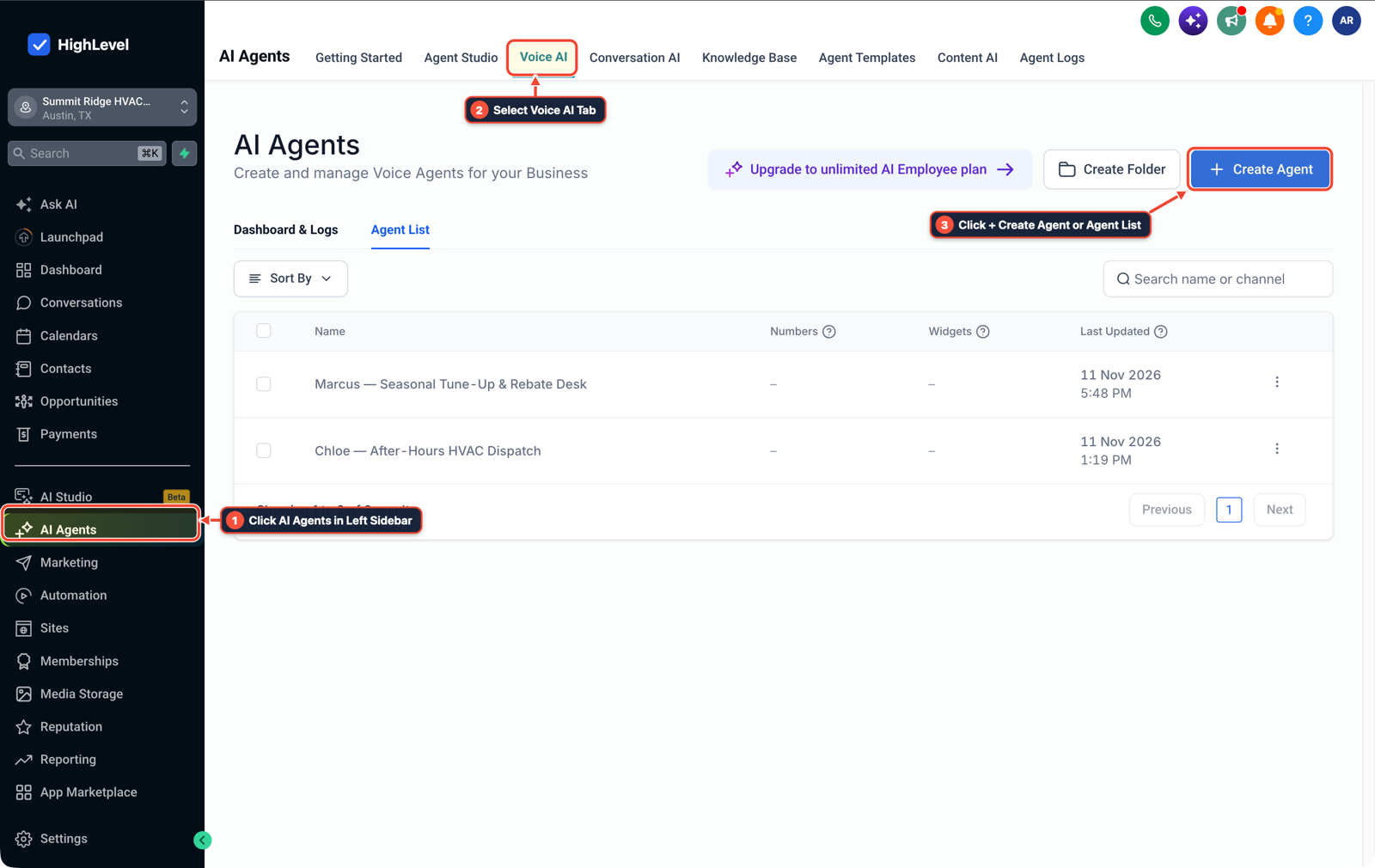
1Click AI Agents in Left Sidebar 2Select Voice AI Tab 3Click + Create Agent or Agent List
MODE: AGENT PROMPT
PASTE INTO CLAUDE CODE, CURSOR, CHATGPT, OR GOHIGHLEVEL ASK AI
AGENT PROMPT
Set up a low-cost missed-call text-back and pay-per-minute Voice AI backup for a small field crew in sub-account <YOUR_LOCATION_ID>:
1. In Settings > Phone System, set Incoming Call Timeout to 15 seconds and enable Call Whisper on the main business number.
2. In Automation > Workflow Builder, create a missed-call workflow with Stop on Response enabled, a 45-second wait, and an SMS asking for the caller's street address and job details.
3. In AI Agents > Voice AI, configure an optional pay-per-minute overflow voice agent that collects Caller Name, Property Street Address, and Service Requested.
GHL-TOOLS MCP SERVER & CLI (DANIELHALLMAN.COM/MCP)
BUILDER + SUB-ACCOUNT TOOLS
# Audit phone timeout settings and missed-call workflows in the sub-account
ghl-crm workflows list --context <YOUR_CONTEXT> --location <YOUR_LOCATION_ID>
ghl-crm custom-fields list --context <YOUR_CONTEXT> --location <YOUR_LOCATION_ID>
Official GHL MCP vs. ghl-tools: HighLevel’s official hosted MCP (services.leadconnectorhq.com/mcp) covers public v2 CRM records (contacts, opportunities, appointments, conversations). ghl-tools MCP complements it with workflow graph inspection & recipes, funnel/form builders, DNS/BIMI checks, and ghl-crm doctor audits.
Cause
- Small three-person field crews miss calls because they are operating mowers, saws, or drills when homeowners ring.
- When the owner shops for Voice AI receptionists, standalone vendors pitch $250 to $500 monthly plans with bundled minutes and CRM seats the crew will never touch, even though 15 to 20 weekly calls only represent 30 to 45 minutes of actual talk time per week.
GoHighLevel Configuration
- Give the owner's cell phone 15 seconds to answer in Settings > Phone System, catch unanswered calls with a 45-second question-first SMS in Automation > Workflow Builder
- and run pay-per-minute Voice AI in AI Agents > Voice AI only for callers who prefer to talk rather than text.
GoHighLevel Menu Paths
| Step | Menu Path in GHL | Action |
|---|---|---|
| Step 1 | Settings > Phone System | Forward your business tracking number to your mobile phone with Incoming Call Timeout set to 15 seconds and Call Whisper enabled so you can answer between jobs without Apple iOS Live Voicemail swallowing the call at 18 seconds. |
| Step 2 | Automation > Workflow Builder | Trigger a workflow on Call Status (Busy, No-Answer, Voicemail) with Stop on Response turned on that waits 45 seconds and sends a plain text (`"Hey, I'm out on a property right now. |
| Step 3 | AI Agents > Voice AI | If you want a voice assistant to pick up when you are on a loud machine, use pay-as-you-go per-minute Voice AI scoped to three intake fields (Caller Name, Property Street Address, and Service Requested) instead of a flat $300/month subscription. |
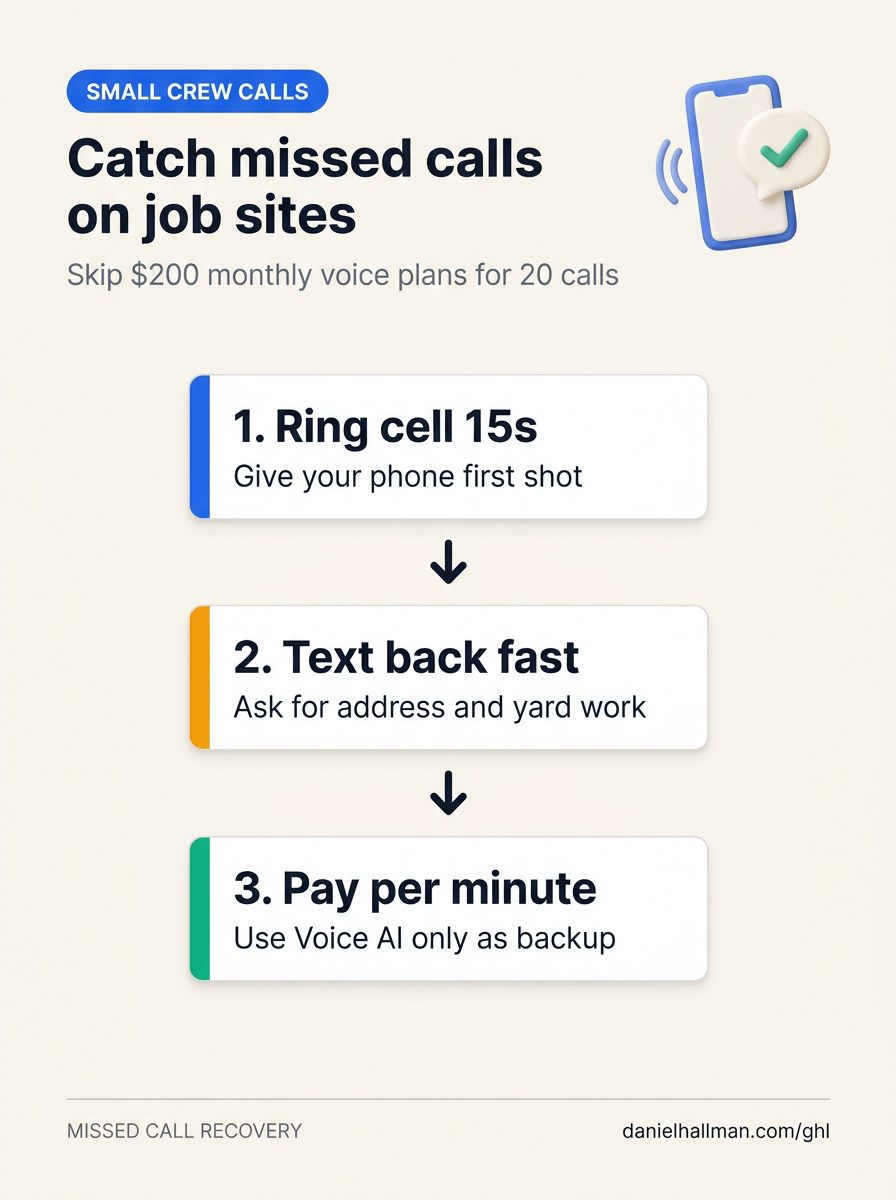
DEFAULT SETUP VS. AUTOMATED WORKFLOW
Operational Comparison
After-Hours & Missed Call Capture
Qualified Jobs Booked 24/7
Related Questions
- How do you stop GoHighLevel Missed-Call Text-Back from texting while a rep is calling back?
- How do you stop iPhone Live Voicemail from breaking GoHighLevel Missed-Call Text-Back?
- What Can't AI Receptionists Do on Live Calls (And How Do You Set Up SMS and Human Fallbacks in GoHighLevel)?
- How do you set up GoHighLevel for a solo home service business without bloated agency snapshots?
BUILD FASTER IN GOHIGHLEVEL · FREE TRIAL BONUSES + MCP SERVER
Build this directly inside your GoHighLevel sub-account
Connect Claude Code, Cursor, or OpenAI Codex to our ghl-tools MCP Server & Rust CLI to build workflows, forms, and funnels from your editor, or start your GoHighLevel plan through our partner link to unlock $612+ in ready-to-import kits (including GHL Small Crew Missed-Call & Voice AI Starter Kit) and weekly live clinics.