GOHIGHLEVEL ANSWERS & PROMPTS: PLAYBOOK T03 · WORKFLOWS & AUTOMATION
AUTHOR: DANIEL HALLMAN
KEYWORD: WORKFLOW
What Usually Goes Wrong
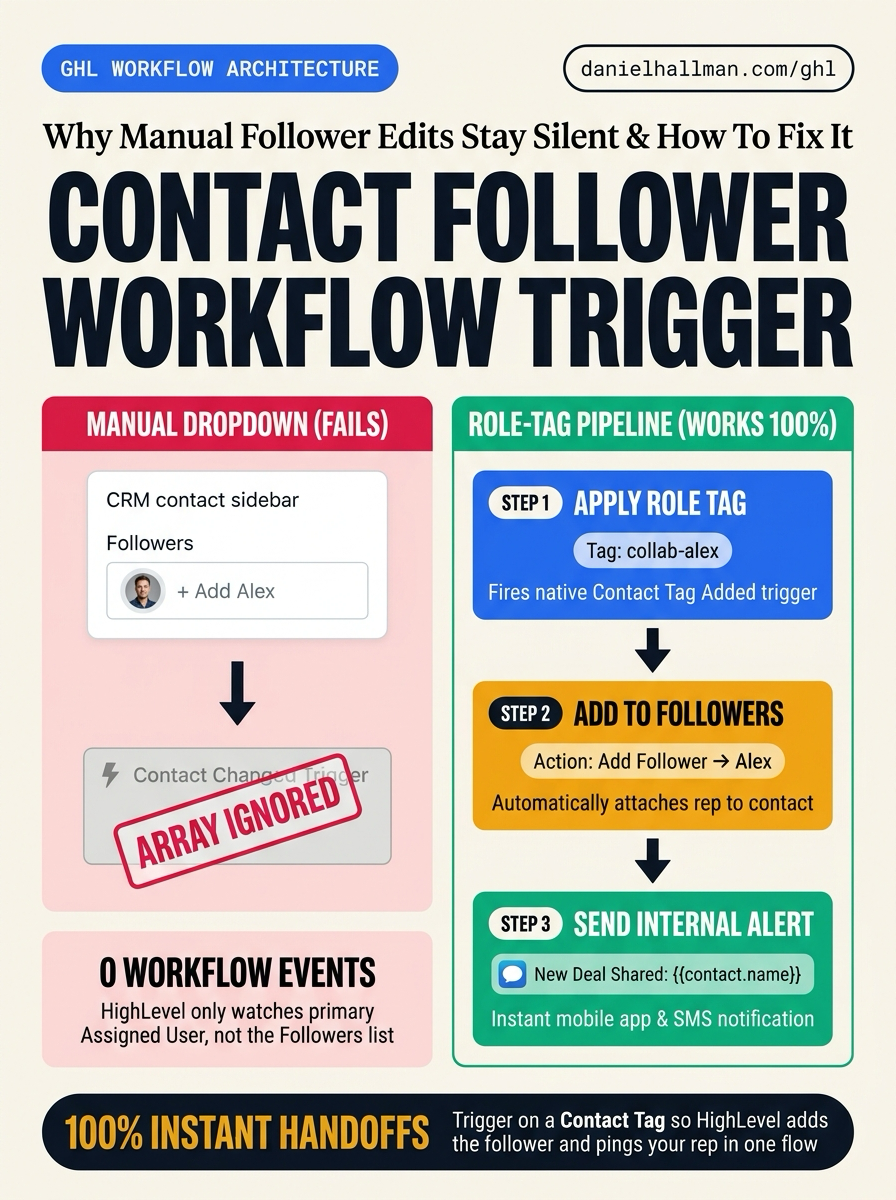
- When team members are manually added to a contact's Followers list in the left-hand sidebar, HighLevel saves the association in the database but does not emit a workflow event.
- Because 'Contact Changed' only monitors standard and custom contact fields, workflows cannot detect follower updates directly.
- Teammates assigned to collaborate on a lead remain completely unalerted unless that lead sends an inbound message or triggers an unrelated sequence.
The Simple Fix in GoHighLevel
- Invert the direction of the assignment.
- Instead of manually clicking '+ Follower' in the sidebar and waiting for a trigger that does not exist, use a dedicated operational trigger—such as applying a tag (e.g.
- 'follow-sarah') or setting a custom user dropdown field ('Add Collaborator').
- Build a workflow that executes two actions in sequence: Action 1: 'Add Contact Follower' to attach the user officially, and Action 2: 'Send Internal Notification' (In-App Push, SMS, or Email) directly to 'Contact Followers' or that specific user with a direct contact link.
BEFORE VS. AFTER BENCHMARK
What Changes When You Turn This On
Speed to Lead & Callback Safety
Caller Reply & Booking Rate
Where to Click in GoHighLevel
| Step | Where to Click in GHL | What to Do |
|---|---|---|
| Step 1 | Create a Helper Trigger (Custom Field or Tag) | Since HighLevel's 'Contact Changed' trigger only monitors contact fields, add a custom dropdown named 'Add Collaborator' (listing your teammates) or use role tags like 'assign-specialist' on the contact record. |
| Step 2 | Configure the Assignment Workflow | Set the workflow trigger to 'Contact Changed' (filter: Add Collaborator is not empty) or 'Tag Added'. Under Actions, add 'Add Contact Follower' and select the matching team member. |
| Step 3 | Fire the Instant Internal Notification | Immediately after the Add Follower action, add 'Send Internal Notification'. Choose In-App Notification and SMS, set Recipient to 'Contact Followers' (or Particular User), and include the direct link ({{contact.url}}). Optionally add a final step to clear the trigger field so it can be reused. |
SIMPLE STEP-BY-STEP INSTRUCTIONS + ANNOTATED GHL SCREENSHOTS
How to Set This Up in GoHighLevel (Under 2 Minutes)
-
STEP 1Create a Helper Trigger (Custom Field or Tag): Since HighLevel's 'Contact Changed' trigger only monitors contact fields, add a custom dropdown named 'Add Collaborator' (listing your teammates) or use role tags like 'assign-specialist' on the contact record.
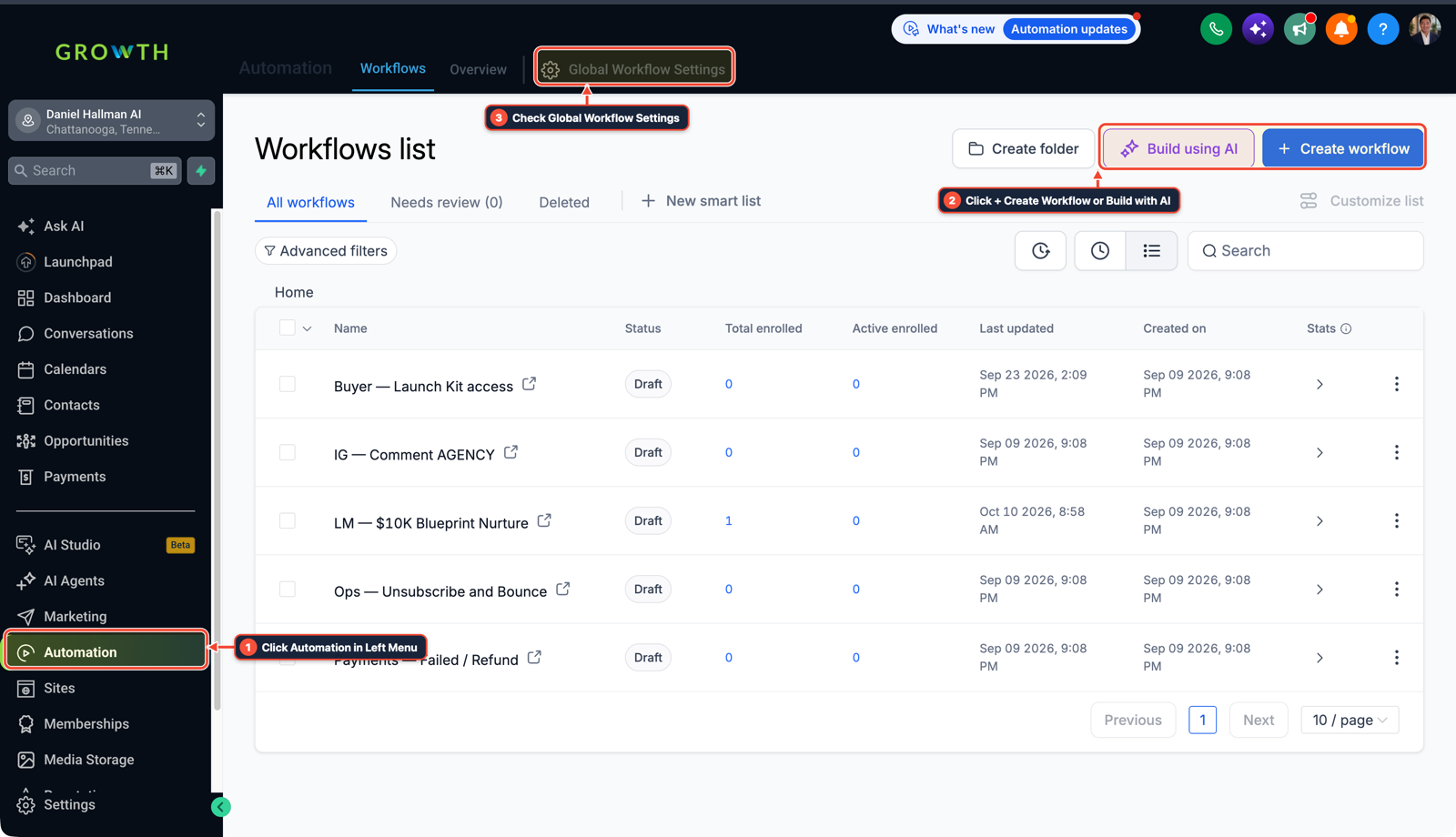
1Click Automation in Left Menu 2Click + Create Workflow or Build with AI 3Check Global Workflow Settings - STEP 2Configure the Assignment Workflow: Set the workflow trigger to 'Contact Changed' (filter: Add Collaborator is not empty) or 'Tag Added'. Under Actions, add 'Add Contact Follower' and select the matching team member.
-
STEP 3Fire the Instant Internal Notification: Immediately after the Add Follower action, add 'Send Internal Notification'. Choose In-App Notification and SMS, set Recipient to 'Contact Followers' (or Particular User), and include the direct link ({{contact.url}}). Optionally add a final step to clear the trigger field so it can be reused.
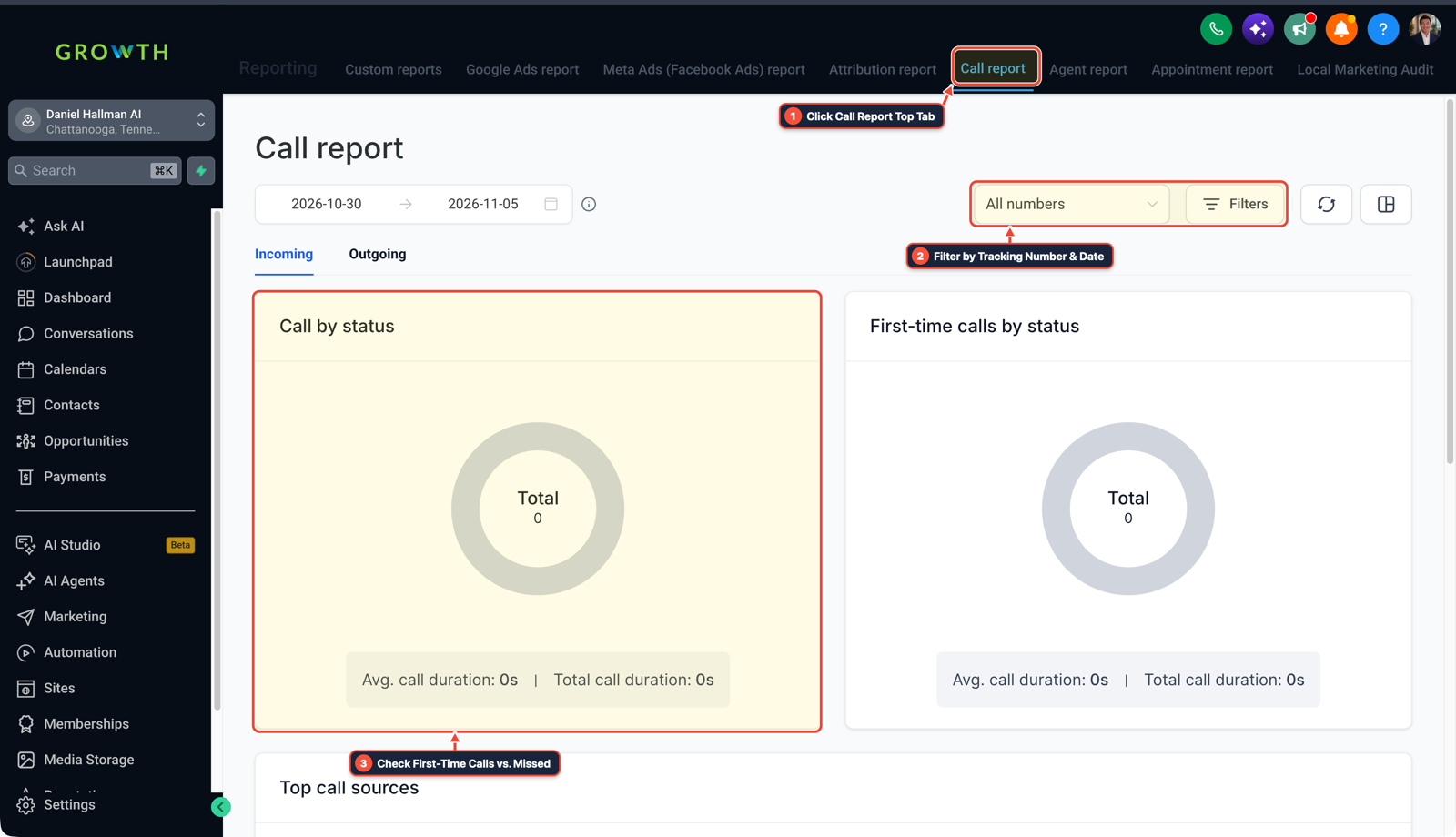
1Click Call Report Top Tab 2Filter by Tracking Number & Date 3Check First-Time Calls vs. Missed
MODE: AGENT PROMPT
PASTE THIS PROMPT INTO CLAUDE CODE, CURSOR, CHATGPT, OR YOUR GHL ASSISTANT
SAFE READ-FIRST WORKFLOW
Build a Contact Follower Notification workflow in our GoHighLevel sub-account:
1. Trigger on 'Contact Changed' when custom field 'Add Collaborator' is updated, or on Tag Added 'assign-reviewer'.
2. Add an action 'Add Contact Follower' to assign the selected user to the contact.
3. Send an immediate High-Priority In-App Internal Notification to Contact Followers: 'You have been added as a collaborator on {{contact.name}}. Tap to view contact: {{contact.url}}'.
4. Clear the 'Add Collaborator' field so subsequent team assignments can re-trigger cleanly.
RUN WITH OUR GHL-TOOLS MCP SERVER OR RUST CLI (DANIELHALLMAN.COM/MCP)
SUPPORTS --DRY-RUN PREVIEW
# 1. MCP Tool Call (ghl-crm-mcp)
{
  "tool": "workflows_create_from_recipe",
  "arguments": {
    "location_id": "<YOUR_LOCATION_ID>",
    "recipe": "contact_follower_instant_alert",
    "clear_trigger_on_complete": true,
    "dry_run": true
  }
}

# 2. Or run via ghl-crm Rust CLI
ghl-crm workflows apply-recipe --location-id <YOUR_LOCATION_ID> --recipe follower-alert --dry-run
Related GoHighLevel Questions & Fixes
PLAYBOOK T22 · Workflows & Automation
Why is my GoHighLevel Inbound Webhook not creating or updating contacts?
Fetch a real sample request inside your Inbound Webhook Trigger (never use the 'Test Workflow' button), add a native Format Data -> Format Phone Number (E.164) step first, and map the formatted phone and email into Create/Update Contact.
PLAYBOOK T24 · Workflows & AutomationWhy is GoHighLevel still sending messages after a customer replies?
The native 'Stop on Response' toggle only stops the specific workflow that sent the message—it never removes leads from overlapping nurture or blast campaigns. Fix it by building a dedicated global Safety Net workflow triggered on Customer Replied with an explicit Remove from Workflow action.
PLAYBOOK T10 · Workflows & AutomationHow do you format data and run math in GoHighLevel Workflows without paying for n8n or Make?
Use HighLevel's built-in Format Data, Math Operation, Goal Events, and Inbound/Outbound Webhook steps inside a single native workflow so contact history and error logs stay in one place.
PLAYBOOK T03 · Unified Inbox & ChatHow do you stop GoHighLevel chat bots from replying after a customer texts STOP?
Trigger HighLevel DND immediately on opt-out keywords (STOP, CANCEL, UNSUBSCRIBE) and place an `ai-conv-paused` tag check before every Conversation AI workflow step.
BUILD FASTER IN GOHIGHLEVEL · FREE TRIAL BONUSES + MCP SERVER
Want this built inside your GoHighLevel account automatically?
Connect Claude Code, Cursor, or OpenAI Codex to our ghl-tools MCP Server & Rust CLI for 30-second sub-account checks and --dry-run previews—or start/upgrade your GoHighLevel plan through our partner link to unlock up to $612+ in ready-to-import kits (including GHL Workflow Recipe Pack ($47 — or Free with Trial)) and our weekly live clinics.