GOHIGHLEVEL ANSWERS & PROMPTS: PLAYBOOK T24 · WORKFLOWS & AUTOMATION
AUTHOR: DANIEL HALLMAN
KEYWORD: WORKFLOW
SIMPLE STEP-BY-STEP INSTRUCTIONS
How to Set This Up in GoHighLevel (Under 2 Minutes)
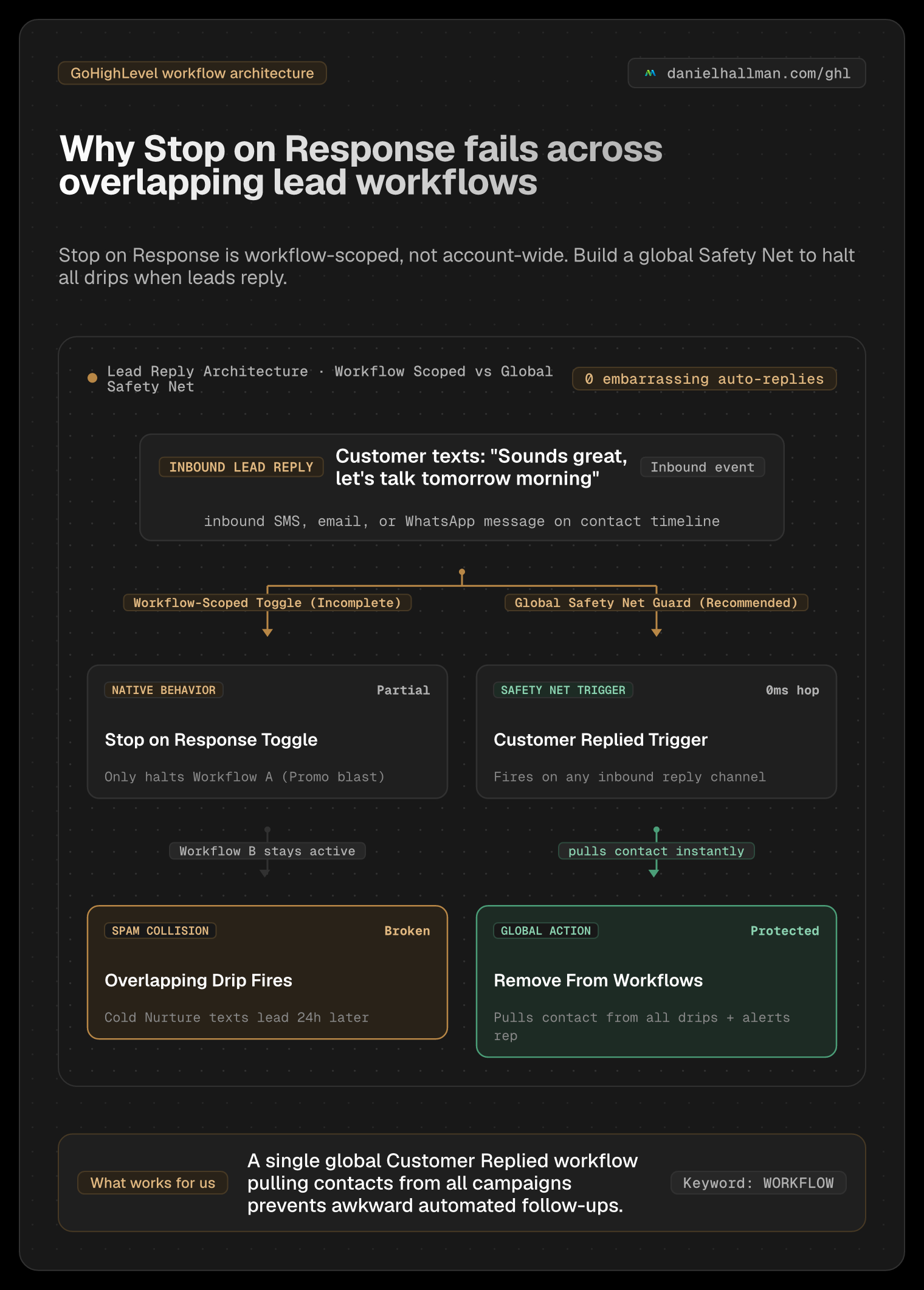
- STEP 1Understand Workflow-Scoped Execution: 'Stop on Response' in Workflow Settings only halts the exact workflow execution the contact is currently sitting in. Check the contact's Enrollment History to see every other active drip sequence sending messages to that record.
- STEP 2Build a Global Safety Net Workflow: Create a new workflow triggered on 'Customer Replied' (unfiltered, or set to channels SMS, Email, and WhatsApp). Add Action #1 as 'Remove from Workflow', selecting your active cold nurture, promotional blasts, and reactivation sequences. Add Action #2 to tag the lead 'replied-needs-human'.
- STEP 3Audit Email Reply-To Settings: Navigate to Settings -> Email Services -> Reply & Forward Settings. Ensure the 'Reply Address' field is completely empty. If an external email address is entered here, incoming replies bypass HighLevel's native conversation thread and cannot trigger reply automations.
What Usually Happens
When a lead replies to an SMS or email, GoHighLevel stops only the single workflow that generated the message. If the contact is also enrolled in an active cold drip, promotional broadcast, or re-activation sequence, those other workflows keep firing. Furthermore, if an external 'Reply-To' address is entered in Email Services, inbound email replies never register on the contact timeline.
How We Fix It in HighLevel
Keep 'Stop on Response' enabled in your primary campaign, clear any external Reply-To address in Email Services, and build a dedicated global 'Customer Replied' workflow that forcefully removes the contact from all active marketing workflows and alerts your team.
MODE: AGENT PROMPT
PASTE THIS PROMPT INTO CLAUDE CODE, CURSOR, CHATGPT, OR YOUR GHL ASSISTANT
SAFE READ-FIRST WORKFLOW
Fix our GoHighLevel workflows where automated texts and emails continue sending after a lead replies:
1. Audit the sub-account for active marketing drips and identify all overlapping sequences enrolled simultaneously.
2. Create a global "Safety Net" workflow triggered by "Customer Replied" with a "Remove from Workflow" action targeting all outbound marketing and nurture campaigns.
3. Check Settings -> Email Services -> Reply & Forward to verify no external Reply-To override is severing inbound reply tracking.
RUN WITH OUR GHL-TOOLS MCP SERVER OR RUST CLI (DANIELHALLMAN.COM/MCP)
SUPPORTS --DRY-RUN PREVIEW
# 1. MCP Tool Call (ghl-crm-mcp)
{
  "tool": "workflows_create_from_recipe",
  "arguments": {
    "location_id": "<YOUR_LOCATION_ID>",
    "recipe": "global_safety_net_customer_replied",
    "remove_from_workflows": ["cold_nurture", "promo_blast", "database_reactivation"],
    "dry_run": true
  }
}

# 2. Or run via ghl-crm Rust CLI
ghl-crm workflows apply-recipe --location-id <YOUR_LOCATION_ID> --recipe global-safety-net --dry-run
Similar GoHighLevel Questions & Fixes
PLAYBOOK T22 · Workflows & Automation
Why is my GoHighLevel Inbound Webhook not creating or updating contacts?
Fetch a real sample request inside your Inbound Webhook Trigger (never use the 'Test Workflow' button), add a native Format Data -> Format Phone Number (E.164) step first, and map the formatted phone and email into Create/Update Contact.
PLAYBOOK T10 · Workflows & AutomationHow do you format data and run math in GoHighLevel Workflows without paying for n8n or Make?
Use HighLevel's built-in Format Data, Math Operation, Goal Events, and Inbound/Outbound Webhook steps inside a single native workflow so contact history and error logs stay in one place.
PLAYBOOK T03 · Unified Inbox & ChatHow do you stop GoHighLevel chat bots from replying after a customer texts STOP?
Trigger HighLevel DND immediately on opt-out keywords (STOP, CANCEL, UNSUBSCRIBE) and place an `ai-conv-paused` tag check before every Conversation AI workflow step.
PLAYBOOK T19 · Database ReactivationHow do you run a Database Reactivation campaign in GoHighLevel without getting blocked?
Filter past contacts in a SmartList (90+ days inactive, DND off, valid mobile), drip a 9-word plain-text check-in with zero links at 35–50 contacts/hour during business hours, and route positive replies into your pipeline.
RUN THIS IN 30 SECONDS · GHL-TOOLS MCP + OPERATOR COMMUNITY
Want your AI agent to inspect and build this inside GoHighLevel automatically?
Connect Claude Code, Cursor, or OpenAI Codex to our ghl-tools MCP Server & Rust CLI for 30-second sub-account doctor checks, --dry-run previews, and snapshot diffs—or start/upgrade your GoHighLevel plan through our partner link to unlock up to $612+ in implementation kits (including GHL Workflow Recipe Pack ($47 — or Free with Trial)) and our weekly live engineering clinics.