GOHIGHLEVEL ANSWERS & PROMPTS: PLAYBOOK T66 · EXTERNAL WEBSITE DNS, SUBDOMAINS & 301 SEO REDIRECTS
AUTHOR: DANIEL HALLMAN
KEYWORD: EXTERNAL SITE DNS
STEP-BY-STEP INSTRUCTIONS + ANNOTATED GHL SCREENSHOTS
Steps in GoHighLevel
-
STEP 1In Settings > Domains & URL Redirects, keep a dedicated subdomain such as
book.yourdomain.com(along with yourlc.yourdomain.comemail sending records) connected to GoHighLevel while pointing your root@andwwwDNS records to your new website host.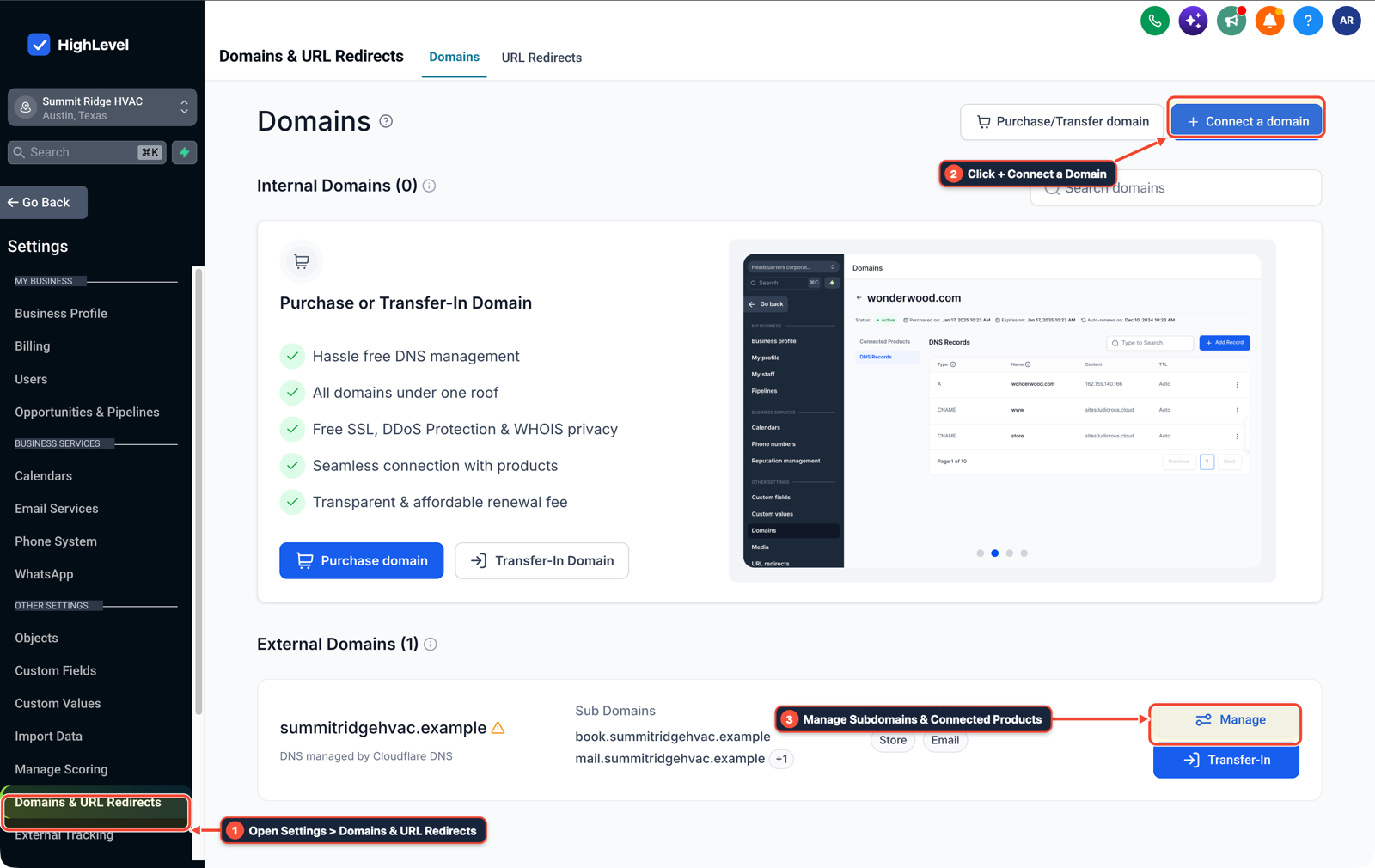
1Open Settings > Domains & URL Redirects 2Click + Connect a Domain 3Manage Subdomains & Connected Products -
STEP 2In Sites > Forms (and Sites > Chat Widget), copy the booking calendar or chat widget script onto your new site, or post your new site's custom form directly to a GoHighLevel Inbound Webhook URL if you prefer not to load an iframe embed.
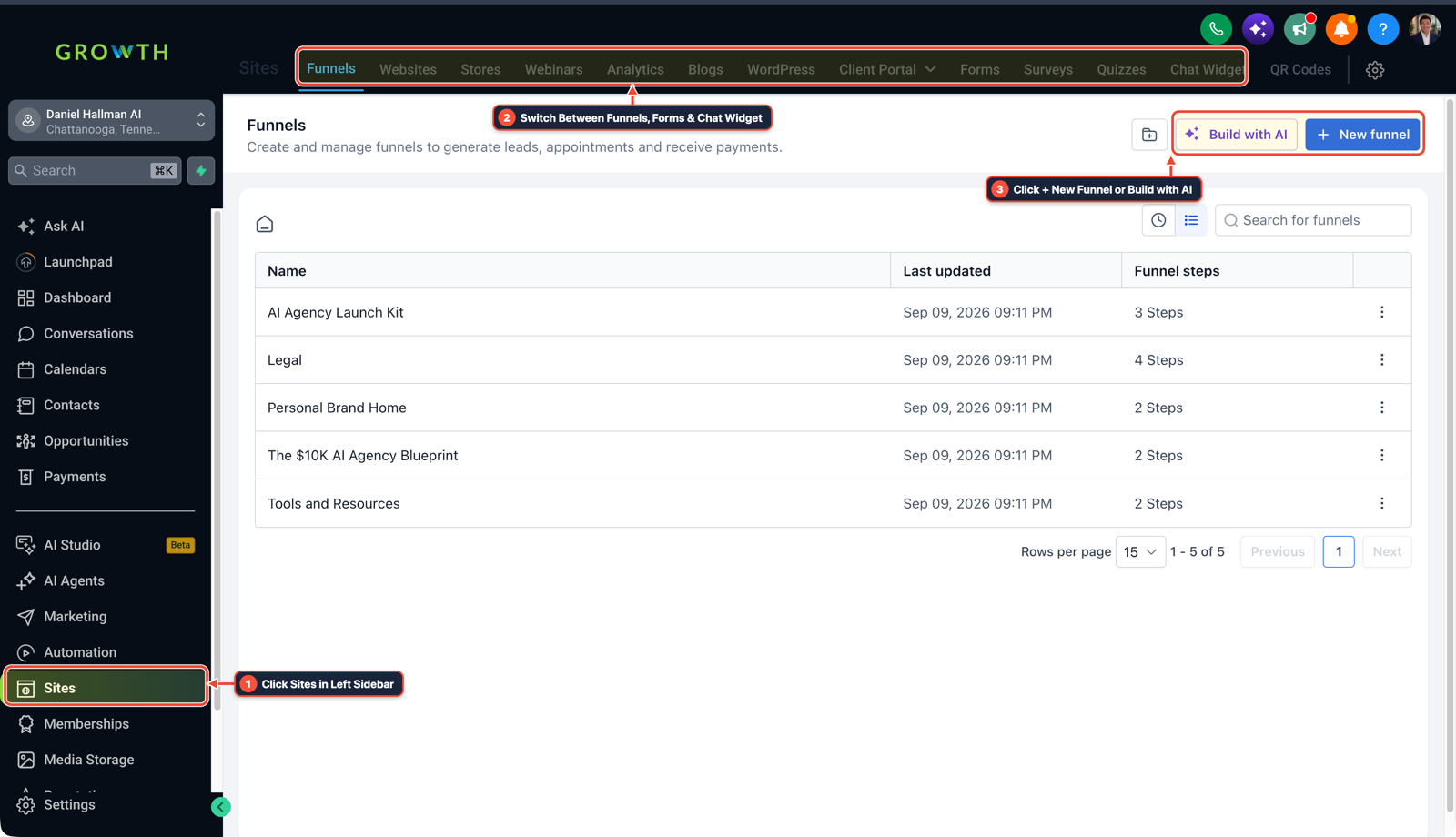
1Click Sites in Left Sidebar 2Switch Between Funnels, Forms & Chat Widget 3Click + New Funnel or Build with AI -
STEP 3In Automation > Workflow Builder, map incoming form or Inbound Webhook submissions to Create/Update Contact and verify
301permanent redirects from every old HighLevel page slug to its matching new URL before switching traffic.
1Add If/Else Condition & Tag Guard 2Chain Priority & Wait Steps 3Switch to Settings or Execution Logs
MODE: AGENT PROMPT
PASTE INTO CLAUDE CODE, CURSOR, CHATGPT, OR GOHIGHLEVEL ASK AI
AGENT PROMPT
Configure subdomain routing and webhook lead capture for an external website paired with sub-account <YOUR_LOCATION_ID>:
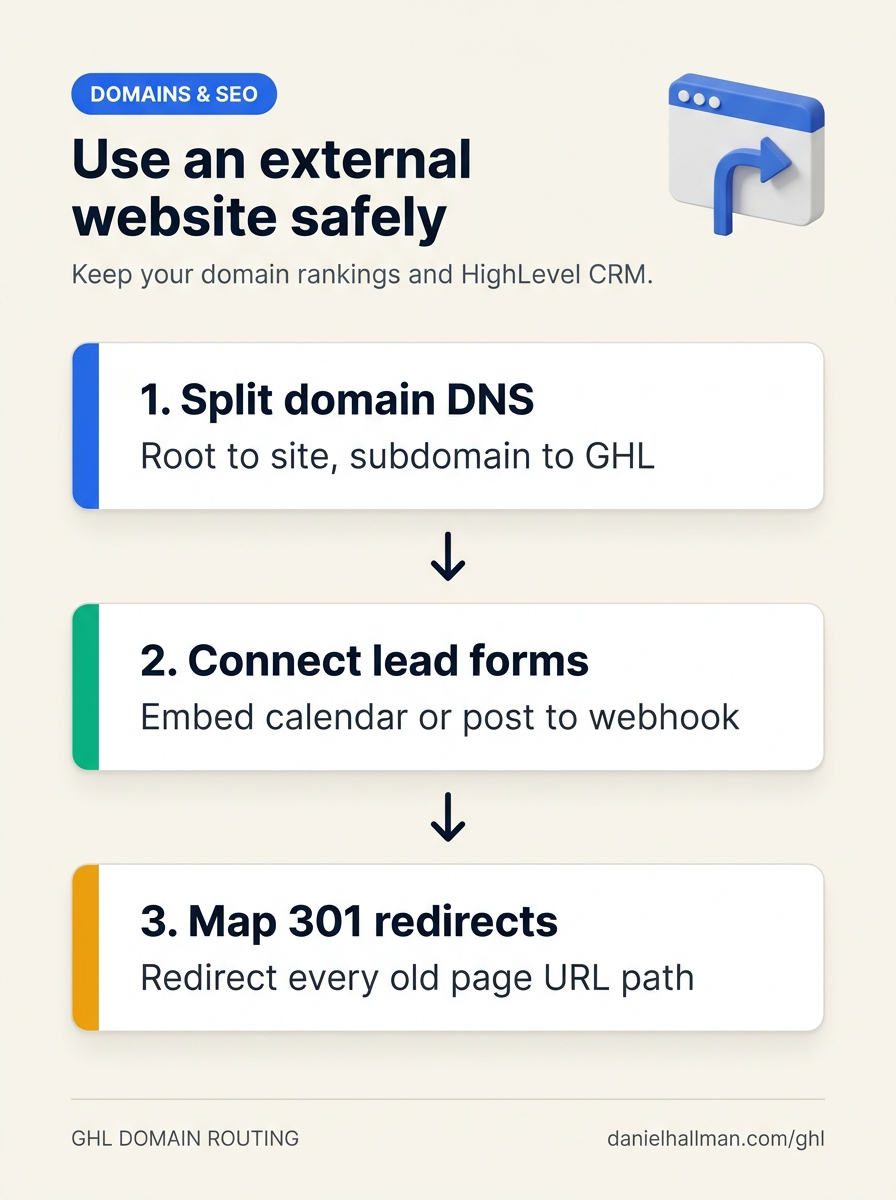
1. In Settings > Domains & URL Redirects, bind book.<yourdomain.com> to GoHighLevel calendars and funnels while pointing root @ and www DNS records to the external web host.
2. In Sites > Forms and Automation > Workflow Builder, connect external form submissions via an Inbound Webhook action that runs Create/Update Contact and assigns the lead opportunity stage.
3. Audit all legacy page slugs and configure 301 redirects to the new site URLs so existing search rankings carry over.
GHL-TOOLS MCP SERVER & CLI (DANIELHALLMAN.COM/MCP)
BUILDER + SUB-ACCOUNT TOOLS
# Audit sub-account domains, forms, and lead intake workflows
ghl-crm funnels list --context <YOUR_CONTEXT> --location <YOUR_LOCATION_ID>
ghl-crm workflows list --context <YOUR_CONTEXT> --location <YOUR_LOCATION_ID>
Official GHL MCP vs. ghl-tools: HighLevel’s official hosted MCP (services.leadconnectorhq.com/mcp) covers public v2 CRM records (contacts, opportunities, appointments, conversations). ghl-tools MCP complements it with workflow graph inspection & recipes, funnel/form builders, DNS/BIMI checks, and ghl-crm doctor audits.
Cause
- Businesses that outgrow stock GoHighLevel page templates often worry that rebuilding their website on an external platform means giving up their domain's Google rankings or disconnecting their CRM pipelines, booking calendars, and automated texts.
- If you repoint the whole domain without keeping a booking subdomain and 301 path redirects, old indexed links 404 and existing calendar or email links stop resolving.
GoHighLevel Configuration
- Split your DNS records so
@andwwwserve the new external website while a subdomain (book.orgo.) and your email records stay on Settings > Domains & URL Redirects, wire lead capture through Sites > Forms or an Inbound Webhook in Automation > Workflow Builder - and map
301redirects from every legacy URL path.
GoHighLevel Menu Paths
| Step | Menu Path in GHL | Action |
|---|---|---|
| Step 1 | Settings > Domains & URL Redirects | Keep a dedicated subdomain such as book.yourdomain.com (along with your lc.yourdomain.com email sending records) connected to GoHighLevel while pointing your root @ and www DNS records to your new website host. |
| Step 2 | Sites > Forms | Copy the booking calendar or chat widget script onto your new site, or post your new site's custom form directly to a GoHighLevel Inbound Webhook URL if you prefer not to load an iframe embed. |
| Step 3 | Automation > Workflow Builder | Map incoming form or Inbound Webhook submissions to Create/Update Contact and verify 301 permanent redirects from every old HighLevel page slug to its matching new URL before switching traffic. |
DEFAULT SETUP VS. AUTOMATED WORKFLOW
Operational Comparison
Manual Admin Work Per Client
Lead-to-Booked-Job Conversion
Related Questions
- How do you isolate custom tracking domains in GoHighLevel so links don't trigger spam filters?
- Why won't my GoDaddy DNS CNAME record or DMARC verify in GoHighLevel?
- How Should You Scope a $699/Month GoHighLevel, Funnel, and Paid Ads Retainer Without Scope Creep?
- Why is my GoHighLevel Inbound Webhook not creating or updating contacts?
BUILD FASTER IN GOHIGHLEVEL · FREE TRIAL BONUSES + MCP SERVER
Build this directly inside your GoHighLevel sub-account
Connect Claude Code, Cursor, or OpenAI Codex to our ghl-tools MCP Server & Rust CLI to build workflows, forms, and funnels from your editor, or start your GoHighLevel plan through our partner link to unlock $612+ in ready-to-import kits (including GHL External Website DNS & Webhook Routing Kit) and weekly live clinics.