GOHIGHLEVEL ANSWERS & PROMPTS: PLAYBOOK T74 · DIRECT MAIL COHORT TAGGING, TRACKING NUMBERS & 90-DAY BOOKED JOB ATTRIBUTION
AUTHOR: DANIEL HALLMAN
KEYWORD: DIRECT MAIL TEST
STEP-BY-STEP INSTRUCTIONS + ANNOTATED GHL SCREENSHOTS
Steps in GoHighLevel
-
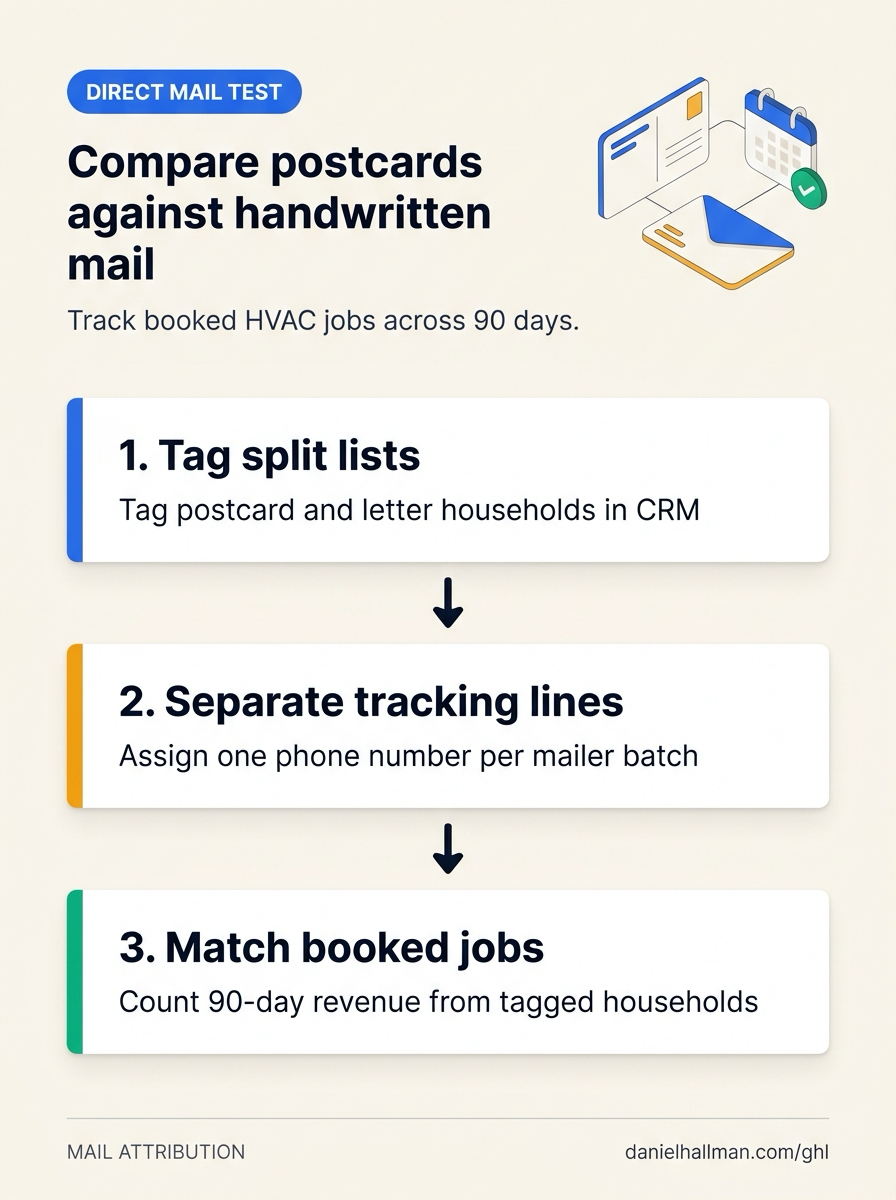
STEP 1In Contacts > Smart Lists, filter past customers by last service date and lifetime spend, split the list randomly into two balanced groups of equal size and recency, and apply
mailer-spring-postcardto Group A andmailer-spring-handwrittento Group B before exporting the mailing CSVs.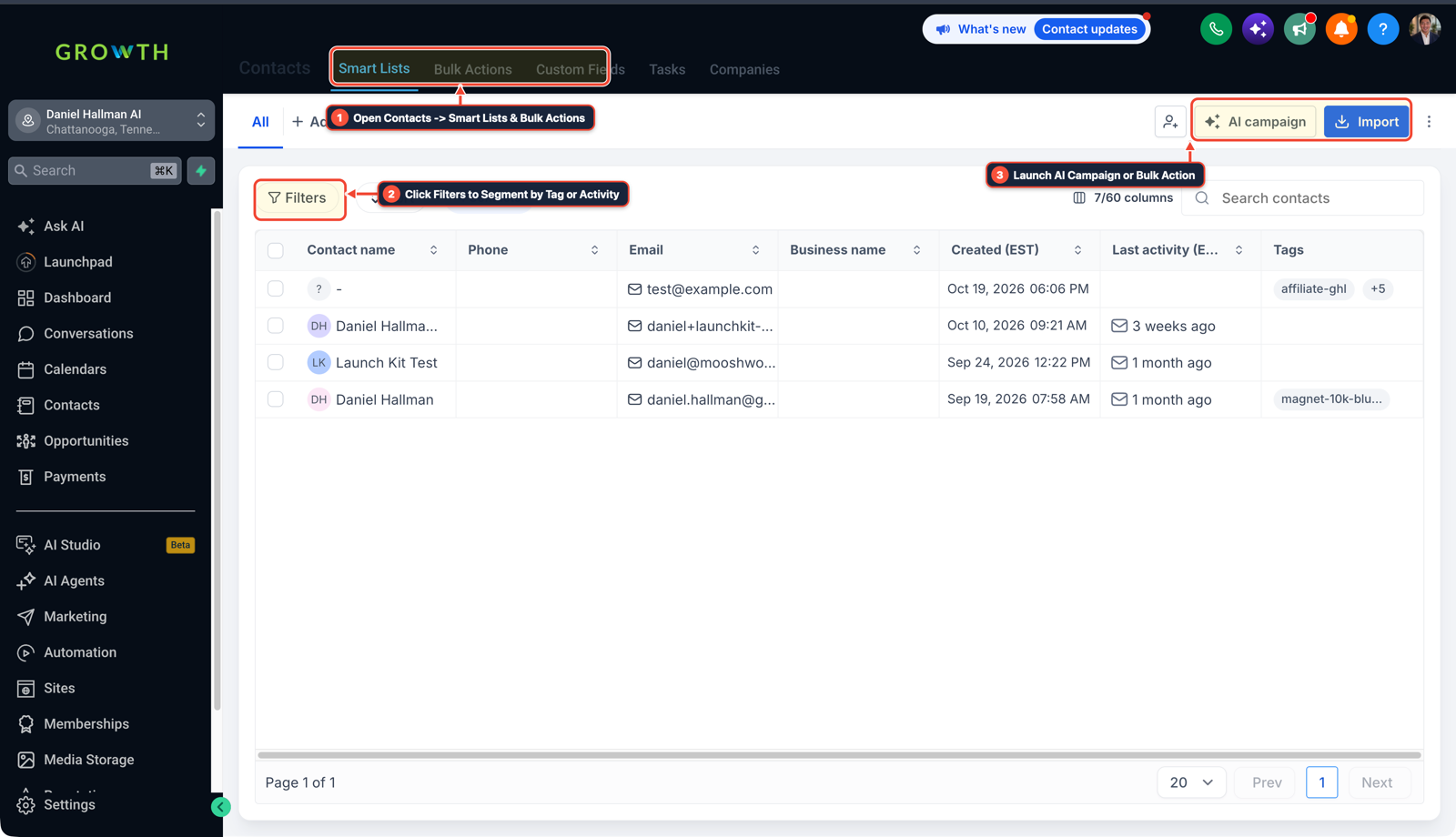
1Open Contacts > Smart Lists & Bulk Actions 2Click Filters to Segment by Tag or Activity 3Launch AI Campaign or Import List -
STEP 2In Settings > Phone System > Manage Numbers, assign one local tracking number (and matching promo code) to the postcard batch and a second tracking number to the handwritten letter batch, forwarding both to your main intake line while tagging callers automatically.
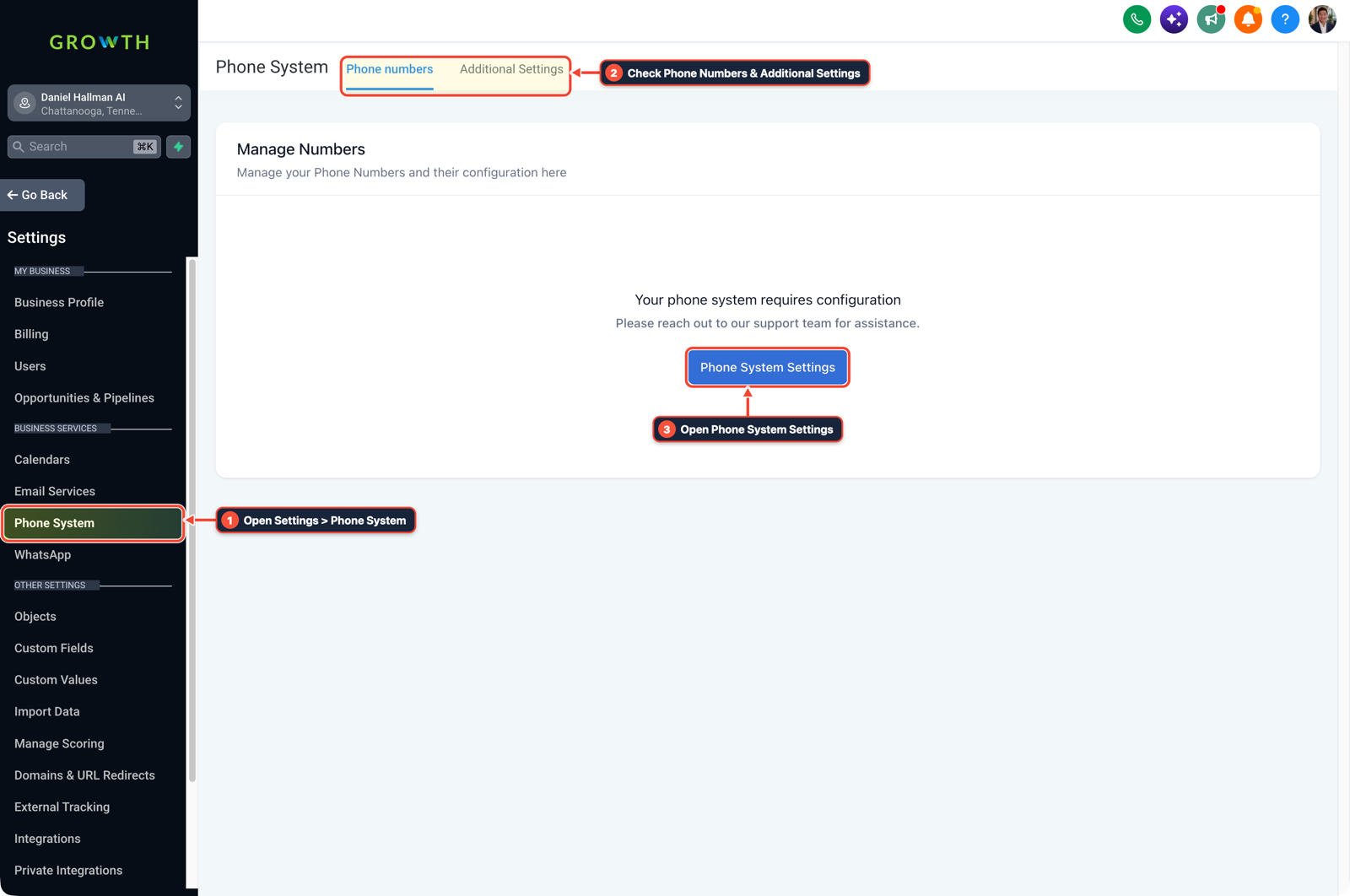
1Open Settings > Phone System 2Check Phone Numbers & Additional Settings 3Open Phone System Settings -
STEP 3In Reporting > Call Report (and Opportunities > Pipelines filtered by contact tag over a
60-to-90-daywindow through the first hot week of the season), compare total booked jobs and net revenue after printing and postage costs across all households carrying each cohort tag, including past customers who called the main shop number directly.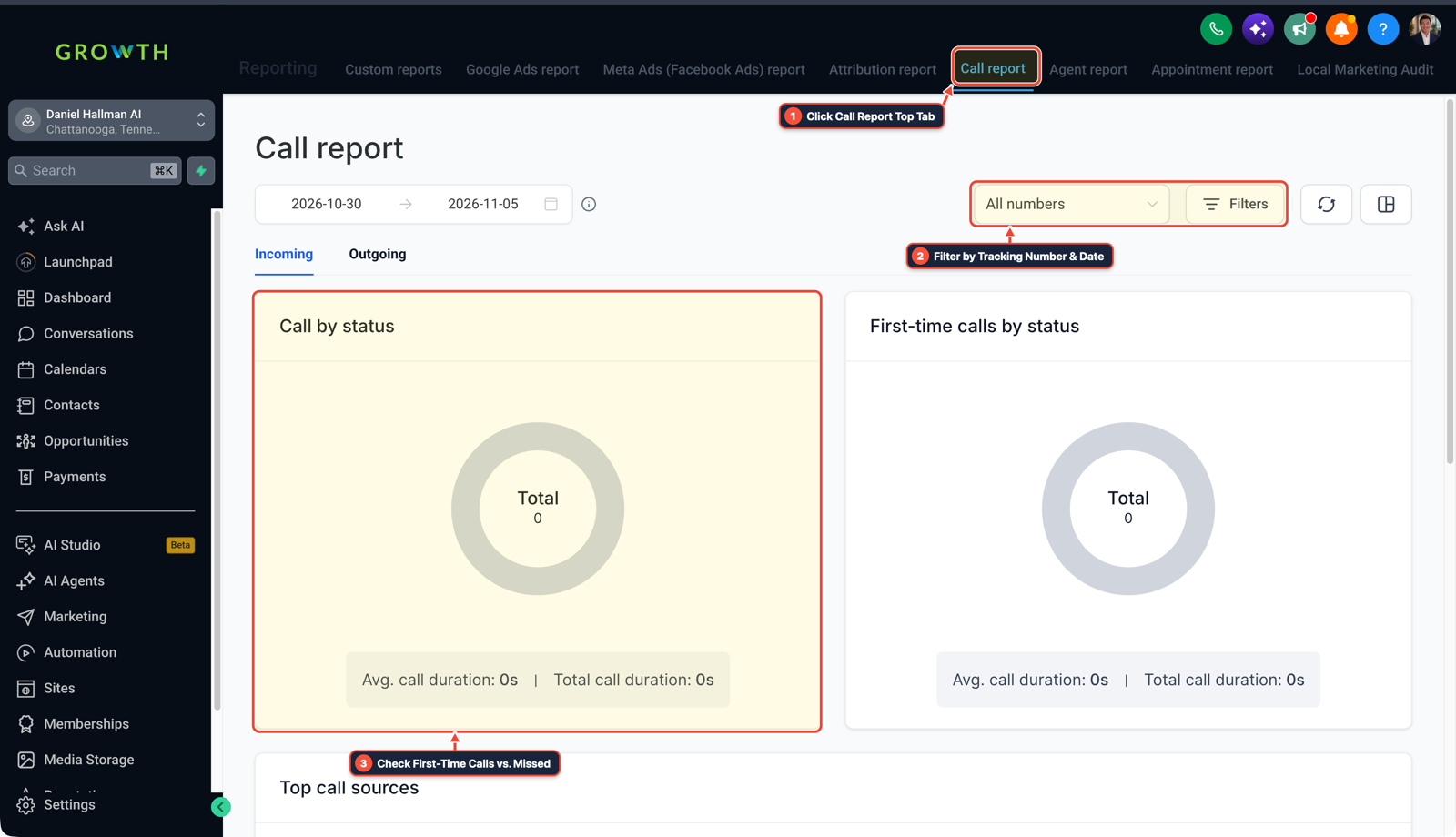
1Click Call Report Top Tab 2Filter by Tracking Number & Date 3Check First-Time Calls vs. Missed
MODE: AGENT PROMPT
PASTE INTO CLAUDE CODE, CURSOR, CHATGPT, OR GOHIGHLEVEL ASK AI
AGENT PROMPT
Set up a 90-day A/B direct mail cohort test comparing printed postcards against handwritten letters in sub-account <YOUR_LOCATION_ID>:
1. In Contacts > Smart Lists, segment past customers by recency and spend into two balanced cohorts tagged mailer-spring-postcard and mailer-spring-handwritten.
2. In Settings > Phone System > Manage Numbers, provision two dedicated tracking numbers forwarding to the main dispatch line and auto-tag inbound calls by number.
3. In Opportunities > Pipelines and Reporting > Call Report, compare booked job counts, total revenue, and cost per booked job across both contact tags over a 90-day window.
GHL-TOOLS MCP SERVER & CLI (DANIELHALLMAN.COM/MCP)
BUILDER + SUB-ACCOUNT TOOLS
# Inspect tracking numbers, smart list tags, and pipeline attribution workflows
ghl-agency phone-wallet-audit --context <YOUR_CONTEXT> --location <YOUR_LOCATION_ID>
ghl-crm workflows list --context <YOUR_CONTEXT> --location <YOUR_LOCATION_ID>
Official GHL MCP vs. ghl-tools: HighLevel’s official hosted MCP (services.leadconnectorhq.com/mcp) covers public v2 CRM records (contacts, opportunities, appointments, conversations). ghl-tools MCP complements it with workflow graph inspection & recipes, funnel/form builders, DNS/BIMI checks, and ghl-crm doctor audits.
Cause
- Handwritten mailers cost several times more per piece than printed postcards, so a test batch is usually only a few hundred homes.
- If an HVAC company mails a spring tune-up offer in March, homeowners often hold the mailer until the first hot week in May and then dial the main office number saved in their phone contacts instead of calling the promo number printed on the card.
GoHighLevel Configuration
- Split your past-customer list into two balanced cohorts tagged
mailer-2026-postcardandmailer-2026-handwrittenin Contacts > Smart Lists, assign a dedicated forwarding number and coupon code to each piece in Settings > Phone System > Manage Numbers - and measure cost per booked job over a
90-dayseasonal window in Reporting > Call Report and Opportunities > Pipelines.
GoHighLevel Menu Paths
| Step | Menu Path in GHL | Action |
|---|---|---|
| Step 1 | Contacts > Smart Lists | Filter past customers by last service date and lifetime spend, split the list randomly into two balanced groups of equal size and recency, and apply mailer-spring-postcard to Group A and mailer-spring-handwritten to Group B before exporting the mailing CSVs. |
| Step 2 | Settings > Phone System > Manage Numbers | Assign one local tracking number (and matching promo code) to the postcard batch and a second tracking number to the handwritten letter batch, forwarding both to your main intake line while tagging callers automatically. |
| Step 3 | Reporting > Call Report | In Reporting > Call Report (and Opportunities > Pipelines filtered by contact tag over a 60-to-90-day window through the first hot week of the season), compare total booked jobs and net revenue after printing and postage costs across all households carrying each cohort tag, including past customers who called the main shop number directly. |
DEFAULT SETUP VS. AUTOMATED WORKFLOW
Operational Comparison
Manual Admin Work Per Client
Lead-to-Booked-Job Conversion
Related Questions
- How do you run a Database Reactivation campaign in GoHighLevel without getting blocked?
- How Do You Fix GA4 vs. CRM Lead Count Discrepancies in GoHighLevel?
- How Should You Scope a $699/Month GoHighLevel, Funnel, and Paid Ads Retainer Without Scope Creep?
- How do you set up Facebook Conversion API (CAPI) and Google Offline Conversions in GoHighLevel?
BUILD FASTER IN GOHIGHLEVEL · FREE TRIAL BONUSES + MCP SERVER
Build this directly inside your GoHighLevel sub-account
Connect Claude Code, Cursor, or OpenAI Codex to our ghl-tools MCP Server & Rust CLI to build workflows, forms, and funnels from your editor, or start your GoHighLevel plan through our partner link to unlock $612+ in ready-to-import kits (including GHL Direct Mail Cohort & Call Attribution Pack) and weekly live clinics.