GOHIGHLEVEL ANSWERS & PROMPTS: PLAYBOOK T75 · IN-HOUSE HOME SERVICE PIPELINES, MULTI-PROPERTY CARDS & WHATSAPP MAINTENANCE
AUTHOR: DANIEL HALLMAN
KEYWORD: SERVICE SETUP
STEP-BY-STEP INSTRUCTIONS + ANNOTATED GHL SCREENSHOTS
Steps in GoHighLevel
-
STEP 1In Opportunities > Pipelines, create a service pipeline (
New Ad Inquiry,Site Visit Booked,Estimate Sent,Installation Active,Recurring Maintenance) and turn on Allow multiple opportunities in Automation > Workflow > Settings so a customer with multiple properties gets a separate card per property address without needing the$497/monthCustom Objects plan.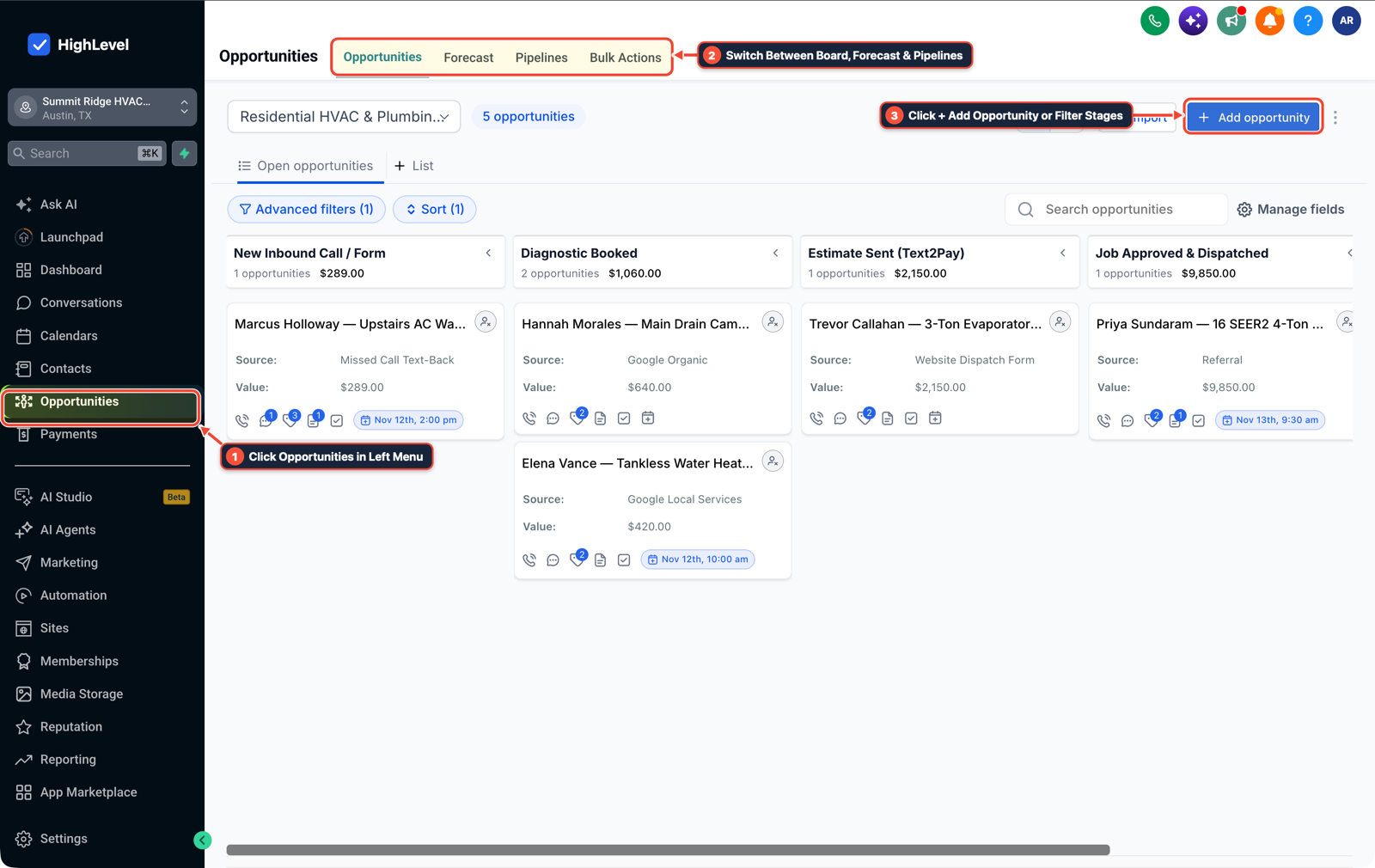
1Click Opportunities in Left Menu 2Switch Between Board, Forecast & Pipelines 3Click + Add Opportunity or Filter Stages -
STEP 2In Settings > Custom Fields, create Opportunity fields for
Property Service Address,Equipment & Pump Model,Installation Photos,Install Completed Date, andMaintenance Interval(3 Months,6 Months,12 Months), and connect QuickBooks under Settings > Integrations so completed estimates sync to accounting.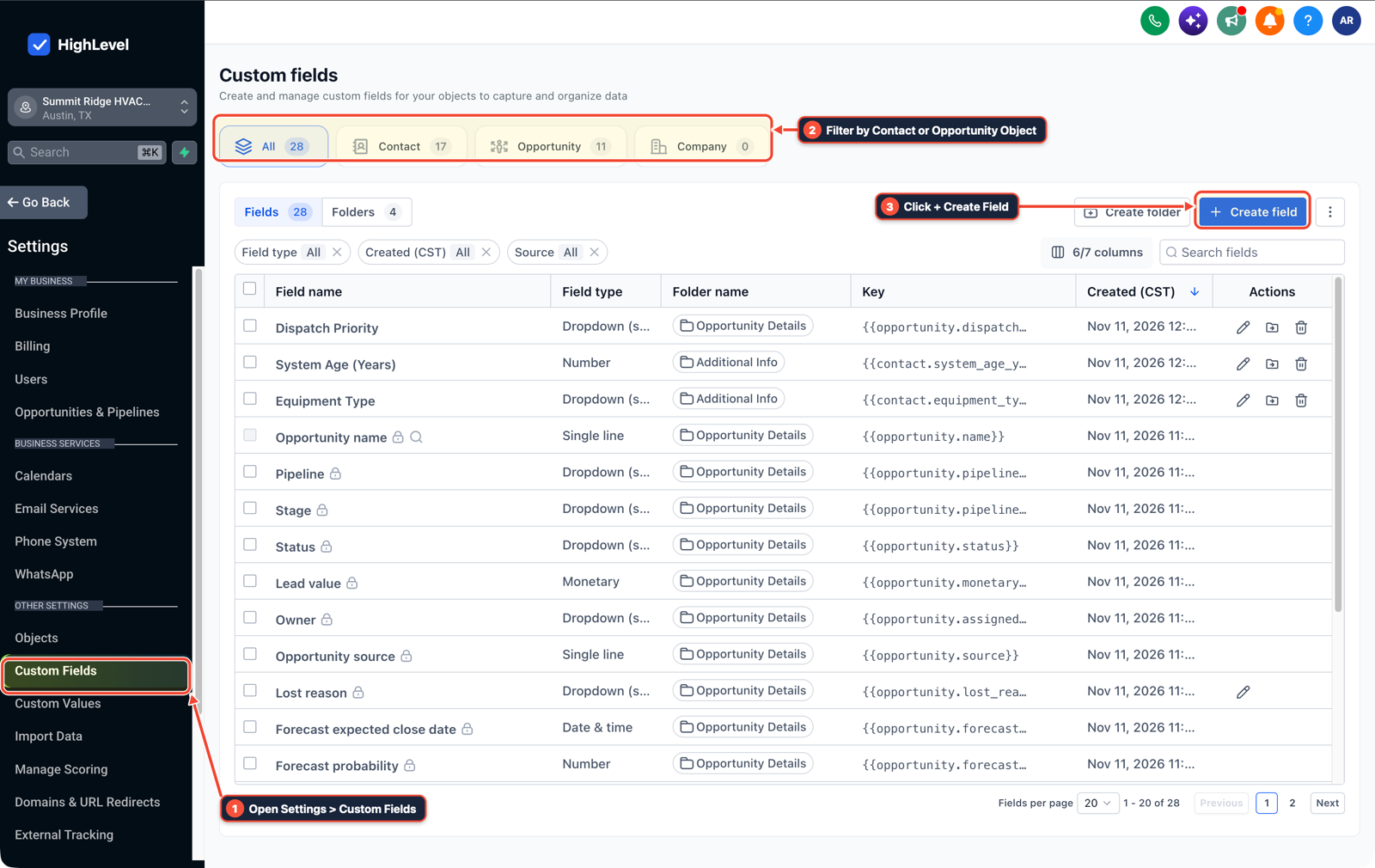
1Open Settings > Custom Fields 2Filter by Contact or Opportunity Object 3Click + Create Field -
STEP 3In Automation > Workflow Builder, trigger a recurring maintenance workflow from
Install Completed Datethat waits90,180, or365 daysand sends an approved WhatsApp Template message (required by Meta whenever more than 24 hours have passed since the customer's last WhatsApp reply).
1Add If/Else Condition & Tag Guard 2Chain Priority & Wait Steps 3Switch to Settings or Execution Logs
MODE: AGENT PROMPT
PASTE INTO CLAUDE CODE, CURSOR, CHATGPT, OR GOHIGHLEVEL ASK AI
AGENT PROMPT
Configure an in-house home service pipeline with multi-property tracking and WhatsApp maintenance reminders in sub-account <YOUR_LOCATION_ID>:
1. In Opportunities > Pipelines, create a service pipeline with stages for New Ad Inquiry, Site Visit Booked, Estimate Sent, Installation Active, and Recurring Maintenance, with Allow multiple opportunities enabled per contact.
2. In Settings > Custom Fields, create Opportunity fields for Property Service Address, Equipment & Pump Model, Installation Photos, Install Completed Date, and Maintenance Interval (3 / 6 / 12 Months).
3. In Automation > Workflow Builder, build a post-install reminder workflow using approved WhatsApp templates for 3-, 6-, and 12-month maintenance intervals.
GHL-TOOLS MCP SERVER & CLI (DANIELHALLMAN.COM/MCP)
BUILDER + SUB-ACCOUNT TOOLS
# Inspect opportunity custom fields, pipelines, and WhatsApp reminder workflows
ghl-crm custom-fields list --context <YOUR_CONTEXT> --location <YOUR_LOCATION_ID>
ghl-crm workflows list --context <YOUR_CONTEXT> --location <YOUR_LOCATION_ID>
Official GHL MCP vs. ghl-tools: HighLevel’s official hosted MCP (services.leadconnectorhq.com/mcp) covers public v2 CRM records (contacts, opportunities, appointments, conversations). ghl-tools MCP complements it with workflow graph inspection & recipes, funnel/form builders, DNS/BIMI checks, and ghl-crm doctor audits.
Cause
- Word-of-mouth referrals close quickly, while paid ad leads mix urgent breakdowns, price shoppers, and homeowners planning months ahead.
- When a service business operates outside the US on WhatsApp and services clients who own multiple properties, two issues trip up a basic setup: Meta blocks standard free-text WhatsApp messages 24 hours after the customer's last reply, and storing equipment specs on the Contact record overwrites the first property when a landlord books a second address.
GoHighLevel Configuration
- Enable multiple opportunities per contact in Opportunities > Pipelines so each property address holds its own card, attach equipment models, install photos
- and service intervals as Opportunity fields in Settings > Custom Fields
- and send 3-, 6-
- and 12-month check-ins through pre-approved WhatsApp utility templates in Automation > Workflow Builder.
GoHighLevel Menu Paths
| Step | Menu Path in GHL | Action |
|---|---|---|
| Step 1 | Opportunities > Pipelines | Create a service pipeline (New Ad Inquiry, Site Visit Booked, Estimate Sent, Installation Active, Recurring Maintenance) and turn on Allow multiple opportunities in Automation > Workflow > Settings so a customer with multiple properties gets a separate card per property address without needing the $497/month Custom Objects plan. |
| Step 2 | Settings > Custom Fields | Create Opportunity fields for Property Service Address, Equipment & Pump Model, Installation Photos, Install Completed Date, and Maintenance Interval (3 Months, 6 Months, 12 Months), and connect QuickBooks under Settings > Integrations so completed estimates sync to accounting. |
| Step 3 | Automation > Workflow Builder | Trigger a recurring maintenance workflow from Install Completed Date that waits 90, 180, or 365 days and sends an approved WhatsApp Template message (required by Meta whenever more than 24 hours have passed since the customer's last WhatsApp reply). |
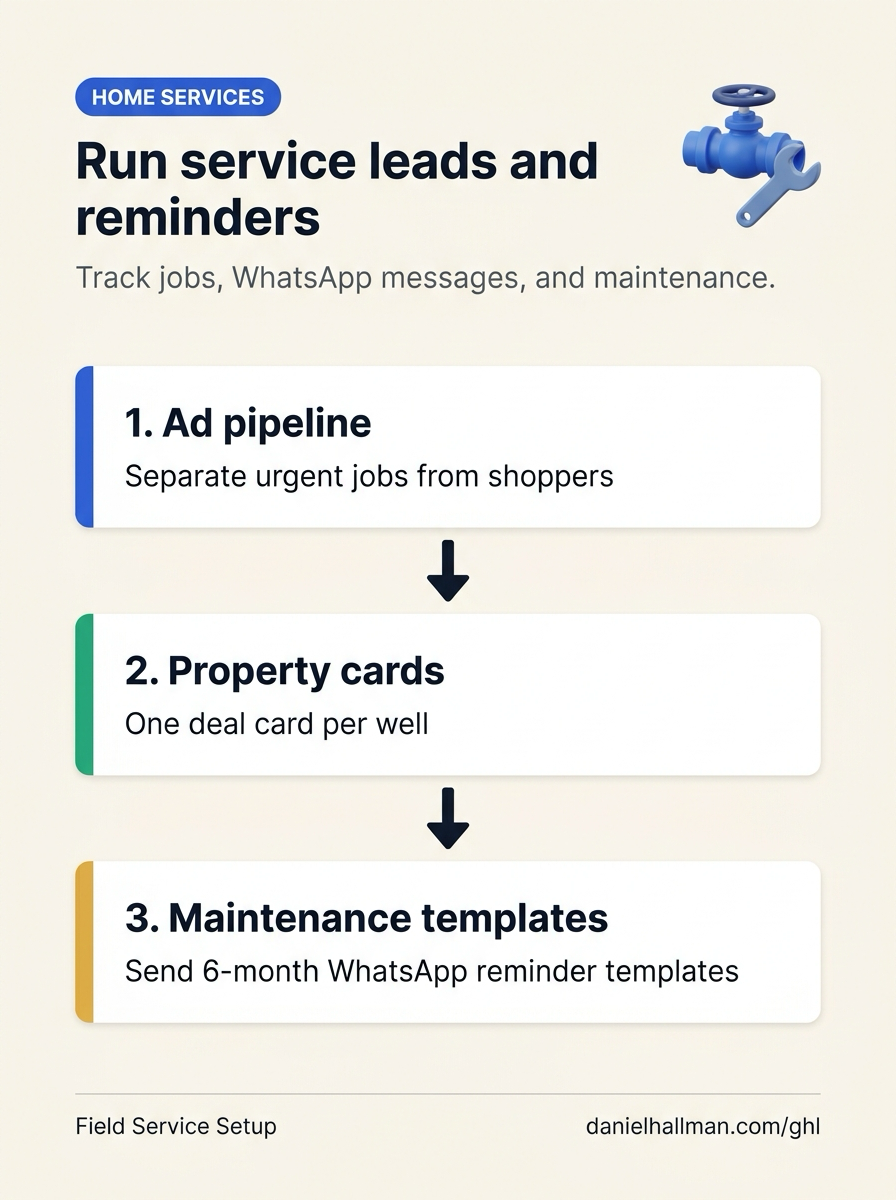
DEFAULT SETUP VS. AUTOMATED WORKFLOW
Operational Comparison
Speed to Lead & Callback Safety
Caller Reply & Booking Rate
Related Questions
- How do you set up GoHighLevel for a solo home service business without bloated agency snapshots?
- How Do You Handle Multiple Orders and Opportunities for One Contact in a Single GoHighLevel Pipeline?
- Should You Use WhatsApp or Standard SMS for Home Service Leads in GoHighLevel?
- How Do You Build a Field, Yard, or Inventory Lookup AI Agent From Team Chat and SMS Without Bad Updates?
BUILD FASTER IN GOHIGHLEVEL · FREE TRIAL BONUSES + MCP SERVER
Build this directly inside your GoHighLevel sub-account
Connect Claude Code, Cursor, or OpenAI Codex to our ghl-tools MCP Server & Rust CLI to build workflows, forms, and funnels from your editor, or start your GoHighLevel plan through our partner link to unlock $612+ in ready-to-import kits (including GHL Home Service Pipeline & WhatsApp Maintenance Pack) and weekly live clinics.