GOHIGHLEVEL ANSWERS & PROMPTS: PLAYBOOK T13 · CALENDARS & BOOKING
AUTHOR: DANIEL HALLMAN
KEYWORD: CREDITS
MODE: AGENT PROMPT
PASTE INTO CLAUDE CODE, CURSOR, CHATGPT, OR GOHIGHLEVEL ASK AI
AGENT PROMPT
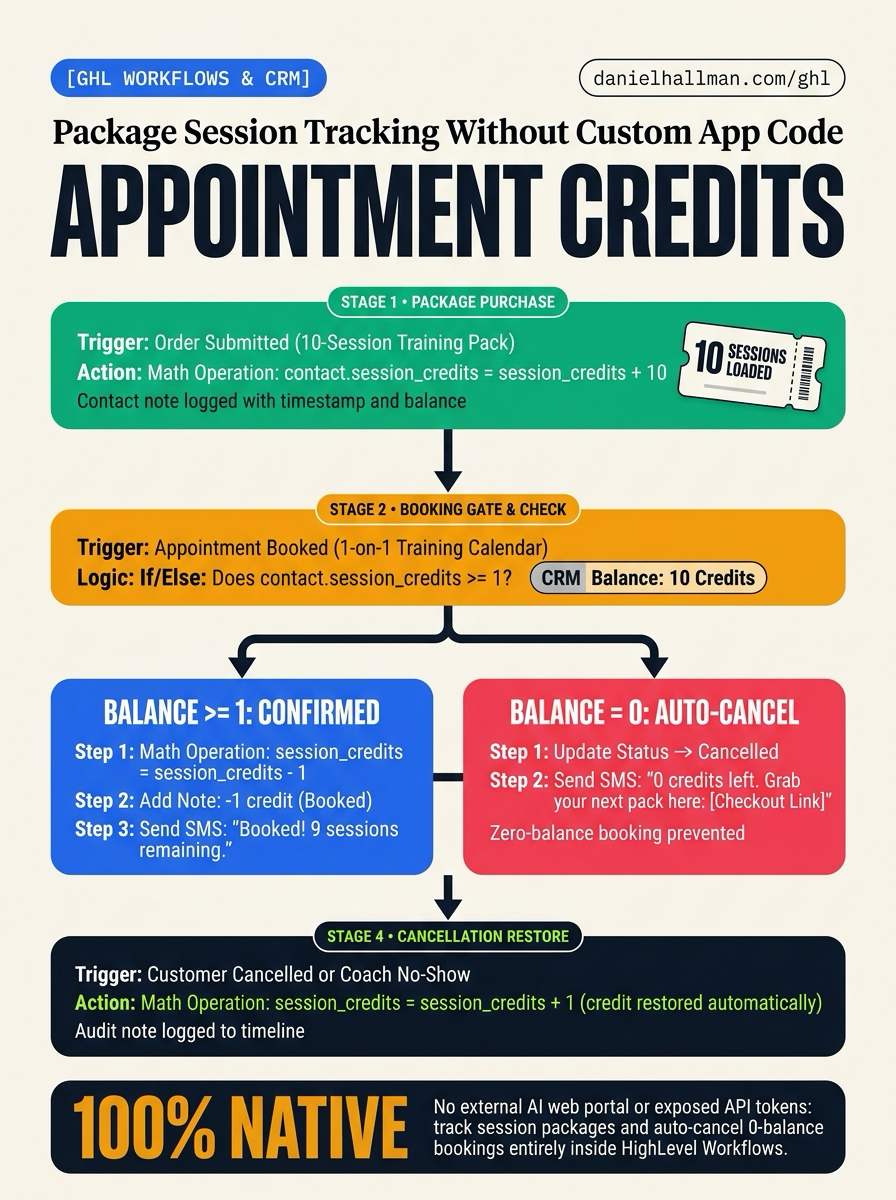
Configure native package session tracking and zero-balance booking gates in GoHighLevel for sub-account <YOUR_LOCATION_ID>:
1. Verify numerical custom field session_credits exists on contacts.
2. In Automation > Workflows, build an Order Submitted workflow adding 10 credits via Math Operation upon package checkout.
3. In Automation > Workflows, build an Appointment Status (Booked) gate checking session_credits >= 1, decrementing 1 credit on approval, or setting status to Cancelled with an SMS reload link if zero.
4. Build a cancellation workflow restoring 1 credit on cancelled appointments or coach no-shows.
GHL-TOOLS MCP SERVER & CLI (DANIELHALLMAN.COM/MCP)
BUILDER + SUB-ACCOUNT TOOLS
# Inspect workflows and custom fields via ghl-crm CLI
ghl-crm workflows list --context <YOUR_CONTEXT> --location <YOUR_LOCATION_ID>
Official GHL MCP vs. ghl-tools: HighLevel’s official hosted MCP (services.leadconnectorhq.com/mcp) covers public v2 CRM records (contacts, opportunities, appointments, conversations). ghl-tools MCP complements it with workflow graph inspection & recipes, funnel/form builders, DNS/BIMI checks, and ghl-crm doctor audits.
STEP-BY-STEP INSTRUCTIONS + ANNOTATED GHL SCREENSHOTS
Steps in GoHighLevel
-
STEP 1Create the Session Credits Field: In Settings > Custom Fields, select Add Field, choose Number, name it
Session Credits(session_credits), and save it to the Contact object with a default value of0.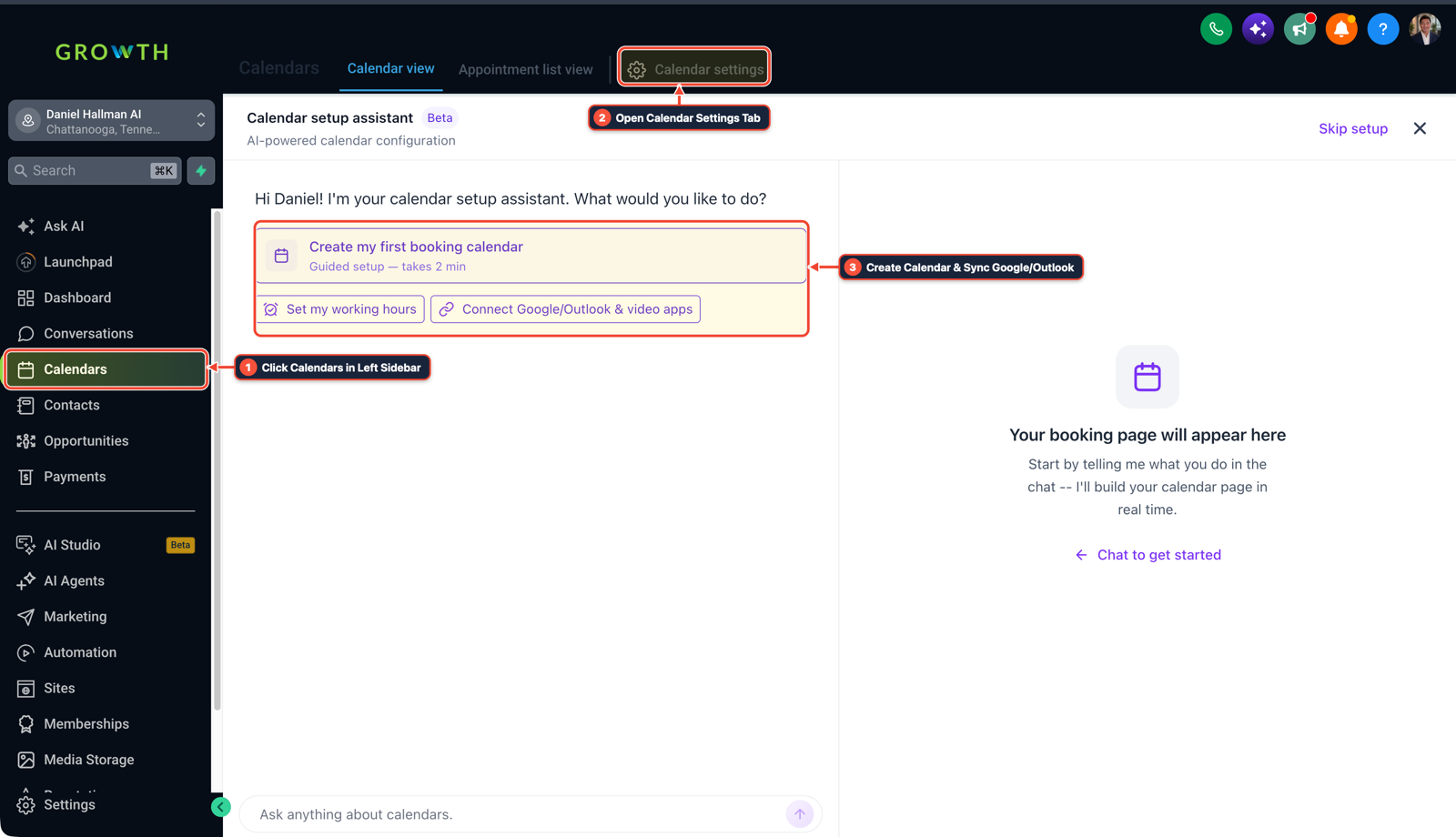
1Click Calendars in Left Sidebar 2Open Calendar Settings Tab 3Create Calendar & Sync Google/Outlook - STEP 2Build the Package Purchase Workflow: In Automation > Workflows, create a workflow triggered by Order Submitted for your session package product. Add a Math Operation action selecting
contact.session_creditswith operation Add and value10, add an Add Contact Note action logging the purchase, and send an email or SMS with the member's private booking calendar link. -
STEP 3Build the Booking Gate & Cancellation Restore Workflows: In Automation > Workflows, create a booking gate triggered by Appointment Status (
Booked) that checks ifcontact.session_credits >= 1. If yes, subtract1credit via Math Operation and confirm the booking; if zero, set status toCancelledand text an instant package reload link. In a companion workflow triggered byCancelledorCustomer No-Show, add1credit back tocontact.session_creditsto restore the balance.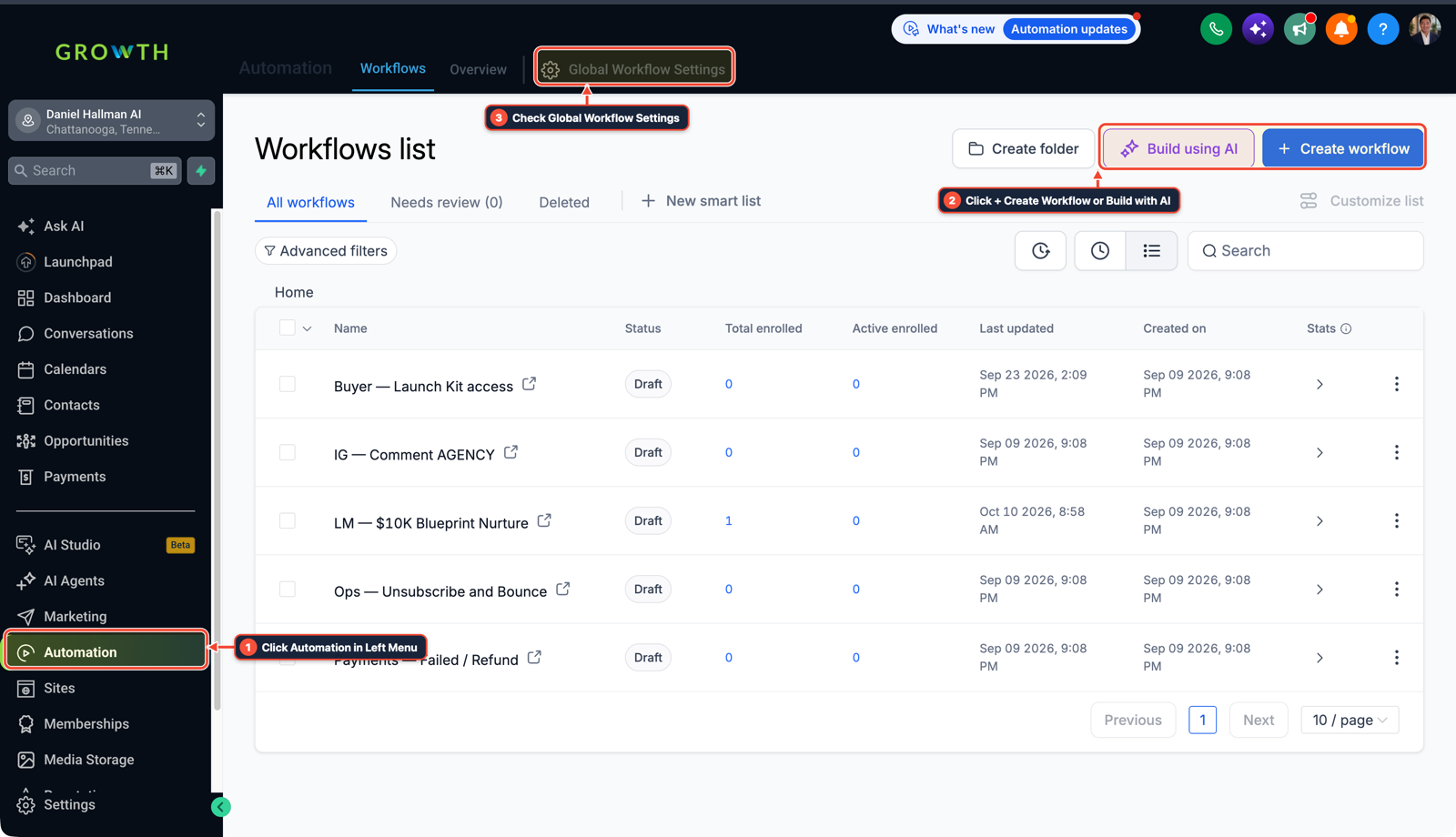
1Click Automation in Left Menu 2Click + Create Workflow or Build with AI 3Check Global Workflow Settings
Cause
- When selling multi-session packages like a 10-pack of gym training or coaching calls, HighLevel calendars have no built-in punch-card ledger.
- If you allow clients to book on an open calendar without a credit gate, members can book unlimited appointments past their package limit.
- Building a separate external web app to track credits adds fragile custom code and exposes API tokens in client-side scripts.
GoHighLevel Configuration
- Use native HighLevel Workflows and custom contact fields to run an automated credit ledger: add a numerical custom field
session_creditsto the contact, add credits on order submission with a Math Operation (+10), check the credit balance on appointment booking to confirm and deduct one credit (-1) or cancel and text a reload link if the balance is zero - and restore the credit (+1) when an appointment is cancelled or marked as a no-show.
GoHighLevel Menu Paths
| Step | Menu Path in GHL | Action |
|---|---|---|
| Step 1 | Settings > Custom Fields | Select Add Field, choose Number, name it Session Credits (session_credits), and save it to the Contact object with a default value of 0. |
| Step 2 | Automation > Workflows | Create a workflow triggered by Order Submitted for your session package product. |
| Step 3 | Automation > Workflows | Create a booking gate triggered by Appointment Status (Booked) that checks if contact.session_credits >= 1. |
DEFAULT SETUP VS. AUTOMATED WORKFLOW
Operational Comparison
Appointment No-Show Rate
Calendar Slot Utilization
Related Questions
- How do you qualify leads on GoHighLevel calendars without killing booking conversion rates?
- How do you reduce appointment no-shows and stop double bookings in GoHighLevel?
- Why are GoHighLevel appointment start and end times blank in my webhook?
- How do you prevent edge cases in a GoHighLevel lead-to-booking automation system?
BUILD FASTER IN GOHIGHLEVEL · FREE TRIAL BONUSES + MCP SERVER
Build this directly inside your GoHighLevel sub-account
Connect Claude Code, Cursor, or OpenAI Codex to our ghl-tools MCP Server & Rust CLI to build workflows, forms, and funnels from your editor, or start your GoHighLevel plan through our partner link to unlock $612+ in ready-to-import kits (including GHL Workflow Architect Pack) and weekly live clinics.