GOHIGHLEVEL ANSWERS & PROMPTS: PLAYBOOK T23 · CALENDARS & BOOKING
AUTHOR: DANIEL HALLMAN
KEYWORD: CALENDAR
SIMPLE STEP-BY-STEP INSTRUCTIONS
How to Set This Up in GoHighLevel (Under 2 Minutes)
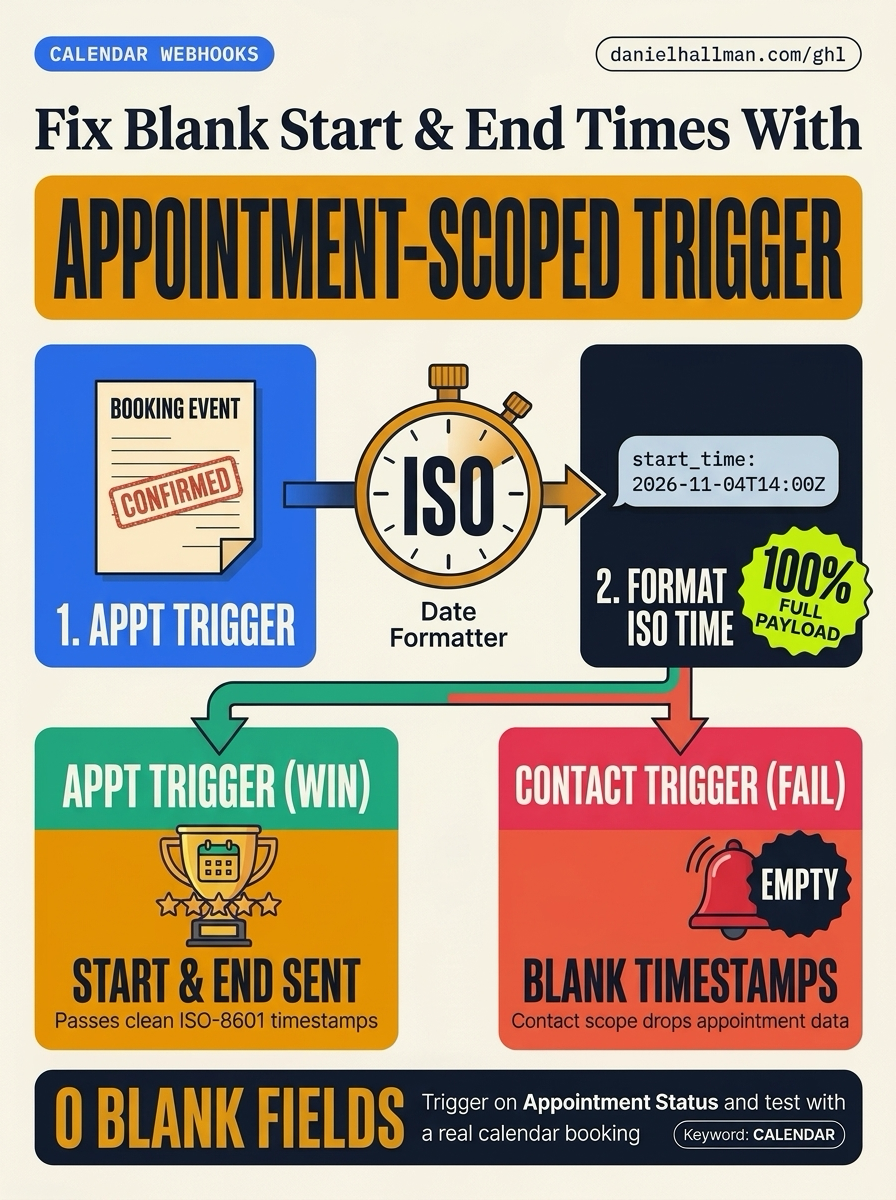
- STEP 1Switch to an Appointment Trigger: Set your workflow trigger to 'Appointment Status' (with filter Event Type = Normal and Status = Confirmed) or 'Customer Booked Appointment' so HighLevel loads the full appointment object.
- STEP 2Add a Native Date/Time Formatter Step: Before your webhook, add 'Format Data -> Date/Time Formatter' to convert '{{appointment.start_time}}' and '{{appointment.end_time}}' into standard ISO-8601 format (YYYY-MM-DDTHH:mm:ssZ).
- STEP 3Map Custom Webhook Keys & Book a Live Slot: In your Outbound Webhook action, add Custom Data keys ('start_time_iso', 'end_time_iso', 'calendar_name') and test by booking a real test slot on the live calendar page.
What Usually Happens
When a workflow starts from a Contact Tag, Pipeline Stage, or the 'Test Workflow' button, HighLevel runs in Contact scope rather than Appointment scope—so {{appointment.start_time}} and {{appointment.end_time}} are sent as empty strings.
How We Fix It in HighLevel
Switch the workflow trigger to an Appointment event ('Appointment Status = Confirmed' or 'Customer Booked Appointment'), add a native Date/Time Formatter step to output clean ISO-8601 timestamps, and pass those formatted fields in your Outbound Webhook.
MODE: AGENT PROMPT
PASTE THIS PROMPT INTO CLAUDE CODE, CURSOR, CHATGPT, OR YOUR GHL ASSISTANT
SAFE READ-FIRST WORKFLOW
Fix our GoHighLevel Outbound Webhook workflow where appointment.start_time and appointment.end_time arrive blank:
1. Check the workflow trigger and replace any Contact-scoped trigger (like Contact Tag Added or Opportunity Changed) with "Appointment Status" (Status = Confirmed) or "Customer Booked Appointment".
2. Add a native "Format Data — Date/Time Formatter" action before the Outbound Webhook to format {{appointment.start_time}} and {{appointment.end_time}} as ISO-8601 timestamps.
3. Map the formatted timestamps into explicit Custom Data keys on the Outbound Webhook action.
RUN WITH OUR GHL-TOOLS MCP SERVER OR RUST CLI (DANIELHALLMAN.COM/MCP)
SUPPORTS --DRY-RUN PREVIEW
# 1. MCP Tool Call (ghl-crm-mcp)
{
  "tool": "workflows_create_from_recipe",
  "arguments": {
    "location_id": "<YOUR_LOCATION_ID>",
    "recipe": "appointment_iso_timestamp_webhook",
    "trigger": "appointment_status_confirmed",
    "dry_run": true
  }
}

# 2. Or run via ghl-crm Rust CLI
ghl-crm workflows apply-recipe --location-id <YOUR_LOCATION_ID> --recipe appointment-iso-webhook --dry-run
Similar GoHighLevel Questions & Fixes
PLAYBOOK T16 · Calendars & Booking
How do you reduce appointment no-shows and stop double bookings in GoHighLevel?
Enable both Linked Calendar and Conflict Calendar sync on Google/Outlook, require a two-way 'Reply C to confirm' SMS 3 hours before the slot, and auto-text a 1-tap reschedule link if unconfirmed.
PLAYBOOK T22 · Workflows & AutomationWhy is my GoHighLevel Inbound Webhook not creating or updating contacts?
Fetch a real sample request inside your Inbound Webhook Trigger (never use the 'Test Workflow' button), add a native Format Data -> Format Phone Number (E.164) step first, and map the formatted phone and email into Create/Update Contact.
PLAYBOOK T10 · Workflows & AutomationHow do you format data and run math in GoHighLevel Workflows without paying for n8n or Make?
Use HighLevel's built-in Format Data, Math Operation, Goal Events, and Inbound/Outbound Webhook steps inside a single native workflow so contact history and error logs stay in one place.
PLAYBOOK T13 · Calendars & BookingHow do you route callers across multiple office locations and calendars in GoHighLevel?
Have your Voice AI or intake form ask for the caller's preferred neighborhood or zip code first, then route them to a partitioned location calendar and text a matching Google Maps pin.
RUN THIS IN 30 SECONDS · GHL-TOOLS MCP + OPERATOR COMMUNITY
Want your AI agent to inspect and build this inside GoHighLevel automatically?
Connect Claude Code, Cursor, or OpenAI Codex to our ghl-tools MCP Server & Rust CLI for 30-second sub-account doctor checks, --dry-run previews, and snapshot diffs—or start/upgrade your GoHighLevel plan through our partner link to unlock up to $612+ in implementation kits (including GHL Workflow Recipe Pack ($47 — or Free with Trial)) and our weekly live engineering clinics.