GOHIGHLEVEL ANSWERS & PROMPTS: PLAYBOOK T18 · ESTIMATES & TEXT2PAY
AUTHOR: DANIEL HALLMAN
KEYWORD: ESTIMATE
STEP-BY-STEP INSTRUCTIONS + ANNOTATED GHL SCREENSHOTS
Steps in GoHighLevel
-
STEP 1Request 2 Project Photos by SMS: In Automation > Workflows, send an intake SMS asking the homeowner to reply with
2photos of the repair or installation area.
1Add If/Else Condition & Tag Guard 2Chain Priority & Wait Steps 3Switch to Settings or Execution Logs -
STEP 2Enable Auto-Deposit Invoice on Estimates: In Payments > Estimates > Settings, turn on Auto-Create Invoice on Acceptance set to a
20%deposit with Apple Pay / Google Pay and Text2Pay enabled.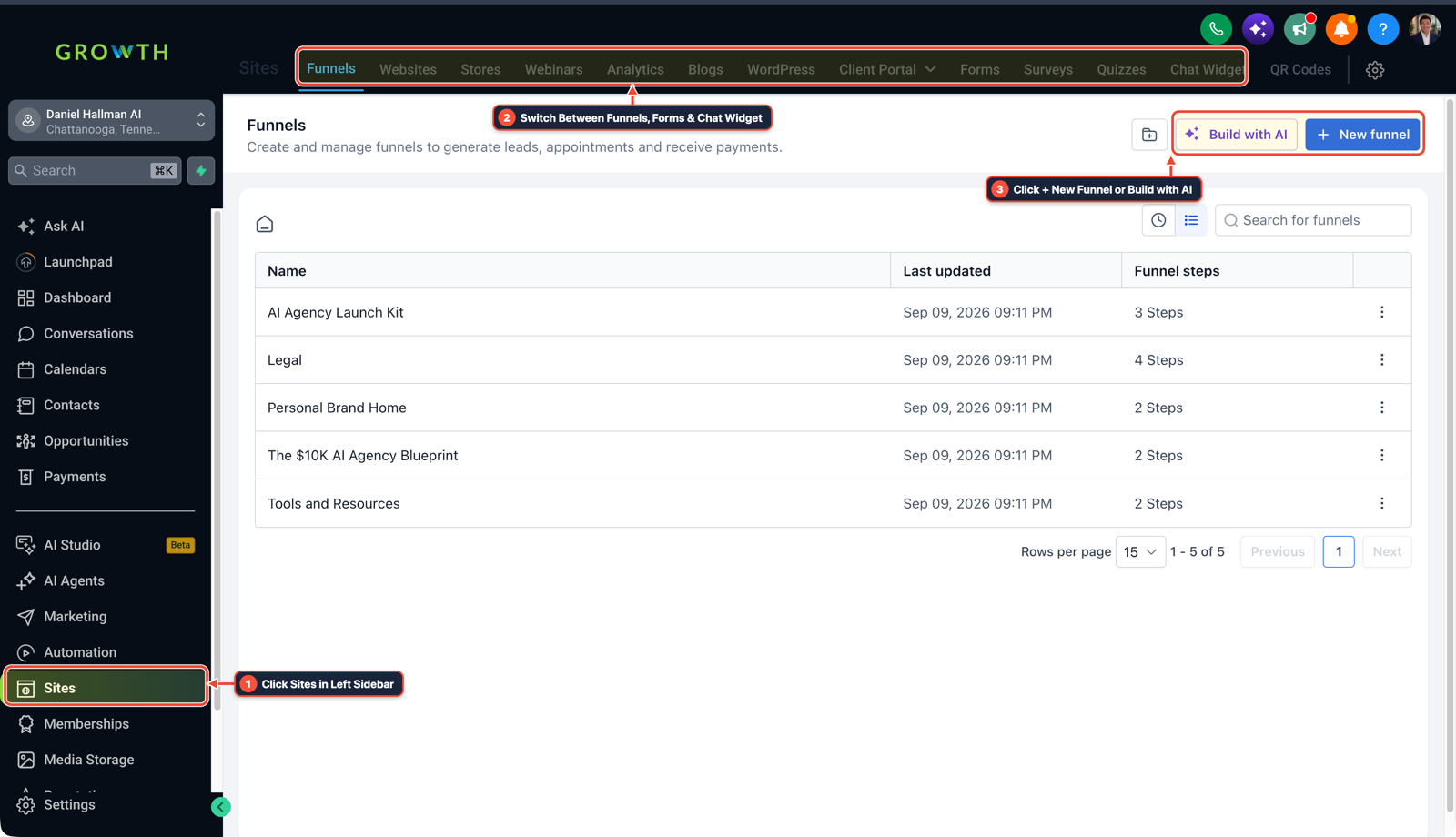
1Click Sites in Left Sidebar 2Switch Between Funnels, Forms & Chat Widget 3Click + New Funnel or Build with AI -
STEP 3Unlock Scheduling When Deposit Clears: In Automation > Workflows, trigger on Invoice Status (
Paid) to move the opportunity toDeposit Paid — Ready to Scheduleand text the priority booking link.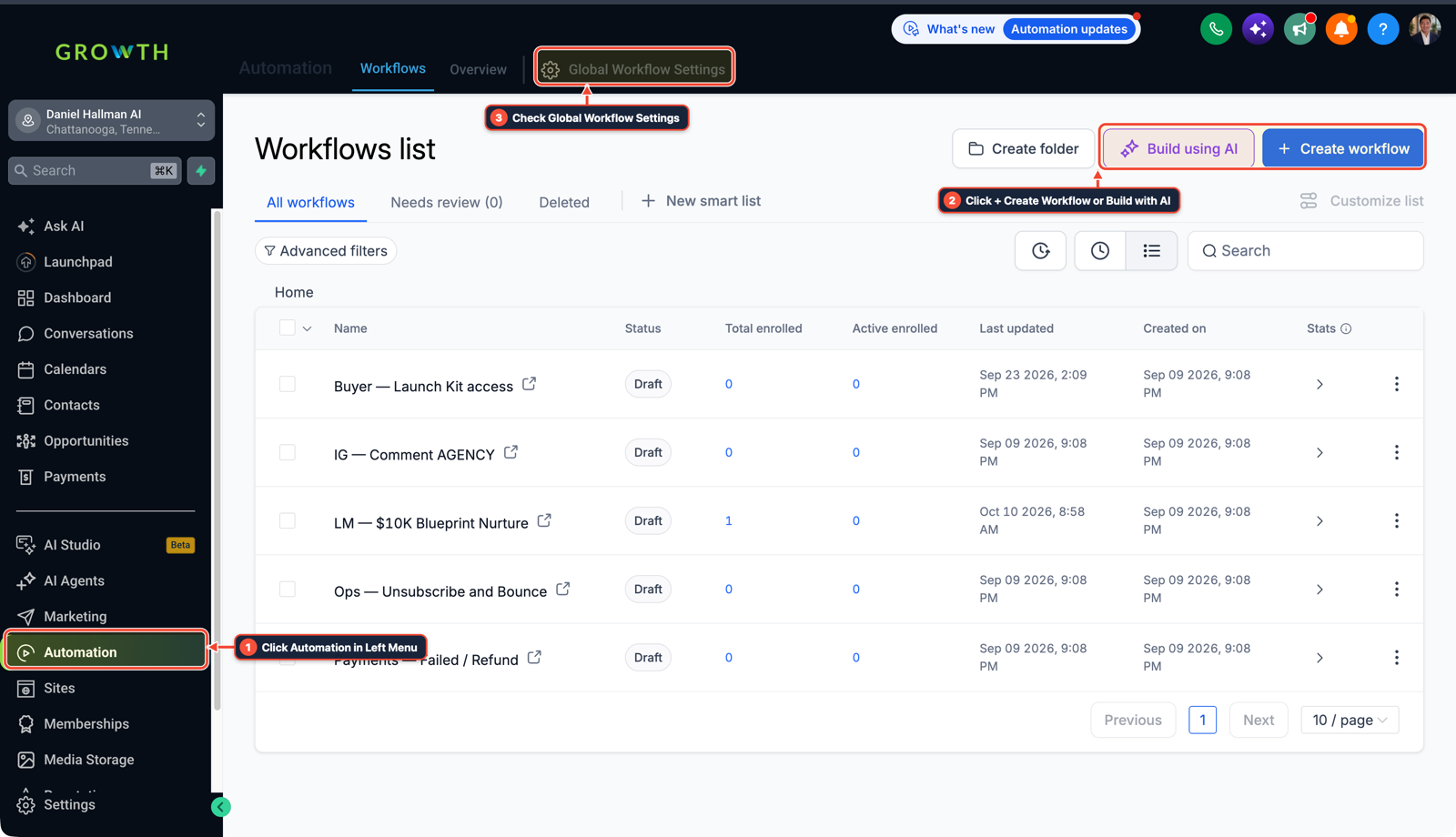
1Click Automation in Left Menu 2Click + Create Workflow or Build with AI 3Check Global Workflow Settings
MODE: AGENT PROMPT
PASTE INTO CLAUDE CODE, CURSOR, CHATGPT, OR GOHIGHLEVEL ASK AI
AGENT PROMPT
Set up a Photo Estimate + Apple Pay Text2Pay Deposit workflow in our GoHighLevel sub-account:
1. Create a Fast Photo Quote workflow that prompts new leads to reply with 2 photos of their project area.
2. Configure HighLevel Estimates & Invoices to automatically convert accepted estimates into a 20% deposit Text2Pay link with Apple Pay and Google Pay enabled.
3. Trigger an post-deposit workflow on Invoice Paid that moves the pipeline stage to "Deposit Paid" and texts the priority installation calendar.
GHL-TOOLS MCP SERVER & CLI (DANIELHALLMAN.COM/MCP)
BUILDER + SUB-ACCOUNT TOOLS
# 1. MCP Tool Call (ghl-crm-mcp)
{
  "tool": "workflows_create_from_recipe",
  "arguments": {
    "location_id": "<YOUR_LOCATION_ID>",
    "recipe": "photo_estimate_text2pay_deposit",
    "deposit_percentage": 20
  }
}

# 2. Or run via ghl-crm Rust CLI
ghl-crm workflows apply-recipe --location-id <YOUR_LOCATION_ID> --recipe photo-estimate-text2pay
Official GHL MCP vs. ghl-tools: HighLevel’s official hosted MCP (services.leadconnectorhq.com/mcp) covers public v2 CRM records (contacts, opportunities, appointments, conversations). ghl-tools MCP complements it with workflow graph inspection & recipes, funnel/form builders, DNS/BIMI checks, and ghl-crm doctor audits.
Cause
- Driving 45 minutes across town just to quote a price-shopper wastes half the day
- and emailed PDF proposals sit unread while the homeowner collects bids from three other contractors.
GoHighLevel Configuration
- Run a fast photo-estimate workflow: have the customer text 2 photos from their driveway, attach them to a mobile HighLevel Estimate with a 1-tap Apple Pay / Google Pay deposit button
- and trigger crew scheduling the moment the deposit clears.
GoHighLevel Menu Paths
| Step | Menu Path in GHL | Action |
|---|---|---|
| Step 1 | Automation > Workflows | Send an intake SMS asking the homeowner to reply with 2 photos of the repair or installation area. |
| Step 2 | Payments > Estimates > Settings | Turn on Auto-Create Invoice on Acceptance set to a 20% deposit with Apple Pay / Google Pay and Text2Pay enabled. |
| Step 3 | Automation > Workflows | Trigger on Invoice Status (Paid) to move the opportunity to Deposit Paid — Ready to Schedule and text the priority booking link. |
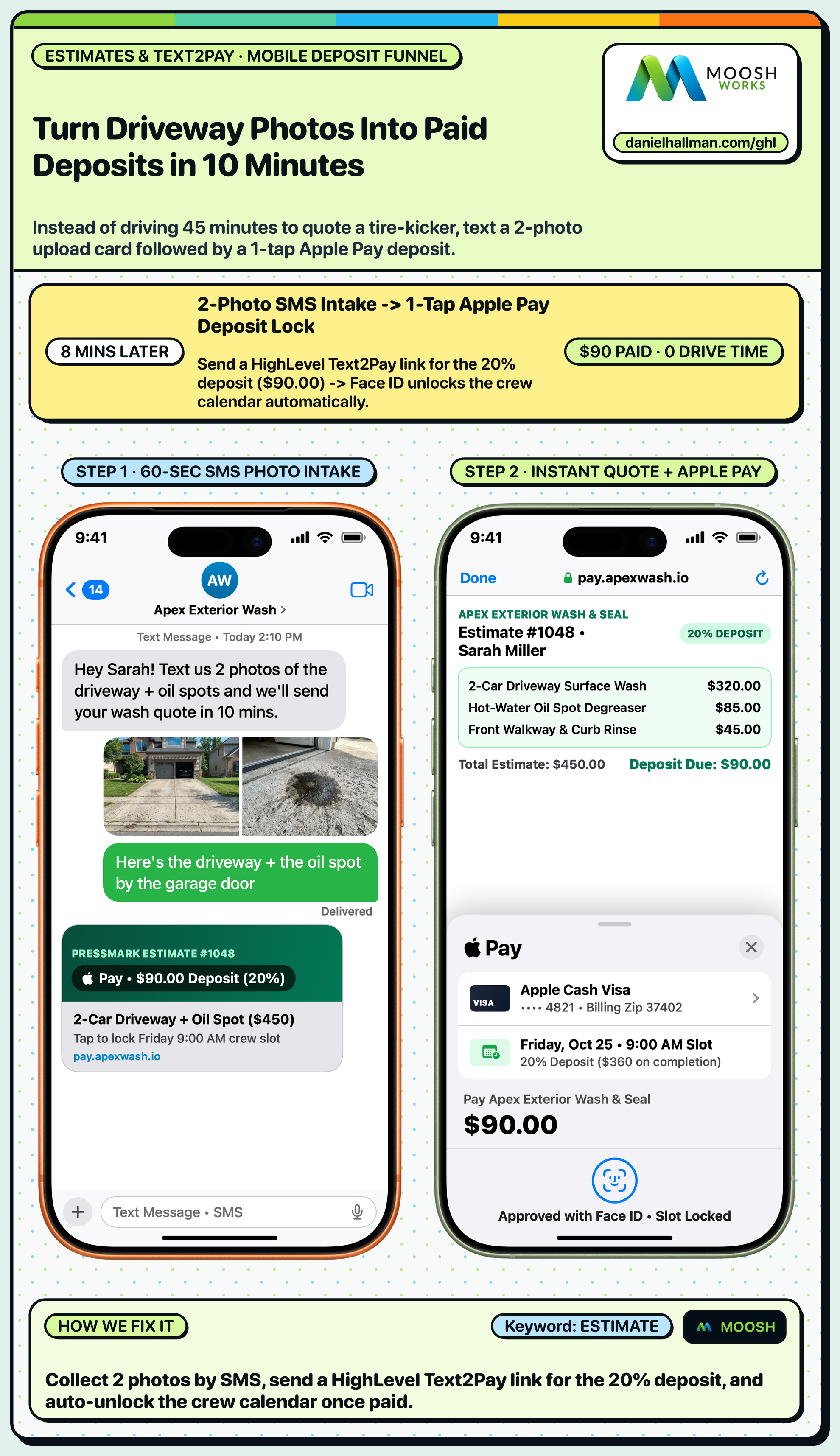
DEFAULT SETUP VS. AUTOMATED WORKFLOW
Operational Comparison
Manual Admin Work Per Client
Lead-to-Booked-Job Conversion
Related Questions
- How do you get more 5-star Google reviews in GoHighLevel without annoying unhappy customers?
- How do you capture partial form submissions in a 2-step GoHighLevel funnel?
- How do you route weekend emergency repair calls in GoHighLevel so contractors never lose a job?
- How do you reduce appointment no-shows and stop double bookings in GoHighLevel?
BUILD FASTER IN GOHIGHLEVEL · FREE TRIAL BONUSES + MCP SERVER
Build this directly inside your GoHighLevel sub-account
Connect Claude Code, Cursor, or OpenAI Codex to our ghl-tools MCP Server & Rust CLI to build workflows, forms, and funnels from your editor, or start your GoHighLevel plan through our partner link to unlock $612+ in ready-to-import kits (including GHL Workflow Recipe Pack ($47 — or Free with Trial)) and weekly live clinics.