GOHIGHLEVEL ANSWERS & PROMPTS: PLAYBOOK T12 · DELIVERABILITY & DNS
AUTHOR: DANIEL HALLMAN
KEYWORD: DNS
STEP-BY-STEP INSTRUCTIONS + ANNOTATED GHL SCREENSHOTS
Steps in GoHighLevel
-
STEP 1Lock Your Primary LC Email Domain to Opted-In Contacts: In Settings > Email Services > Dedicated Domain and IP, keep your root domain (
agency.com) and LC Email subdomain (mail.agency.com) strictly for opted-in leads and active clients.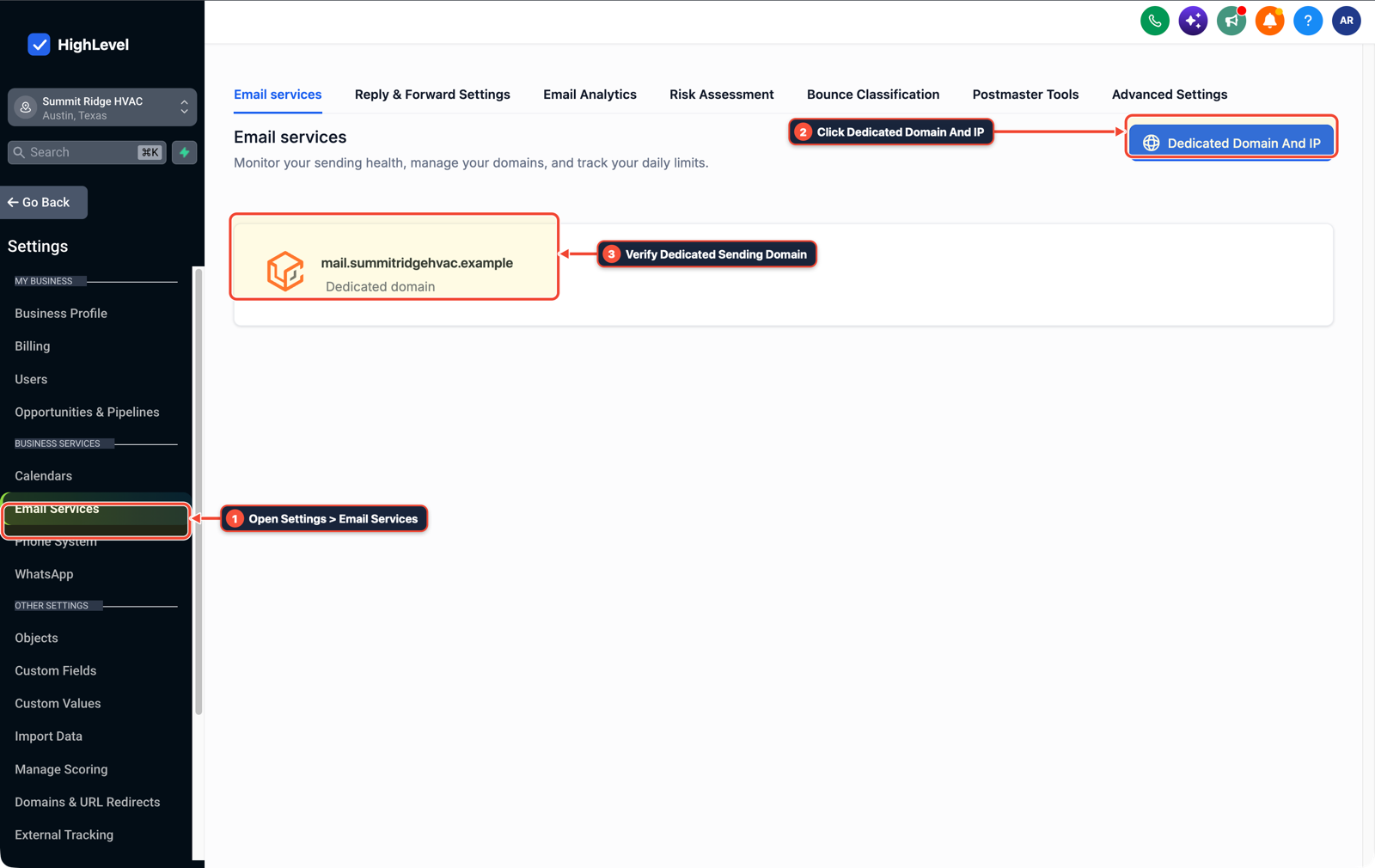
1Open Settings > Email Services 2Click Dedicated Domain And IP 3Verify Dedicated Sending Domain -
STEP 2Configure SPF, DKIM, and DMARC on Secondary Domains: In your DNS provider (Cloudflare > DNS), publish
SPF,DKIM, and_dmarcrecords on 2–3 secondary outreach domains and cap sending at25–30plain-text emails/day per inbox.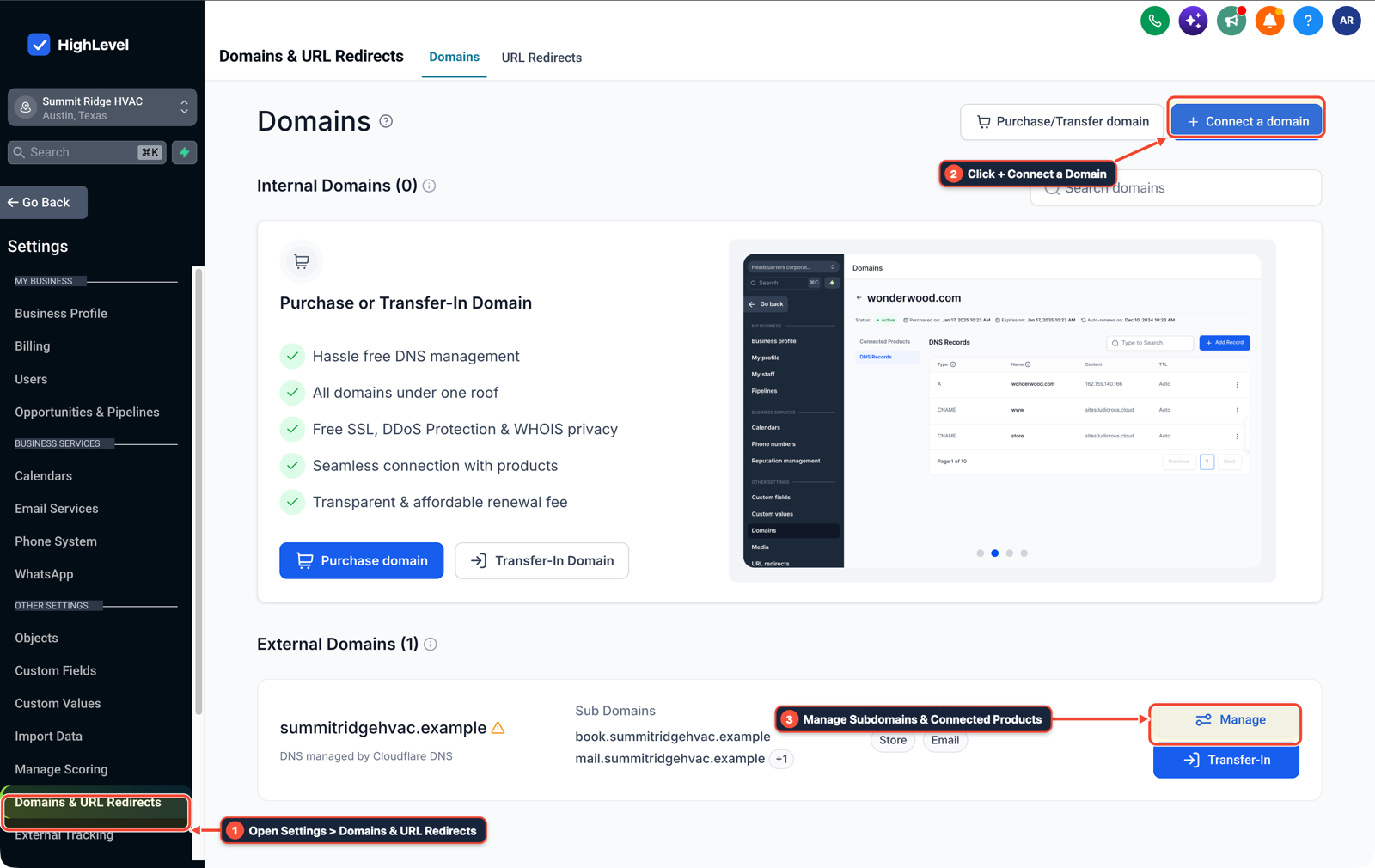
1Open Settings > Domains & URL Redirects 2Click + Connect a Domain 3Manage Subdomains & Connected Products -
STEP 3Route Positive Replies via Inbound Webhook: In Automation > Workflows, create an Inbound Webhook trigger that creates an opportunity in your primary sub-account only when a prospect replies positively.

1Add If/Else Condition & Tag Guard 2Chain Priority & Wait Steps 3Switch to Settings or Execution Logs
MODE: AGENT PROMPT
PASTE INTO CLAUDE CODE, CURSOR, CHATGPT, OR GOHIGHLEVEL ASK AI
AGENT PROMPT
Audit our email sending domains and set up a clean firewall between cold outreach and our main GoHighLevel sub-account domain:
1. Verify that our primary business domain and LC Email sending subdomain have valid SPF, DKIM, and DMARC records and are restricted to opted-in contacts.
2. Check that no cold unopted list imports are queued on the primary HighLevel LC Email domain.
3. Configure an inbound webhook workflow to create a HighLevel opportunity only when a prospect replies positively from our secondary outreach inboxes.
GHL-TOOLS MCP SERVER & CLI (DANIELHALLMAN.COM/MCP)
BUILDER + SUB-ACCOUNT TOOLS
# 1. MCP Tool Call (ghl-onboard-mcp)
{
  "tool": "dns_audit_deliverability",
  "arguments": {
    "domain": "clientdomain.com",
    "sending_subdomain": "mail.clientdomain.com",
    "require_dmarc_policy": "quarantine_or_reject"
  }
}

# 2. Or run via apple-branded-mail / ghl-crm CLI
apple-branded-mail audit --domain clientdomain.com
Official GHL MCP vs. ghl-tools: HighLevel’s official hosted MCP (services.leadconnectorhq.com/mcp) covers public v2 CRM records (contacts, opportunities, appointments, conversations). ghl-tools MCP complements it with workflow graph inspection & recipes, funnel/form builders, DNS/BIMI checks, and ghl-crm doctor audits.
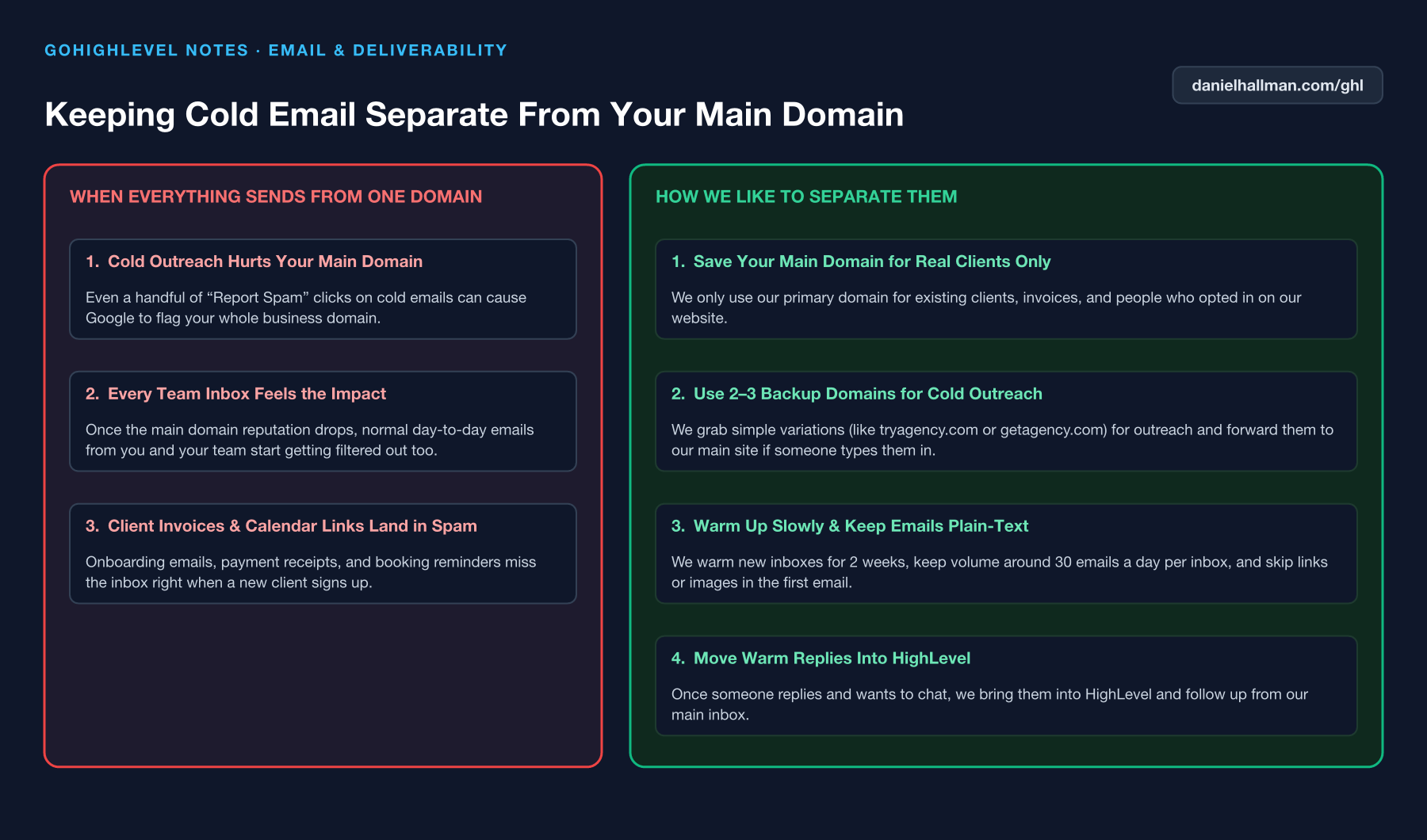
Cause
- Sending cold outbound campaigns from your main agency or client domain (
agency.com) risks spam complaints that tank deliverability for everyday client invoices, proposals - and appointment confirmations.
GoHighLevel Configuration
- 3 secondary lookalike domains for cold prospecting, warm them for 14 days with SPF, DKIM
- and DMARC configured
- and sync only positive replies into your main HighLevel sub-account pipeline.
GoHighLevel Menu Paths
| Step | Menu Path in GHL | Action |
|---|---|---|
| Step 1 | Settings > Email Services > Dedicated Domain and IP | Keep your root domain (agency.com) and LC Email subdomain (mail.agency.com) strictly for opted-in leads and active clients. |
| Step 2 | Cloudflare > DNS | Publish SPF, DKIM, and _dmarc records on 2–3 secondary outreach domains and cap sending at 25–30 plain-text emails/day per inbox. |
| Step 3 | Automation > Workflows | Create an Inbound Webhook trigger that creates an opportunity in your primary sub-account only when a prospect replies positively. |
DEFAULT SETUP VS. AUTOMATED WORKFLOW
Operational Comparison
Manual Admin Work Per Client
Lead-to-Booked-Job Conversion
Related Questions
- How do you isolate custom tracking domains in GoHighLevel so links don't trigger spam filters?
- Why won't my GoDaddy DNS CNAME record or DMARC verify in GoHighLevel?
- How do you get GoHighLevel A2P 10DLC campaign registration approved on the first try?
- How do you run a Database Reactivation campaign in GoHighLevel without getting blocked?
BUILD FASTER IN GOHIGHLEVEL · FREE TRIAL BONUSES + MCP SERVER
Build this directly inside your GoHighLevel sub-account
Connect Claude Code, Cursor, or OpenAI Codex to our ghl-tools MCP Server & Rust CLI to build workflows, forms, and funnels from your editor, or start your GoHighLevel plan through our partner link to unlock $612+ in ready-to-import kits (including Deliverability, DNS & Apple Branded Mail Pack ($47 — or Free with Trial)) and weekly live clinics.