GOHIGHLEVEL ANSWERS & PROMPTS: PLAYBOOK T07 · ACCOUNT ONBOARDING & SNAPSHOTS
AUTHOR: DANIEL HALLMAN
KEYWORD: BUILD TIMELINE
STEP-BY-STEP INSTRUCTIONS + ANNOTATED GHL SCREENSHOTS
Steps in GoHighLevel
-
STEP 1In Agency View > Account Snapshots, select your vertical template and load it into the new sub-account so pipelines, calendars, and core workflows deploy together instead of building each asset from scratch.
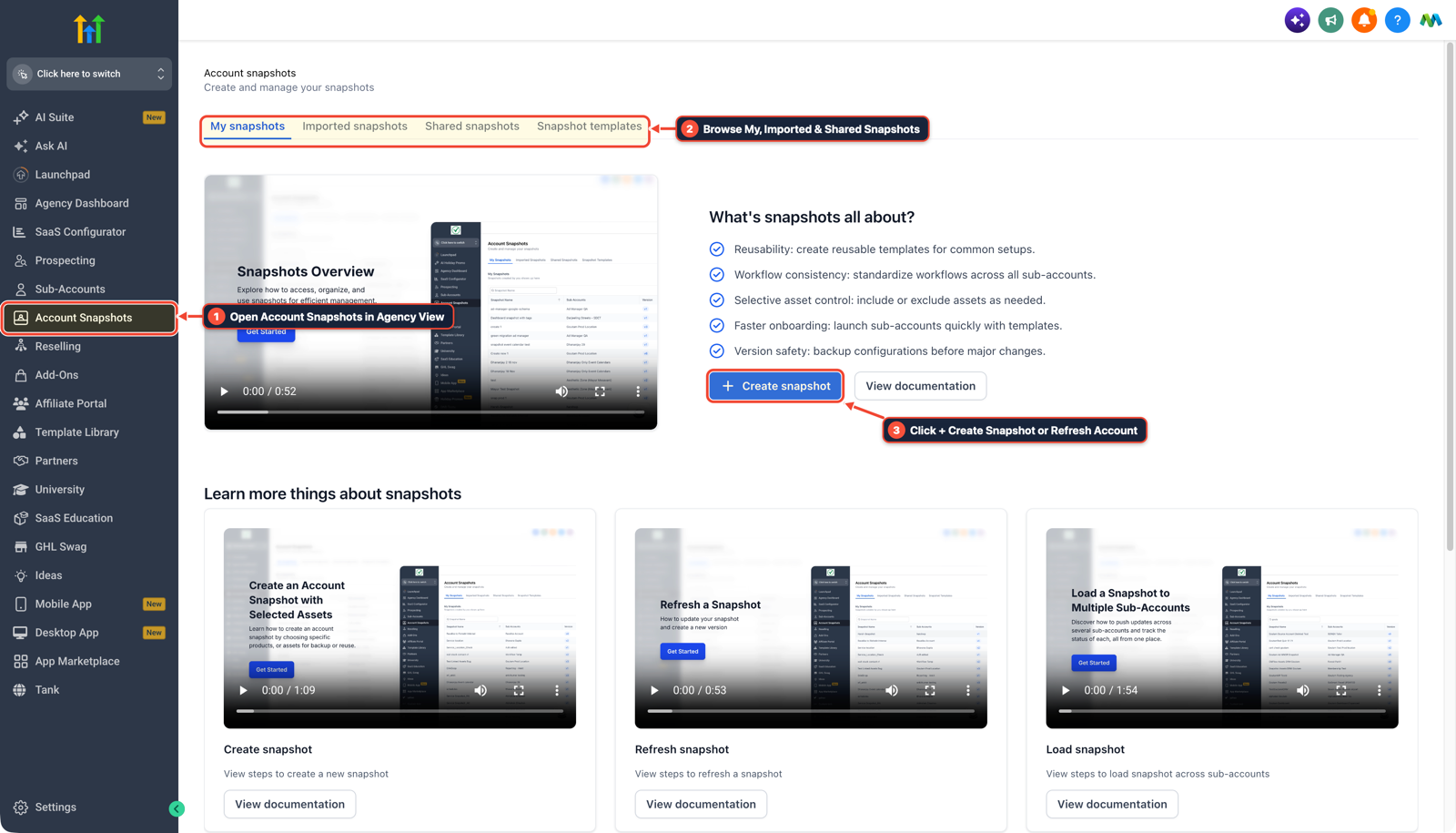
1Open Account Snapshots in Agency View 2Browse My, Imported & Shared Snapshots 3Click + Create Snapshot or Refresh Account -
STEP 2In Settings > Custom Values, fill in
{{custom_values.business_phone}},{{custom_values.booking_link}}, and{{custom_values.google_review_link}}so every imported SMS and email step populates automatically.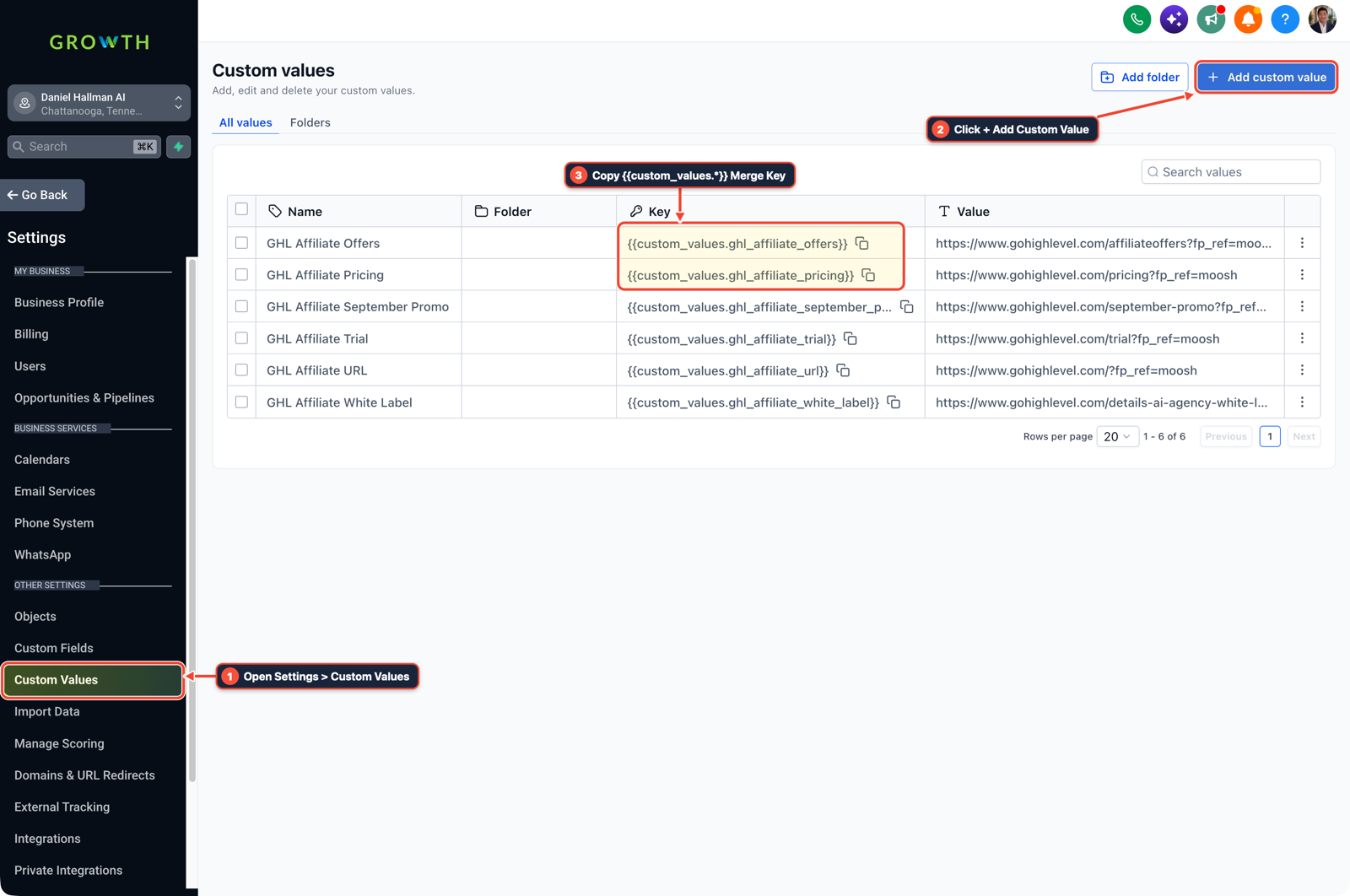
1Open Settings > Custom Values 2Click + Add Custom Value 3Copy {{custom_values.*}} Merge Key -
STEP 3In Settings > Phone Numbers > Trust Center and Settings > Email Services, submit the client's EIN and opt-in form for A2P 10DLC vetting and verify the dedicated sending domain
SPF,DKIM, andDMARCrecords on day one while you test workflows.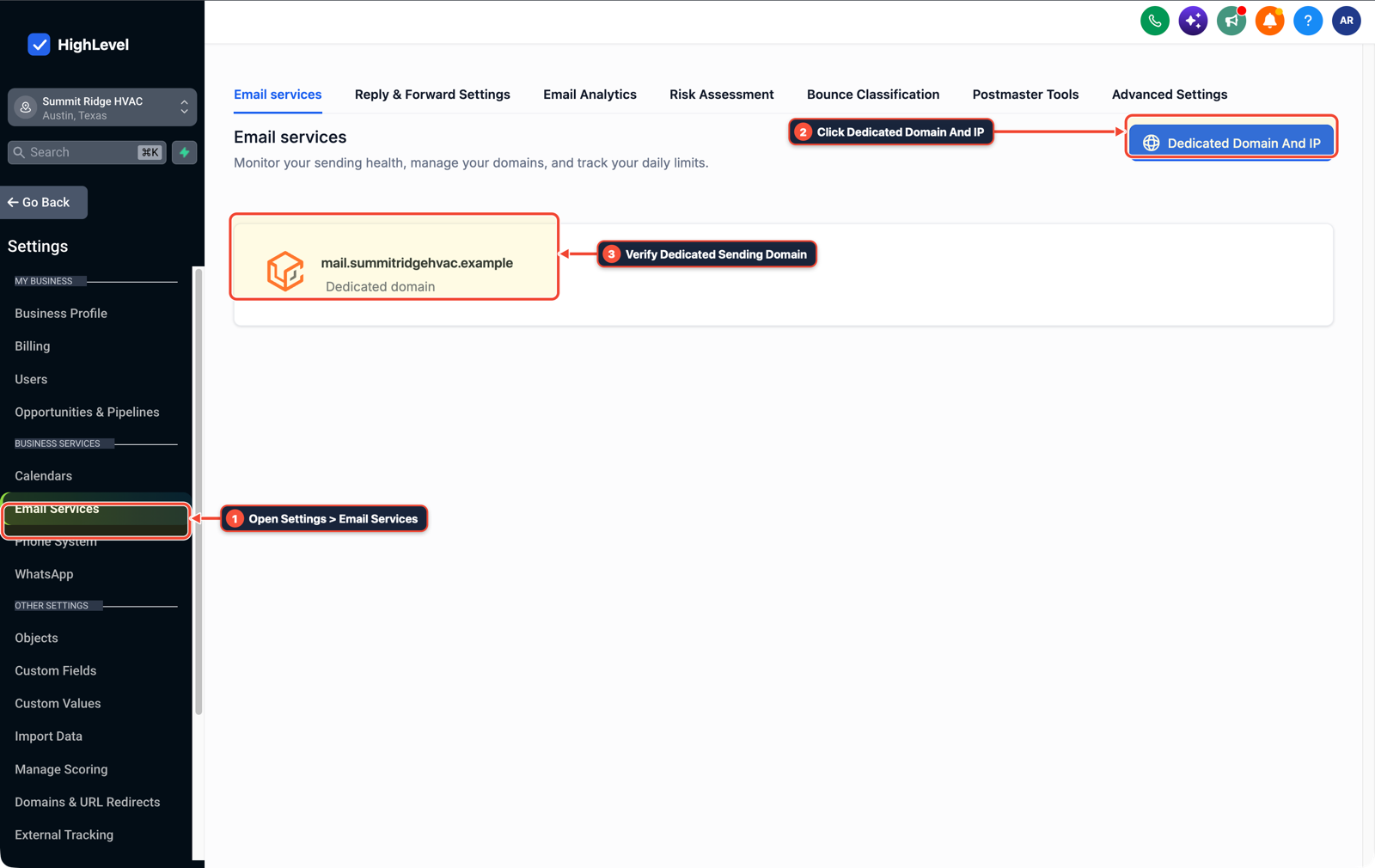
1Open Settings > Email Services 2Click Dedicated Domain And IP 3Verify Dedicated Sending Domain
MODE: AGENT PROMPT
PASTE INTO CLAUDE CODE, CURSOR, CHATGPT, OR GOHIGHLEVEL ASK AI
AGENT PROMPT
Onboard and configure sub-account <YOUR_LOCATION_ID> using an Agency Snapshot and Custom Values:
1. In Agency View > Account Snapshots, push the vertical snapshot into sub-account <YOUR_LOCATION_ID>.
2. In Settings > Custom Values, populate business_phone, booking_link, google_review_link, and business_hours.
3. In Settings > Phone Numbers > Trust Center and Settings > Email Services, submit A2P 10DLC registration and verify dedicated sending domain DNS records.
GHL-TOOLS MCP SERVER & CLI (DANIELHALLMAN.COM/MCP)
BUILDER + SUB-ACCOUNT TOOLS
# Inspect sub-account custom values and workflows via ghl-agency and ghl-crm
ghl-agency custom-values-audit --context <YOUR_CONTEXT> --location <YOUR_LOCATION_ID>
ghl-crm workflows list --context <YOUR_CONTEXT> --location <YOUR_LOCATION_ID>
Official GHL MCP vs. ghl-tools: HighLevel’s official hosted MCP (services.leadconnectorhq.com/mcp) covers public v2 CRM records (contacts, opportunities, appointments, conversations). ghl-tools MCP complements it with workflow graph inspection & recipes, funnel/form builders, DNS/BIMI checks, and ghl-crm doctor audits.
Cause
- New agency owners and local businesses often estimate GoHighLevel setup time by counting how many workflows and funnels they need to click together.
- Even when a snapshot imports pipelines and automations in ten minutes, outbound SMS and email sequences sit blocked for a week if A2P 10DLC brand and campaign vetting, dedicated email DNS records, and Custom Values are left until the end of the build.
GoHighLevel Configuration
- Split onboarding into a Day-1 carrier and DNS submission track and a 2-day Snapshot + Custom Values configuration track so your pipelines, calendars
- and workflows are tested and ready the moment A2P approval clears.
GoHighLevel Menu Paths
| Step | Menu Path in GHL | Action |
|---|---|---|
| Step 1 | Agency View > Account Snapshots | Select your vertical template and load it into the new sub-account so pipelines, calendars, and core workflows deploy together instead of building each asset from scratch. |
| Step 2 | Settings > Custom Values | Fill in {{custom_values.business_phone}}, {{custom_values.booking_link}}, and {{custom_values.google_review_link}} so every imported SMS and email step populates automatically. |
| Step 3 | Settings > Phone Numbers > Trust Center | In Settings > Phone Numbers > Trust Center and Settings > Email Services, submit the client's EIN and opt-in form for A2P 10DLC vetting and verify the dedicated sending domain SPF, DKIM, and DMARC records on day one while you test workflows. |
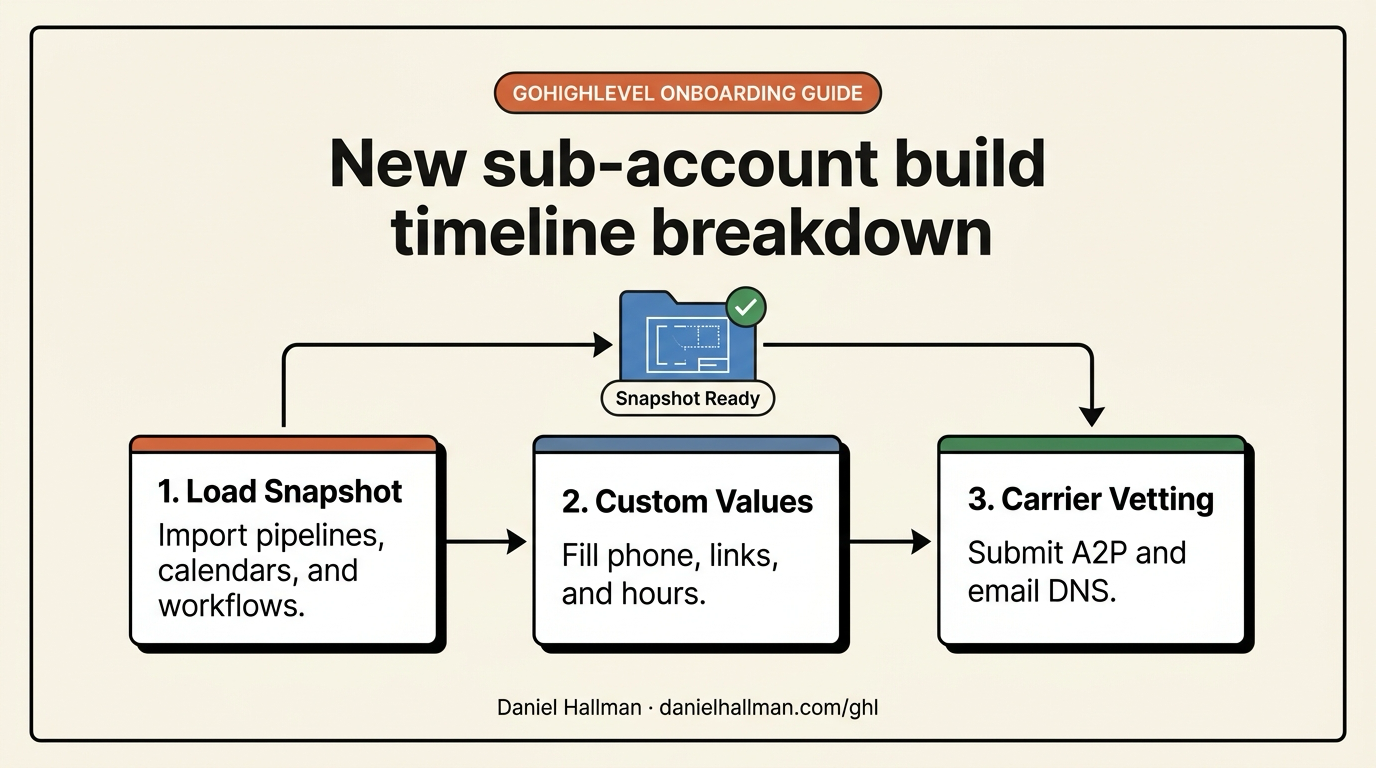
DEFAULT SETUP VS. AUTOMATED WORKFLOW
Operational Comparison
Manual Admin Work Per Client
Lead-to-Booked-Job Conversion
Related Questions
- How do you onboard a new GoHighLevel agency client fast?
- How do you push GoHighLevel snapshot updates without wiping out client customizations?
- How do you get GoHighLevel A2P 10DLC campaign registration approved on the first try?
- How do you replace Zapier, Calendly, and ManyChat with native GoHighLevel Workflows?
BUILD FASTER IN GOHIGHLEVEL · FREE TRIAL BONUSES + MCP SERVER
Build this directly inside your GoHighLevel sub-account
Connect Claude Code, Cursor, or OpenAI Codex to our ghl-tools MCP Server & Rust CLI to build workflows, forms, and funnels from your editor, or start your GoHighLevel plan through our partner link to unlock $612+ in ready-to-import kits (including GHL 3-Day Snapshot Onboarding Pack) and weekly live clinics.