GOHIGHLEVEL ANTWORTEN & PROMPTS: PLAYBOOK T25 · GOOGLE & META CAPI ANZEIGEN
AUTOR: DANIEL HALLMAN
SCHLÜSSELWORT: BERICHTSWESEN
SCHRITT-FÜR-SCHRITT-ANLEITUNGEN + MIT ANMERKUNGEN VERSEHENE GHL-SCREENSHOTS
Schritte in GoHighLevel
-
SCHRITT 1UTM-Vorlagen aktivieren und 4 Executive-Widgets hinzufügen: Überprüfen Sie unter Settings > Integrations die UTM-Tracking-Vorlagen für Google Ads und Meta Ads, und öffnen Sie dann Dashboard > Edit Dashboard > Add Widget, um vier Kacheln zu platzieren: Opportunities by First Attribution Source, Call Status & Text-Back Saves, Appointment Show Rate und Closed Won Revenue.
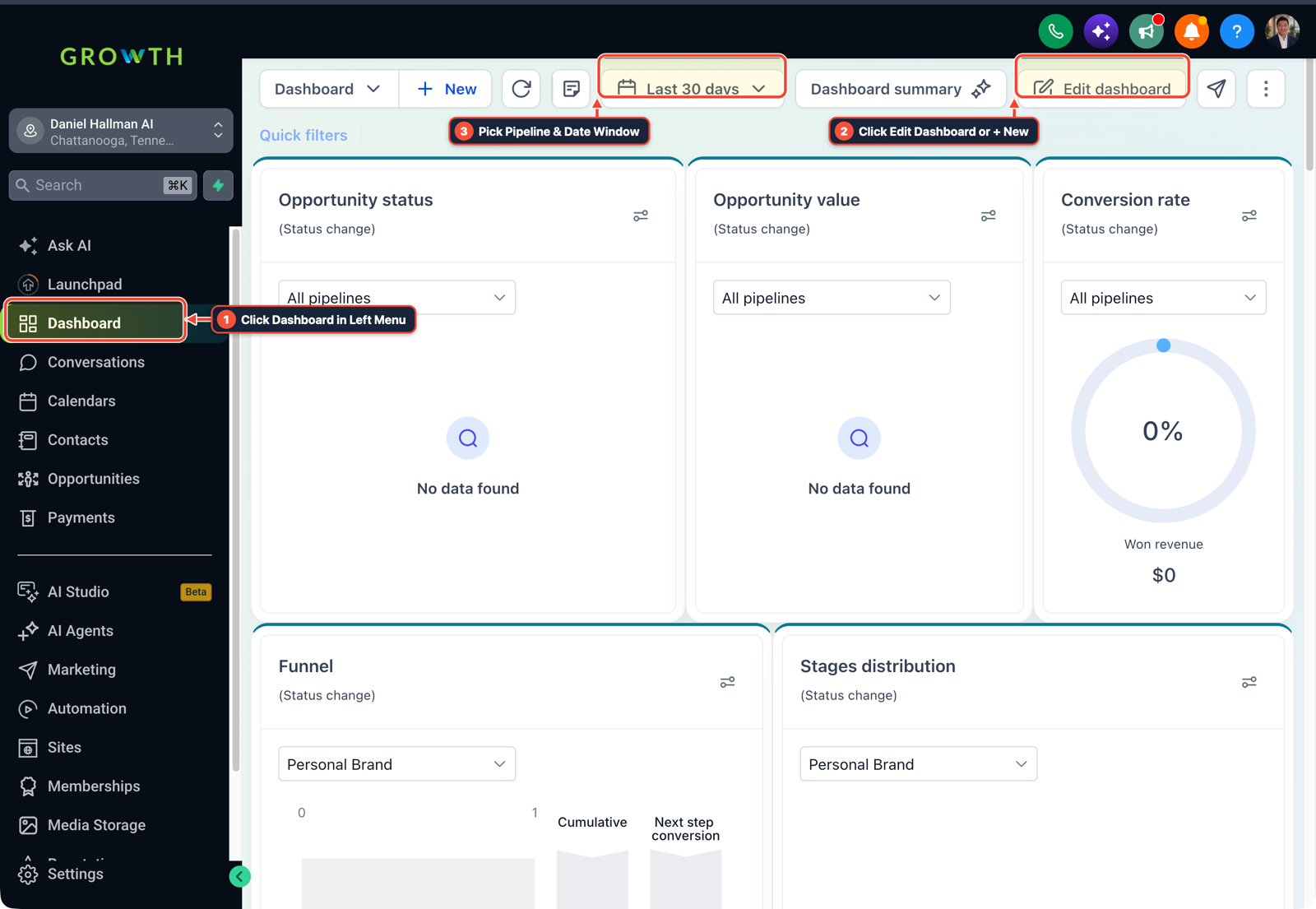
1Auf Dashboard im linken Menü klicken 2Zeitraum & Pipeline-Filter wählen 3Auf Edit Dashboard oder + New klicken -
SCHRITT 2Benutzerdefinierte Metriken für ROAS und Kosten pro gebuchtem Auftrag erstellen: In Dashboard > Dashboard bearbeiten > Benutzerdefinierte Metriken, erstellen Sie zwei Formel-Widgets zur Division von
Closed Won Opportunity Value / Total Ad Spend(ROAS) undTotal Ad Spend / Confirmed + Showed Appointments.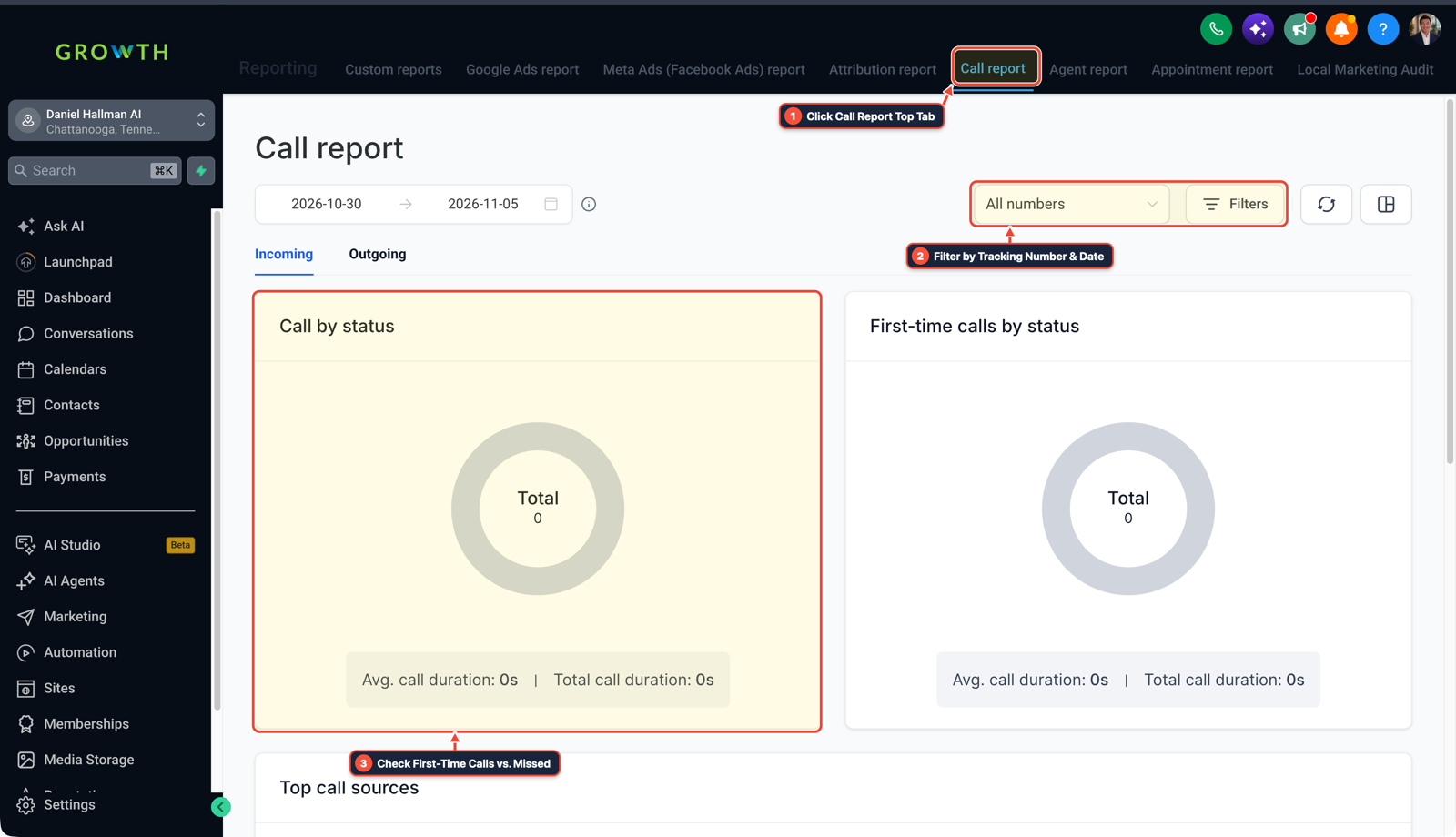
1Auf den oberen Tab Anrufbericht klicken 2Nach Tracking-Nummer und Datum filtern 3Erstmalige Anrufe vs. verpasste Anrufe prüfen -
SCHRITT 3Montag 8:00 planen:00 Uhr PDF-Zustellung: In Berichterstattung > Benutzerdefinierte Berichte, klicken Sie auf Bericht planen, stellen Sie die Taktung ein auf Wöchentlich auf
Monday at 8:00 AM, hängen Sie die visuelle PDF-Zusammenfassung an und geben Sie die E-Mail-Adresse des Geschäftsinhabers ein.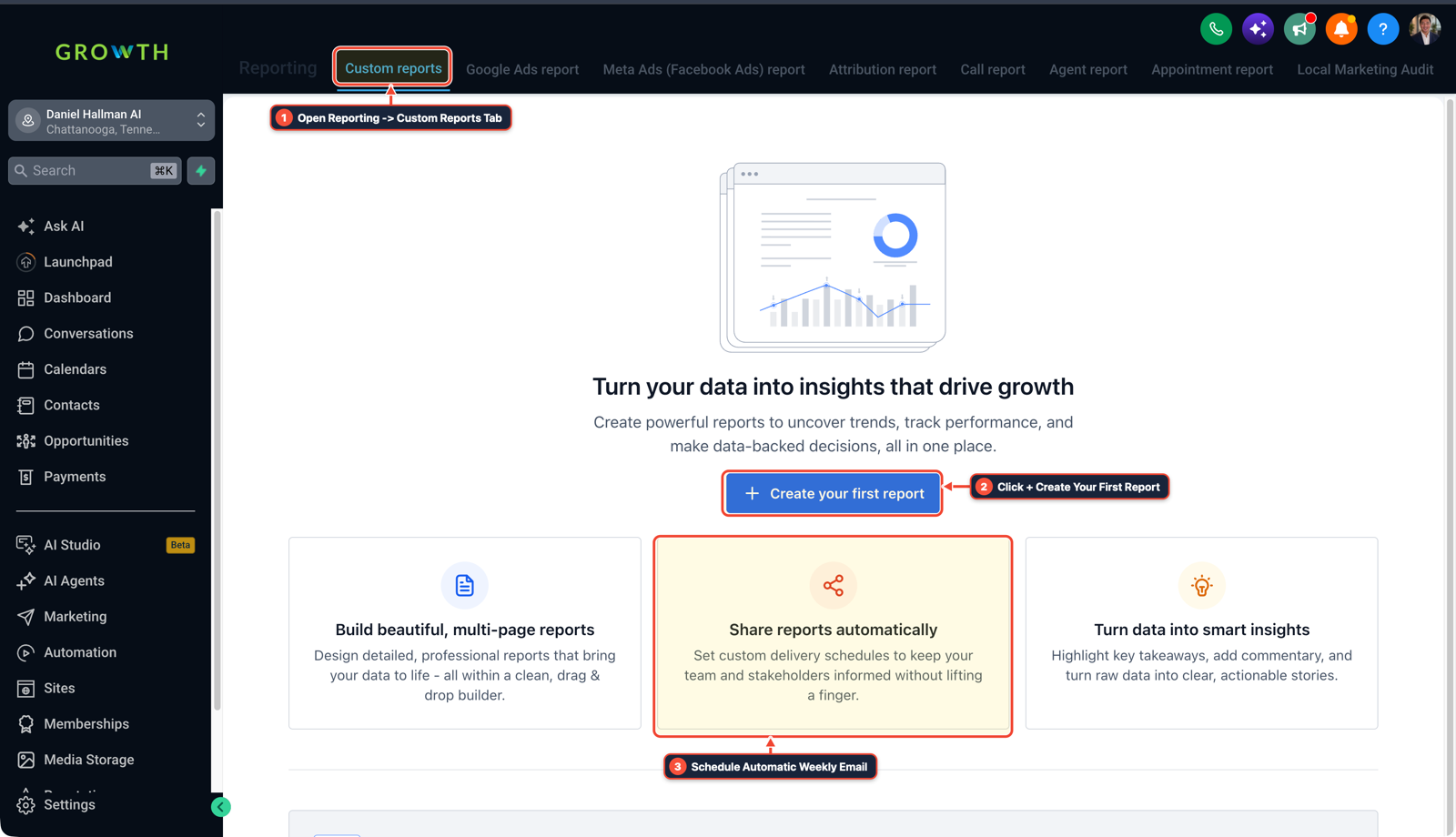
1Den Tab Berichte > Benutzerdefinierte Berichte öffnen 2Auf + Ersten Bericht erstellen klicken 3Automatische wöchentliche E-Mail planen
MODUS: AGENT-PROMPT
IN CLAUDE CODE, CURSOR, CHATGPT ODER GOHIGHLEVEL ASK AI EINFÜGEN AGENTEN-PROMPT
Configure a 4-Widget Executive Client Reporting Dashboard and automated Monday PDF email in our GoHighLevel sub-account:
1. Verify Google Ads and Meta Ads UTM tracking templates are active so First Attribution records campaign, ad group, and keyword sources instead of 'Direct Traffic'.
2. Create a Custom Dashboard named 'Executive ROI Summary' with 4 core widgets:
   - Widget 1: Opportunities by First Attribution Source (Donut chart: Google Ads, Meta CAPI, Organic GMB).
   - Widget 2: Call Status Scorecard (Answered vs. Missed Calls + Missed-Call Text-Back conversations saved).
   - Widget 3: Appointment Funnel (Booked -> Confirmed -> Showed -> Won conversion rate).
   - Widget 4: Custom Metric Formula displaying Live ROAS (Total Won Opportunity Value / Total Ad Spend) and Cost Per Booked Job.
3. Configure Scheduled Reports to email a PDF snapshot of 'Executive ROI Summary' to the client owner every Monday at 8:00 AM local time.
GHL-TOOLS MCP SERVER & CLI (DANIELHALLMAN.COM/MCP)
BUILDER + SUB-ACCOUNT TOOLS
# 1. MCP Tool Call (ghl-crm-mcp)
{
  "tool": "dashboards_apply_template",
  "arguments": {
    "location_id": "<YOUR_LOCATION_ID>",
    "template": "executive_4_widget_roi",
    "schedule_weekly_pdf": "MON_0800"
  }
}

# 2. Or run a 30-second sub-account & attribution audit via ghl-crm Rust CLI
ghl-crm doctor --location-id <YOUR_LOCATION_ID>
Official GHL MCP vs. ghl-tools: HighLevel’s official hosted MCP (services.leadconnectorhq.com/mcp) covers public v2 CRM records (contacts, opportunities, appointments, conversations). ghl-tools MCP complements it with workflow graph inspection & recipes, funnel/form builders, DNS/BIMI checks, and ghl-crm doctor audits.
Ursache
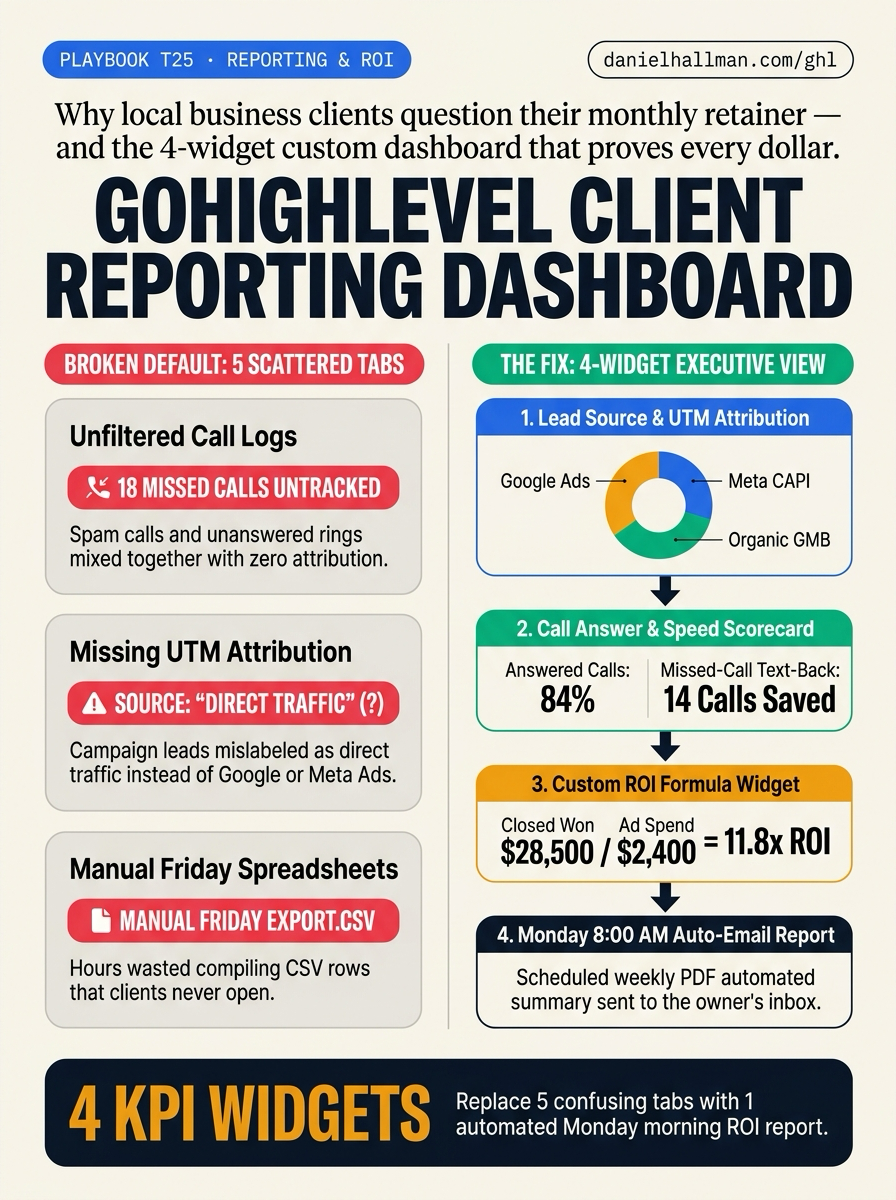
- Die meisten Kunden lokaler Dienstleistungen kündigen ihren monatlichen Vorschuss nicht, weil die Automatisierungen ausgefallen sind, sondern weil sie nicht erkennen können, was sie für ihr Geld erhalten haben.
- Wenn sich ein Geschäftsinhaber in einen Standard-Sub-Account von GoHighLevel einloggt, muss er sich durch 5 separate Reporting-Tabs (Google Ads, Facebook Ads, Attribution, Call Reporting und Appointment Reporting) klicken, die voller ungefilterter Robocall-Protokolle und fälschlich als 'Direct Traffic' markierter Leads sind, weil UTM-Vorlagen fehlen.
GoHighLevel-Konfiguration
- Ersetzen Sie die 5 Standard-Reporting-Tabs durch ein einziges Executive-Dashboard und einen automatisierten PDF-Bericht jeden Montag um 08:00 Uhr.
- Aktive UTM-Tracking-Vorlagen in Google- und Meta-Anzeigen stellen sicher, dass jeder Lead seine tatsächliche Kampagnenquelle erfasst, während formelbasierte benutzerdefinierte Metriken den Return on Ad Spend live berechnen (
ROAS) und Kosten pro gebuchtem Auftrag automatisch.
GoHighLevel-Menüpfade
| Schritt | Menüpfad in GHL | Aktion |
|---|---|---|
| Schritt 1 | Settings > Integrations | Überprüfen Sie die UTM-Tracking-Vorlagen für Google Ads und Meta Ads und öffnen Sie dann Dashboard > Dashboard bearbeiten > Widget hinzufügen um vier Karten zu platzieren: Opportunities nach erster Attributionsquelle, Anrufstatus & SMS-Rückgewinnung, Termin-Erscheinungsrate, und Umsatz durch gewonnene Abschlüsse. |
| Schritt 2 | Dashboard > Edit Dashboard > Custom Metrics | Zwei Formel-Widgets erstellen, die teilen Closed Won Opportunity Value / Total Ad Spend (ROAS) und Total Ad Spend / Confirmed + Showed Appointments. |
| Schritt 3 | Reporting > Custom Reports | 00 Uhr PDF-Zustellung: In Berichterstattung > Benutzerdefinierte Berichte, klicken Sie auf Bericht planen, stellen Sie die Taktung ein auf Wöchentlich auf Monday at 8:00 AM, hängen Sie die visuelle PDF-Zusammenfassung an und geben Sie die E-Mail-Adresse des Geschäftsinhabers ein. |
STANDARD-SETUP VS. AUTOMATISIERTER WORKFLOW
Operativer Vergleich
Erforderliche Registerkarten zum Nachweis des Kunden-ROI
Monatliche Kundenbindung & Leistungsnachweis
Ähnliche Fragen
- Wie richten Sie die Facebook Conversion API (CAPI) und Google Offline-Conversions in GoHighLevel ein?
- Wie verkaufen Sie GoHighLevel an lokale Handwerker und Hausservice-Unternehmen?
- Wie reduzieren Sie Terminausfälle und verhindern Doppelbuchungen in GoHighLevel?
- Wie binden Sie neue Agenturkunden in GoHighLevel schnell ein?
SCHNELLER BAUEN IN GOHIGHLEVEL · KOSTENLOSE TEST-BONI + MCP-SERVER
Bauen Sie dies direkt in Ihrem GoHighLevel-Unterkonto auf
Verbinden Sie Claude Code, Cursor oder OpenAI Codex mit unserem ghl-tools MCP-Server & Rust-CLI um Workflows, Formulare und Funnels direkt aus Ihrem Editor zu erstellen, oder starten Sie Ihren GoHighLevel-Tarif über unseren Partner-Link, um freizuschalten $612+ in sofort importierbaren Kits (einschließlich GHL 3-Stufen-Operator-Bonus-Stack ($291 bis $612+ kostenlos bei Testphase/Upgrade)) und wöchentliche Live-Sprechstunden.