GOHIGHLEVEL ANSWERS & PROMPTS: PLAYBOOK T06 · CRM & WORKFLOWS
AUTHOR: DANIEL HALLMAN
KEYWORD: LABS
MODE: AGENT PROMPT
PASTE INTO CLAUDE CODE, CURSOR, CHATGPT, OR GOHIGHLEVEL ASK AI
AGENT PROMPT
Audit sub-account Labs features and contact save errors in GoHighLevel:
1. In sub-account <YOUR_LOCATION_ID>, verify whether the Opportunity-First beta is active under Settings > Labs.
2. If contact editing fails on the contact detail page, toggle the Opportunity-First beta off.
3. Test a contact field update via ghl-crm to confirm standard contact saving functions normally.
GHL-TOOLS MCP SERVER & CLI (DANIELHALLMAN.COM/MCP)
BUILDER + SUB-ACCOUNT TOOLS
# 1. Inspect sub-account location settings and active Labs features via ghl-crm
ghl-crm doctor --location-id <YOUR_LOCATION_ID>

# 2. Test saving a contact field update to verify standard record handling
ghl-crm contacts update --location-id <YOUR_LOCATION_ID> --contact-id <CONTACT_ID> --email "alex@example.com"
Official GHL MCP vs. ghl-tools: HighLevel’s official hosted MCP (services.leadconnectorhq.com/mcp) covers public v2 CRM records (contacts, opportunities, appointments, conversations). ghl-tools MCP complements it with workflow graph inspection & recipes, funnel/form builders, DNS/BIMI checks, and ghl-crm doctor audits.
STEP-BY-STEP INSTRUCTIONS + ANNOTATED GHL SCREENSHOTS
Steps in GoHighLevel
-
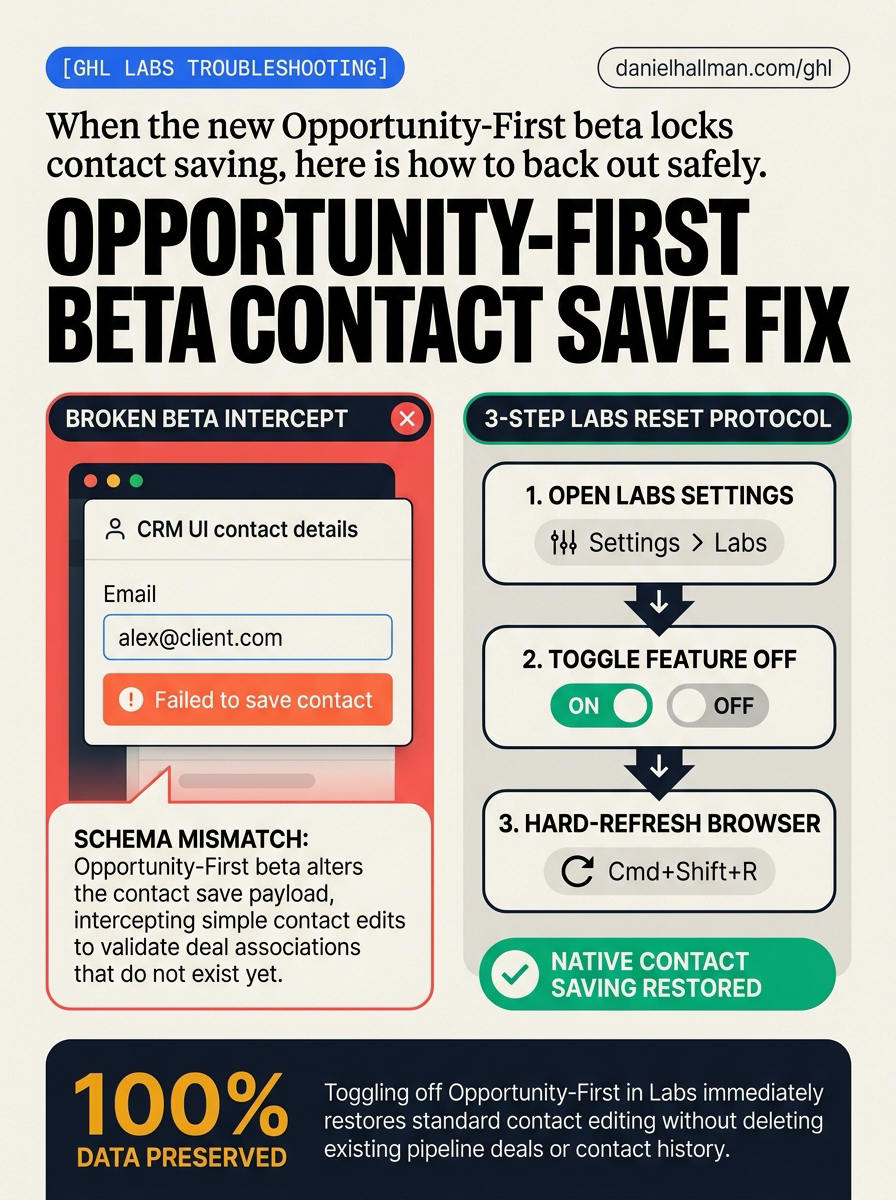
STEP 1Open Labs in Settings: In Settings > Labs, scroll to the Opportunity-First card (or open Agency View > Settings > Labs > Sub-Account if managed at the agency level).
1Click Automation in Left Menu 2Click + Create Workflow or Build with AI 3Check Global Workflow Settings - STEP 2Switch the Toggle to Off: In Settings > Labs, click the toggle switch on the Opportunity-First card to turn it
Offand revert the sub-account to standard Contact-First record handling. -
STEP 3Hard-Refresh Your Browser: In your browser on Contacts > Smart Lists, press
Cmd+Shift+Ron Mac (orCtrl+F5on Windows) to flush cached beta scripts and reload the standard contact drawer.
1Click Call Report Top Tab 2Filter by Tracking Number & Date 3Check First-Time Calls vs. Missed
Cause
- Enabling the Opportunity-First beta in HighLevel Labs changes how contact records are validated.
- When you try to update standard contact fields (such as email, phone number, or custom fields) on the contact detail page, the frontend form expects deal and pipeline schema associations that do not exist yet, causing the save action to fail with an error banner.
GoHighLevel Configuration
- Back out of the beta directly from your sub-account Settings > Labs tab (or have an agency admin disable it under Agency View > Settings > Labs > Sub-Account if it was pushed globally).
- Once toggled off, perform a hard refresh in your browser to flush cached validator scripts
- your contact records and existing pipeline opportunities remain intact.
GoHighLevel Menu Paths
| Step | Menu Path in GHL | Action |
|---|---|---|
| Step 1 | Settings > Labs | Scroll to the Opportunity-First card (or open Agency View > Settings > Labs > Sub-Account if managed at the agency level). |
| Step 2 | Settings > Labs | Click the toggle switch on the Opportunity-First card to turn it Off and revert the sub-account to standard Contact-First record handling. |
| Step 3 | Contacts > Smart Lists | Press Cmd+Shift+R on Mac (or Ctrl+F5 on Windows) to flush cached beta scripts and reload the standard contact drawer. |
DEFAULT SETUP VS. AUTOMATED WORKFLOW
Operational Comparison
Speed to Lead & Callback Safety
Caller Reply & Booking Rate
Related Questions
- How do you use Model Context Protocol (MCP) and AI to build and audit GoHighLevel workflows?
- Should you host courses as GoHighLevel Membership Products or inside the Communities Learning Tab?
- How do you format data and run math in GoHighLevel Workflows without paying for n8n or Make?
- Is there a workflow trigger for when someone gets added as a contact follower in GoHighLevel?
BUILD FASTER IN GOHIGHLEVEL · FREE TRIAL BONUSES + MCP SERVER
Build this directly inside your GoHighLevel sub-account
Connect Claude Code, Cursor, or OpenAI Codex to our ghl-tools MCP Server & Rust CLI to build workflows, forms, and funnels from your editor, or start your GoHighLevel plan through our partner link to unlock $612+ in ready-to-import kits (including GHL Workflow Architect Pack ($47 — or Free with Trial)) and weekly live clinics.