GOHIGHLEVEL ANSWERS & PROMPTS: PLAYBOOK T03 · WORKFLOWS & AUTOMATION
AUTHOR: DANIEL HALLMAN
KEYWORD: MCP
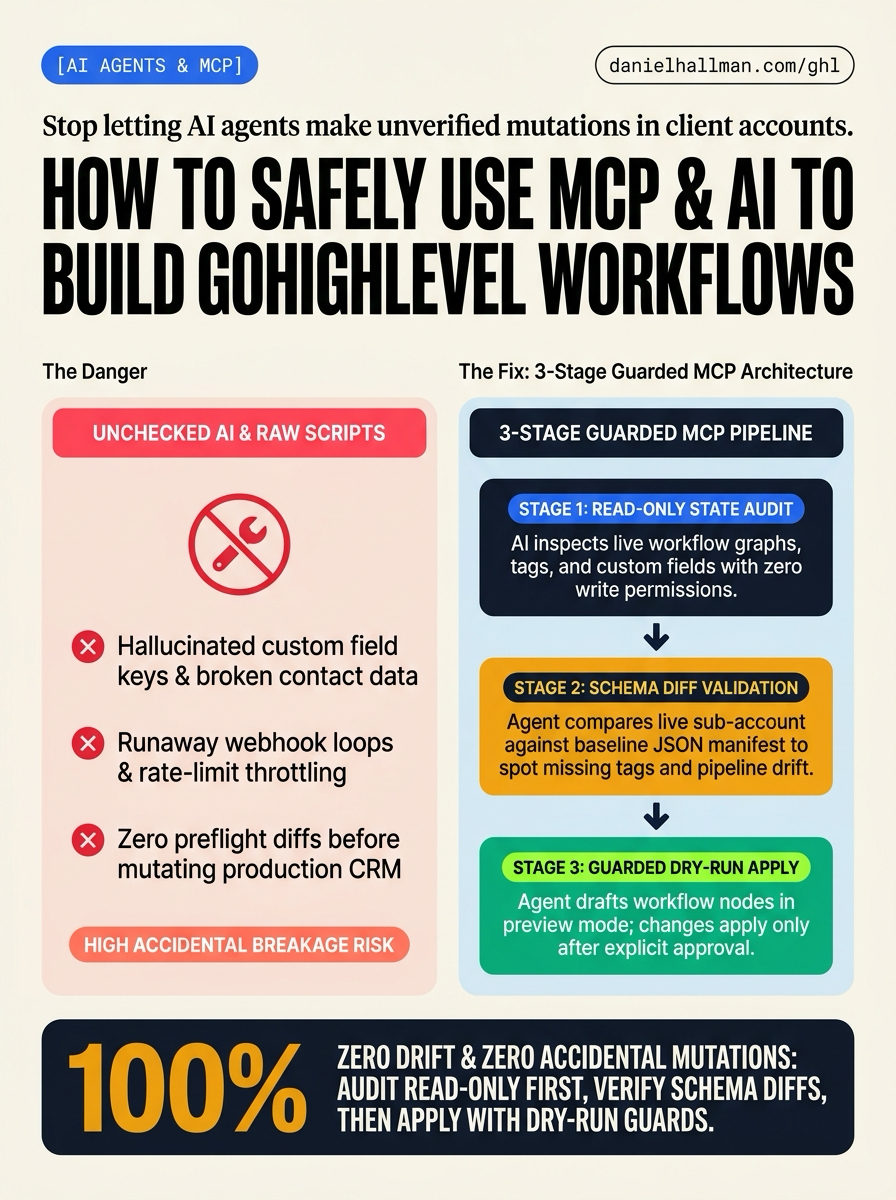
What Usually Goes Wrong
- Agency operators want AI to speed up sub-account setup—building multi-step workflows, generating custom forms, verifying pipeline stages, and auditing tags across dozens of accounts.
- But letting an LLM write directly to the HighLevel API without guards is dangerous: agents hallucinate field keys, overwrite contact states, and create runaway webhook loops.
- Meanwhile, building every automation by hand in the UI wastes hours on repetitive plumbing.
The Simple Fix in GoHighLevel
- Run a 3-layer guarded Model Context Protocol (MCP) architecture.
- First, connect your AI assistant to a purpose-built HighLevel MCP server (such as ghl-tools).
- Second, use read-only inspection tools (like snapshot_diff_audit and custom_values_audit) so the AI reads sub-account state and outputs a clear JSON diff before touching anything.
- Third, enforce dry-run validation on every write operation—the agent drafts the exact workflow graph, form fields, and tags, but only applies changes after human review.
BEFORE VS. AFTER BENCHMARK
What Changes When You Turn This On
Speed to Lead & Callback Safety
Caller Reply & Booking Rate
Where to Click in GoHighLevel
| Step | Where to Click in GHL | What to Do |
|---|---|---|
| Step 1 | Connect Your AI Assistant to a HighLevel MCP Server | Add the HighLevel MCP server configuration to your AI assistant (Cursor mcp.json, Claude Desktop config, or Antigravity settings) pointing to your guarded GHL tools binary with sub-account read permissions. |
| Step 2 | Run Read-Only Schema & Workflow Audits | Prompt your AI agent to inspect the target sub-account. The agent compares your live sub-account against standard baseline templates to spot missing tags, untracked pipelines, and broken workflow triggers without mutating live data. |
| Step 3 | Generate Workflow Graphs with Dry-Run Execution | When building new workflows, forms, or custom fields, prompt the agent to generate the declarative graph in dry-run mode. Review the proposed JSON schema and trigger logic before applying changes cleanly into HighLevel. |
SIMPLE STEP-BY-STEP INSTRUCTIONS + ANNOTATED GHL SCREENSHOTS
How to Set This Up in GoHighLevel (Under 2 Minutes)
-
STEP 1Connect Your AI Assistant to a HighLevel MCP Server: Add the HighLevel MCP server configuration to your AI assistant (Cursor mcp.json, Claude Desktop config, or Antigravity settings) pointing to your guarded GHL tools binary with sub-account read permissions.
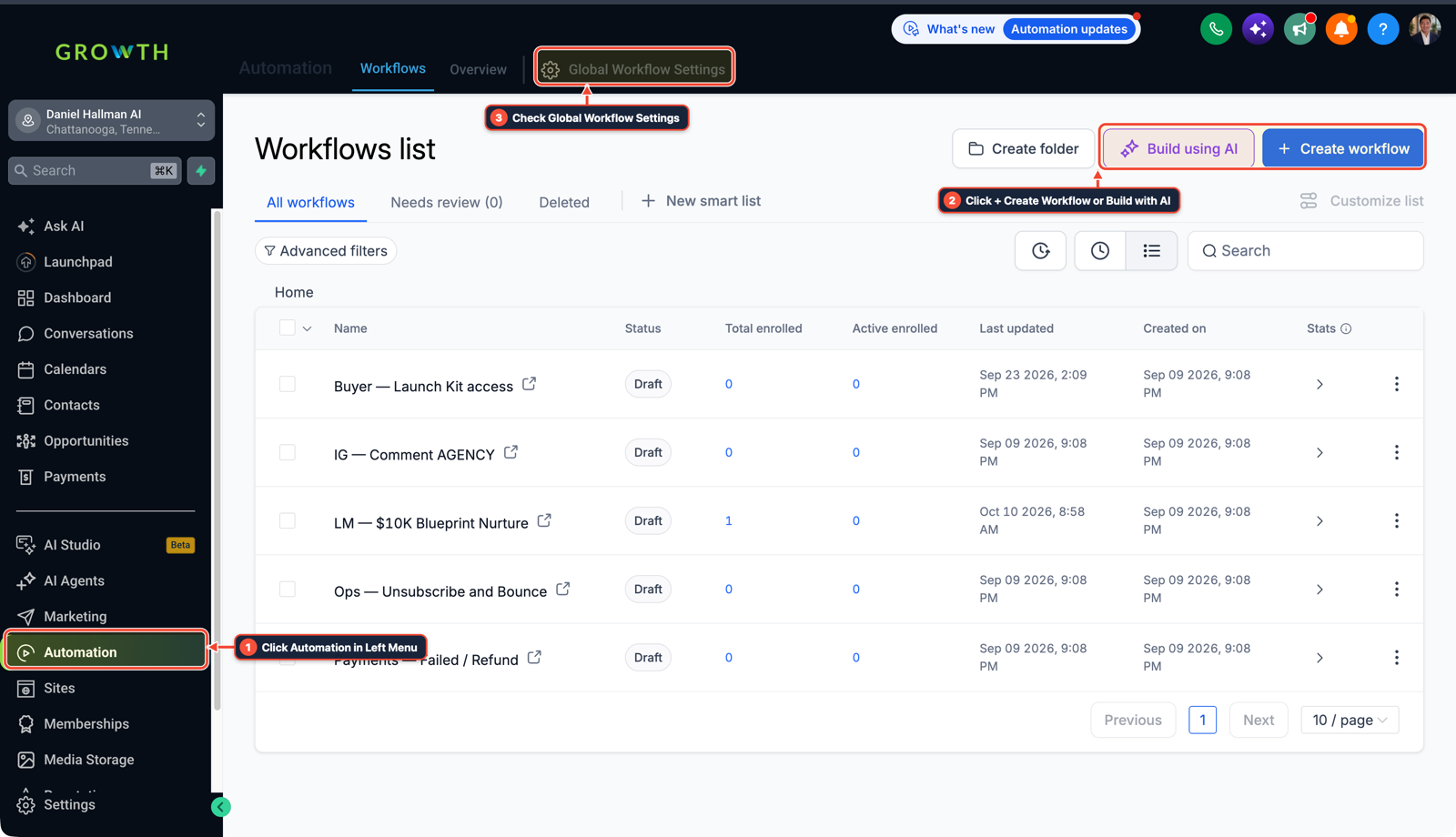
1Click Automation in Left Menu 2Click + Create Workflow or Build with AI 3Check Global Workflow Settings - STEP 2Run Read-Only Schema & Workflow Audits: Prompt your AI agent to inspect the target sub-account. The agent compares your live sub-account against standard baseline templates to spot missing tags, untracked pipelines, and broken workflow triggers without mutating live data.
-
STEP 3Generate Workflow Graphs with Dry-Run Execution: When building new workflows, forms, or custom fields, prompt the agent to generate the declarative graph in dry-run mode. Review the proposed JSON schema and trigger logic before applying changes cleanly into HighLevel.
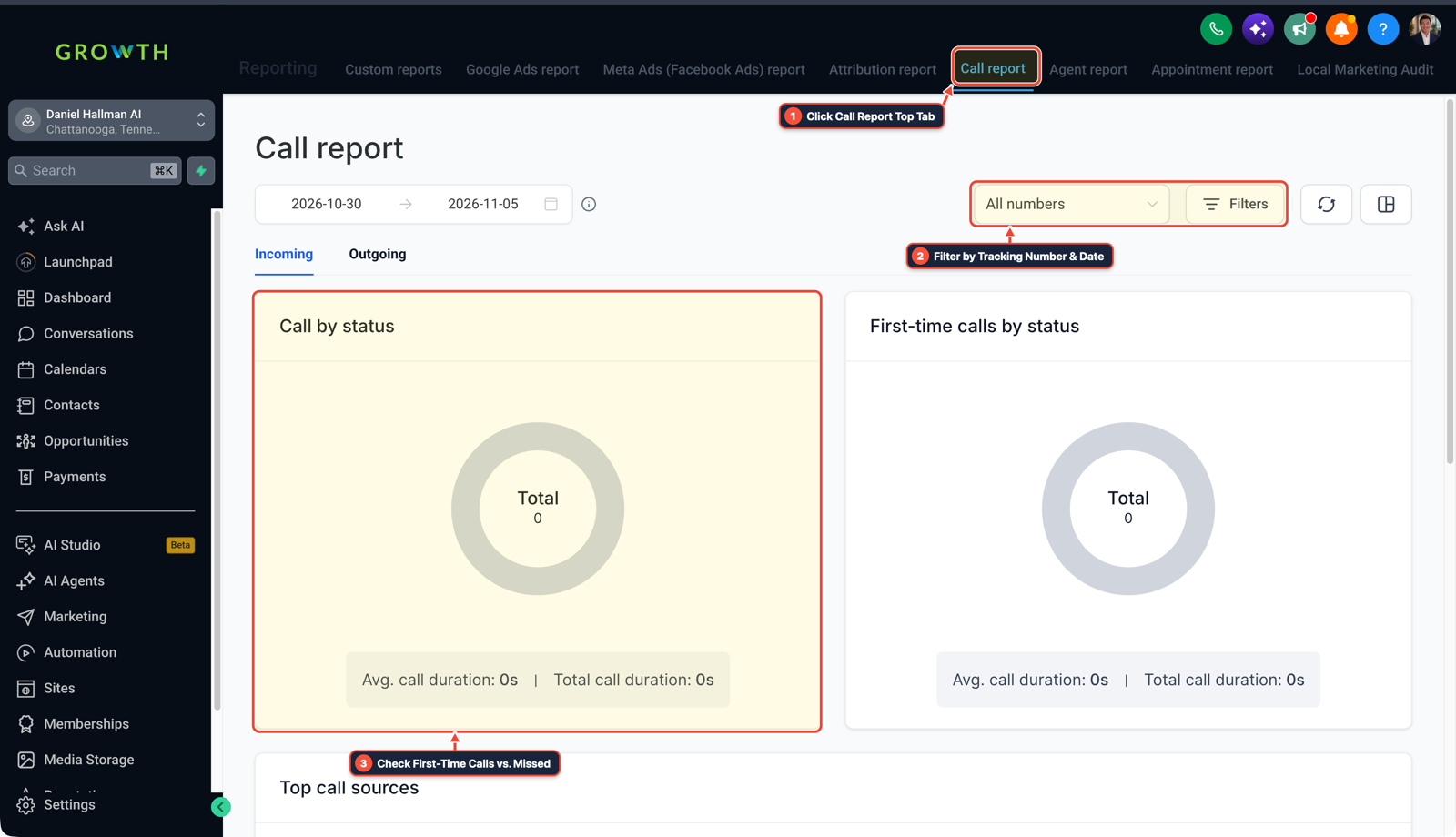
1Click Call Report Top Tab 2Filter by Tracking Number & Date 3Check First-Time Calls vs. Missed
MODE: AGENT PROMPT
PASTE THIS PROMPT INTO CLAUDE CODE, CURSOR, CHATGPT, OR YOUR GHL ASSISTANT
SAFE READ-FIRST WORKFLOW
You are auditing and configuring workflows for a GoHighLevel sub-account using Model Context Protocol (MCP):
1. Run a read-only audit of existing workflows, custom fields, and tags in sub-account <YOUR_LOCATION_ID>.
2. Generate a schema diff against our standard snapshot template to identify missing triggers or untracked pipeline stages.
3. Draft the required workflow graph in dry-run mode with preflight validation before applying any mutation.
RUN WITH OUR GHL-TOOLS MCP SERVER OR RUST CLI (DANIELHALLMAN.COM/MCP)
SUPPORTS --DRY-RUN PREVIEW
# 1. Run a read-only snapshot & custom field audit via ghl-tools MCP
{
  "tool": "ghl_snapshot_diff_audit",
  "arguments": {
    "location_id": "<YOUR_LOCATION_ID>",
    "dry_run": true
  }
}

# 2. Or run sub-account health inspection via CLI
ghl-agency doctor --context moosh-growth
Related GoHighLevel Questions & Fixes
PLAYBOOK T10 · Workflows & Automation
How do you format data and run math in GoHighLevel Workflows without paying for n8n or Make?
Use HighLevel's built-in Format Data, Math Operation, Goal Events, and Inbound/Outbound Webhook steps inside a single native workflow so contact history and error logs stay in one place.
PLAYBOOK T19 · SaaS & Client SnapshotsShould you host courses as GoHighLevel Membership Products or inside the Communities Learning Tab?
Build your curriculum, video lessons, and drip rules in Memberships -> Products first, then attach that course directly into your Community's Learning tab so students access their lessons and discussion channels through a single unified portal login.
PLAYBOOK T03 · Workflows & AutomationIs there a workflow trigger for when someone gets added as a contact follower in GoHighLevel?
HighLevel has no native 'Contact Follower Added' workflow trigger because followers are an association array rather than a standard contact field. Invert the flow: trigger a workflow from an operational event (such as a collaborative tag or custom dropdown field) that executes 'Add Contact Follower' to attach the user, then immediately fires 'Send Internal Notification' so teammates get alerted the second they are assigned.
PLAYBOOK T25 · Google & Meta CAPI AdsHow do you build custom client reporting dashboards and automated Monday ROI emails in GoHighLevel?
Instead of letting local business clients wander through 5 separate default reporting tabs, build a single 4-Widget Executive Dashboard (First-Touch UTM Attribution Donut, Call Answer & Missed-Call Text-Back Scorecard, Appointment Show-Rate Funnel, and a Custom Metric dividing Closed Won Value by Total Ad Spend), then schedule a recurring Monday 8:00 AM PDF email report so the owner sees clear ROI without logging in.
BUILD FASTER IN GOHIGHLEVEL · FREE TRIAL BONUSES + MCP SERVER
Want this built inside your GoHighLevel account automatically?
Connect Claude Code, Cursor, or OpenAI Codex to our ghl-tools MCP Server & Rust CLI for 30-second sub-account checks and --dry-run previews—or start/upgrade your GoHighLevel plan through our partner link to unlock up to $612+ in ready-to-import kits (including GHL Workflow Architect Pack ($47 — or Free with Trial)) and our weekly live clinics.