GOHIGHLEVEL ANSWERS & PROMPTS: PLAYBOOK T57 · ROOFER SPEED-TO-LEAD AUDIT & LIVE DEMO NUMBER OUTREACH
AUTHOR: DANIEL HALLMAN
KEYWORD: ROOFER OUTREACH
STEP-BY-STEP INSTRUCTIONS + ANNOTATED GHL SCREENSHOTS
Steps in GoHighLevel
-
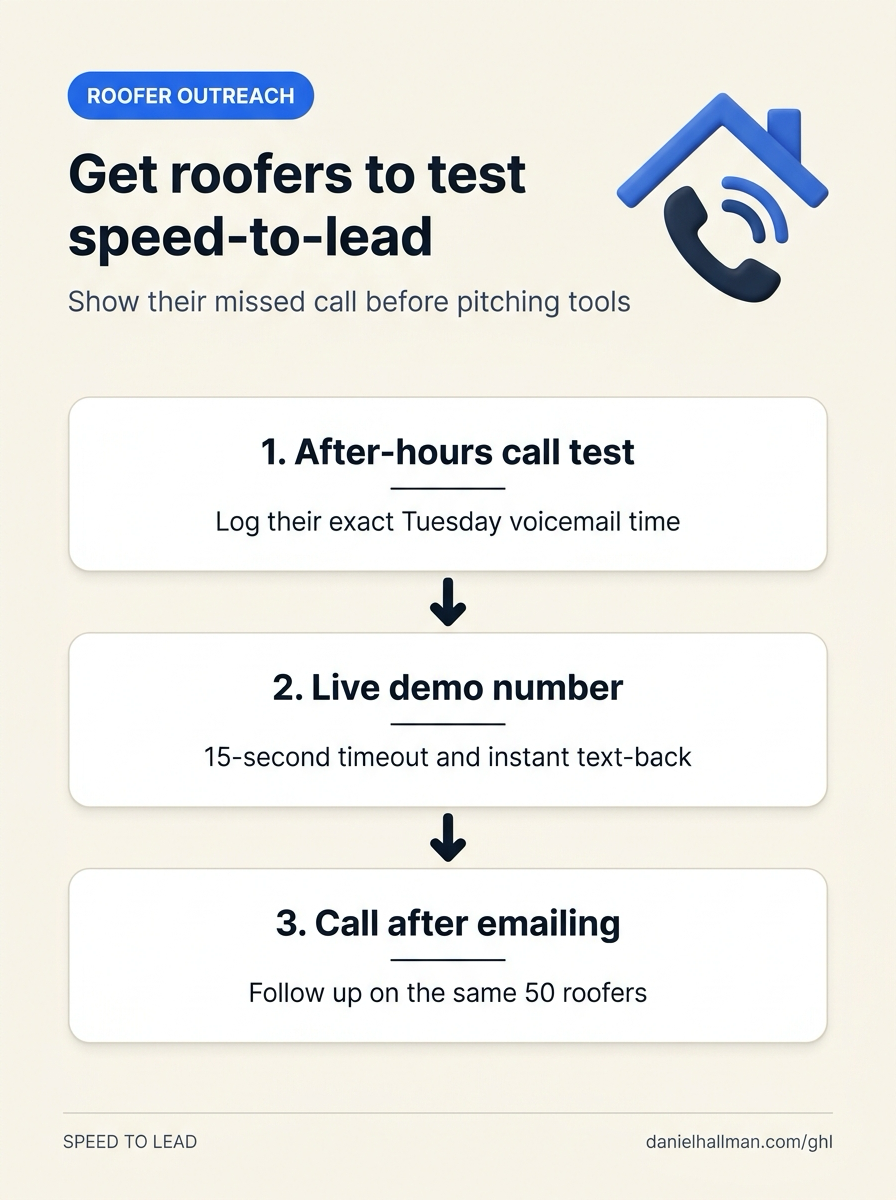
STEP 1In Reporting > Call Report (and your 50-roofer prospect sheet), call or submit each roofer's contact form after 6:00 PM on a weekday and log the exact timestamp when the call hits voicemail or waits until the next morning for a reply.
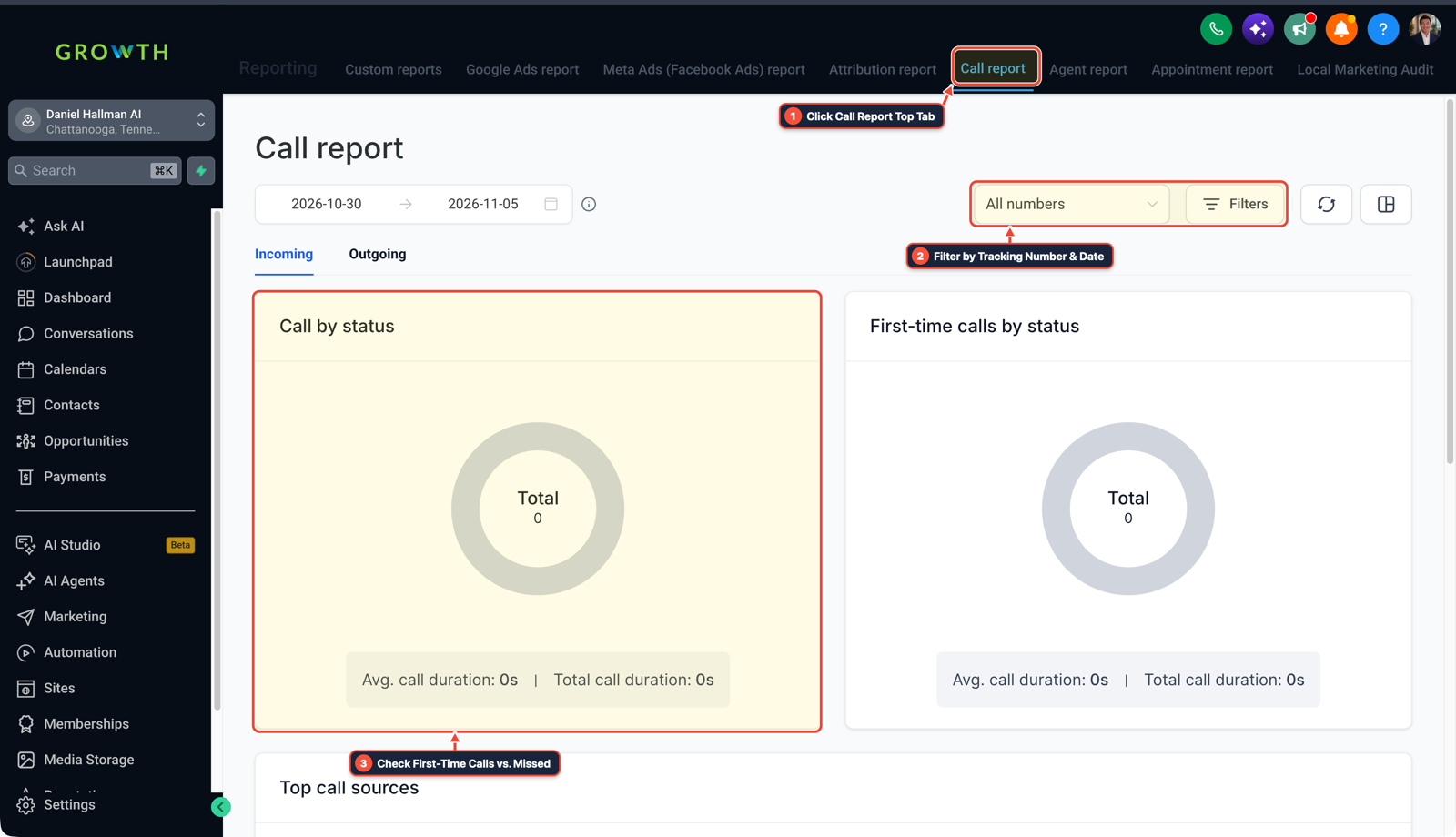
1Click Call Report Top Tab 2Filter by Tracking Number & Date 3Check First-Time Calls vs. Missed -
STEP 2In Settings > Phone System, set a local demo number to a
15-secondCall Timeout with a 45-second missed-call SMS that asks for the homeowner's street address and a roof leak photo, and put that phone number directly in your email so the roofer can call it in 20 seconds.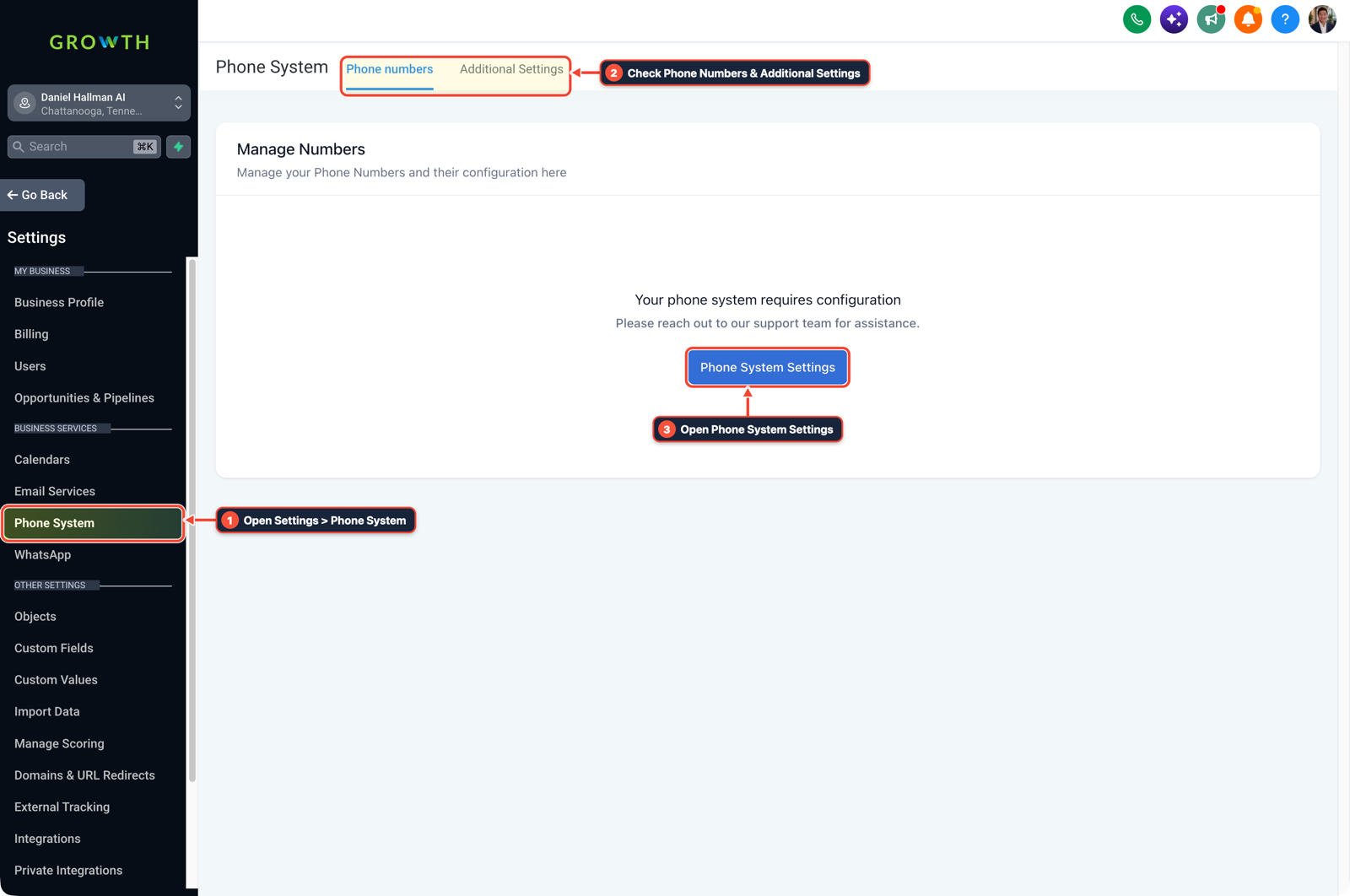
1Open Settings > Phone System 2Check Phone Numbers & Additional Settings 3Open Phone System Settings -
STEP 3In Conversations > Team Inbox (Manual Actions), call the same 50 roofers two days after your email instead of switching niches: ask the owner or office manager if they saw the live demo number and text them a 30-second screenshot of how the missed-call thread books an estimate.
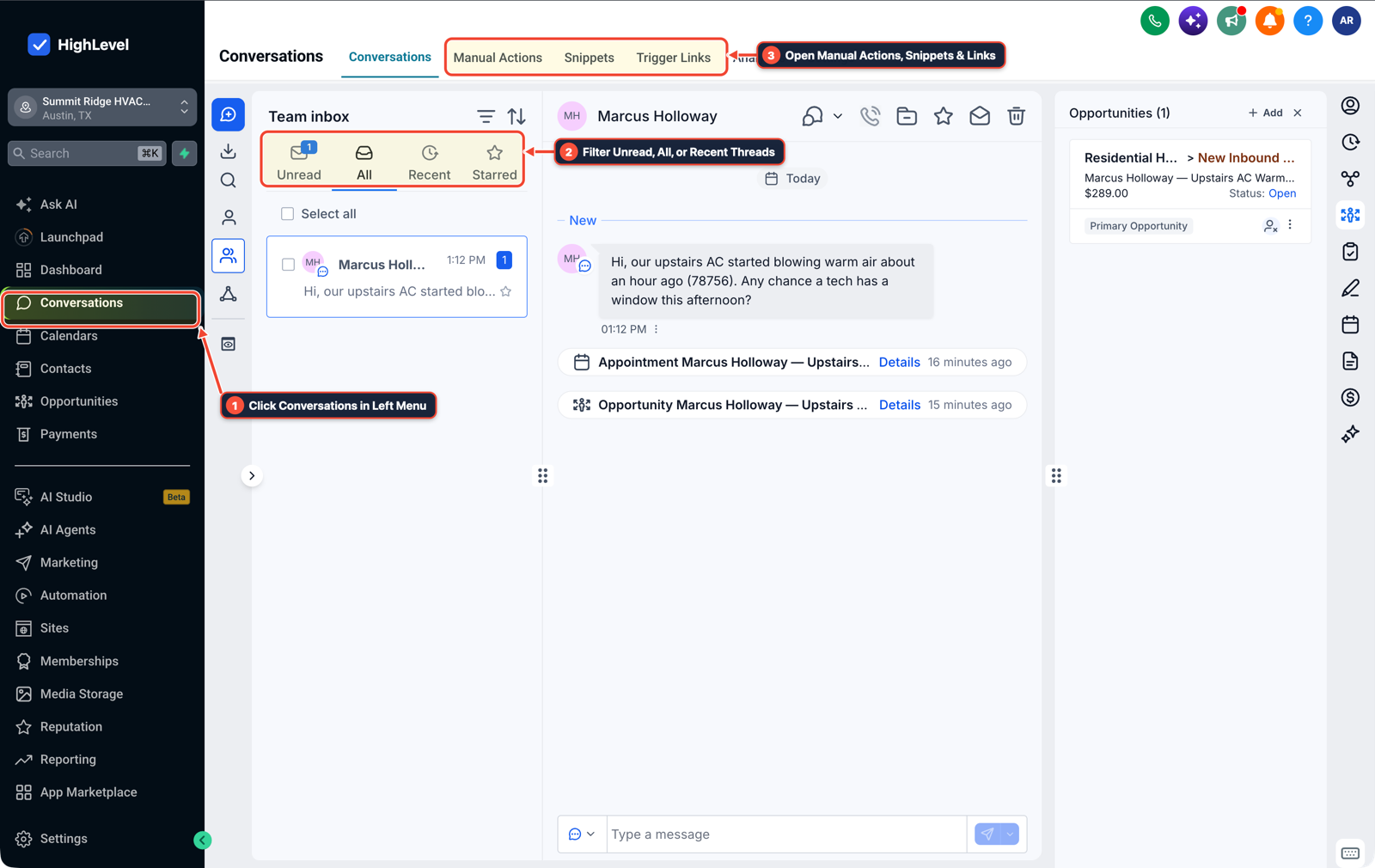
1Click Conversations in Left Menu 2Filter Unread, All, or Recent Threads 3Open Manual Actions, Snippets & Links
MODE: AGENT PROMPT
PASTE INTO CLAUDE CODE, CURSOR, CHATGPT, OR GOHIGHLEVEL ASK AI
AGENT PROMPT
Set up a live roofer speed-to-lead demo line and 3-touch prospect follow-up in sub-account <YOUR_LOCATION_ID>:
1. In Settings > Phone System, configure a local roofer demo number with a 15-second Call Timeout before iOS voicemail intercepts at 18 seconds.
2. In Automation > Workflow Builder, trigger a 45-second missed-call SMS asking for the caller's address, roof issue, and leak photo.
3. In Conversations > Manual Actions, queue a 48-hour follow-up call and SMS for the 50 targeted roofing prospects.
GHL-TOOLS MCP SERVER & CLI (DANIELHALLMAN.COM/MCP)
BUILDER + SUB-ACCOUNT TOOLS
# Audit the roofer demo phone line and missed-call speed-to-lead workflows
ghl-agency phone-wallet-audit --context <YOUR_CONTEXT> --location <YOUR_LOCATION_ID>
ghl-crm workflows list --context <YOUR_CONTEXT> --location <YOUR_LOCATION_ID>
Official GHL MCP vs. ghl-tools: HighLevel’s official hosted MCP (services.leadconnectorhq.com/mcp) covers public v2 CRM records (contacts, opportunities, appointments, conversations). ghl-tools MCP complements it with workflow graph inspection & recipes, funnel/form builders, DNS/BIMI checks, and ghl-crm doctor audits.
Cause
- Builders often spend months crafting a custom Make or GoHighLevel speed-to-lead and AI receptionist flow, send 50 personalized cold emails mentioning a roofer's website hours or active ads, and assume the niche is dead when nobody replies.
- Cold email alone typically requires 500 to 1,500 prospects per closed deal unless you pair it with a live phone test.
GoHighLevel Configuration
- Document the roofer's actual evening response gap in Reporting > Call Report, let them test a live 15-second missed-call number from their own cell in Settings > Phone System
- and run a 3-touch phone and SMS follow-up on the same 50 prospects in Conversations > Team Inbox.
GoHighLevel Menu Paths
| Step | Menu Path in GHL | Action |
|---|---|---|
| Step 1 | Reporting > Call Report | Call or submit each roofer's contact form after 6:00 PM on a weekday and log the exact timestamp when the call hits voicemail or waits until the next morning for a reply. |
| Step 2 | Settings > Phone System | Set a local demo number to a 15-second Call Timeout with a 45-second missed-call SMS that asks for the homeowner's street address and a roof leak photo, and put that phone number directly in your email so the roofer can call it in 20 seconds. |
| Step 3 | Conversations > Team Inbox | Call the same 50 roofers two days after your email instead of switching niches: ask the owner or office manager if they saw the live demo number and text them a 30-second screenshot of how the missed-call thread books an estimate. |
DEFAULT SETUP VS. AUTOMATED WORKFLOW
Operational Comparison
After-Hours & Missed Call Capture
Qualified Jobs Booked 24/7
Related Questions
- How do you sell GoHighLevel to local contractors and home service businesses?
- Does Apple iPhone Call Screening Replace an AI Receptionist or Missed-Call Text-Back for Contractors?
- How Do You Get AI Receptionist Clients With GoHighLevel Voice AI Instead of Building From Scratch?
- How Do You Get Your First U.S. Law Firm Clients for a GoHighLevel Intake Automation Agency?
BUILD FASTER IN GOHIGHLEVEL · FREE TRIAL BONUSES + MCP SERVER
Build this directly inside your GoHighLevel sub-account
Connect Claude Code, Cursor, or OpenAI Codex to our ghl-tools MCP Server & Rust CLI to build workflows, forms, and funnels from your editor, or start your GoHighLevel plan through our partner link to unlock $612+ in ready-to-import kits (including GHL Roofer Speed-to-Lead & Voice AI Demo Kit) and weekly live clinics.