GOHIGHLEVEL ANSWERS & PROMPTS: PLAYBOOK T99 · CRM REVENUE EXPORTS, LANDING PAGE HEADLINE CHECKS & BOOKED-CALL CAPI SIGNALS
AUTHOR: DANIEL HALLMAN
KEYWORD: META ADS
STEP-BY-STEP INSTRUCTIONS + ANNOTATED GHL SCREENSHOTS
Steps in GoHighLevel
-
STEP 1In Reporting > Call Report, filter by tracking number and campaign source (
utm_campaignandfbclid) to export your Meta ad leads alongside first-time calls, booked appointments, and won deal values before pasting the table into Claude for audience analysis.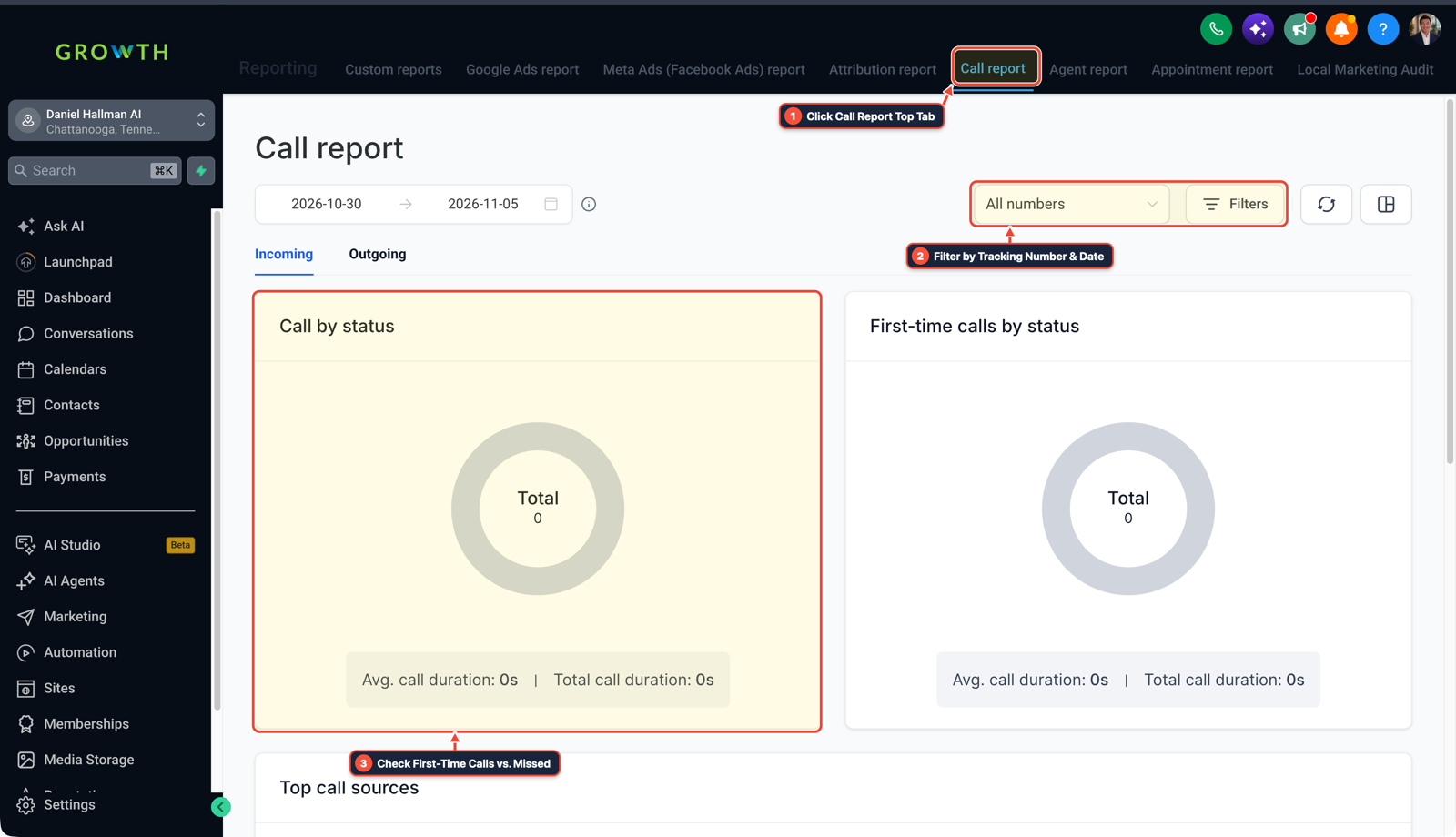
1Click Call Report Top Tab 2Filter by Tracking Number & Date 3Check First-Time Calls vs. Missed -
STEP 2In Sites > Funnels, open the mobile landing page tied to each ad set and have Claude compare the page headline, offer terms, and 3-field intake form (
first_name,phone,service_needed) against your ad copy so message mismatches are fixed before launch.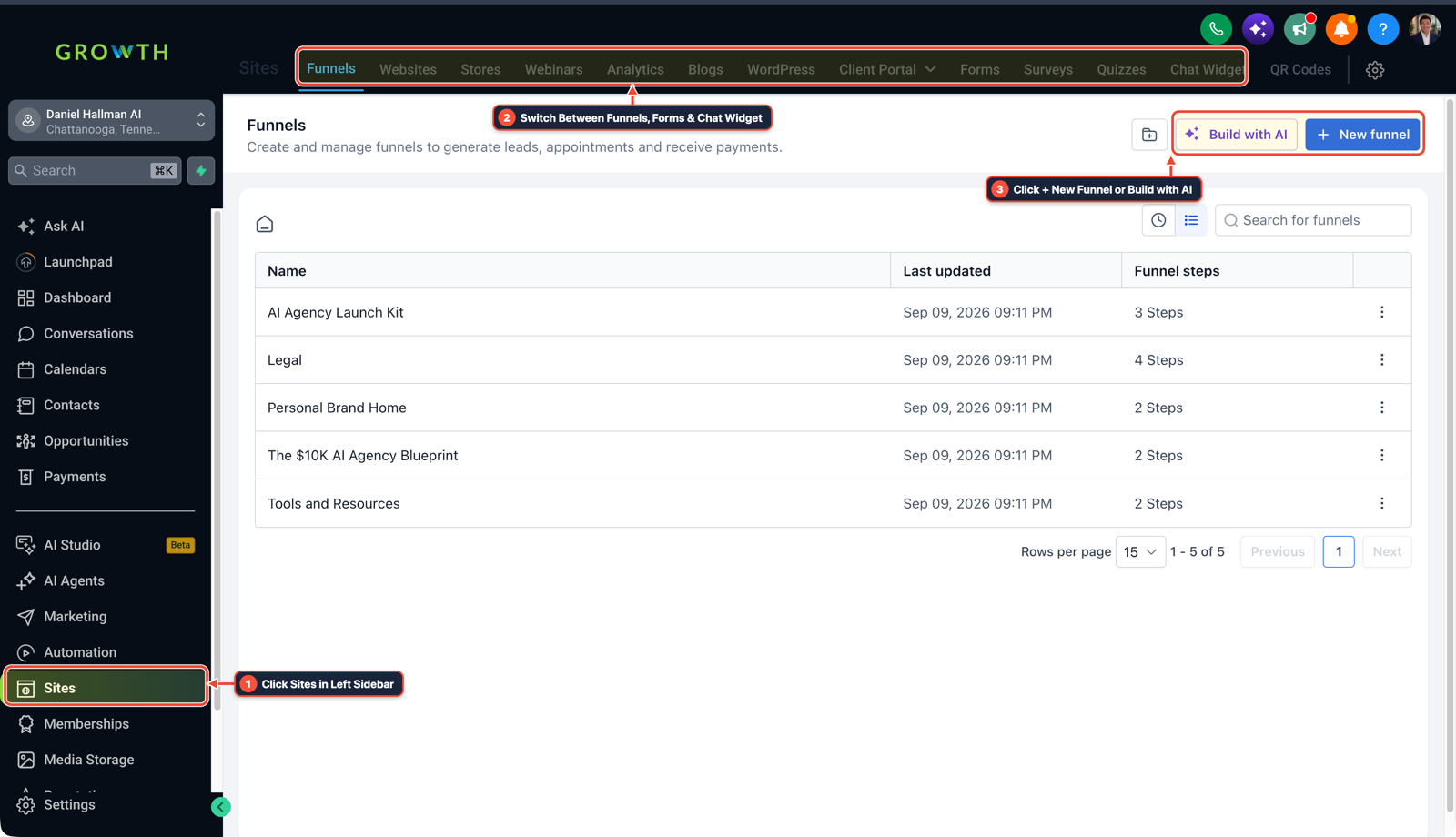
1Click Sites in Left Sidebar 2Switch Between Funnels, Forms & Chat Widget 3Click + New Funnel or Build with AI -
STEP 3In Automation > Workflow Builder, send a Facebook Conversion API event only when an opportunity reaches
ConfirmedorWonso Meta optimizes delivery toward actual buyers rather than cheap form fills.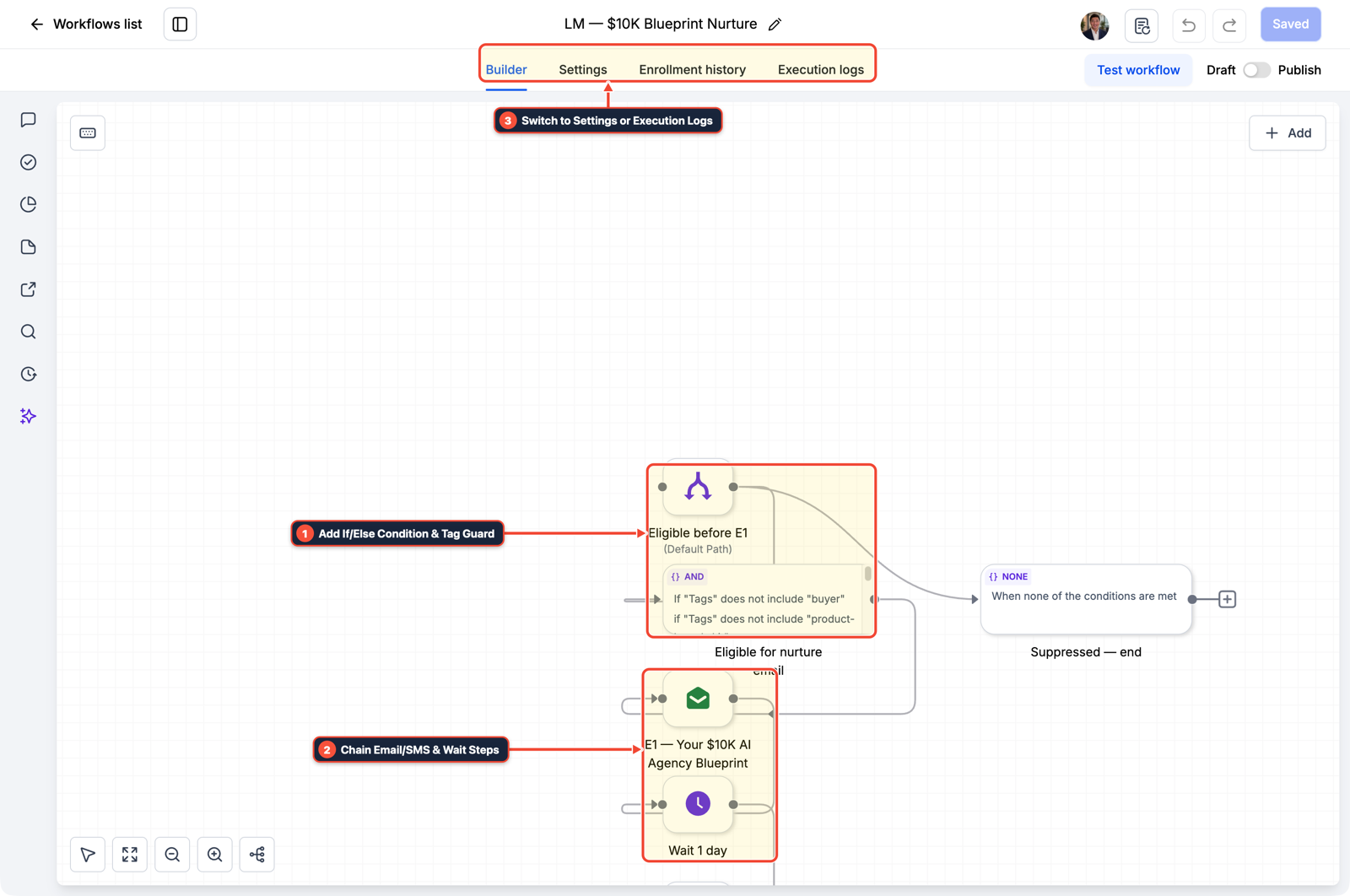
1Add If/Else Condition & Tag Guard 2Chain Priority & Wait Steps 3Switch to Settings or Execution Logs
MODE: AGENT PROMPT
PASTE INTO CLAUDE CODE, CURSOR, CHATGPT, OR GOHIGHLEVEL ASK AI
AGENT PROMPT
Set up a Meta Ads attribution and CAPI conversion workflow in sub-account <YOUR_LOCATION_ID>:
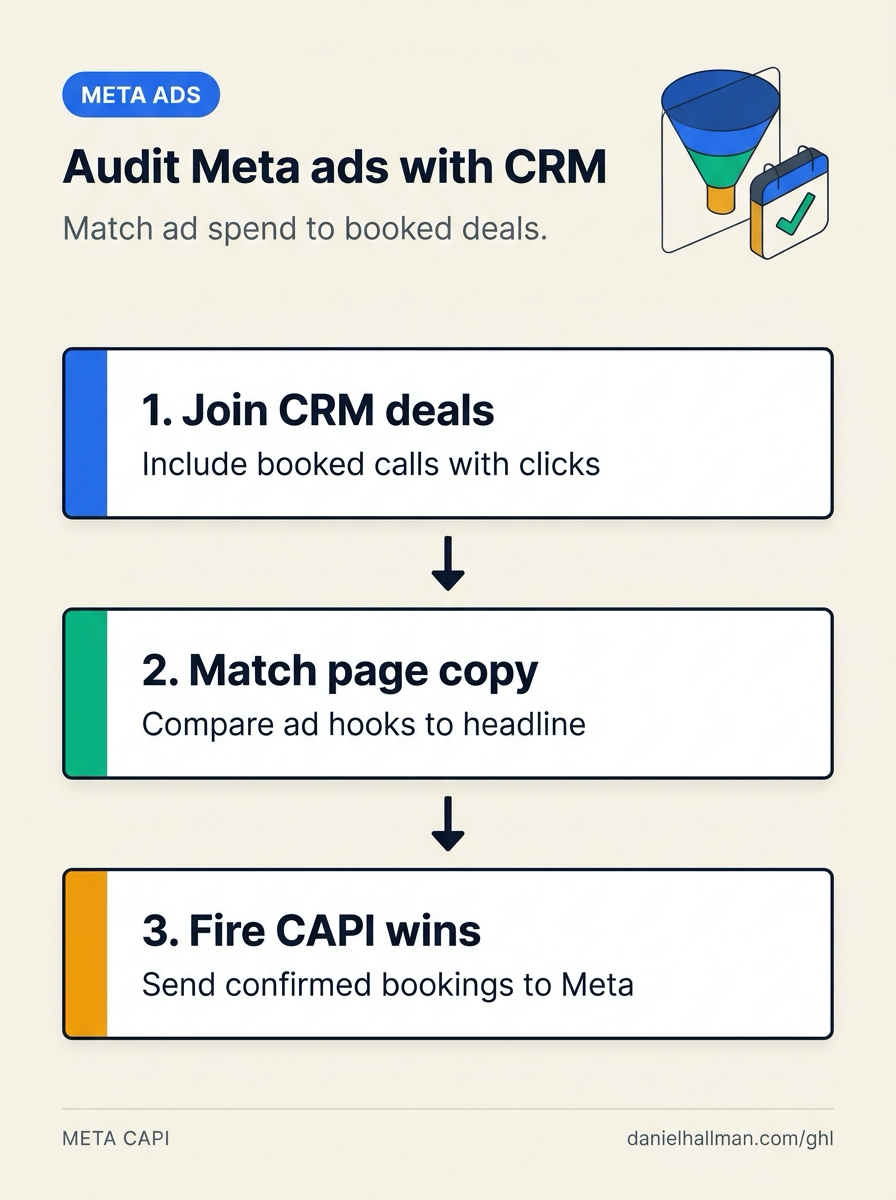
1. In Reporting > Call Report, export campaign and ad-set rows joined with first-time calls, booked appointments, and won opportunity values.
2. In Sites > Funnels, verify that each landing page headline and 3-field intake form match the specific offer and location named in the ad set.
3. In Automation > Workflow Builder, trigger a Facebook Conversion API event when an appointment is confirmed or an opportunity stage moves to Won.
GHL-TOOLS MCP SERVER & CLI (DANIELHALLMAN.COM/MCP)
BUILDER + SUB-ACCOUNT TOOLS
# Inspect Meta CAPI workflows and funnel pages in the sub-account
ghl-crm workflows list --context <YOUR_CONTEXT> --location <YOUR_LOCATION_ID>
ghl-crm funnels list --context <YOUR_CONTEXT> --location <YOUR_LOCATION_ID>
Official GHL MCP vs. ghl-tools: HighLevel’s official hosted MCP (services.leadconnectorhq.com/mcp) covers public v2 CRM records (contacts, opportunities, appointments, conversations). ghl-tools MCP complements it with workflow graph inspection & recipes, funnel/form builders, DNS/BIMI checks, and ghl-crm doctor audits.
Cause
- Evaluating Meta ad sets on click-through rate and raw form-submission cost hides which audience angles send unqualified clicks or bad phone numbers
- while launching new ad hooks without checking the destination page headline causes visitors to bounce on mobile.
GoHighLevel Configuration
- Join your Meta Ads export with booked appointments and deal revenue from Reporting > Call Report, audit ad hooks against mobile page headlines in Sites > Funnels
- and send server-side Facebook Conversion API events on confirmed bookings in Automation > Workflow Builder.
GoHighLevel Menu Paths
| Step | Menu Path in GHL | Action |
|---|---|---|
| Step 1 | Reporting > Call Report | Filter by tracking number and campaign source (utm_campaign and fbclid) to export your Meta ad leads alongside first-time calls, booked appointments, and won deal values before pasting the table into Claude for audience analysis. |
| Step 2 | Sites > Funnels | Open the mobile landing page tied to each ad set and have Claude compare the page headline, offer terms, and 3-field intake form (first_name, phone, service_needed) against your ad copy so message mismatches are fixed before launch. |
| Step 3 | Automation > Workflow Builder | Send a Facebook Conversion API event only when an opportunity reaches Confirmed or Won so Meta optimizes delivery toward actual buyers rather than cheap form fills. |
DEFAULT SETUP VS. AUTOMATED WORKFLOW
Operational Comparison
Manual Admin Work Per Client
Lead-to-Booked-Job Conversion
Related Questions
- How do you set up Facebook Conversion API (CAPI) and Google Offline Conversions in GoHighLevel?
- How Are Marketing Operations Teams Using GoHighLevel Workflows and n8n for Lead Cleanup, Reporting, and Offline Ad Attribution?
- How Do You Fix GA4 vs. CRM Lead Count Discrepancies in GoHighLevel?
- How Should a New GoHighLevel Agency Structure a $297 Offer and $1,000 Meta Ads Budget?
BUILD FASTER IN GOHIGHLEVEL · FREE TRIAL BONUSES + MCP SERVER
Build this directly inside your GoHighLevel sub-account
Connect Claude Code, Cursor, or OpenAI Codex to our ghl-tools MCP Server & Rust CLI to build workflows, forms, and funnels from your editor, or start your GoHighLevel plan through our partner link to unlock $612+ in ready-to-import kits (including GHL Meta CAPI & Ad Attribution Workflow Kit) and weekly live clinics.