GOHIGHLEVEL ANSWERS & PROMPTS: PLAYBOOK T56 · DIY $97 SAAS TRIAL ACTIVATION & SNAPSHOT SETUP
AUTHOR: DANIEL HALLMAN
KEYWORD: DIY SAAS
STEP-BY-STEP INSTRUCTIONS + ANNOTATED GHL SCREENSHOTS
Steps in GoHighLevel
-
STEP 1In Agency View > Account Snapshots, load a focused 3-workflow snapshot (45-second Missed-Call Text-Back, 2-step Web Lead SMS alert, and 2-hour Post-Job Google Review request) instead of handing new trial users an empty sub-account and a library of video tutorials.
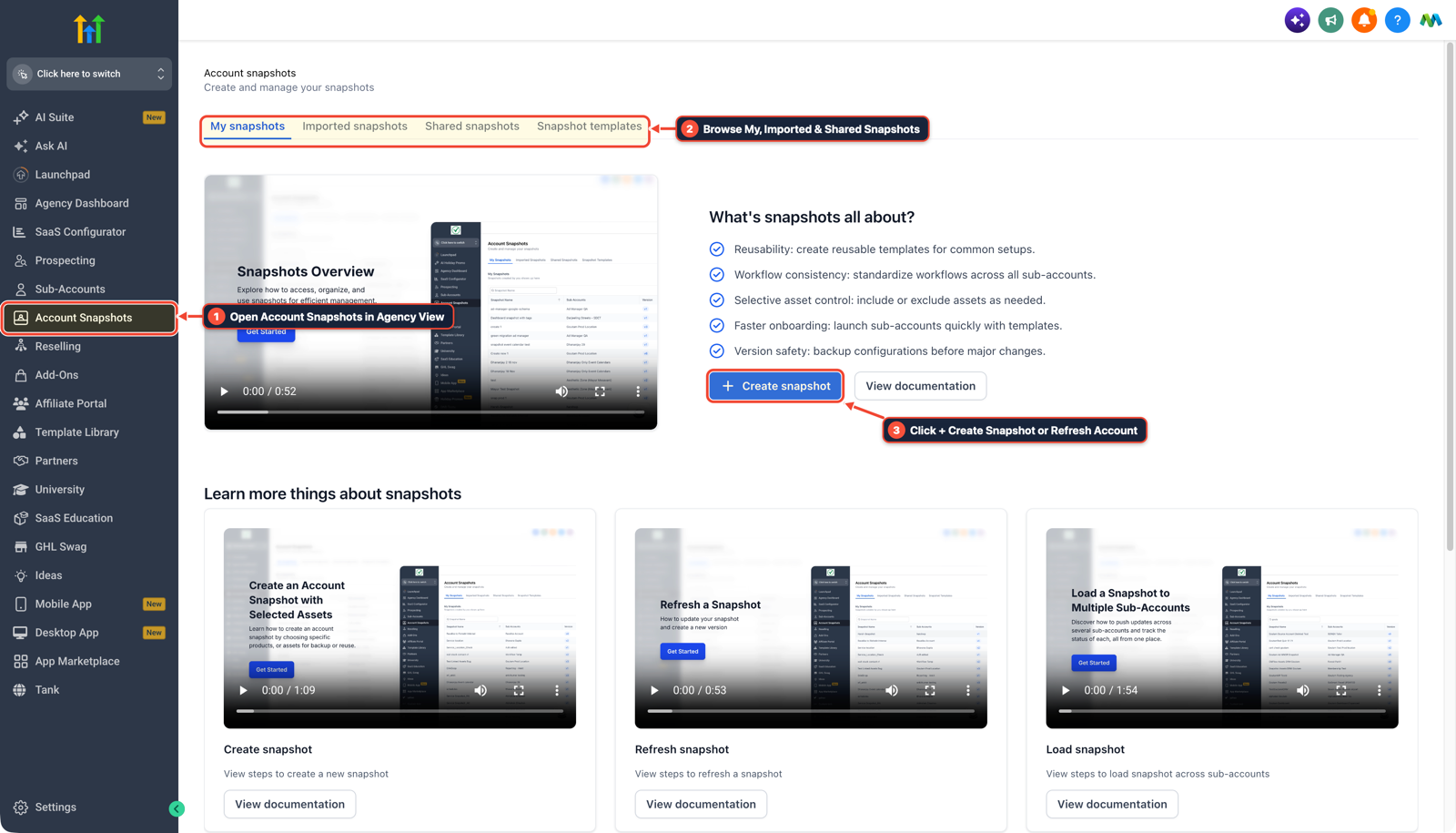
1Open Account Snapshots in Agency View 2Browse My, Imported & Shared Snapshots 3Click + Create Snapshot or Refresh Account -
STEP 2In Settings > Custom Values, bind every workflow message to
{{custom_values.business_phone}},{{custom_values.booking_link}}, and{{custom_values.google_review_url}}and populate them from a 5-question onboarding form rather than offering open-ended monthly build credits.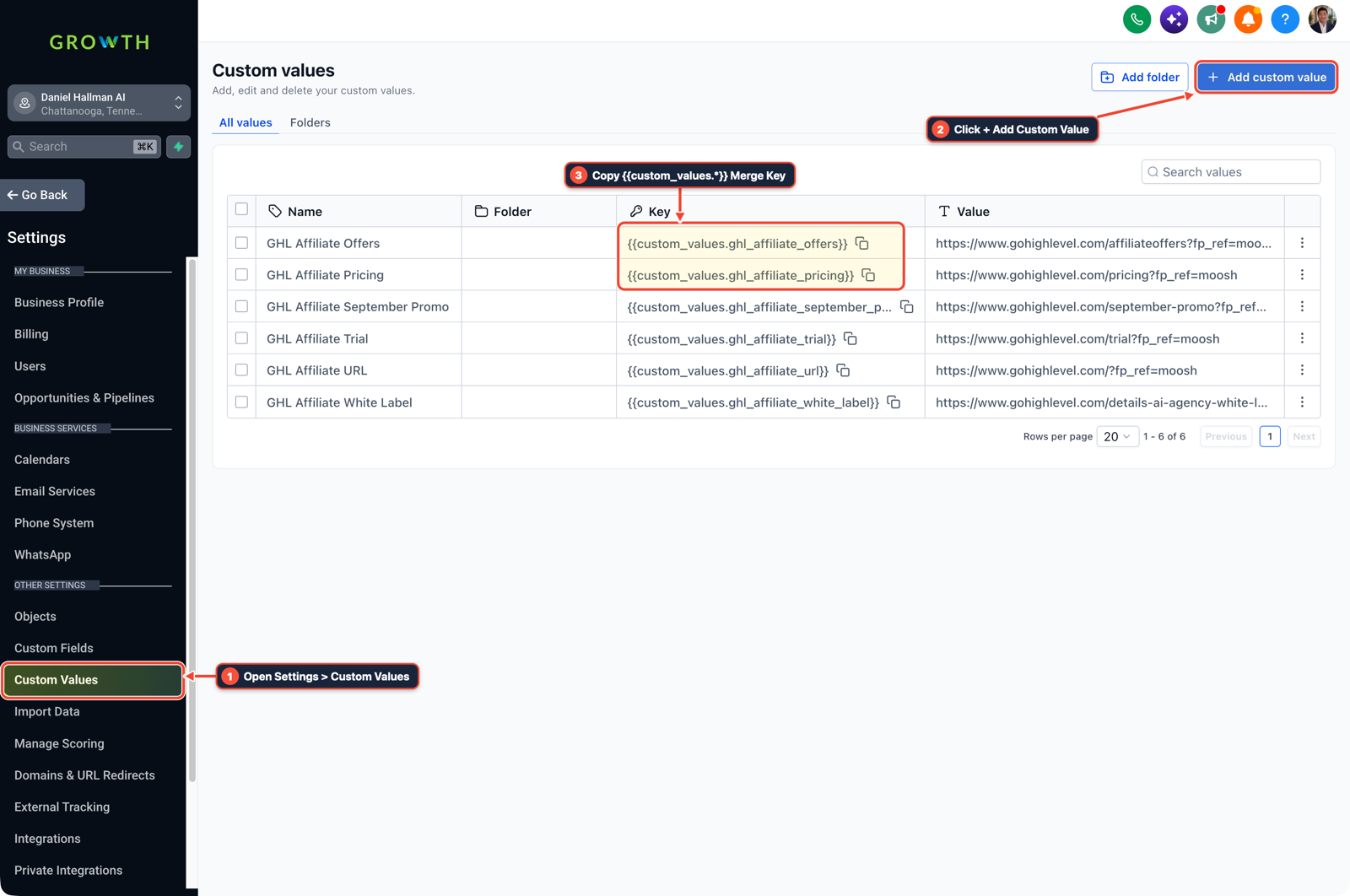
1Open Settings > Custom Values 2Click + Add Custom Value 3Copy {{custom_values.*}} Merge Key -
STEP 3In Settings > Phone System, run a 15-minute Day-1 setup call to submit their Trust Center A2P 10DLC registration and turn on a
15-secondCall Timeout with conditional call forwarding so the client catches a live missed-call lead during their 7-day trial.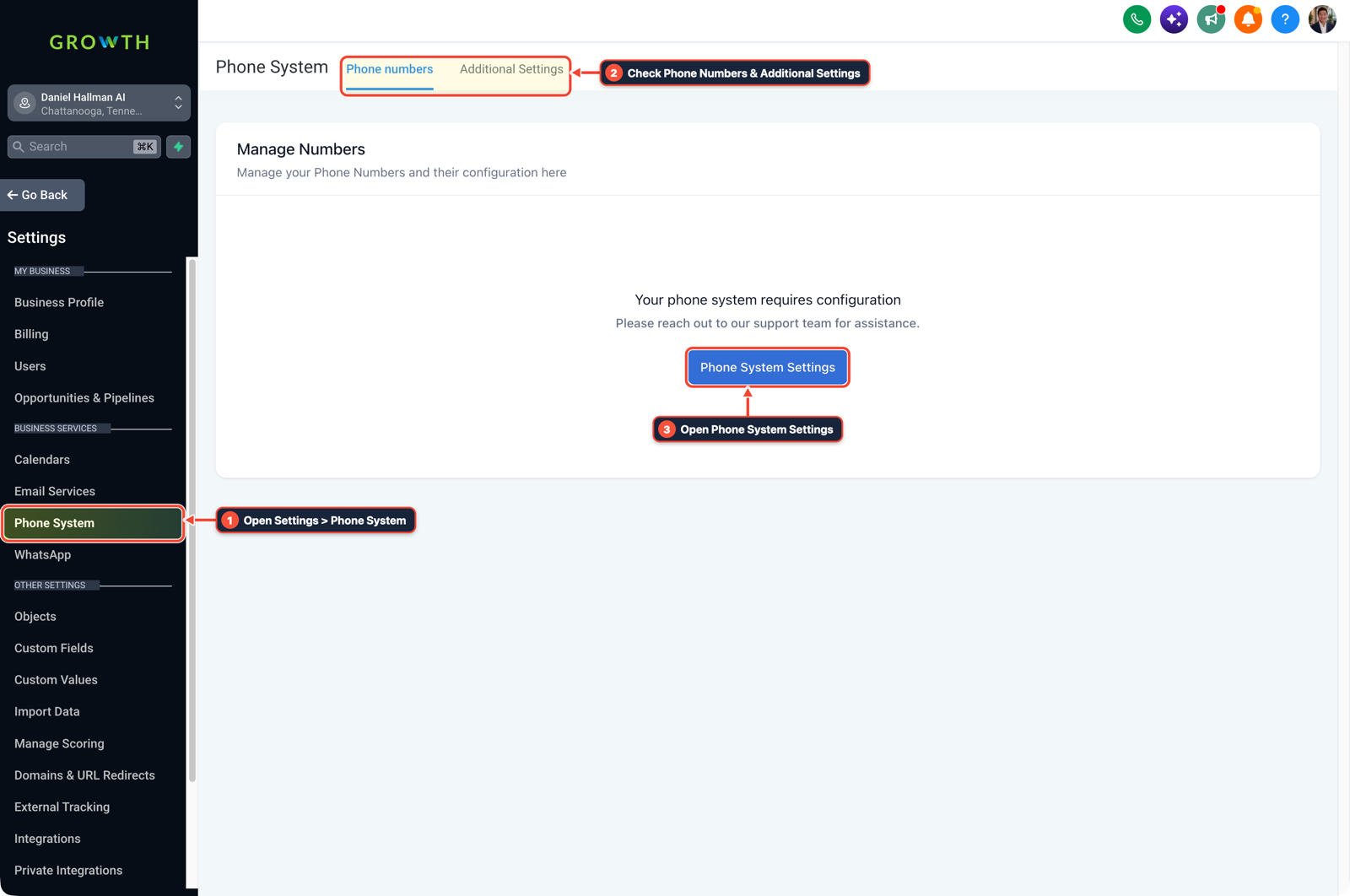
1Open Settings > Phone System 2Check Phone Numbers & Additional Settings 3Open Phone System Settings
MODE: AGENT PROMPT
PASTE INTO CLAUDE CODE, CURSOR, CHATGPT, OR GOHIGHLEVEL ASK AI
AGENT PROMPT
Configure a 7-day $97/month DIY SaaS trial sub-account <YOUR_LOCATION_ID> for Day-1 activation:
1. In Agency View > Account Snapshots, load the 3-workflow lead capture and Google review snapshot.
2. In Settings > Custom Values, map business_phone, forwarding_cell, booking_link, and google_review_url from the client's intake form.
3. In Settings > Phone System, verify the 15-second Call Timeout and submit Trust Center A2P 10DLC details on Day 1.
GHL-TOOLS MCP SERVER & CLI (DANIELHALLMAN.COM/MCP)
BUILDER + SUB-ACCOUNT TOOLS
# Audit custom values and phone settings for a new SaaS trial sub-account
ghl-agency custom-values-audit --context <YOUR_CONTEXT> --location <YOUR_LOCATION_ID>
ghl-agency phone-wallet-audit --context <YOUR_CONTEXT> --location <YOUR_LOCATION_ID>
Official GHL MCP vs. ghl-tools: HighLevel’s official hosted MCP (services.leadconnectorhq.com/mcp) covers public v2 CRM records (contacts, opportunities, appointments, conversations). ghl-tools MCP complements it with workflow graph inspection & recipes, funnel/form builders, DNS/BIMI checks, and ghl-crm doctor audits.
Cause
- Bundling a 7-day $97/month GoHighLevel trial with hours of video courses, webinars
- and monthly 'build credits' creates two problems at once: busy shop owners never watch the tutorials during a 7-day window
- and open-ended build credits turn a low-ticket DIY subscription into custom agency labor that eats your margin.
GoHighLevel Configuration
- Ship one pre-built lead recovery snapshot in Agency View > Account Snapshots, populate the client's phone number, calendar
- and Google review link automatically via Settings > Custom Values
- and help them submit carrier verification on Day 1 in Settings > Phone System so they see real leads before the trial ends.
GoHighLevel Menu Paths
| Step | Menu Path in GHL | Action |
|---|---|---|
| Step 1 | Agency View > Account Snapshots | Load a focused 3-workflow snapshot (45-second Missed-Call Text-Back, 2-step Web Lead SMS alert, and 2-hour Post-Job Google Review request) instead of handing new trial users an empty sub-account and a library of video tutorials. |
| Step 2 | Settings > Custom Values | Bind every workflow message to {{custom_values.business_phone}}, {{custom_values.booking_link}}, and {{custom_values.google_review_url}} and populate them from a 5-question onboarding form rather than offering open-ended monthly build credits. |
| Step 3 | Settings > Phone System | Run a 15-minute Day-1 setup call to submit their Trust Center A2P 10DLC registration and turn on a 15-second Call Timeout with conditional call forwarding so the client catches a live missed-call lead during their 7-day trial. |
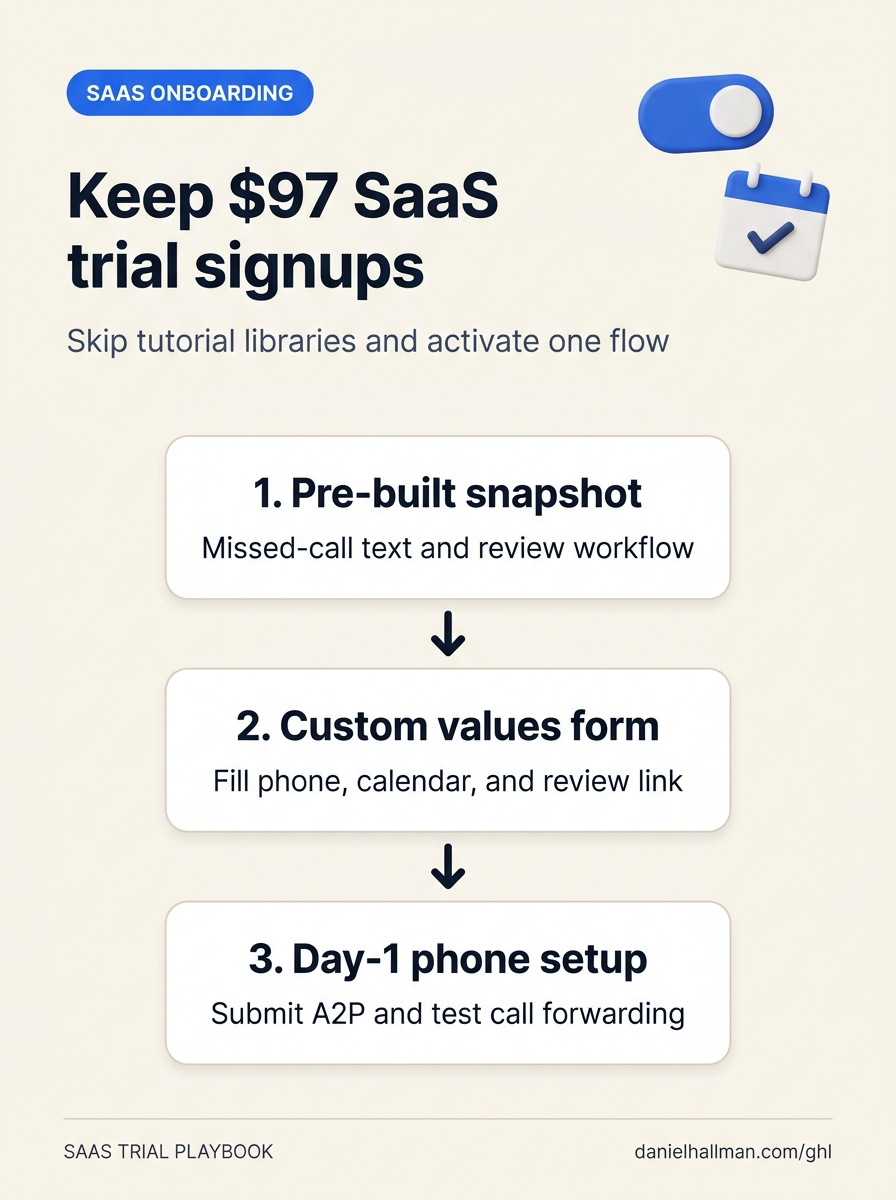
DEFAULT SETUP VS. AUTOMATED WORKFLOW
Operational Comparison
Manual Admin Work Per Client
Lead-to-Booked-Job Conversion
Related Questions
- How Should a New GoHighLevel Agency Structure a $297 Offer and $1,000 Meta Ads Budget?
- How do you make money with GoHighLevel in 2026 without selling software logins?
- How Long Does a New GoHighLevel Account Take to Build With Automations?
- How do you set up GoHighLevel for a solo home service business without bloated agency snapshots?
BUILD FASTER IN GOHIGHLEVEL · FREE TRIAL BONUSES + MCP SERVER
Build this directly inside your GoHighLevel sub-account
Connect Claude Code, Cursor, or OpenAI Codex to our ghl-tools MCP Server & Rust CLI to build workflows, forms, and funnels from your editor, or start your GoHighLevel plan through our partner link to unlock $612+ in ready-to-import kits (including GHL $97 SaaS Trial Snapshot & Custom Values Kit) and weekly live clinics.