GOHIGHLEVEL ANSWERS & PROMPTS: PLAYBOOK T109 · CAPTION READINESS DELAYS, VIDEO-ID DEDUPLICATION & REVISION-LOCKED SOCIAL PLANNER DRAFTS
AUTHOR: DANIEL HALLMAN
KEYWORD: VIDEO REPURPOSING
STEP-BY-STEP INSTRUCTIONS + ANNOTATED GHL SCREENSHOTS
Steps in GoHighLevel
-
STEP 1In Automation > Workflow Builder (paired with your n8n YouTube trigger), filter out Shorts, wait
15minutes after upload for caption processing to finish, and check with an If/Else condition that the caption text exceeds your minimum character count before calling Gemini.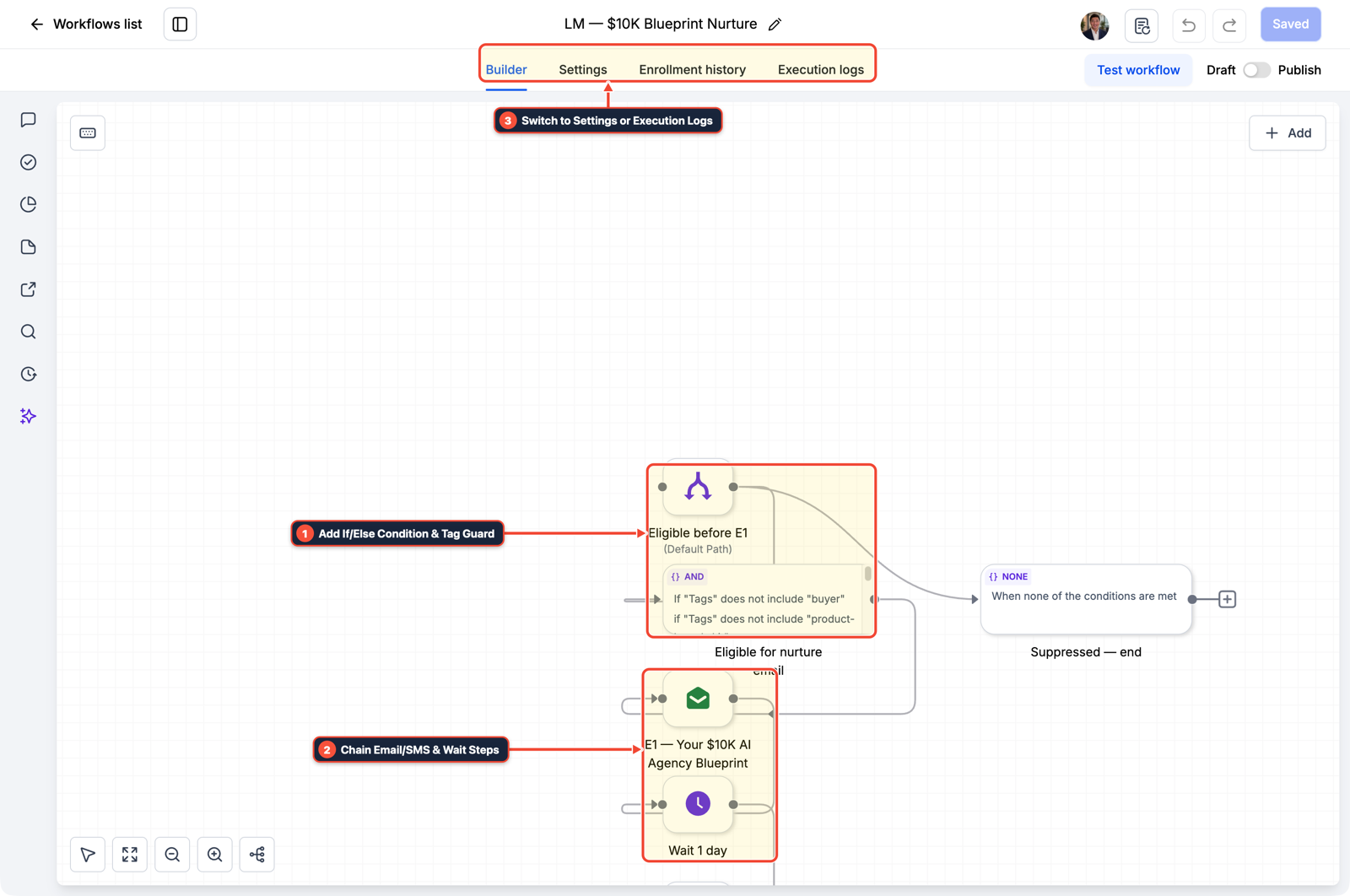
1Add If/Else Condition & Tag Guard 2Chain Priority & Wait Steps 3Switch to Settings or Execution Logs -
STEP 2In Settings > Custom Fields, store the
YouTube Video ID,Approved Draft Revision, andReview Status(Pending,Draft,Needs Edit,Approved) so the workflow stops immediately if that video ID already has a draft and flipsApprovedback toNeeds Editwhenever someone changes the post text.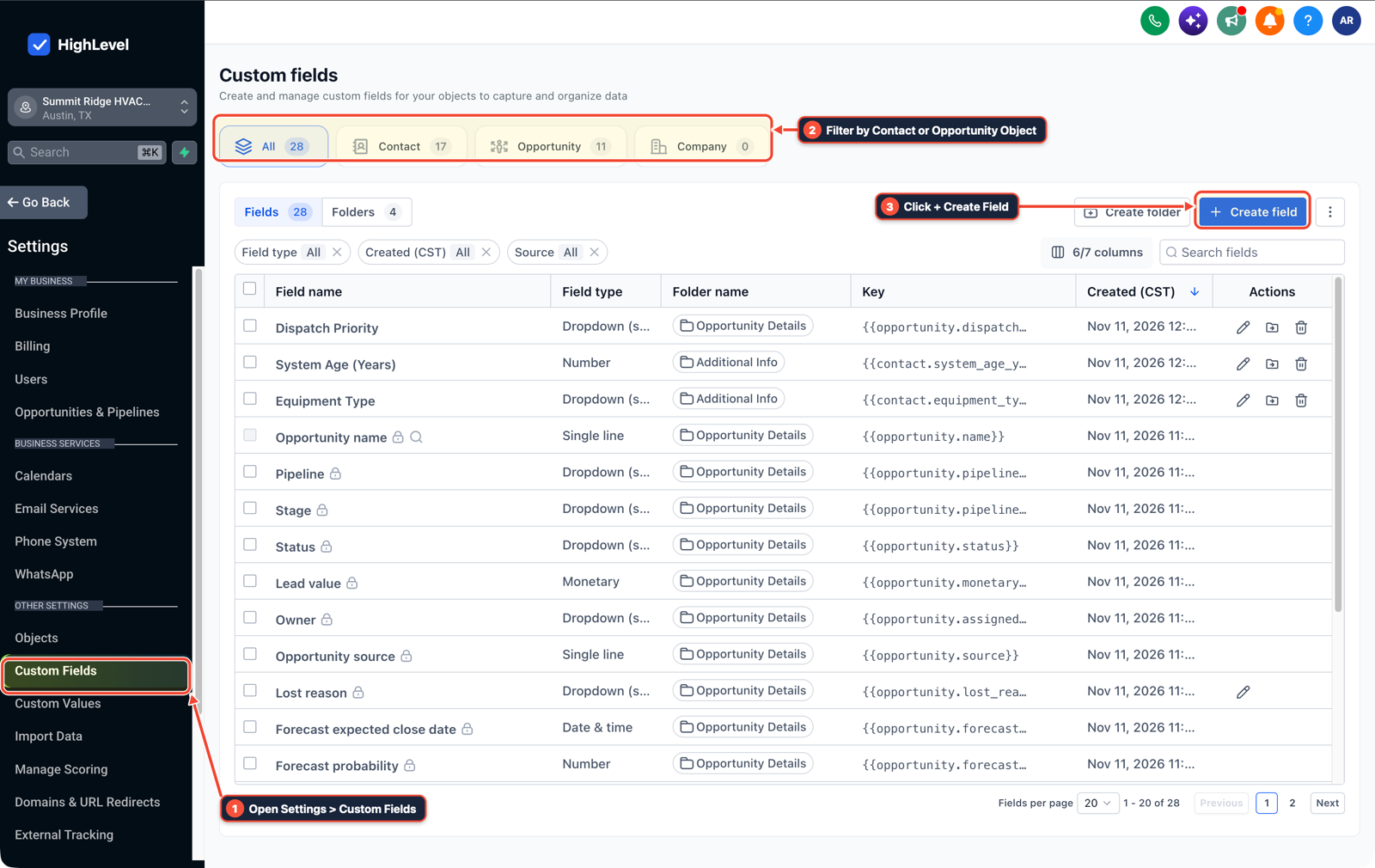
1Open Settings > Custom Fields 2Filter by Contact or Opportunity Object 3Click + Create Field -
STEP 3In Marketing > Social Planner, create the LinkedIn post and multi-part social thread in draft state and notify your reviewer in Conversations > Team Inbox to inspect the exact revision before scheduling publication.
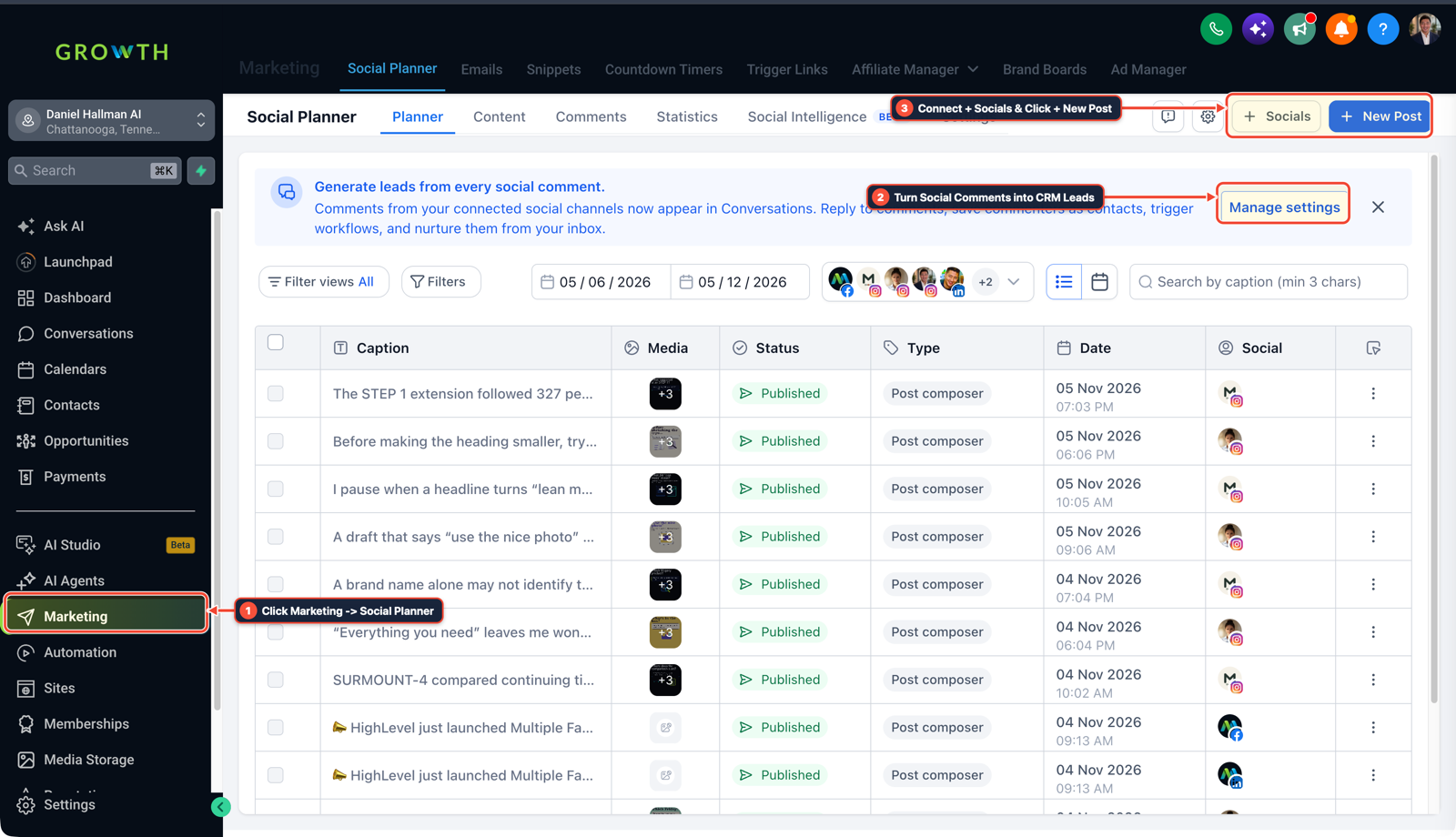
1Click Marketing > Social Planner 2Turn Social Comments into CRM Leads 3Connect + Socials & Click + New Post
MODE: AGENT PROMPT
PASTE INTO CLAUDE CODE, CURSOR, CHATGPT, OR GOHIGHLEVEL ASK AI
AGENT PROMPT
Set up a draft-only YouTube-to-LinkedIn repurposing workflow in sub-account <YOUR_LOCATION_ID>:
1. In Automation > Workflow Builder, add a 15-minute wait after YouTube upload and an If/Else check that requires a populated caption transcript before calling Gemini.
2. In Settings > Custom Fields, track YouTube Video ID and Approved Draft Revision so duplicate triggers terminate and post-approval edits reset status to Needs Edit.
3. In Marketing > Social Planner, stage generated LinkedIn and social posts as drafts and assign a review task in Conversations > Team Inbox.
GHL-TOOLS MCP SERVER & CLI (DANIELHALLMAN.COM/MCP)
BUILDER + SUB-ACCOUNT TOOLS
# Inspect Social Planner draft workflows and video-tracking custom fields in the sub-account
ghl-crm workflows list --context <YOUR_CONTEXT> --location <YOUR_LOCATION_ID>
ghl-crm custom-fields list --context <YOUR_CONTEXT> --location <YOUR_LOCATION_ID>
Official GHL MCP vs. ghl-tools: HighLevel’s official hosted MCP (services.leadconnectorhq.com/mcp) covers public v2 CRM records (contacts, opportunities, appointments, conversations). ghl-tools MCP complements it with workflow graph inspection & recipes, funnel/form builders, DNS/BIMI checks, and ghl-crm doctor audits.
Cause
- Triggering Gemini the moment a YouTube RSS item appears feeds an incomplete caption track into the prompt
- and auto-publishing straight to LinkedIn or X without locking the approved draft text risks pushing generic slogans or unreviewed teammate edits live on your profile.
GoHighLevel Configuration
- Wait
15minutes and verify transcript length in Automation > Workflow Builder, log eachYouTube Video IDand draft hash in Settings > Custom Fields - and hold every generated post as a reviewed draft in Marketing > Social Planner.
GoHighLevel Menu Paths
| Step | Menu Path in GHL | Action |
|---|---|---|
| Step 1 | Automation > Workflow Builder | Filter out Shorts, wait 15 minutes after upload for caption processing to finish, and check with an If/Else condition that the caption text exceeds your minimum character count before calling Gemini. |
| Step 2 | Settings > Custom Fields | Store the YouTube Video ID, Approved Draft Revision, and Review Status (Pending, Draft, Needs Edit, Approved) so the workflow stops immediately if that video ID already has a draft and flips Approved back to Needs Edit whenever someone changes the post text. |
| Step 3 | Marketing > Social Planner | Create the LinkedIn post and multi-part social thread in draft state and notify your reviewer in Conversations > Team Inbox to inspect the exact revision before scheduling publication. |
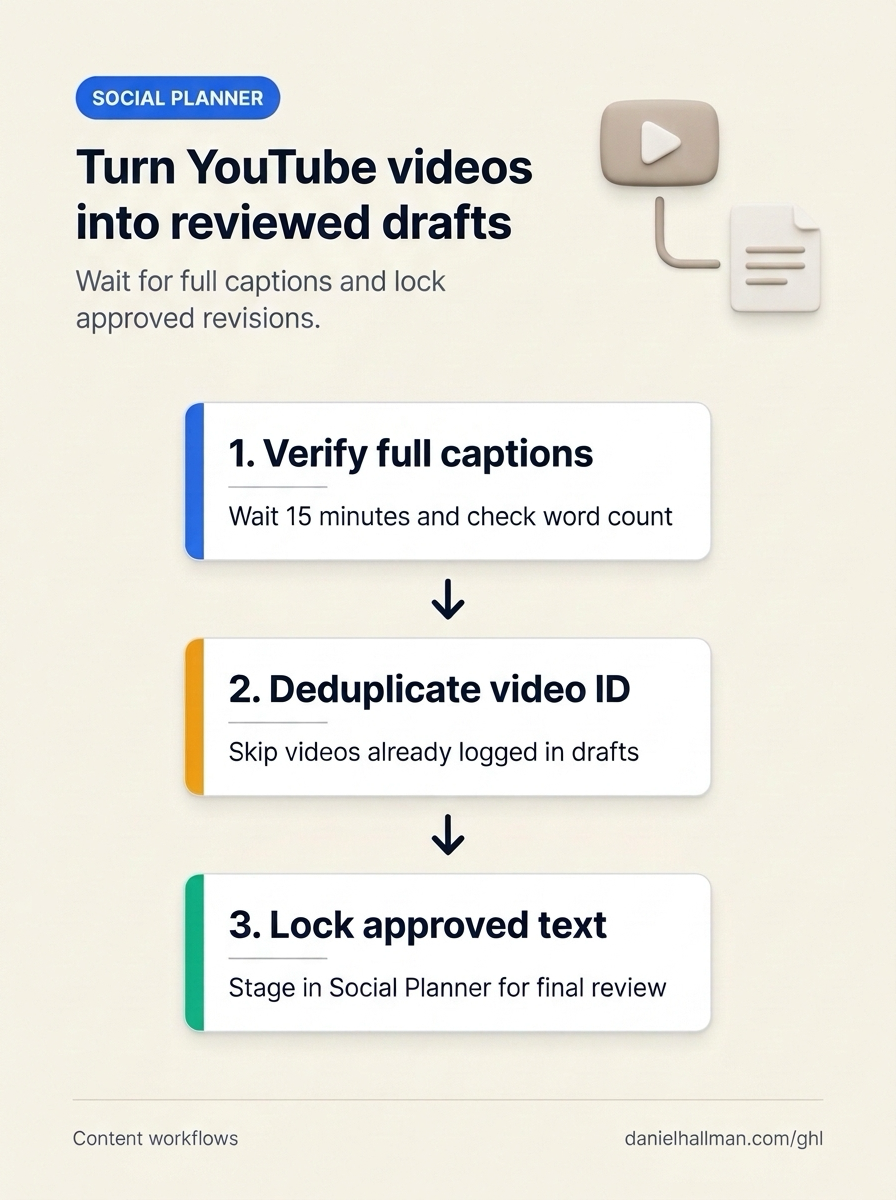
DEFAULT SETUP VS. AUTOMATED WORKFLOW
Operational Comparison
Manual Admin Work Per Client
Lead-to-Booked-Job Conversion
Related Questions
- How Do You Keep Unattended n8n and GoHighLevel Workflows From Failing Silently or Double-Posting on Retries?
- What Actions Should an AI Agent Never Take Without Asking a Human First in GoHighLevel and MCP Workflows?
- How Do You Let Non-Engineers Approve Risky AI Agent Actions in GoHighLevel Without Slowing the Team?
- How Do You Prevent a One-Off AI Agent Mistake From Becoming a Bad Standing Rule in n8n and GoHighLevel?
BUILD FASTER IN GOHIGHLEVEL · FREE TRIAL BONUSES + MCP SERVER
Build this directly inside your GoHighLevel sub-account
Connect Claude Code, Cursor, or OpenAI Codex to our ghl-tools MCP Server & Rust CLI to build workflows, forms, and funnels from your editor, or start your GoHighLevel plan through our partner link to unlock $612+ in ready-to-import kits (including GHL & n8n YouTube-to-Social Planner Draft Kit) and weekly live clinics.