GOHIGHLEVEL ANSWERS & PROMPTS: PLAYBOOK T04 · WHATSAPP WEBHOOKS & RELIABLE HOSTING
AUTHOR: DANIEL HALLMAN
KEYWORD: WHATSAPP 502
STEP-BY-STEP INSTRUCTIONS + ANNOTATED GHL SCREENSHOTS
Steps in GoHighLevel
-
STEP 1In Settings > Domains & URL Redirects (or Cloudflare DNS), point a public HTTPS subdomain to your n8n instance via Cloudflare Tunnel or Caddy and set
WEBHOOK_URL=https://n8n.yourdomain.com/so Meta's WhatsApp callback verification succeeds withoutInvalid parametererrors.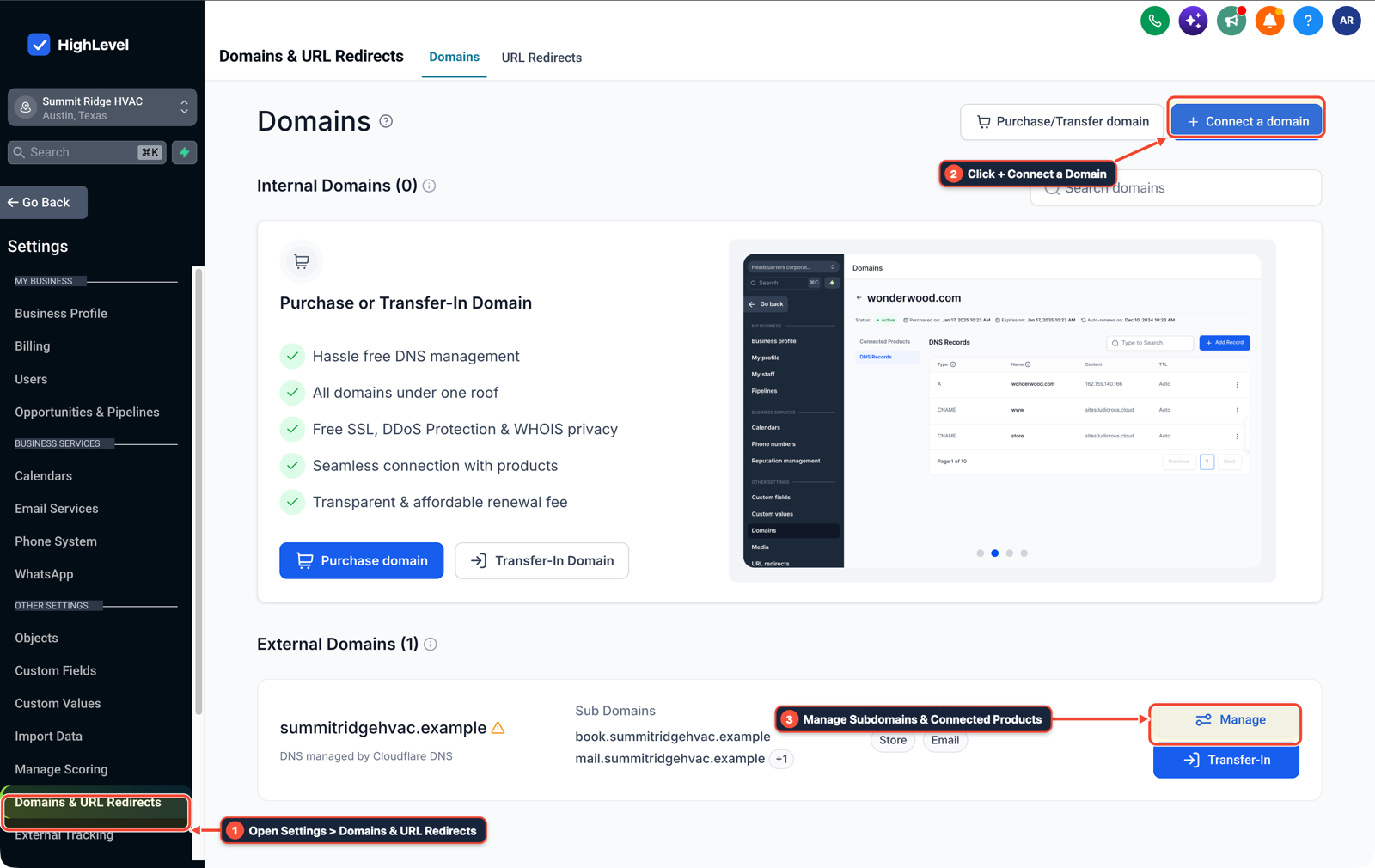
1Open Settings > Domains & URL Redirects 2Click + Connect a Domain 3Manage Subdomains & Connected Products -
STEP 2In Automation > Workflows (or your container host configuration), mount a persistent volume to
/home/node/.n8non an instance with at least1 GBto2 GBof RAM, or connect the number directly in GoHighLevel Settings > WhatsApp and trigger a workflow on Customer Replied (Reply Channel = WhatsApp).
1Add If/Else Condition & Tag Guard 2Chain Priority & Wait Steps 3Switch to Settings or Execution Logs -
STEP 3In Conversations > Team Inbox, verify that inbound WhatsApp messages appear on the contact's activity timeline and that any outbound Webhook forwarded to n8n returns
200 OKwithout502 Bad Gatewayrestarts.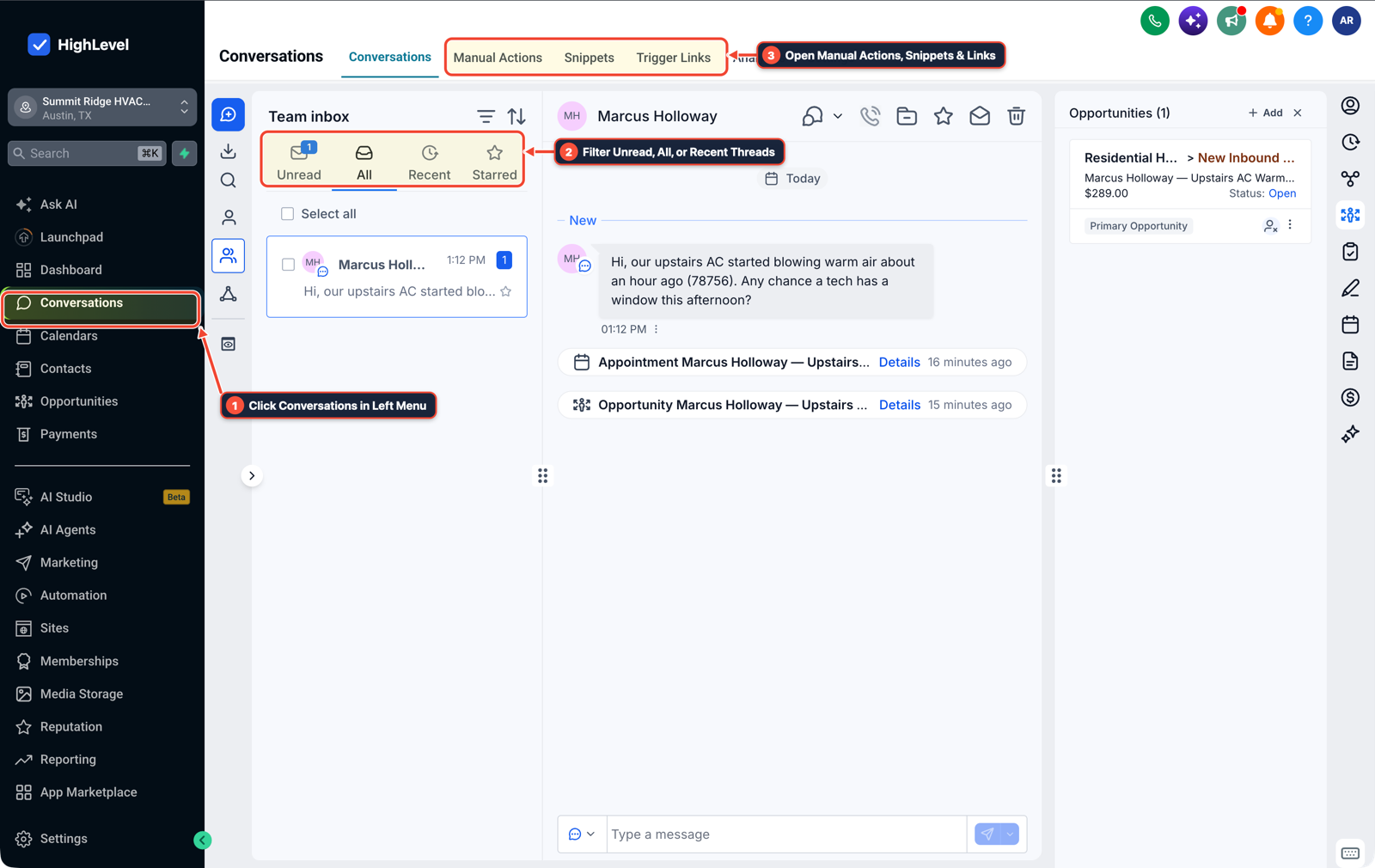
1Click Conversations in Left Menu 2Filter Unread, All, or Recent Threads 3Open Manual Actions, Snippets & Links
MODE: AGENT PROMPT
PASTE INTO CLAUDE CODE, CURSOR, CHATGPT, OR GOHIGHLEVEL ASK AI
AGENT PROMPT
Configure reliable WhatsApp inbound routing in sub-account <YOUR_LOCATION_ID>:
1. In Settings > Domains & URL Redirects or Cloudflare DNS, confirm any external n8n webhook endpoint uses public HTTPS with WEBHOOK_URL configured and persistent storage mounted.
2. In Settings > WhatsApp and Automation > Workflows, connect the verified Meta WhatsApp Business number and trigger on Customer Replied (Reply Channel = WhatsApp).
3. In Conversations > Team Inbox, confirm inbound WhatsApp messages log to the contact timeline and forward clean webhook payloads when external processing is needed.
GHL-TOOLS MCP SERVER & CLI (DANIELHALLMAN.COM/MCP)
BUILDER + SUB-ACCOUNT TOOLS
# Inspect WhatsApp reply workflows in the target sub-account via ghl-crm
ghl-crm workflows list --context <YOUR_CONTEXT> --location <YOUR_LOCATION_ID>
Official GHL MCP vs. ghl-tools: HighLevel’s official hosted MCP (services.leadconnectorhq.com/mcp) covers public v2 CRM records (contacts, opportunities, appointments, conversations). ghl-tools MCP complements it with workflow graph inspection & recipes, funnel/form builders, DNS/BIMI checks, and ghl-crm doctor audits.
Cause
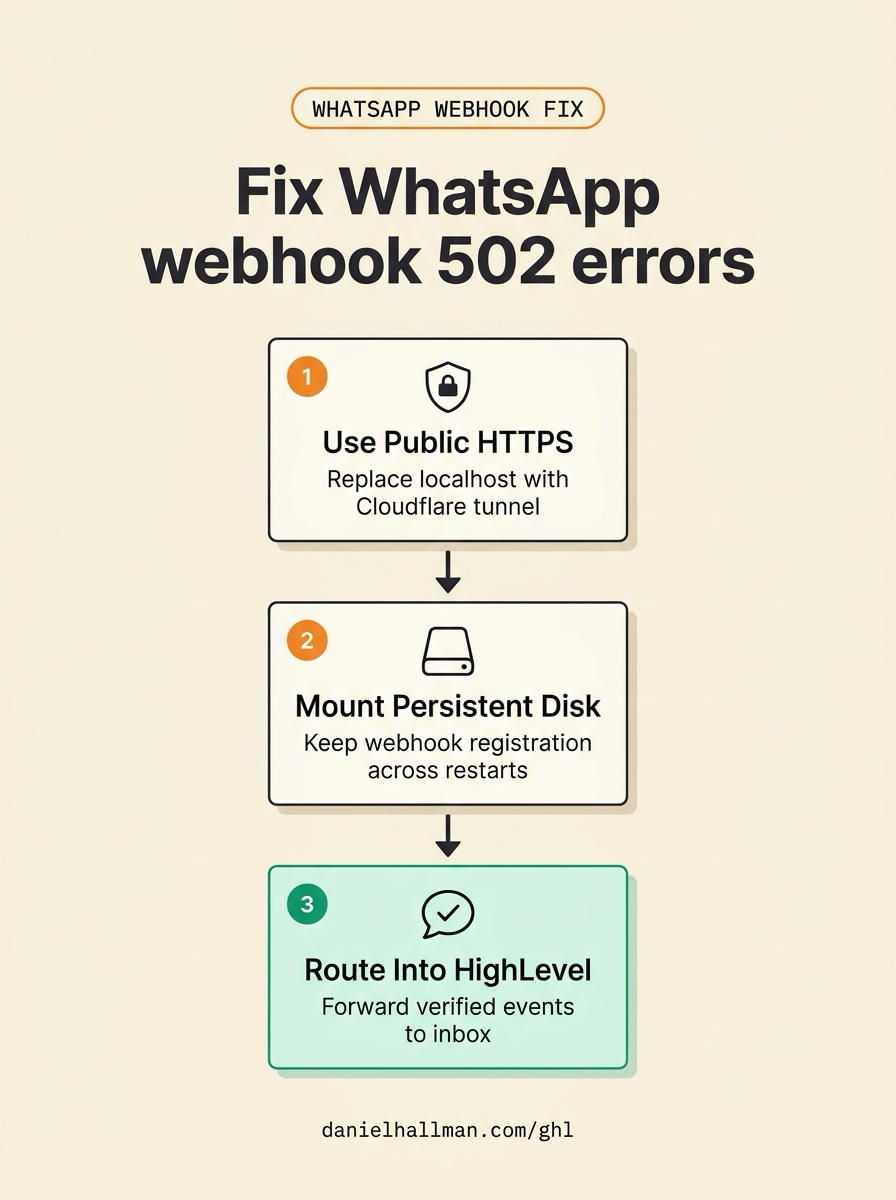
- Operators testing the WhatsApp Trigger on a local machine hit Meta's 'Invalid parameter' error because
http://localhost:5678is not reachable from Meta's servers. - Moving to a free 512 MB Render container fixes the URL temporarily, but Node heap memory exhaustion causes 502 crashes and every container spin-down wipes SQLite credentials and webhook registrations when no persistent disk is attached.
GoHighLevel Configuration
- Give n8n a permanent HTTPS hostname (
WEBHOOK_URL=https://...) via Cloudflare Tunnel or Caddy on a small VPS with a mounted/home/node/.n8ndisk and 1 to 2 GB of RAM - or terminate the WhatsApp Business number inside GoHighLevel's native WhatsApp integration and forward only specific events to n8n.
GoHighLevel Menu Paths
| Step | Menu Path in GHL | Action |
|---|---|---|
| Step 1 | Settings > Domains & URL Redirects | Point a public HTTPS subdomain to your n8n instance via Cloudflare Tunnel or Caddy and set WEBHOOK_URL=https://n8n.yourdomain.com/ so Meta's WhatsApp callback verification succeeds without Invalid parameter errors. |
| Step 2 | Automation > Workflows | Mount a persistent volume to /home/node/.n8n on an instance with at least 1 GB to 2 GB of RAM, or connect the number directly in GoHighLevel Settings > WhatsApp and trigger a workflow on Customer Replied (Reply Channel = WhatsApp). |
| Step 3 | Conversations > Team Inbox | Verify that inbound WhatsApp messages appear on the contact's activity timeline and that any outbound Webhook forwarded to n8n returns 200 OK without 502 Bad Gateway restarts. |
DEFAULT SETUP VS. AUTOMATED WORKFLOW
Operational Comparison
Manual Admin Work Per Client
Lead-to-Booked-Job Conversion
Related Questions
- How Do You Bundle a White-Label WhatsApp Team Inbox With Client Automations in GoHighLevel?
- Should You Use WhatsApp or Standard SMS for Home Service Leads in GoHighLevel?
- How do you format data and run math in GoHighLevel Workflows without paying for n8n or Make?
- How Do You Stop a Self-Hosted n8n Outage from Dropping Client Leads in GoHighLevel?
BUILD FASTER IN GOHIGHLEVEL · FREE TRIAL BONUSES + MCP SERVER
Build this directly inside your GoHighLevel sub-account
Connect Claude Code, Cursor, or OpenAI Codex to our ghl-tools MCP Server & Rust CLI to build workflows, forms, and funnels from your editor, or start your GoHighLevel plan through our partner link to unlock $612+ in ready-to-import kits (including GHL WhatsApp & Webhook Reliability Pack) and weekly live clinics.