GOHIGHLEVEL ANSWERS & PROMPTS: PLAYBOOK T05 · OUTCOME-BASED AGENCY OFFERS & LEAD QUALIFICATION
AUTHOR: DANIEL HALLMAN
KEYWORD: OUTCOME OFFER
STEP-BY-STEP INSTRUCTIONS + ANNOTATED GHL SCREENSHOTS
Steps in GoHighLevel
-
STEP 1In Calendars > Calendar Settings, gate your Booking Calendar behind a qualifying survey that requires budget bracket, timeline, and pre-approval status before a buyer or seller can pick a time slot.
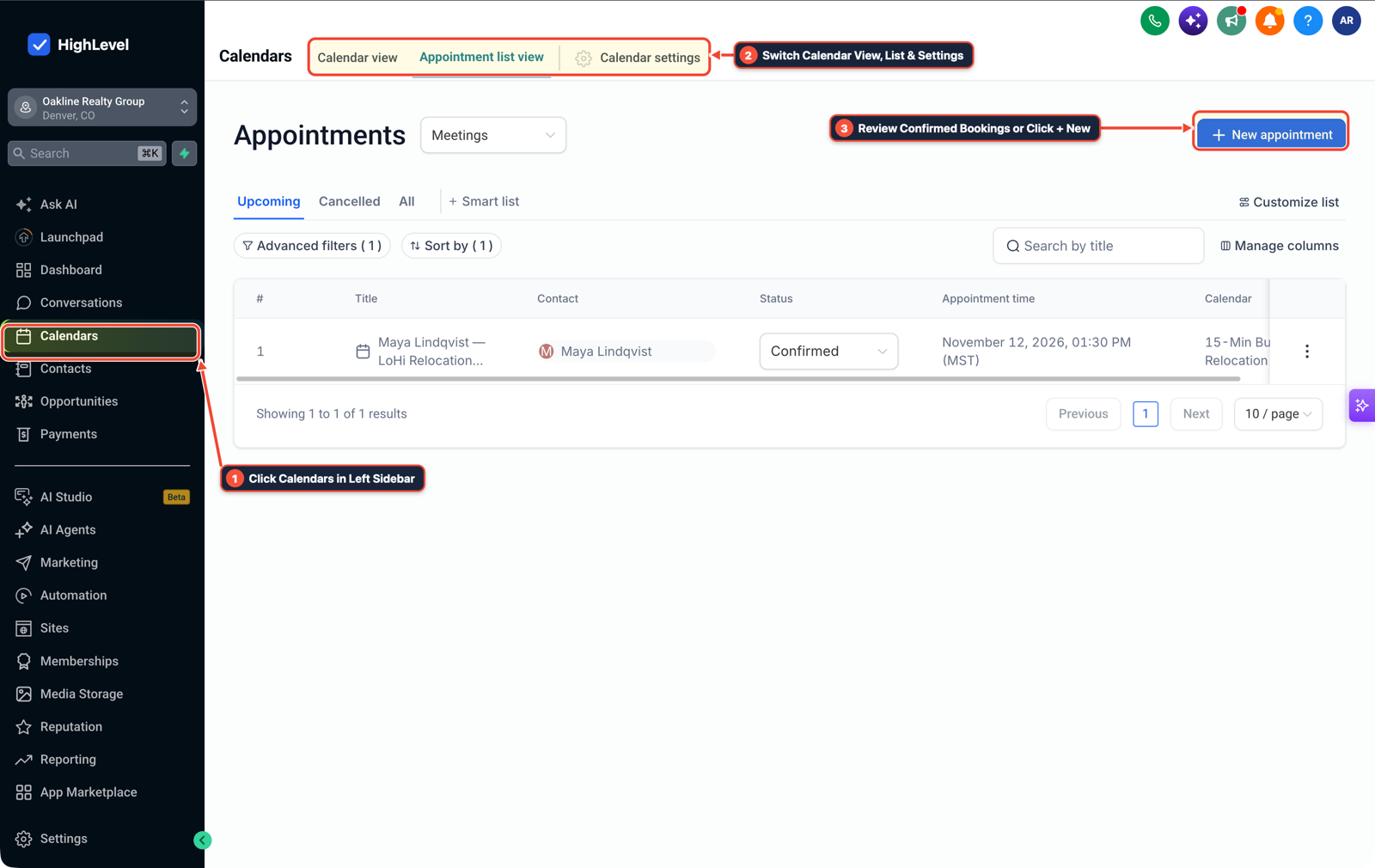
1Click Calendars in Left Sidebar 2Switch Calendar View, List & Settings 3Review Confirmed Bookings or Click + New -
STEP 2In Conversations > Team Inbox and Automation > Workflows, send an instant SMS confirmation and trigger a
45-second Call Connect bridge to the assigned agent so every qualified inquiry gets a live call while still on their phone.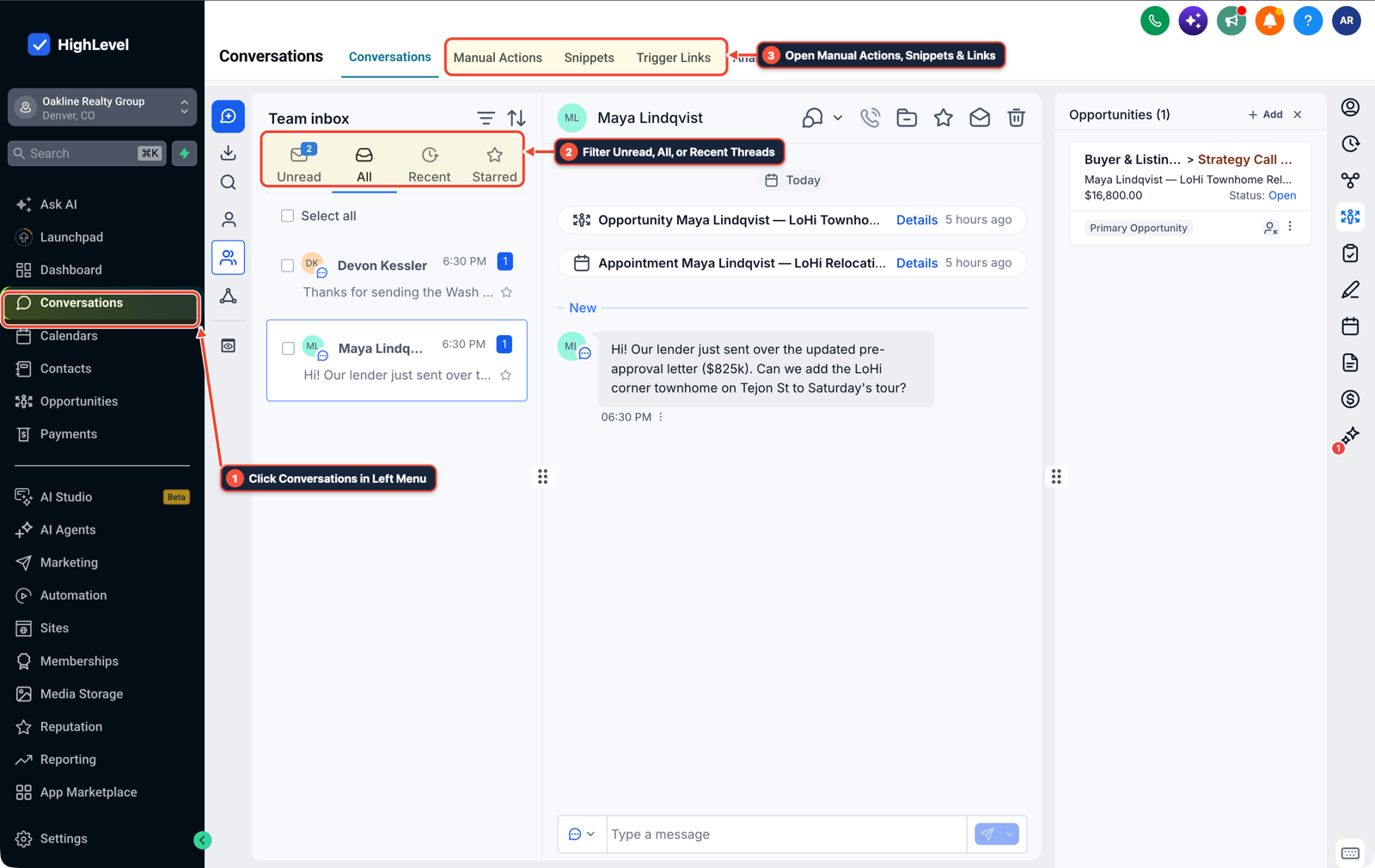
1Click Conversations in Left Menu 2Filter Unread, All, or Recent Threads 3Open Manual Actions, Snippets & Links -
STEP 3In Opportunities > Pipelines, move prospects across
Qualified Survey,Consult Booked, andShowedstages with Deal Value attached so both sides see which appointments met the agreed qualification rules.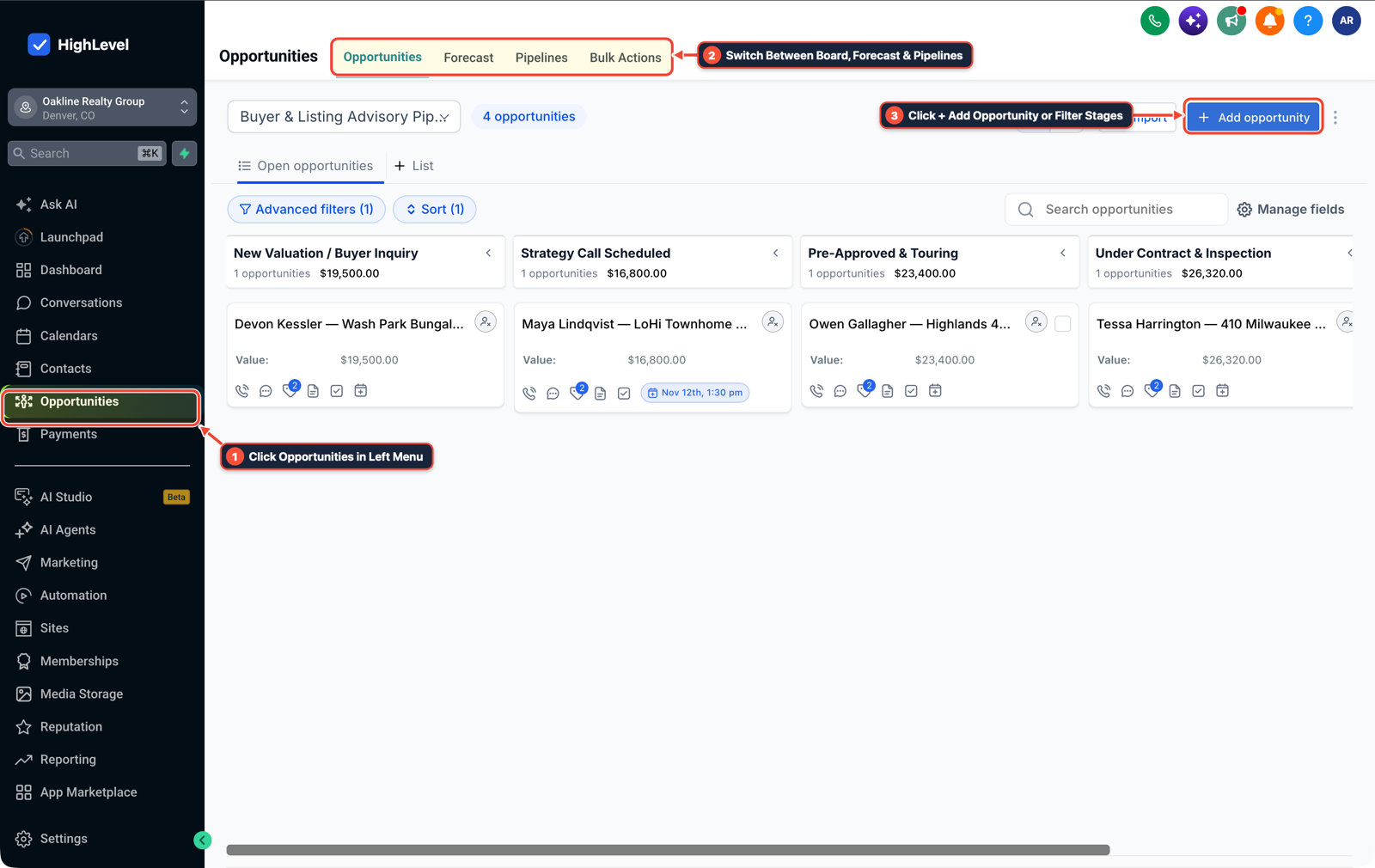
1Click Opportunities in Left Menu 2Switch Between Board, Forecast & Pipelines 3Click + Add Opportunity or Filter Stages
MODE: AGENT PROMPT
PASTE INTO CLAUDE CODE, CURSOR, CHATGPT, OR GOHIGHLEVEL ASK AI
AGENT PROMPT
Configure a qualified booking survey, 45-second Call Connect workflow, and showed-appointment pipeline in sub-account <YOUR_LOCATION_ID>:
1. In Calendars > Calendar Settings, attach a qualifying form that requires budget bracket, move timeline, and pre-approval status before booking.
2. In Automation > Workflows and Conversations > Team Inbox, trigger on qualifying form submission, send an SMS confirmation, and start a 45-second Call Connect bridge to the assigned agent.
3. In Opportunities > Pipelines, create Qualified Survey, Consult Booked, and Showed stages to track qualified appointment delivery.
GHL-TOOLS MCP SERVER & CLI (DANIELHALLMAN.COM/MCP)
BUILDER + SUB-ACCOUNT TOOLS
# Inspect sub-account funnels, calendars, and qualification workflows via ghl-crm
ghl-crm funnels list --context <YOUR_CONTEXT> --location <YOUR_LOCATION_ID>
ghl-crm workflows list --context <YOUR_CONTEXT> --location <YOUR_LOCATION_ID>
Official GHL MCP vs. ghl-tools: HighLevel’s official hosted MCP (services.leadconnectorhq.com/mcp) covers public v2 CRM records (contacts, opportunities, appointments, conversations). ghl-tools MCP complements it with workflow graph inspection & recipes, funnel/form builders, DNS/BIMI checks, and ghl-crm doctor audits.
Cause
- When you sell Meta Ads to luxury real estate teams or local service businesses, you cannot control their commission structure, local inventory, or how well their sales reps close.
- Promising closed deals puts your retainer at the mercy of slow client follow-up, while promising raw leads invites arguments over whether each form fill was actually qualified.
GoHighLevel Configuration
- Define a qualified outcome using concrete survey filters and calendar show status in GoHighLevel.
- Gate your booking calendar behind a qualifying form that checks budget bracket and buying timeline, fire a 45-second Call Connect whisper to the client's phone the moment a qualified prospect submits, and track showed appointments on the pipeline board.
GoHighLevel Menu Paths
| Step | Menu Path in GHL | Action |
|---|---|---|
| Step 1 | Calendars > Calendar Settings | Gate your Booking Calendar behind a qualifying survey that requires budget bracket, timeline, and pre-approval status before a buyer or seller can pick a time slot. |
| Step 2 | Conversations > Team Inbox | Send an instant SMS confirmation and trigger a 45-second Call Connect bridge to the assigned agent so every qualified inquiry gets a live call while still on their phone. |
| Step 3 | Opportunities > Pipelines | Move prospects across Qualified Survey, Consult Booked, and Showed stages with Deal Value attached so both sides see which appointments met the agreed qualification rules. |
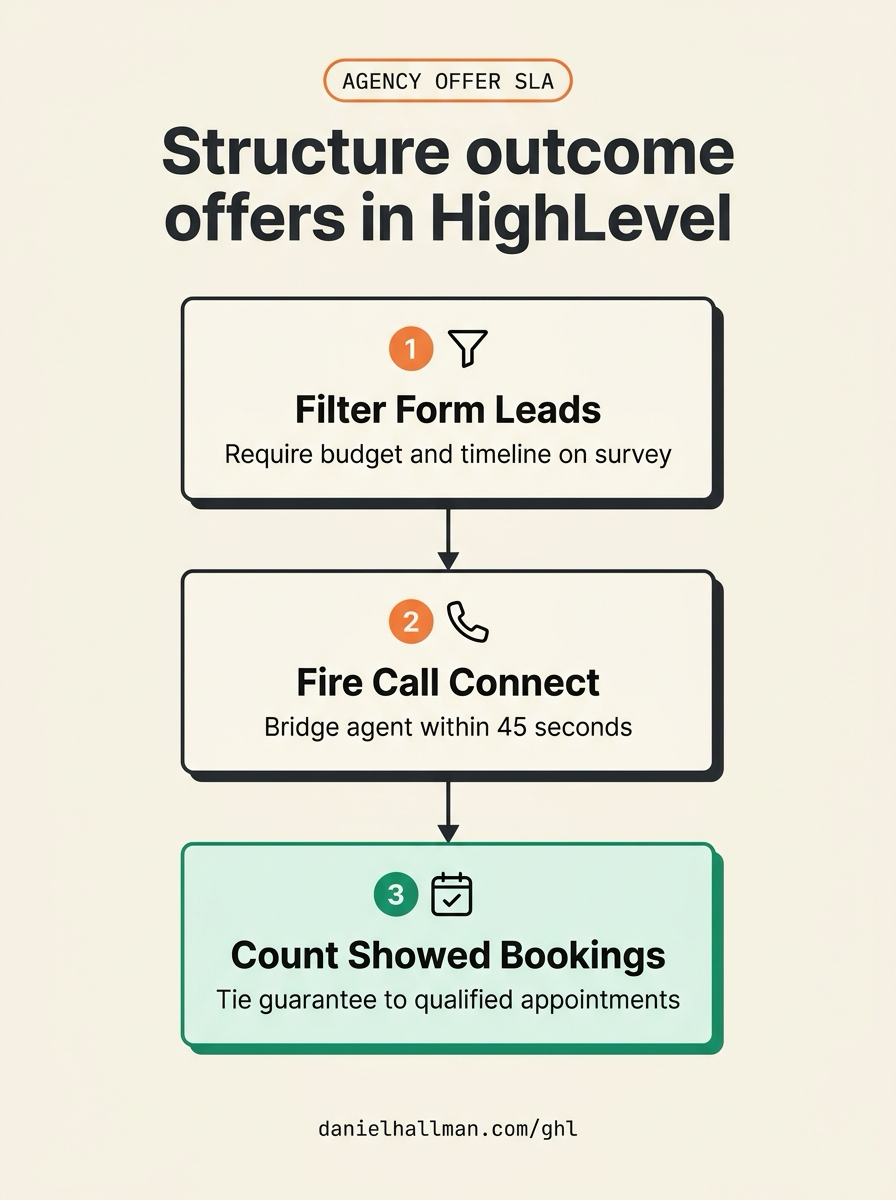
DEFAULT SETUP VS. AUTOMATED WORKFLOW
Operational Comparison
Manual Admin Work Per Client
Lead-to-Booked-Job Conversion
Related Questions
- How Do Marketing Agencies Stay Valuable to Clients When AI Automates Content and Ad Production?
- How do you make money with GoHighLevel in 2026 without selling software logins?
- How are you guys getting clients for your marketing agency?
- How do you capture partial form submissions in a 2-step GoHighLevel funnel?
BUILD FASTER IN GOHIGHLEVEL · FREE TRIAL BONUSES + MCP SERVER
Build this directly inside your GoHighLevel sub-account
Connect Claude Code, Cursor, or OpenAI Codex to our ghl-tools MCP Server & Rust CLI to build workflows, forms, and funnels from your editor, or start your GoHighLevel plan through our partner link to unlock $612+ in ready-to-import kits (including AI Agency Launch Kit) and weekly live clinics.