GOHIGHLEVEL ANSWERS & PROMPTS: PLAYBOOK T62 · WEBHOOK SEND RECEIPT VERIFICATION & 15-MINUTE PENDING WATCHDOG
AUTHOR: DANIEL HALLMAN
KEYWORD: SILENT NODE FAIL
STEP-BY-STEP INSTRUCTIONS + ANNOTATED GHL SCREENSHOTS
Steps in GoHighLevel
-
STEP 1In Settings > Custom Fields, create Contact or Opportunity fields for
Outbound Send Status(pending,sent,failed) andProvider Message ID, and setOutbound Send Status = pendingas the first step before your webhook or n8n send node runs.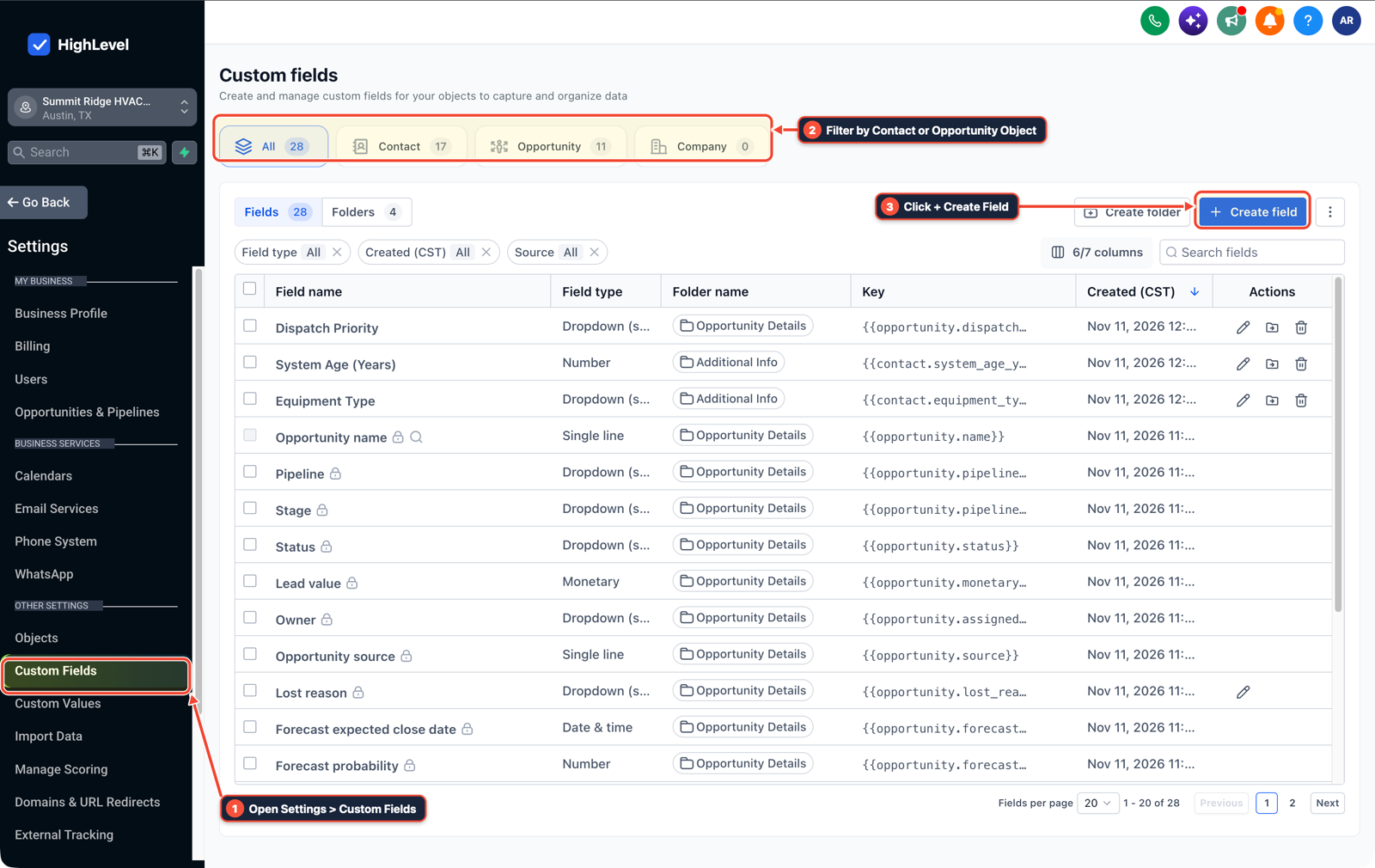
1Open Settings > Custom Fields 2Filter by Contact or Opportunity Object 3Click + Create Field -
STEP 2In Automation > Workflow Builder (and your n8n send node with Continue On Fail and Always Output Data turned off), place an immediate If/Else check verifying that
message_idis present in the response payload: only updateOutbound Send Statustosentwhen the ID exists, and route empty or error responses straight to an Internal Notification alert.
1Add If/Else Condition & Tag Guard 2Chain Priority & Wait Steps 3Switch to Settings or Execution Logs -
STEP 3In Automation > Workflow > Execution Logs (paired with a
15-minuteWait step in your workflow), check whetherOutbound Send Statusis stillpending: if no providermessage_idwas written back within 15 minutes, move the card to a retry queue and ping your ops channel.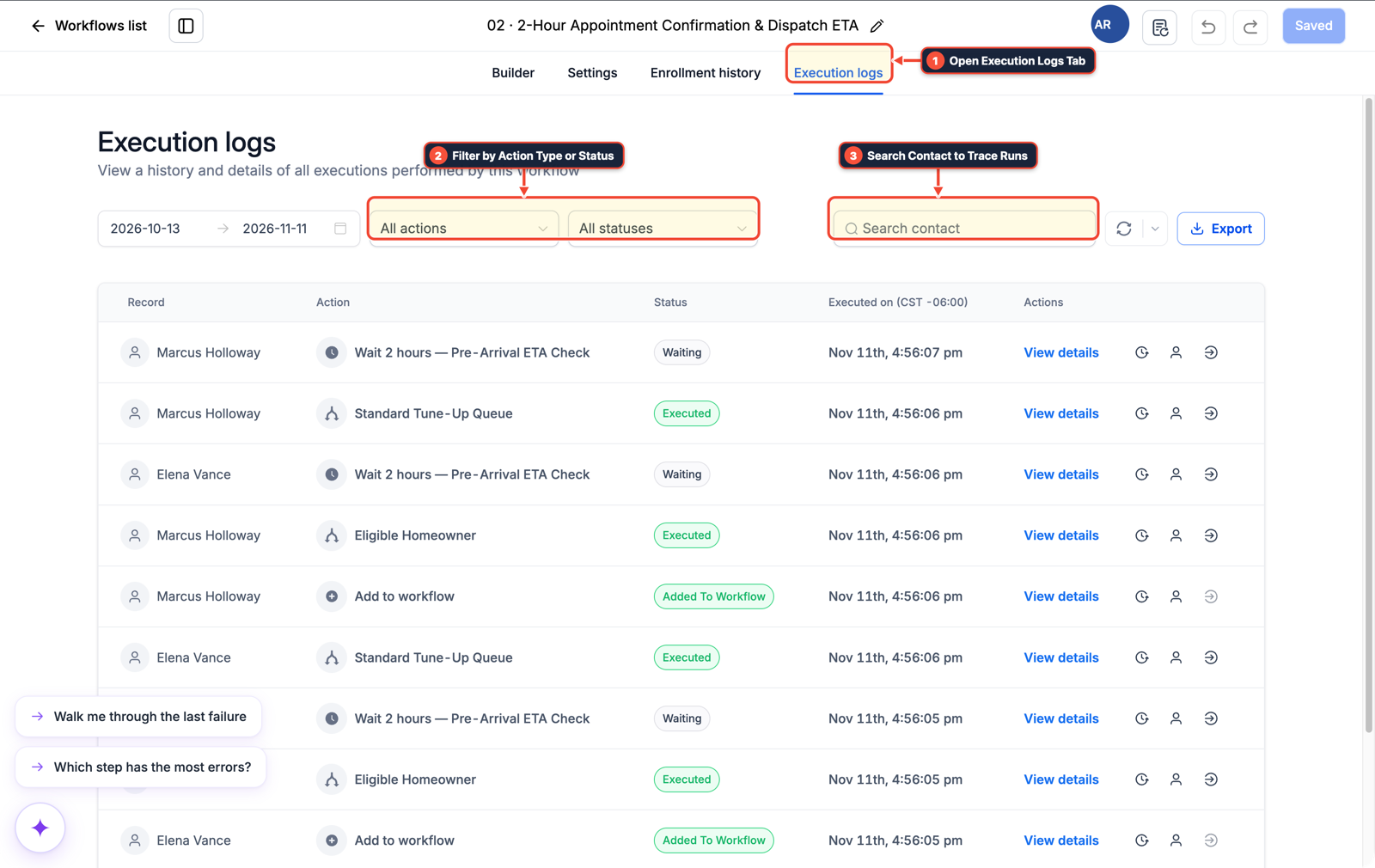
1Open Execution Logs Tab 2Filter by Action Type or Status 3Search Contact to Trace Runs
MODE: AGENT PROMPT
PASTE INTO CLAUDE CODE, CURSOR, CHATGPT, OR GOHIGHLEVEL ASK AI
AGENT PROMPT
Add silent-failure detection and 15-minute send confirmation checks in sub-account <YOUR_LOCATION_ID>:
1. In Settings > Custom Fields, create Outbound Send Status (pending / sent / failed) and Provider Message ID fields.
2. In Automation > Workflow Builder and n8n, set Outbound Send Status to pending before the send step, disable Continue On Fail and Always Output Data, and verify a non-empty message_id before marking the send complete.
3. Add a 15-minute Wait and If/Else watchdog in Automation > Workflow Builder that sends an Internal Notification if Outbound Send Status remains pending.
GHL-TOOLS MCP SERVER & CLI (DANIELHALLMAN.COM/MCP)
BUILDER + SUB-ACCOUNT TOOLS
# Inspect custom fields and webhook send verification workflows in the sub-account
ghl-crm custom-fields list --context <YOUR_CONTEXT> --location <YOUR_LOCATION_ID>
ghl-crm workflows list --context <YOUR_CONTEXT> --location <YOUR_LOCATION_ID>
Official GHL MCP vs. ghl-tools: HighLevel’s official hosted MCP (services.leadconnectorhq.com/mcp) covers public v2 CRM records (contacts, opportunities, appointments, conversations). ghl-tools MCP complements it with workflow graph inspection & recipes, funnel/form builders, DNS/BIMI checks, and ghl-crm doctor audits.
Cause
- Messaging and webhook nodes often fail without throwing a 500 error: an API returns
200 OKwith{}orstatus: 'queued'and no message ID, or n8n'sAlways Output Data/Continue On Failtoggle passes an empty item downstream. - Because no exception was thrown, the Error Workflow stays quiet and you only find out days later when a client asks why a lead was never contacted.
GoHighLevel Configuration
- Track an explicit
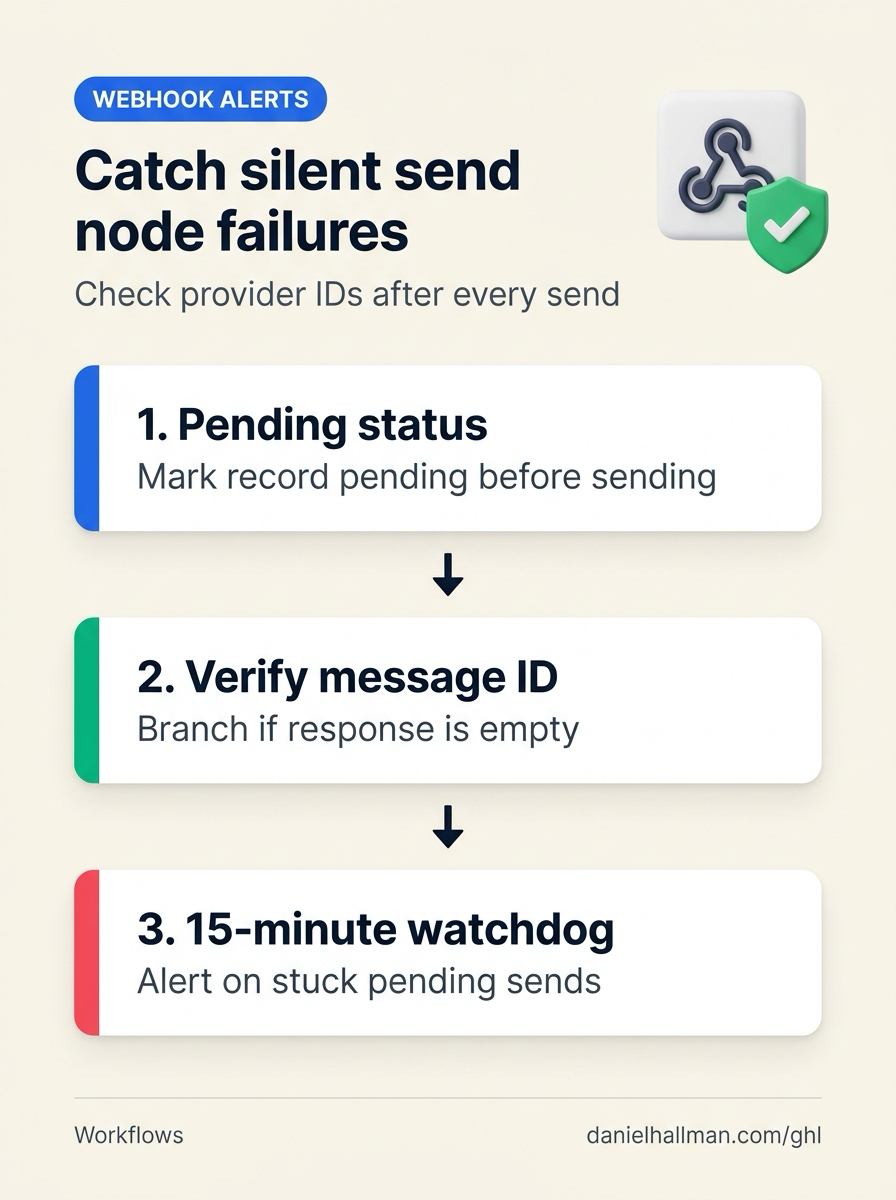
pending>sentstate transition in Settings > Custom Fields, check for a real providermessage_idright after the send step in Automation > Workflow Builder (and n8n) - and run a 15-minute watchdog that flags unconfirmed sends in Automation > Workflow > Execution Logs.
GoHighLevel Menu Paths
| Step | Menu Path in GHL | Action |
|---|---|---|
| Step 1 | Settings > Custom Fields | Create Contact or Opportunity fields for Outbound Send Status (pending, sent, failed) and Provider Message ID, and set Outbound Send Status = pending as the first step before your webhook or n8n send node runs. |
| Step 2 | Automation > Workflow Builder | In Automation > Workflow Builder (and your n8n send node with Continue On Fail and Always Output Data turned off), place an immediate If/Else check verifying that message_id is present in the response payload: only update Outbound Send Status to sent when the ID exists, and route empty or error responses straight to an Internal Notification alert. |
| Step 3 | Automation > Workflow > Execution Logs | In Automation > Workflow > Execution Logs (paired with a 15-minute Wait step in your workflow), check whether Outbound Send Status is still pending: if no provider message_id was written back within 15 minutes, move the card to a retry queue and ping your ops channel. |
DEFAULT SETUP VS. AUTOMATED WORKFLOW
Operational Comparison
Speed to Lead & Callback Safety
Caller Reply & Booking Rate
Related Questions
- How Do You Stop a Self-Hosted n8n Outage from Dropping Client Leads in GoHighLevel?
- How Do You Stop Self-Hosted n8n Out-of-Memory Crashes When Multiple Webhook and GoHighLevel Workflows Run at Once?
- How Do You Stop Concurrent n8n Lead Webhooks From Overwriting Google Sheets Rows?
- Why Is My GoHighLevel Workflow Not Sending Notifications When a Customer Replies?
BUILD FASTER IN GOHIGHLEVEL · FREE TRIAL BONUSES + MCP SERVER
Build this directly inside your GoHighLevel sub-account
Connect Claude Code, Cursor, or OpenAI Codex to our ghl-tools MCP Server & Rust CLI to build workflows, forms, and funnels from your editor, or start your GoHighLevel plan through our partner link to unlock $612+ in ready-to-import kits (including GHL & n8n Silent Node Failure Watchdog Pack) and weekly live clinics.